مقدمة
The Coby Ultimate Wireless Speaker is designed to deliver a powerful and immersive audio experience, complemented by dynamic light-up modes. This portable speaker is engineered for high-fidelity sound, ensuring crisp highs, rich mids, and deep bass. With its travel-friendly design and extended battery life, it is suitable for various environments, from personal listening to social gatherings.

Image: The Coby Ultimate Wireless Speaker, showcasing its vibrant, multi-color light display on the front grille. The speaker is black with a robust, portable design.
المنتج انتهىview والضوابط
Familiarize yourself with the speaker's layout and controls for optimal use.
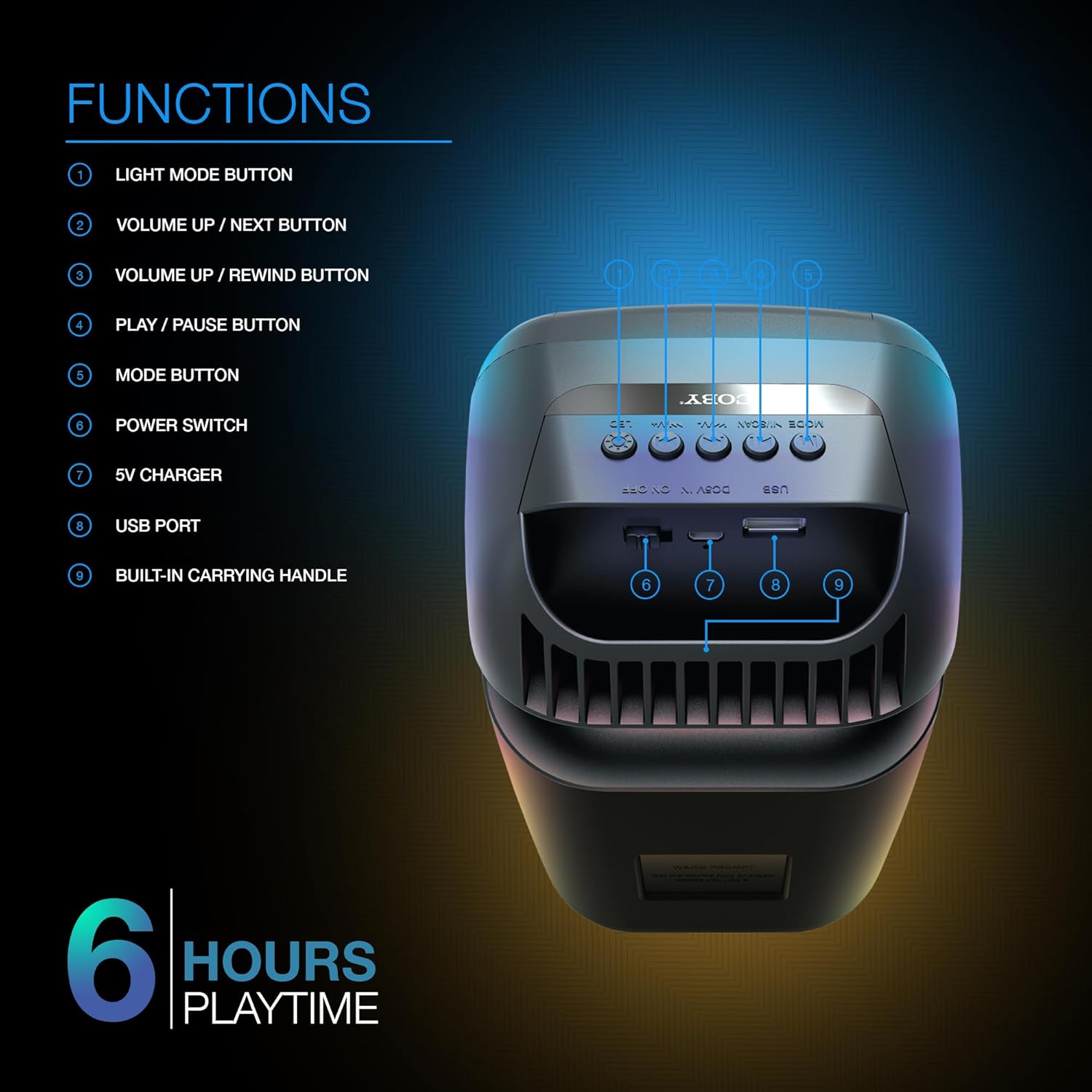
Image: A detailed diagram illustrating the top and rear controls of the Coby Ultimate Wireless Speaker. Numbered labels point to each function: Light Mode Button, Volume Up/Next, Volume Up/Rewind, Play/Pause, Mode Button, Power Switch, 5V Charger Port, USB Port, and Built-in Carrying Handle.
وظائف التحكم:
- زر وضع الإضاءة: Cycles through the 5 dazzling light-up modes.
- زر رفع الصوت / زر التالي: يزيد من مستوى الصوت أو ينتقل إلى المسار التالي.
- Volume Up / Rewind Button: Decreases volume or rewinds the current track.
- زر التشغيل / الإيقاف المؤقت: Starts or pauses audio playback.
- زر الوضع: Switches between different input modes (e.g., Bluetooth, FM Radio).
- مفتاح التشغيل: لتشغيل مكبر الصوت أو إيقاف تشغيله.
- شاحن 5 فولت: Port for connecting the charging cable.
- منفذ USB: For USB media playback or charging external devices (if supported).
- Built-in Carrying Handle: لسهولة الحمل.
يثبت
1. شحن مكبر الصوت
Before first use, fully charge the speaker. Connect the provided 5V charging cable to the 5V Charger port on the speaker and plug the other end into a compatible USB power adapter (not included). The charging indicator light will show the charging status. A full charge provides up to 6 hours of playtime.
2. تشغيل / إيقاف التشغيل
Locate the Power Switch on the speaker. Slide the switch to the 'ON' position to power on the device. Slide it to the 'OFF' position to power off.
3. اقتران بلوتوث
- Ensure the speaker is powered on and in Bluetooth mode (indicated by the Mode button).
- على جهازك المحمول (الهاتف الذكي، الجهاز اللوحي، وما إلى ذلك)، قم بتمكين البلوتوث وابحث عن الأجهزة المتاحة.
- Select "Coby CPA9000" or a similar name from the list of found devices.
- Once connected, the speaker will emit an audible confirmation, and you can begin streaming audio.
The speaker features Bluetooth version 5.3 for fast pairing and stable audio streaming.
عملية
1. تشغيل الصوت
- تشغيل/إيقاف مؤقت: Press the Play/Pause button to start or pause the current track.
- ضبط مستوى الصوت: Use the Volume Up / Next and Volume Up / Rewind buttons to adjust the playback volume.
- تتبع الملاحة: Briefly press the Volume Up / Next button to skip to the next track. Briefly press the Volume Up / Rewind button to go to the previous track.
2. Light-Up Modes
The speaker features 5 dazzling light-up modes that synchronize with your music. Press the Light Mode Button to cycle through the available light patterns and effects. Choose the mode that best suits your mood or environment.
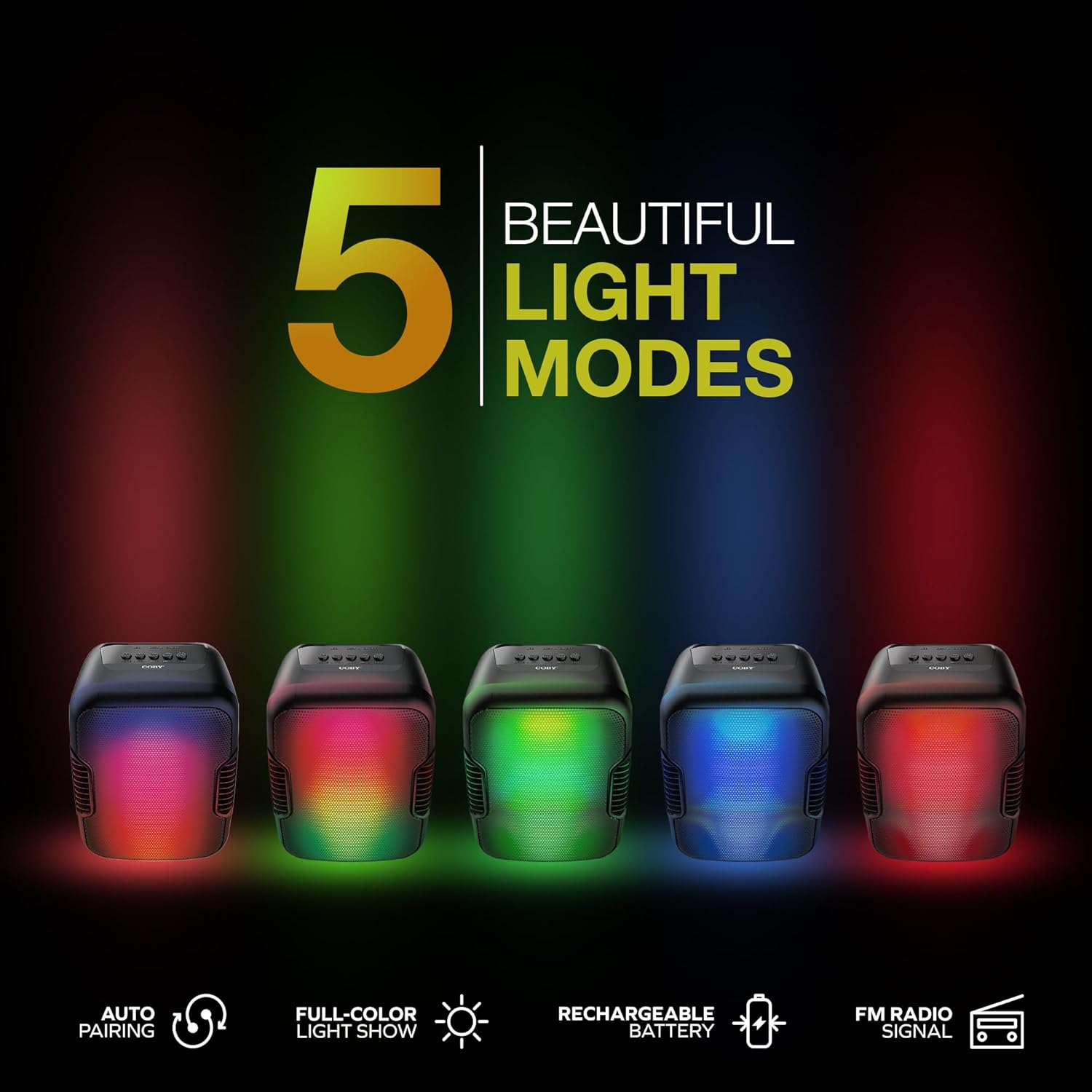
Image: Five Coby Ultimate Wireless Speakers arranged in a row, each displaying a different vibrant light mode, illustrating the variety of visual effects available.
3. وظيفة راديو FM
To use the FM Radio, press the Mode button until you hear the FM radio signal. The speaker will automatically scan and tune into available stations. Use the Volume Up / Next and Volume Up / Rewind buttons to navigate between stations.
صيانة
- تنظيف: استخدم قطعة قماش ناعمة وجافة لتنظيف الجزء الخارجي من مكبر الصوت. لا تستخدم منظفات أو مذيبات كاشطة.
- تخزين: قم بتخزين مكبر الصوت في مكان بارد وجاف بعيدًا عن أشعة الشمس المباشرة ودرجات الحرارة العالية عند عدم استخدامه لفترات طويلة.
- العناية بالبطارية: لإطالة عمر البطارية، تجنب تفريغها بالكامل بشكل متكرر. اشحن السماعة بانتظام، حتى لو لم تكن قيد الاستخدام المستمر.
استكشاف الأخطاء وإصلاحها
| مشكلة | السبب المحتمل | حل |
|---|---|---|
| لا يتم تشغيل مكبر الصوت. | نفدت طاقة البطارية. | Charge the speaker fully using the provided charging cable. |
| لا يوجد صوت من مكبر الصوت. | Volume is too low or muted; Device not paired correctly; Incorrect mode selected. | Increase volume on both speaker and connected device. Re-pair Bluetooth. Press Mode button to select correct input. |
| اتصال البلوتوث غير مستقر. | Device is out of range; Interference from other devices. | Move the connected device closer to the speaker. Avoid placing speaker near other wireless devices. |
| Light modes are not working. | Light mode feature is off. | Press the Light Mode Button to activate and cycle through modes. |
تحديد

Image: The Coby Ultimate Wireless Speaker shown with its dimensions: 9.46 inches height, 4.92 inches width, and 4.33 inches depth.
| ميزة | التفاصيل |
|---|---|
| اسم الموديل | CPA9000 FLAME |
| نوع السماعة | مكبر الصوت الفرعي |
| تكنولوجيا الاتصال | بلوتوث |
| تكنولوجيا الاتصالات اللاسلكية | بلوتوث 5.3 |
| وضع إخراج الصوت | ستيريو |
| عمر البطارية | حتى ساعتين |
| مصدر الطاقة | تعمل بالبطارية (بطارية ليثيوم أيون واحدة متضمنة) |
| أبعاد المنتج (العمق × العرض × الارتفاع) | 4.33 بوصة × 4.92 بوصة × 9.46 بوصة |
| وزن العنصر | 14.1 أونصة |
| ميزة خاصة | USB Port, Light-Up Modes, Built-in Handle, FM Radio |
| الأجهزة المتوافقة | الهاتف الذكي والكمبيوتر اللوحي |
| طريقة التحكم | Buttons on device |
| مقاوم للماء | خطأ شنيع |
| رمز المنتج الموحد | 810071493751 |
الضمان والدعم
The Coby Ultimate Wireless Speaker comes with a limited warranty. For specific warranty terms and conditions, please refer to the documentation included with your purchase or visit the official Coby website. For technical support or further assistance, please contact Coby customer service.


