Tera Portable EV Charger P01 User Manual
Model: P01 (ZA05-U007K series) | Brand: Tera
1. المقدمة
This manual provides detailed instructions for the safe and efficient use of your Tera Portable EV Charger P01. This Level 1 & 2 J1772 charger is designed for electric vehicles, offering flexible charging options with NEMA 14-50 and 5-15 compatibility, Wi-Fi connectivity, and a 25FT cable. Please read this manual thoroughly before operation and retain it for future reference.
2. معلومات السلامة
WARNING: Failure to follow these safety instructions could result in fire, electric shock, injury, or damage to the product or property.
- Ensure the charging unit is properly grounded.
- لا تستخدم الشاحن إذا كان الكابل أو الموصل تالفًا.
- لا تغمر الشاحن في الماء أو السوائل الأخرى.
- أبقِ الأطفال بعيداً عن منطقة الشحن أثناء التشغيل.
- Only use the charger with compatible electric vehicles (J1772 EVs).
- افصل الطاقة قبل التنظيف أو إجراء أي صيانة.
- The charger is ETL & Energy Star certified, indicating adherence to high safety and energy efficiency standards.
The Tera EV Charger is designed with multiple protection features including overvoltage, overload, overheat, ground, earth leakage, and short circuit protection. It also features IP66 and Type 4 protection for water and dust resistance.

Image: Safety and Reliability features of the Tera EV Charger, highlighting ETL and FCC certifications, IP66 rating, and 24/7 support.
3. محتويات العبوة
تأكد من وجود جميع العناصر في العبوة:
- Portable EV Charger (1 unit)
- J1772 Cable Wall Mount Box Holder (1 unit)
- حقيبة تخزين (وحدة واحدة)
- EV Charger Screw Kit (1 set)
- دليل المستخدم (نسخة واحدة)

Image: Contents of the Tera Portable EV Charger P01 package, showing the main unit, connectors, wall mount, storage bag, and screw kit.
4. الإعداد
4.1 الاستخدام المحمول
For portable use, simply connect the NEMA 14-50 plug to a compatible 240V outlet or use the appropriate adapter for a 120V outlet (if applicable, verify product specifications for 5-15 compatibility). Ensure the outlet is rated for the charger's current draw.

Image: The Tera Portable EV Charger P01 and its storage bag, illustrating its portability.
4.2 التثبيت على الحائط
The charger can be permanently installed using the included wall mount box holder. Choose a suitable location near your parking spot with access to a compatible electrical outlet.
- Select a sturdy wall surface.
- Use the screw kit to securely attach the J1772 Cable Wall Mount Box Holder to the wall.
- Mount the charger unit onto the holder.
- Ensure the charging cable can reach your vehicle's charging port without strain.

Image: The Tera Portable EV Charger P01 installed on a wall, showcasing its fixed-use capability.
5. تعليمات التشغيل
5.1 الاتصال بسيارتك الكهربائية
- تأكد من توصيل الشاحن بمصدر طاقة.
- افتح منفذ شحن سيارتك.
- Insert the J1772 connector firmly into the vehicle's charging port until it clicks into place.
- The charger will begin the charging process automatically if in "Plug-and-Play" mode.
5.2 Smart LED Screen Display
The integrated LED screen provides real-time charging information:
- Ampإيراج: Current charging rate (e.g., 32A).
- سرعة الشحن: Indication of charging progress.
- حجم الإدخالtage: المجلد الحاليtage from the power source (e.g., 240V).
- وقت التأخير: If scheduled charging is active.
- ممارسات الشحن: مؤشرات الحالة.
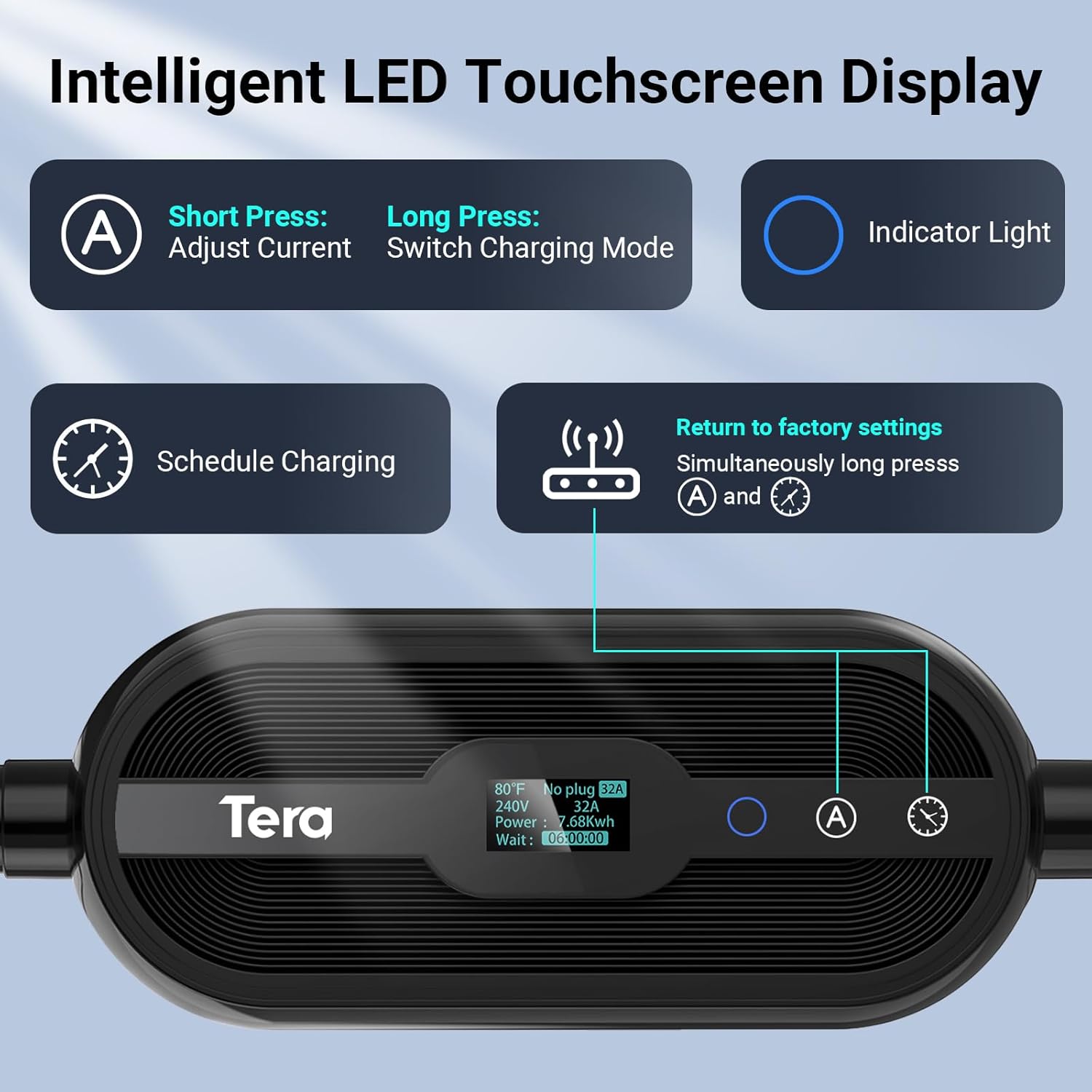
الصورة: مفصلة view of the Tera EV Charger's LED touchscreen, illustrating the controls for current adjustment, charging mode selection, and scheduling.
5.3 Adjustable Current with Memory Function
The charger supports adjustable current settings from 8A to 32A. The system remembers the last used current setting for continuous use. It will only revert to the default 12 amps after a reboot.
- Short Press 'A' Button: Adjust current (8A, 15A, 24A, 32A).
- Long Press 'A' Button: Switch charging mode (Plug-and-Play or APP Start).
Note: Hybrid vehicles may automatically reduce current based on their maximum allowed value.
5.4 App Control (Smart Life)
The Tera EV Charger can be controlled via the Smart Life app, offering advanced features:
- Reserve Charging: Schedule charging times to take advantagهـ - أسعار الكهرباء خارج أوقات الذروة.
- مراقبة الشحن: View real-time charging status.
- View Expenses & Historical Records: Track your charging costs and history.
- Full-Charge Notifications: Receive alerts when your vehicle is fully charged.
Download the Smart Life app from the متجر التطبيقات or متجر جوجل بلاي.

Image: The Smart Life app interface on a smartphone, demonstrating remote control and monitoring capabilities for the Tera EV Charger.
5.5 Scheduling Charging
You can schedule charging via the touchscreen, the Smart Life app, or your vehicle's onboard system. Scheduling allows you to charge during off-peak hours to save on costs.
- شاشة تعمل باللمس: Use the clock button to set delay times (1-12 hours).
- برنامج: Utilize the "Schedule" function within the Smart Life app.
- Vehicle Onboard System: Refer to your vehicle's manual for scheduling options.
Video: A demonstration of the Tera EV Charger's APP User Guide, showing how to control and schedule charging via the mobile application.
6. الصيانة
- Regularly inspect the charging cable and connector for any signs of wear or damage.
- حافظ على وحدة الشحن نظيفة وخالية من الغبار والأوساخ. استخدم قطعة قماش ناعمة وجافة للتنظيف.
- Ensure the charging port on your vehicle is clean before connecting the charger.
- Store the charger in its storage bag when not in use, especially for portable applications, to protect it from environmental elements.
7. استكشاف الأخطاء وإصلاحها
| مشكلة | السبب المحتمل / الحل |
|---|---|
| أزرار اللمس لا تستجيب | Ensure the connector is pulled out from the vehicle. Touch buttons will not respond if the charging gun is inserted. |
| Charging not starting (APP Start mode) | If your mode is set to "APP Start", pull out the charging gun, long-press the 'A' button to switch to "Plug-and-Play" mode, then re-insert. |
| Abnormal behavior when adjusting current via App | Pause the charging process before making current adjustments via the App. |
| الشاحن لا يعمل | Check the power outlet and ensure the NEMA 14-50 plug is fully inserted. Verify power supply to the outlet. |
| ضوء مؤشر الخطأ | Refer to the LED indicator guide for specific error codes (e.g., flashing patterns for over voltage, ground fault, over-current, leakage, over-temperature). Disconnect and reconnect the charger. If the issue persists, contact customer support. |
Video: A short demonstration on how to reset the Tera EV Charger, which can resolve certain operational issues.
8. المواصفات
- نموذج: P01 (ZA05-U007K series)
- حجم الإدخالtage: 110 فولت / 240 فولت
- التيار القابل للتعديل: 8 أمبير، 15 أمبير، 24 أمبير، 32 أمبير
- القوة القصوى: 7.68 kWh (at 32A, 240V)
- طول الكابل: 25 FT (Pure Copper)
- نوع الموصل: J1772 EVs
- نوع القابس: NEMA 14-50 (with 5-15 compatibility, verify with manufacturer)
- الشهادات: ETL, Energy Star, FCC, UL2231-1/-2, UL 991, UL 2231, UL 2251, UL1998 & UL 2594
- مستوى الحماية: IP66, Type 4 (Waterproof)
- درجة حرارة التشغيل: -22 درجة فهرنهايت إلى 122 درجة فهرنهايت (-30 درجة مئوية إلى 50 درجة مئوية)
- أبعاد: 15.83 × 12.76 × 7.05 بوصة (الحزمة)
- وزن: 12.8 رطل
9. الضمان والدعم
Tera is a US-based brand with over 20 years of legacy. They offer a 2-year warranty on this product.
- ضمان: 2 سنة الضمان.
- الدعم الفني: دعم فني مدى الحياة.
- خدمة العملاء: 24/7 email support and phone support from 7 AM to 6 PM PST, Monday to Friday (excluding public holidays).
For assistance, please refer to the contact information provided with your product or visit the official Tera webموقع.

Image: Tera's commitment as a US-based brand, emphasizing design, development, and support in the USA.


