مقدمة
The OLIGHT Oclip is a versatile and compact wearable clip-on light designed for various activities. It features both white and red LED light sources, offering multiple modes for different lighting needs. Its lightweight and durable design, combined with convenient charging and attachment options, makes it suitable for outdoor adventures, daily tasks, and safety signaling.

Image: The OLIGHT Oclip, a compact clip-on light in black with blue accents, featuring its main LED and integrated clip.
محتويات الحزمة
يرجى التأكد من وجود جميع العناصر في الحزمة الخاصة بك:
- OLIGHT Oclip Wearable Light
- كابل شحن USB من النوع C
- دليل المستخدم

Image: The OLIGHT Oclip light, its USB-C charging cable, and the instruction manual as typically found in the product packaging.
يثبت
الشحن الأولي
Before first use, fully charge the Oclip light. Connect the provided USB Type-C cable to the charging port on the device and to a compatible USB power source. The battery indicator will show charging status.
- المؤشر الأحمر: Battery level is below 95% (charging).
- المؤشر الأخضر: Battery level is 95% or above (fully charged).
تستغرق عملية الشحن الكامل عادةً حوالي 1.5 ساعة.
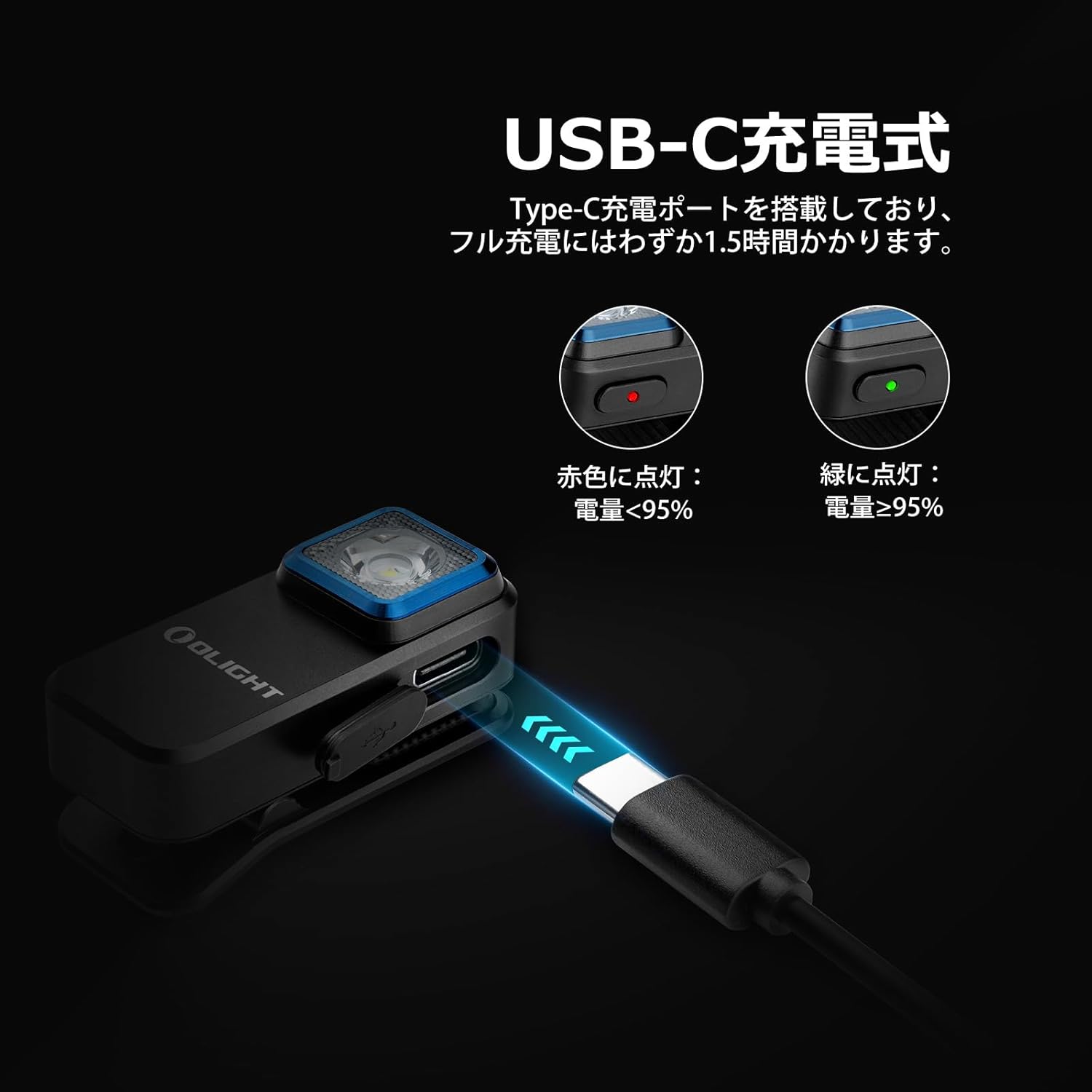
Image: The OLIGHT Oclip being charged via its USB-C port, with visual indicators for battery status (red for charging, green for charged).
تعليمات التشغيل
تشغيل/إيقاف التشغيل واختيار الوضع
- تشغيل/إيقاف التشغيل: Press and hold the power button for approximately 1 second to turn the light on or off.
- أوضاع الإضاءة البيضاء: When the light is on, single-click the power button to cycle through Moonlight, Low, Medium, and High white light modes.
- وضع الضوء الأحمر: From any white light mode, double-click the power button to activate the constant red light mode. Double-click again to return to the previous white light mode.
- أوضاع الوميض:
- وميض أبيض: From any white light mode, triple-click the power button to activate white flashing mode (flashes every 3 seconds).
- وميض أحمر: From constant red light mode, triple-click the power button to activate red flashing mode.

Image: Visual representation of the Oclip's different brightness levels for white light (Moonlight, Low, Medium, High) and the constant red light mode.
مؤشر مستوى البطارية
The Oclip features a battery indicator light to show the remaining power:
- أخضر: 60% - 100% من البطارية المتبقية
- البرتقالي: 30% - 60% من البطارية المتبقية
- أحمر: 0% - 30% من البطارية المتبقية

Image: The Oclip's battery indicator light, illustrating the color-coded system for quick battery status checks.
خيارات المرفقات
The Oclip offers multiple ways to attach and use the light:
- مشبك: The integrated clip allows secure attachment to clothing (belts, pockets, collars), hats, backpack straps, or other fabric edges up to 14mm thick.
- مغناطيسي: The Oclip can magnetically attach to iron or other metallic surfaces, providing hands-free illumination.
- معلقة: A dedicated hanging hole allows for attachment to keychains or lanyards.

الصورة: السابقamples of the Oclip's compact size and how it can be clipped onto clothing or bags for convenient use.

Image: The Oclip demonstrating its magnetic attachment feature, adhering to a metal surface.

Image: A hand demonstrating the robust clip mechanism of the Oclip, highlighting its ability to securely attach to various thicknesses.
السلامة والرؤية
The Oclip's red light and flashing modes enhance visibility, especially during nighttime activities:
- الضوء الأحمر: Ideal for preserving night vision or as a subtle light source.
- أوضاع الوميض: White and red flashing modes serve as effective warning or signal lights, increasing user safety during running, cycling, or other low-light conditions.

Image: The Oclip's red flashing mode in use during nighttime cycling, demonstrating its high visibility for safety.
سيناريوهات الاستخدام
The Oclip is suitable for a wide range of activities including:
- Running, jogging, and walking
- Camping and hiking
- Night fishing
- Dog walking
- مهام الفحص والصيانة
- General outdoor and indoor illumination
Video: This video demonstrates various practical applications of the OLIGHT Oclip, showing how it can be clipped onto clothing, backpacks, or used magnetically for hands-free lighting in different environments.
Video: This video illustrates the Oclip's versatility, showing it clipped to a hat for hands-free work, and demonstrating its white and red light modes for visibility and signaling.
صيانة
- تنظيف: امسح الضوء بقطعة ناعمة، دamp استخدم قطعة قماش لإزالة الأوساخ أو الشوائب. لا تستخدم المنظفات الكاشطة أو المذيبات.
- مقاومة الماء: The Oclip is IPX5 water-resistant, meaning it can withstand splashes and light rain. لا تغمر الجهاز في الماء.
- تخزين: Store the light in a cool, dry place when not in use for extended periods.

Image: The Oclip demonstrating its IPX5 water resistance, shown with water droplets on its surface.
استكشاف الأخطاء وإصلاحها
- الضوء لا يضيء: Ensure the battery is charged. Connect the light to a USB-C power source and check the charging indicator.
- Light not changing modes: Ensure the light is powered on. Try pressing and holding the button to reset, then attempt mode changes again.
- قضايا الشحن: Verify the USB-C cable is securely connected to both the light and the power source. Try a different cable or power adapter if necessary.
تحديد
| ميزة | التفاصيل |
|---|---|
| ماركة | أولايت |
| رقم الموديل | O-OCLIP-BK |
| أبعاد | 4.85 × 2.1 × 2.3 سم |
| وزن | 60 جرام (بما في ذلك البطارية) |
| مصادر الضوء | مصباح LED أبيض، مصباح LED أحمر |
| الحد الأقصى للإنتاج | 300 لومن |
| أقصى مسافة للشعاع | 70 متر |
| نوع الشحن | يو إس بي من النوع سي |
| وقت الشحن | حوالي 1.5 ساعات |
| مقاومة الماء | IPX5 |
| مقاومة السقوط | 1.5 متر |
| Clip Thickness Capacity | حتى 14 ملم |
| مادة | سبائك الألومنيوم عالية الجودة |

Image: A detailed table outlining the various output modes, including brightness (lumens), runtime, and beam distance for the Oclip.
الضمان والدعم
For warranty information or technical support, please refer to the official OLIGHT website or contact your authorized OLIGHT retailer. Keep your purchase receipt for warranty claims.
Manufacturer: OLIGHT
Seller: Olight® Direct JP


