1. المقدمة
This manual provides detailed instructions for the installation, operation, and maintenance of the BougeRV Sunflow MPPT Solar Charge Controller 60A. This device is designed to efficiently manage power flow from solar panels to various battery types, including LiFePO4, SLD, Gel, FLD, and AGM batteries, in 12V or 24V systems. It is suitable for RV and marine applications.
2. تعليمات السلامة
Please read all instructions carefully before installation and operation to ensure safe and optimal performance. Failure to follow these instructions may result in damage to the unit, personal injury, or property damage.
- Ensure all wiring connections are secure and correct before applying power.
- لا تقم بتفكيك وحدة التحكم أو محاولة إصلاحها. اتصل بفنيين مؤهلين للصيانة.
- قم بتثبيت وحدة التحكم في منطقة جيدة التهوية، بعيدًا عن المواد القابلة للاشتعال وأشعة الشمس المباشرة.
- Wear appropriate personal protective equipment, including eye protection, during installation.
- تحقق من حجم البطاريةtage and polarity before connecting to the controller.
- The controller is designed for 12V/24V systems. Do not connect to higher voltagالأنظمة الإلكترونية.
3. انتهى المنتجview
The BougeRV Sunflow MPPT Solar Charge Controller 60A is designed for efficient solar power management. Key features include:
- توافق بطارية LiFePO4: Includes low-temperature cut-off charging (below 0°C / 32°F) to protect LiFePO4 batteries. It can also reactivate dormant 12V or 24V LiFePO4 batteries that have been shut down due to short circuits or over-discharge.
- Smart LCD and App Control: Features a backlit LCD display and remote app control via Bluetooth (up to 32 feet range). The 'Solar' APP provides real-time status for solar panels, batteries, and loads. The controller offers three display operation modes: Full-featured, No-load, and Viewعمل.
- شحن عالي الكفاءة: The controller can adjust the charge current from 0A to 60A. It achieves a tracking efficiency of up to 99.5% and a peak conversion efficiency of up to 99%, maximizing solar panel output. An integrated aluminum heat sink aids in heat dissipation, minimizing power loss during full-load operation.
- ميزات الحماية المتكاملة: Certified by CE and RoHS. Features a dual MOS circuit to prevent reverse current and reduce operational heat. Includes 6 protection mechanisms: over-temperature, open-circuit, short-circuit, overload, reverse polarity, and current flow backward prevention.
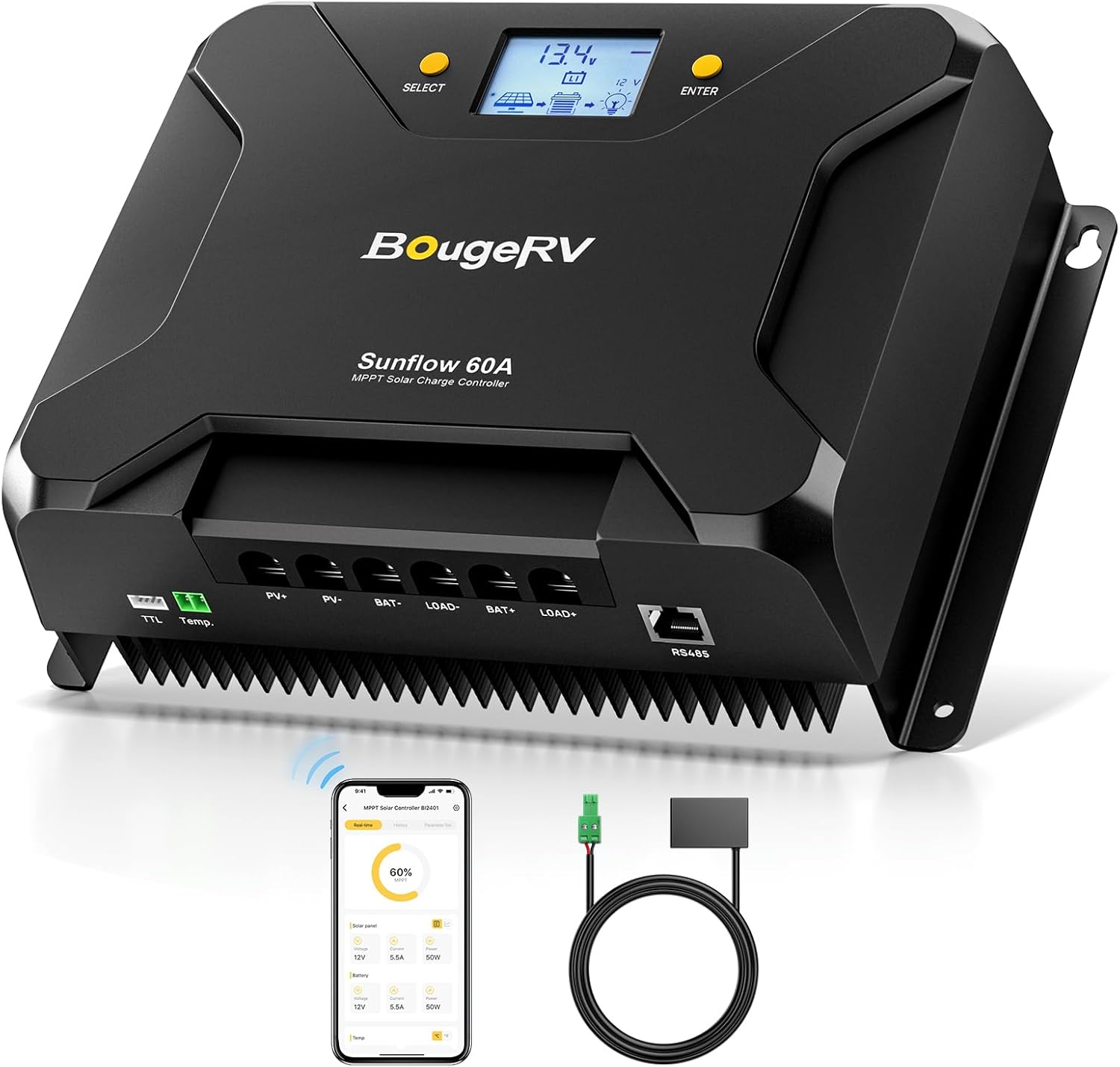
Figure 3.1: BougeRV Sunflow 60A MPPT Solar Charge Controller with included accessories.

Figure 3.2: Physical dimensions of the BougeRV Sunflow 60A MPPT Solar Charge Controller (10.35"L x 7.32"W x 3.34"H).
4. دليل التثبيت
4.1 توصيلات الأسلاك
Follow the wiring sequence below to prevent damage to the controller or system components. Always connect the battery first, then the solar panels, and finally the load.
- قم بتوصيل البطارية: Connect the 12V/24V battery to the controller's battery terminals (BAT+ and BAT-). Ensure correct polarity. This step is crucial for the controller to recognize the system voltage and activate the display.
- قم بتوصيل الألواح الشمسية: Connect the solar panel array to the controller's PV terminals (PV+ and PV-). Ensure correct polarity and that the maximum PV input voltage (95V) and power (900W/12V, 1800W/24V) are not exceeded.
- توصيل الحمل (اختياري): Connect your DC loads to the controller's load terminals (LOAD+ and LOAD-).
Wire specifications: 15-8AWG.

Figure 4.1: Connection terminals and safety features of the controller.
4.2 التركيب
Mount the controller vertically on a non-flammable surface in a dry, well-ventilated indoor location. Allow sufficient clearance around the controller for proper heat dissipation.
5. دليل التشغيل
5.1 شاشة LCD أكثرview
The controller features a backlit LCD display that shows system status and parameters. Use the 'SELECT' and 'ENTER' buttons to navigate and adjust settings.

Figure 5.1: LCD display icons and their functions, including battery type, charging stagه، المجلد النظامtage, load status, and communication indicators.
5.2 أوضاع العمل
The controller supports three working modes:
- Full-featured Mode: All functions are accessible and editable via the buttons on the device. This mode allows comprehensive parameter adjustments without needing the mobile app.
- No-load Mode: Designed for systems where the load output of the controller is not utilized. Load-related settings are hidden, simplifying navigation.
- Viewوضع التشغيل: Allows monitoring of system status parameters only. Parameters cannot be edited in this mode.

الشكل 5.2: انتهىview of the three operational modes.
5.3 Switching Working Modes
To switch between working modes:
- Press and hold the 'SELECT' button for 5 seconds until the working mode icon on the display flashes.
- Use the 'SELECT' button to cycle through the available modes (Full-featured, No-load, Viewجي).
- Once the desired mode is displayed, press and hold the 'ENTER' button for 2 seconds to save the setting.
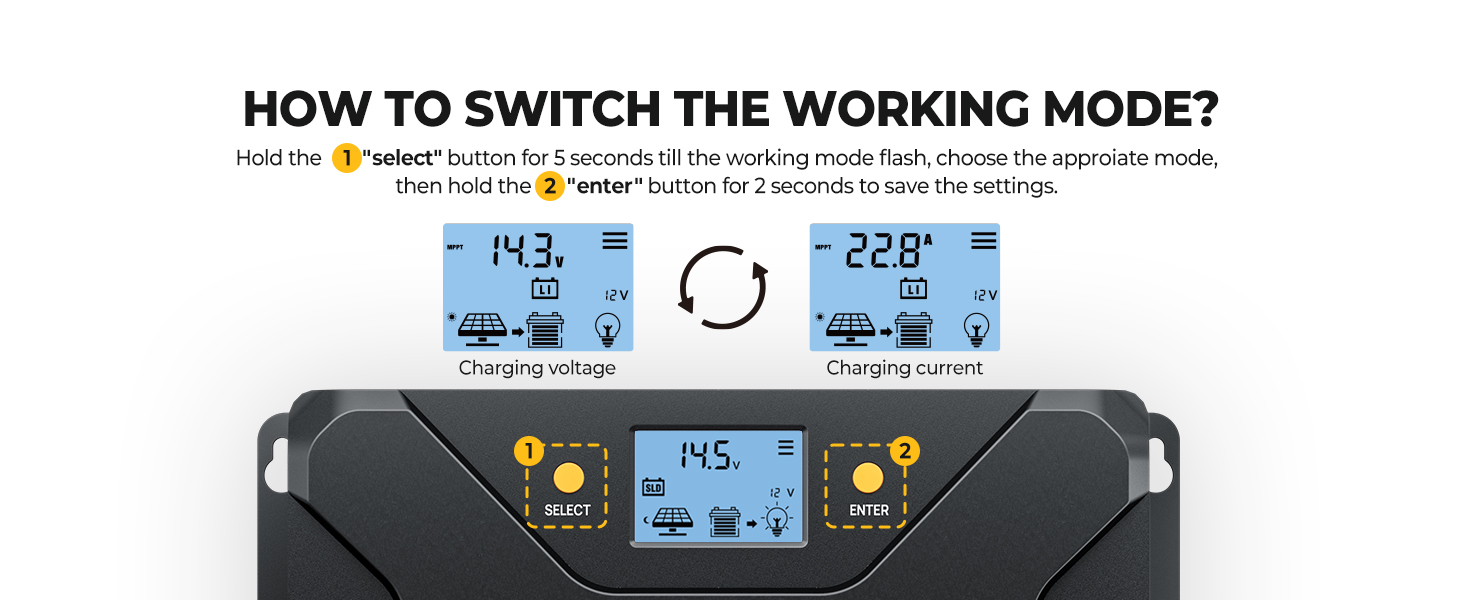
Figure 5.3: Visual guide for switching working modes on the LCD.
5.4 التحكم في التطبيق
The BougeRV Sunflow controller can be managed via a mobile application, offering enhanced monitoring and parameter adjustment capabilities.
5.4.1 تنزيل التطبيق وإقرانه
- بحث عن 'BougeRV' on your device's app store.
- Alternatively, scan the QR code provided in the user manual or visit http://b.nxw.so/2o42ln لتحميل التطبيق.
- تأكد من تمكين البلوتوث على هاتفك.
- Open the app, click the Bluetooth logo, and connect to the device.

الشكل 5.4: عملية تنزيل التطبيق وإقرانه.
5.4.2 ميزات التطبيق
- المراقبة في الوقت الحقيقي: View current system status, including solar panel input, battery voltage, and load output. The app automatically detects system status and common fault interfaces, providing timely reports and adjustment options.
- البيانات التاريخية Viewعمل: Access historical data of the controller, solar panel output, and battery charging status.
- Convenient Parameter Setting: Adjust various parameters, such as battery type, charging voltage, and low-temperature protection settings, directly from the mobile app.
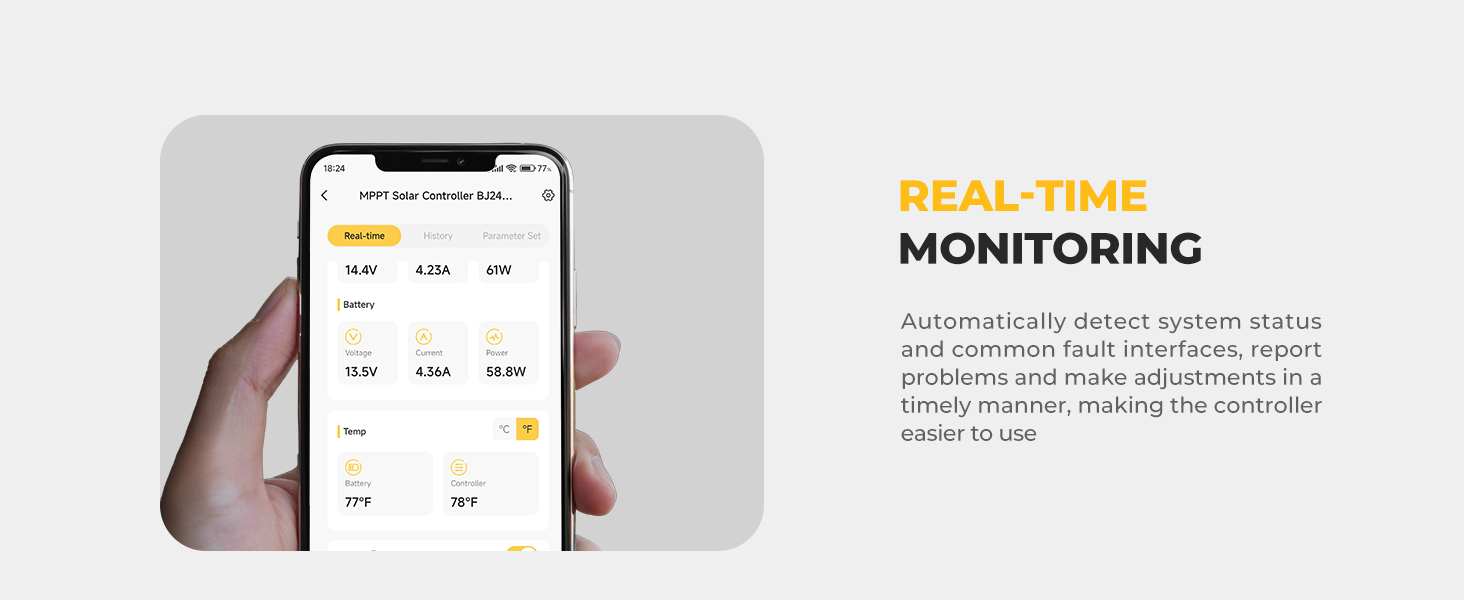
Figure 5.5: Real-time monitoring interface in the BougeRV app.
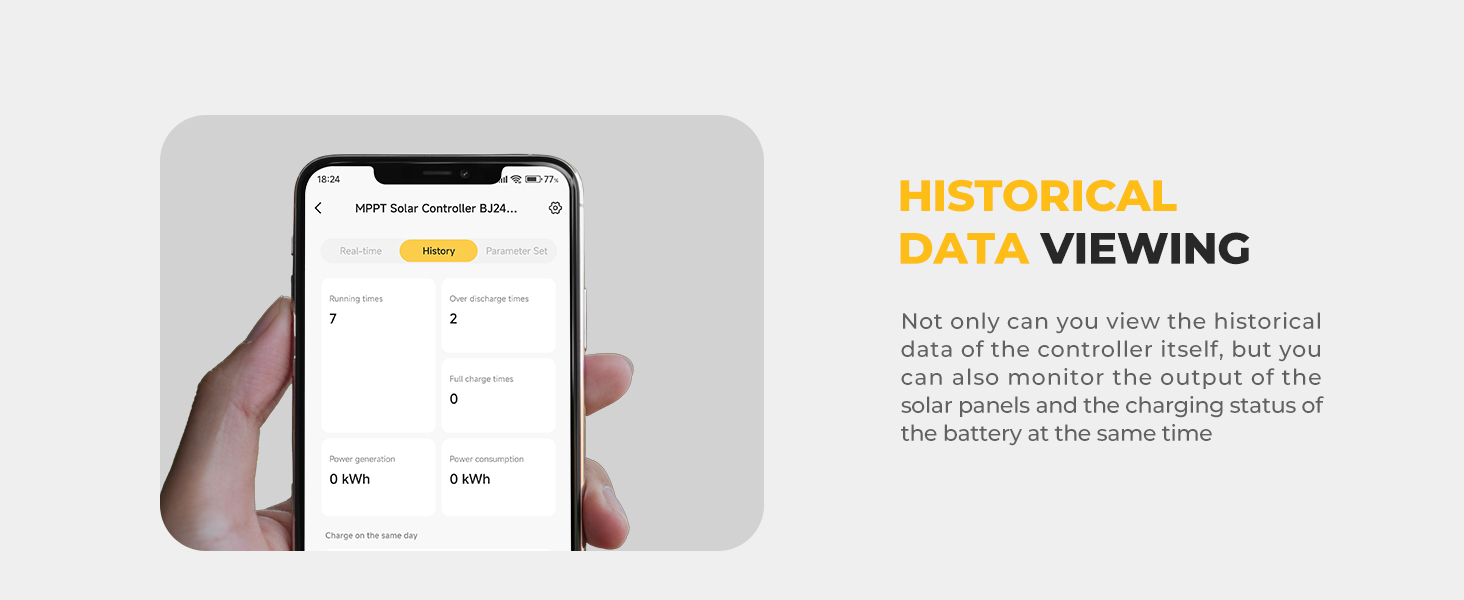
Figure 5.6: Historical data viewing in the BougeRV app.
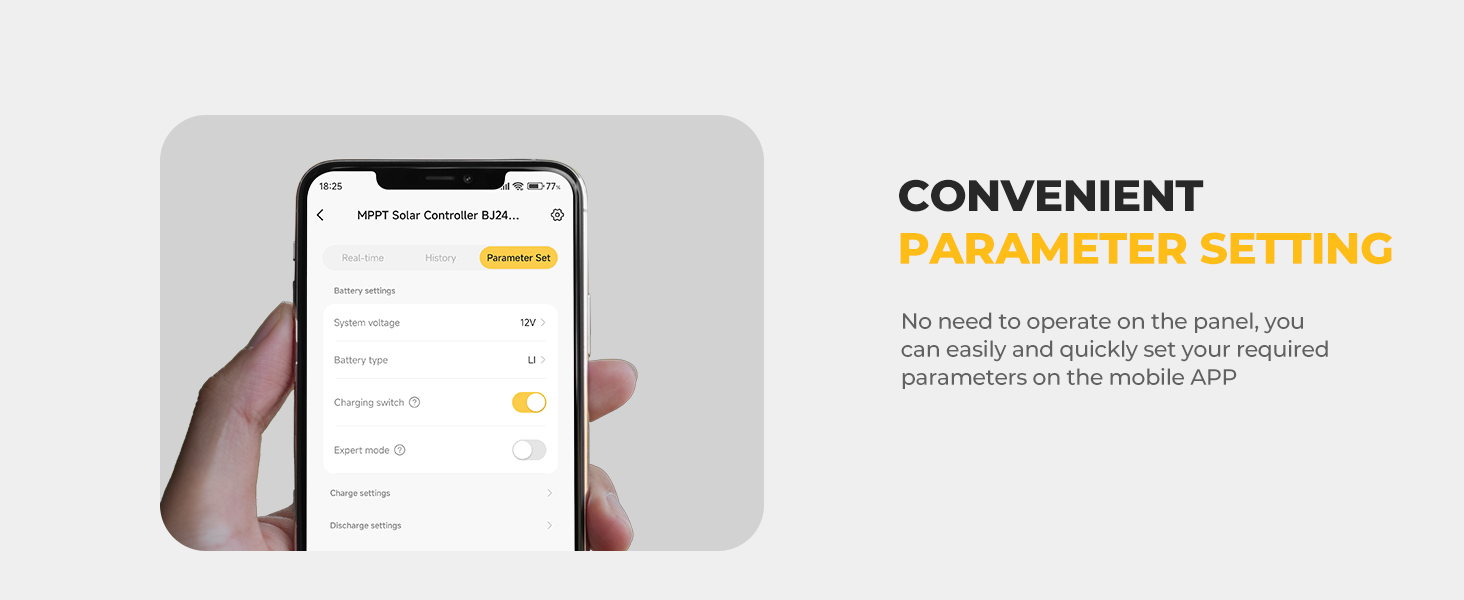
Figure 5.7: Parameter setting interface in the BougeRV app.
6. الصيانة
تضمن الصيانة الدورية طول عمر جهاز التحكم في شحن الطاقة الشمسية وأدائه الأمثل.
- تنظيف: نظّف الجزء الخارجي من وحدة التحكم بشكل دوري بقطعة قماش جافة لإزالة الغبار والأوساخ. تأكد من أن فتحات التهوية خالية من العوائق.
- فحوصات الاتصال: Annually inspect all wiring connections for tightness and corrosion. Loose connections can cause overheating and power loss.
- تحديثات البرامج الثابتة: Check the BougeRV app for any available firmware updates to ensure the controller operates with the latest features and improvements.
7. استكشاف الأخطاء وإصلاحها
This section addresses common issues you might encounter with the BougeRV Sunflow MPPT Solar Charge Controller.
| مشكلة | السبب المحتمل | حل |
|---|---|---|
| لا يوجد عرض/وحدة التحكم لا تعمل | Battery not connected or incorrect polarity; Battery voltagهـ منخفضة جدًا. | Ensure battery is connected first with correct polarity. Check battery voltage; charge if too low. |
| لا يتم الشحن من الألواح الشمسية | Solar panels not connected or incorrect polarity; Insufficient sunlight; PV input voltagمنخفض جدًا/مرتفع جدًا. | Verify solar panel connections and polarity. Check for shading. Ensure PV voltage is within specifications (Max 95V). |
| تيار شحن منخفض | Partial shading on solar panels; Battery already near full charge; High ambient temperature. | Clear any shading. This is normal behavior as the battery approaches full charge. Ensure adequate ventilation. |
| التحميل لا يعمل | Load not connected or incorrect polarity; Overload protection activated; Battery voltagهـ منخفضة جدًا. | Check load connections and polarity. Reduce load. Charge battery. |
| تطبيق البلوتوث لا يتصل | Bluetooth not enabled on phone; App not updated; Distance too far. | Enable Bluetooth. Update the app. Move closer to the controller (within 32 feet). |
8. المواصفات الفنية
| المعلمة | قيمة |
|---|---|
| رقم الموديل | ISE219N |
| حجم النظامtage | 12V/24V (Auto-recognition) |
| تيار الشحن المقدر | 60 أمبير |
| أقصى طاقة دخل من الألواح الكهروضوئية (12 فولت) | 900 واط |
| أقصى طاقة دخل من الألواح الكهروضوئية (24 فولت) | 1800 واط |
| الحد الأقصى لحجم إدخال PVtage | 95 فولت |
| تحميل الحمولة الحالية | 20 أمبير |
| كفاءة التتبع | تصل إلى 99.5% |
| كفاءة التحويل | تصل إلى 99% |
| نوع العرض | شاشة LCD ذات إضاءة خلفية |
| درجة حرارة التشغيل | 0 درجة مئوية إلى 50 درجة مئوية (32 درجة فهرنهايت إلى 122 درجة فهرنهايت) |
| الأبعاد (الطول × العرض × الارتفاع) | 10.35 × 7.32 × 3.34 بوصة |
| وزن العنصر | 6.13 رطل |
| مادة | بلاستيك ايه بي اس |
9. الضمان والدعم
BougeRV provides an 18-month technical support period for the Sunflow MPPT Solar Charge Controller 60A. For any technical assistance, troubleshooting, or warranty claims, please contact BougeRV customer service through their official channels. Keep your purchase receipt for warranty validation.


