1. المقدمة
This manual provides detailed instructions for the installation, setup, and operation of your SONOFF Matter Smart Light Switch M5-3C-120W 3-Gang. This smart wall switch integrates with Matter, allowing seamless control through various smart home ecosystems including Alexa, Google Home, and SmartThings. It features 2.4GHz WiFi connectivity, requiring a neutral wire for installation. Please read this manual thoroughly before installation and use to ensure proper function and safety.

الصورة 1.1: الجبهة view of the SONOFF Matter Smart Light Switch M5-3C-120W 3-Gang.

الصورة 1.2: انتهىview of Matter compatibility with various smart home platforms.
2. معلومات السلامة
تحذير: Risk of electric shock. Installation should be performed by a qualified electrician. Always turn off power at the circuit breaker before installing or servicing the switch. Ensure all wiring is compliant with local electrical codes.
- تم تصميم هذا الجهاز للاستخدام الداخلي فقط.
- لا تقم بالتركيب بأيدٍ مبللة أو عند الوقوف على أرض مبللة أو جافة.amp الأسطح.
- Ensure the power supply is disconnected before any installation, maintenance, or removal procedures.
- A neutral wire is required for the operation of this smart switch. Verify its presence in your electrical box before proceeding.
- The device is FCC certified, ensuring safety and reliability.

Image 2.1: Illustration of the switch's internal design, highlighting high temperature resistance and safe disassembly features.
3. محتويات العبوة
عند فتح العبوة، تأكد من وجود جميع العناصر وعدم تعرضها للتلف:
- SONOFF Matter Smart Light Switch (M5-3C-120W) x 1
- دليل سريع × 1
- براغي × 2

الصورة 3.1: الجبهة view of the product packaging.

الصورة 3.2: الخلف view of the product packaging, detailing specifications and features.
4. التثبيت
مهم: Installation requires working with electrical wiring. If you are not comfortable with electrical work, consult a qualified electrician.
4.1 فحص التثبيت المسبق
- Verify Neutral Wire: This smart switch requires a neutral wire (typically white or gray) in your electrical box. Without a neutral wire, the switch cannot be installed.
- إيقاف التشغيل: Locate your circuit breaker panel and turn off the power to the switch you are replacing. Confirm the power is off using a voltagه اختبار.
- Existing Switch Removal: Carefully remove the faceplate and unscrew the existing switch from the wall box. Disconnect the wires, noting their connections.
4.2 تعليمات الأسلاك
The SONOFF M5-3C-120W switch has terminals for Line (Live), Load, and Neutral wires. Refer to the diagram below for typical wiring connections.
- Line (L): Connect the incoming live wire from your electrical supply.
- Load (L1, L2, L3): Connect the wires going to your light fixtures. Each gang corresponds to a load terminal.
- محايد (N): Connect the neutral wire from your electrical supply.
- الأرض (GND): Connect the ground wire (if present in your wall box) to the switch's ground terminal.
4.3 التثبيت المادي
- After wiring, carefully push the switch into the wall box.
- Secure the switch to the wall box using the provided screws.
- قم بتوصيل لوحة الواجهة بالمفتاح.
- Restore power at the circuit breaker. The switch's indicator light should illuminate.

Image 4.1: Compatibility with standard US wall boxes and detailed product dimensions.
5. الإعداد والاقتران
The SONOFF M5-3C-120W supports Matter protocol for broad compatibility.
5.1 Initial Setup with eWeLink App (Optional)
While Matter allows direct integration, you can also use the eWeLink app for initial setup or additional features.
- تنزيل تطبيق eWeLink: بحث عن قم بتنزيل تطبيق "eWeLink" في متجر التطبيقات الخاص بهاتفك الذكي (متجر Google Play أو متجر Apple App Store) ثم قم بتثبيته.
- التسجيل/تسجيل الدخول: افتح التطبيق وقم بإنشاء حساب أو قم بتسجيل الدخول إذا كان لديك حساب بالفعل.
- إضافة جهاز: Follow the in-app instructions to add a new device. The switch should enter pairing mode automatically after power-up.
5.2 Pairing with Matter Ecosystems
To integrate with Matter-compatible hubs (e.g., Apple Home, Google Home, Alexa, SmartThings), follow these general steps:
- Ensure your Matter-compatible hub (e.g., HomePod, Apple TV 4K, Google Nest Hub, Amazon Echo device) is set up and online.
- Open the respective smart home app (Apple Home, Google Home, Alexa, SmartThings).
- Initiate the "Add Device" or "Add Accessory" process within the app.
- Scan the Matter QR code located on the device or its packaging, or manually enter the pairing code.
- اتبع التعليمات التي تظهر على الشاشة لإكمال عملية الاقتران.
6. تعليمات التشغيل
6.1 التحكم اليدوي
Press the physical buttons on the switch to manually turn connected lights on or off.
6.2 التحكم عن بعد عبر التطبيق
Use the eWeLink app or your preferred Matter-compatible smart home app to control the switch remotely.
- التحكم في التشغيل/الإيقاف: Tap the respective button in the app to toggle the light on or off.
- الجدولة: Set custom schedules and timers for automatic light control.
- Loop Timer: Configure lights to cycle on and off at specified intervals.
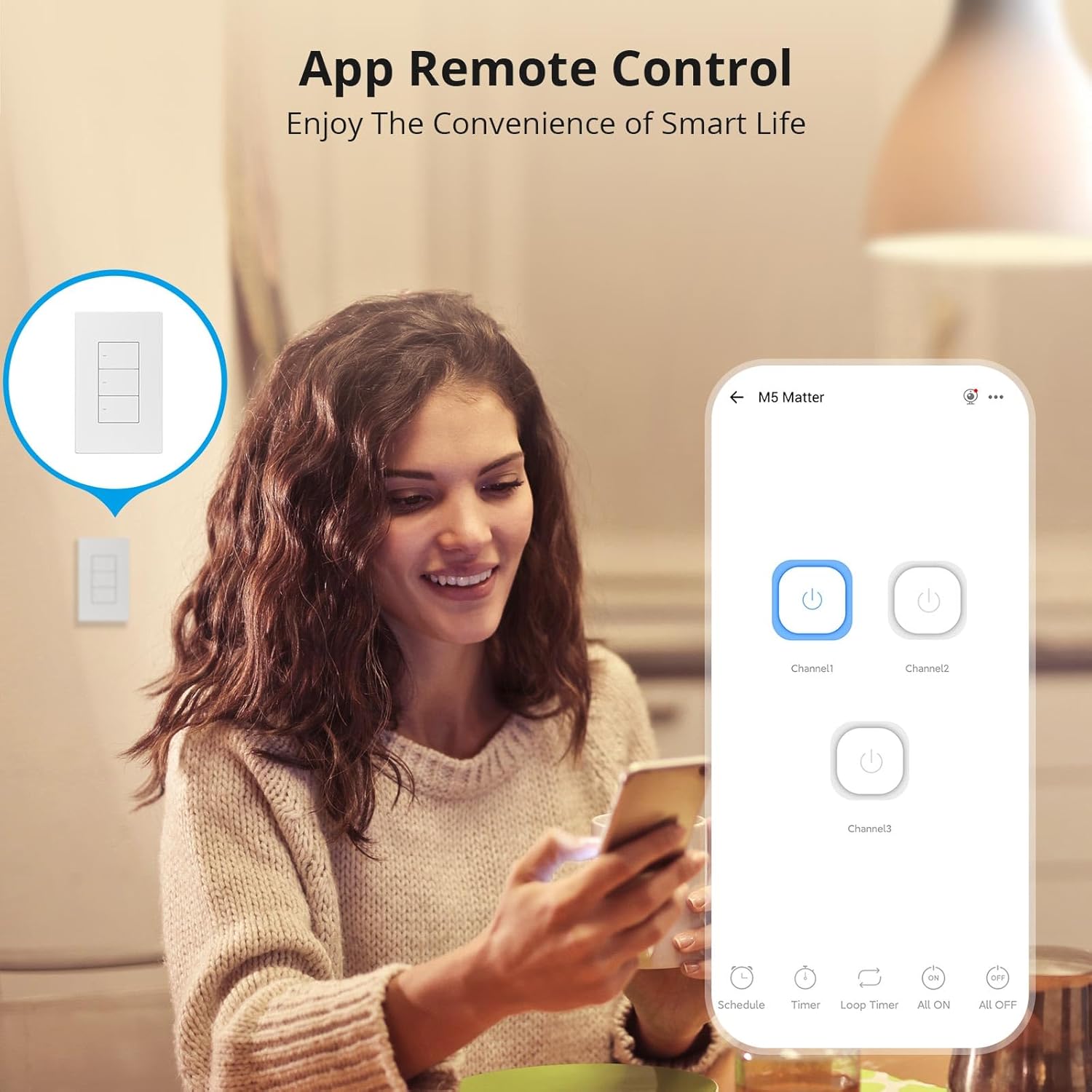
Image 6.1: Remote control via the eWeLink app interface.

الصورة 6.2: مثالample of setting scheduled on/off times for automated lighting.
6.3 التحكم الصوتي
Once integrated with Alexa, Google Home, or other voice assistants, you can control your lights using voice commands.
- Example: "Alexa, turn off the living room light."
- Example: "Hey Google, turn on the kitchen lights."

Image 6.3: Voice control in action with a smart speaker.
6.4 Smart Scenes
Create smart scenes to automate actions based on specific conditions or other smart devices.
- Example: Link with a door sensor (e.g., SONOFF DW2-WiFi) to automatically turn on lights when a door opens.

Image 6.4: Smart scene example: lights activate upon door opening.
6.5 Two-Way Control (with SONOFF R5)
The SONOFF M5 switch can be paired with a SONOFF R5 Scene Controller for two-way or multi-way control without complex wiring.

Image 6.5: Two-way control setup using an M5 switch and an R5 scene controller.
6.6 ضبط مؤشر LED
The LED indicator on the switch buttons can be adjusted for brightness via the eWeLink app to suit your preference, especially for locating the switch in the dark or minimizing disturbance during sleep.

Image 6.6: App interface for adjusting LED indicator brightness.
7. الصيانة
To maintain the performance and appearance of your smart switch:
- نظّف السطح بقطعة قماش ناعمة وجافة. لا تستخدم منظفات أو مذيبات كاشطة.
- Ensure the switch is kept free from dust and moisture.
- Do not attempt to disassemble the switch beyond what is described in the safety section, as this may void the warranty and pose a safety risk.
8. استكشاف الأخطاء وإصلاحها
If you encounter issues with your SONOFF Matter Smart Light Switch, refer to the following common problems and solutions:
- Switch is unresponsive / No power:
- Check the circuit breaker to ensure power is restored to the switch.
- Verify that the neutral wire is correctly connected.
- تأكد من أن جميع توصيلات الأسلاك آمنة.
- Cannot connect to WiFi / Drops connection frequently:
- Ensure your WiFi network is 2.4GHz. This device does not support 5GHz WiFi.
- Check the distance between the switch and your WiFi router. Obstructions can weaken the signal.
- أعد تشغيل جهاز توجيه الواي فاي الخاص بك.
- Perform a factory reset on the switch (refer to the quick guide for specific steps) and attempt pairing again.
- Cannot pair with Matter / Smart Home App:
- Ensure your Matter-compatible hub is online and within range.
- Verify that the Matter QR code or pairing code is entered correctly.
- Check for any firmware updates for your Matter hub or the smart switch.
- Try resetting the switch and initiating the pairing process again.
- Lights flicker or do not turn off completely:
- This can sometimes occur with low-wattage LED bulbs. Ensure your bulbs are compatible with smart switches.
- Verify the load connected does not exceed the maximum wattagه المحدد في المواصفات.
9. المواصفات
| ميزة | التفاصيل |
|---|---|
| نموذج | M5-3C-120W |
| أبعاد المنتج | 4.72 × 2.91 × 1.63 بوصة |
| وزن العنصر | 8.08 أونصات |
| وضع التشغيل | تشغيل/إيقاف |
| التقييم الحالي | 6 Amps |
| حجم التشغيلtage | 100-240 Volts AC |
| نوع الاتصال | مغلق عادة |
| نوع الموصل | Clamp |
| صالة | أفسد |
| نوع الدائرة | 1-الطريق |
| نوع المحرك | زر |
| واي فاي | IEEE 802.11 b / g / n 2.4GHz |
| Casinمادة g | كمبيوتر شخصي V0 + CRS |
| درجة حرارة العمل | -10 درجة مئوية إلى 40 درجة مئوية |
| شهادة | CE/FCC/ISED |
| Max. Load (per gang) | 3-Gang: 1320W (440W/Gang) |
10. الضمان والدعم
صُممت منتجات SONOFF وصُنعت وفقًا لأعلى معايير الجودة. للحصول على معلومات الضمان والدعم الفني، يُرجى الرجوع إلى موقع SONOFF الرسمي. webالموقع أو تواصل مع خدمة العملاء مباشرةً. احتفظ بإيصال الشراء كإثبات للشراء في حال وجود أي مطالبات بالضمان.
الشركة المصنعة: SONOFF
Webموقع: sonoff.tech
البريد الإلكتروني للخدمة: support@itead.cc


