1. المقدمة
The SCHUBERTH SC2 communication system represents a new standard for motorcycle communication, designed for seamless integration with your Schuberth C5, E2, and S3 helmets. This advanced system offers superior connectivity and audio quality, enhancing your riding experience with reliable intercom and multimedia capabilities.
This manual provides essential information for the installation, operation, and maintenance of your SC2 system, ensuring optimal performance and user satisfaction.
2. انتهى المنتجview
The SCHUBERTH SC2 system consists of a main communication unit, a remote control, and a microphone, all designed for easy integration into compatible Schuberth helmets.
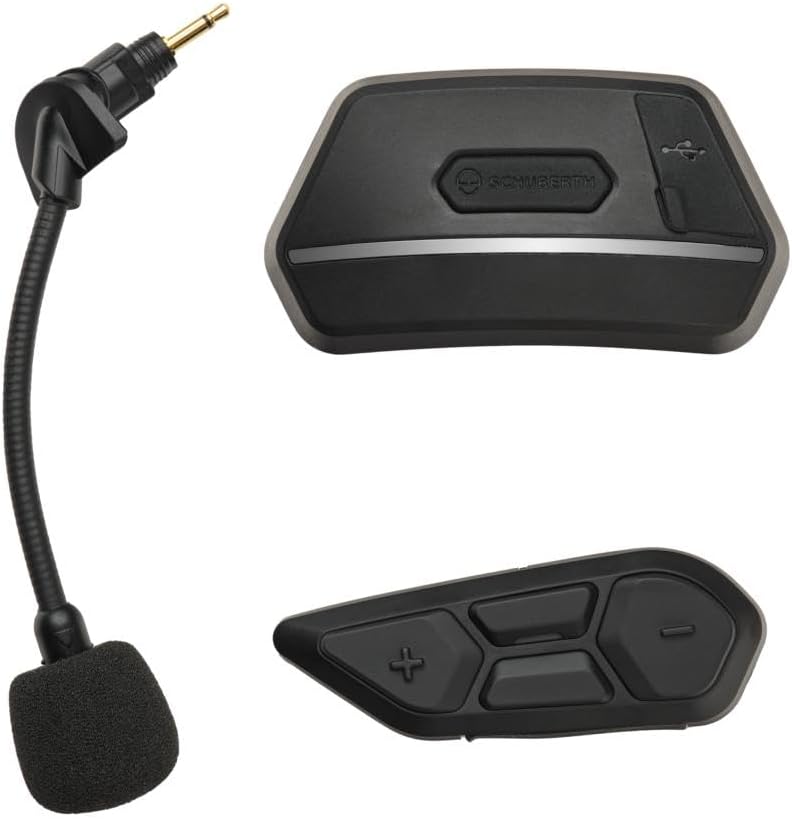
Figure 1: SCHUBERTH SC2 Communication System components. Shown are the main communication unit (top right), the remote control (bottom right), and the flexible boom microphone (left).
المميزات الرئيسية:
- بلوتوث شنومكس: للحصول على اتصال لاسلكي مستقر وفعال.
- نظام اتصال داخلي متعدد الاتجاهات: Connect with multiple riders.
- شبكة الاتصال الداخلي™: Supports up to 24 participants in Group Mesh mode, with multi-channel communication allowing users to switch between 9 communication channels in Open Mesh mode.
- نطاق ممتد: Intercom range of up to 2 km in open terrain.
- تعدد المهام الصوتية: Listen to music or GPS instructions while communicating.
- الأوامر الصوتية: Multi-language voice command support for hands-free operation.
- تكامل المساعد الذكي: يدعم Siri ومساعد Google.
- الاتصال الداخلي العالمي: Connect with headsets from other brands.
3. الإعداد والتثبيت
The SCHUBERTH SC2 is designed for extremely easy installation into compatible Schuberth C5, E2, and S3 helmets. These helmets come with pre-installed antennas for FM-Radio, Bluetooth Intercom, and Mesh Intercom, as well as HD speakers, simplifying the setup process.
خطوات التثبيت:
- تجهيز الخوذة: Locate the designated slots for the SC2 Main Unit and the remote control on your Schuberth C5, E2, or S3 helmet. Remove any pre-installed covers from these slots.
- أدخل الوحدة الرئيسية: Carefully insert the SC2 Main Unit into its designated receptacle in the helmet. Ensure it clicks securely into place.
- أدخل جهاز التحكم عن بعد: Insert the remote control into its corresponding slot. This unit typically requires a separate coin cell battery (not powered by the main system).
- قم بتوصيل الميكروفون: Connect the flexible boom microphone to the appropriate port on the SC2 Main Unit. Position the microphone correctly inside the helmet for optimal voice pickup.
- تشغيل الطاقة: Once both units are securely installed, power on the system according to the operating instructions.
Important Warning: Ensure that you install the device and its antennas correctly to ensure stable and reliable communication. Improper installation may affect performance.
4. Operating the SC2 System
The SCHUBERTH SC2 system is designed for intuitive operation, allowing riders to manage communication and audio functions easily while on the road.
الوظائف الأساسية:
- تشغيل/إيقاف التشغيل: Refer to the specific button combinations on the remote control for powering the system on or off.
- التحكم في مستوى الصوت: Use the dedicated buttons on the remote control to adjust the audio volume.
- تفعيل نظام الاتصال الداخلي: Initiate or end intercom conversations with other riders. The system supports Group Intercom for up to 4 SCHUBERTH communication systems and Universal Intercom for connecting with other brands.
- شبكة الاتصال الداخلي: Activate Mesh Intercom for large group communication. The system automatically adapts to the number of participants.
- تعدد المهام الصوتية: The system allows for simultaneous audio playback (e.g., music, GPS) while maintaining intercom communication.
- الأوامر الصوتية: Utilize multi-language voice commands to control various functions without taking your hands off the handlebars. Simply activate your preferred voice assistant (Siri or Google Assistant) and speak your command.
For detailed instructions on specific button functions and advanced features, please refer to the comprehensive digital manual available on the SCHUBERTH webموقع.
5. الصيانة والعناية
Proper maintenance ensures the longevity and optimal performance of your SCHUBERTH SC2 communication system.
- تنظيف: استخدمي قطعة قماش ناعمةamp cloth to clean the exterior of the main unit and remote control. Avoid using harsh chemicals or abrasive cleaners.
- تخزين: Store the system in a dry place, away from extreme temperatures and direct sunlight, when not in use for extended periods.
- العناية بالبطارية: Ensure the remote control's coin cell battery is replaced as needed. For the main unit's rechargeable battery, avoid fully discharging it frequently to prolong its lifespan.
- العناية بالميكروفون: Keep the microphone foam cover clean and free from debris.
6. استكشاف الأخطاء وإصلاحها
If you encounter issues with your SCHUBERTH SC2 system, try the following troubleshooting steps:
- لا يوجد طاقة:
- Ensure the main unit is fully charged.
- Check the remote control's coin cell battery and replace if necessary.
- مشاكل في اتصال نظام الاتصال الداخلي:
- Verify that the device and its antennas are correctly installed and securely connected within the helmet.
- Ensure both devices are within range and properly paired.
- حاول إعادة إقران الأجهزة.
- ضعف جودة الصوت:
- تحقق من وضعية الميكروفون.
- Ensure speakers are correctly seated in the helmet.
- ضبط مستويات الصوت.
- الأوامر الصوتية لا تستجيب:
- تأكد من توصيل الميكروفون ووضعه في المكان الصحيح.
- تحدث بوضوح وبمستوى صوت طبيعي.
- Check if the voice command feature is enabled.
If problems persist, please consult the full digital manual or contact SCHUBERTH customer support.
7. المواصفات
| ميزة | التفاصيل |
|---|---|
| ماركة | شوبرث |
| أرقام الطراز | إس بي 127، إس بي 106 |
| تكنولوجيا الاتصال | بلوتوث 5.0 |
| مصدر الطاقة | تعمل بالبطارية |
| لون | أسود |
| ميزة خاصة | وزير الخارجية الارسال |
| نطاق الاتصال الداخلي | Up to 2 km (in open terrain) |
| Mesh Intercom Participants | Up to 24 (Group Mesh) |
8. الضمان والدعم
Information regarding the product warranty is not provided within this manual. Please refer to the warranty card included with your product packaging or visit the official SCHUBERTH webالموقع للحصول على شروط وأحكام الضمان التفصيلية.
For technical support, troubleshooting assistance, or further inquiries, please contact SCHUBERTH customer service through their official webالموقع أو معلومات الاتصال المقدمة مع عملية الشراء.


