مقدمة
يُقدّم هذا الدليل تعليماتٍ مُفصّلة لإعداد وتشغيل وصيانة سماعة الرأس اللاسلكية PDP Afterglow Wave. صُمّمت هذه السماعة لتوفير تجربة صوتية غامرة، وهي متوافقة مع Xbox Series X|S، وأجهزة الكمبيوتر التي تعمل بنظامي التشغيل Windows 10/11، وPlayStation PS5/PS4، والعديد من الأجهزة التي تدعم تقنية Bluetooth.

صورة: سماعة الرأس اللاسلكية PDP Afterglow Wave، معروضةasinيتميز بتصميمه الأسود وإضاءة RGB قابلة للتخصيص على سماعات الأذن.
مميزات المنتج
- إضاءة RGB قابلة للتخصيص: قم بتخصيص سماعة الرأس الخاصة بك باستخدام ملايين تركيبات الألوان وتأثيرات الإضاءة عبر تطبيق PDP Control Hub المجاني.
- تصميم مريح: تتميز بوسائد أذن ناعمة مصنوعة من إسفنج الذاكرة وأكواب أذن دوارة لجلسات لعب طويلة وتخزين مريح.
- صوت غامر: مزودة بمحركات صوتية 50 مم للحصول على صوت عالي واضح وصوت منخفض عميق.
- ضوابط مريحة: أزرار تحكم في مستوى الصوت على سماعة الأذن وقرص لموازنة الصوت بين اللعبة والدردشة لإجراء تعديلات سريعة على الصوت.
- ميكروفون إلغاء الضوضاء: يوفر اتصالاً واضحاً، مع وظيفة كتم الصوت بالقلب للحفاظ على الخصوصية.
- اتصال متعدد الاستخدامات: يتصل لاسلكيًا عبر دونجل USB منخفض زمن الوصول بوحدات التحكم أو عبر البلوتوث بالأجهزة المحمولة.
- توافق واسع: مرخصة رسميًا لجهاز Xbox، ومتوافقة مع أجهزة الكمبيوتر التي تعمل بنظامي التشغيل Windows 10/11، وأجهزة PlayStation (PS5/PS4)، ومعظم أجهزة Bluetooth.
- عمر بطارية طويل: ما يصل إلى 16 ساعة من اللعب بشحنة واحدة.
تعليمات الإعداد
1. شحن سماعة الرأس
قبل الاستخدام الأول، اشحن سماعة الرأس بالكامل. وصّل كابل الشحن USB المرفق بمنفذ الشحن الخاص بالسماعة وبمنفذ USB مزود بالطاقة (مثل جهاز ألعاب، أو كمبيوتر، أو محول طاقة جداري). ستومض أضواء RGB الخاصة بالسماعة أثناء الشحن، وستضيء بشكل ثابت عند اكتمال الشحن. يستغرق الشحن الكامل عادةً حوالي 8 ساعات، ويوفر ما يصل إلى 16 ساعة من عمر البطارية.
صورة: سماعة الرأس التي تسلط الضوء على عمر بطاريتها الذي يصل إلى 16 ساعة لجلسات لعب ممتدة.
2. الاتصال بجهاز Xbox/الكمبيوتر الشخصي (دونجل لاسلكي)
- أدخل جهاز استقبال USB اللاسلكي في منفذ USB متاح على جهاز Xbox أو الكمبيوتر الشخصي.
- قم بتشغيل سماعة الرأس بالضغط مع الاستمرار على زر التشغيل حتى تضيء الأضواء.
- يجب أن يقترن كل من سماعة الرأس وجهاز الاستقبال تلقائيًا. يشير الضوء الثابت على كليهما إلى نجاح الاتصال.
- اضبط مستوى الصوت باستخدام أزرار التحكم الموجودة على سماعة الأذن.
صورة: سماعة الرأس التي تؤكد توافقها مع مختلف منصات الألعاب وأجهزة البلوتوث.
3. الاتصال عبر البلوتوث (الأجهزة المحمولة، PS5/PS4)
- تأكد من إيقاف تشغيل سماعة الرأس.
- اضغط مع الاستمرار على زر البلوتوث الموجود على سماعة الرأس حتى يبدأ ضوء المؤشر بالوميض، مما يشير إلى وضع الاقتران.
- على جهازك (مثل الهاتف الذكي أو الجهاز اللوحي أو جهاز بلاي ستيشن)، انتقل إلى إعدادات البلوتوث وحدد "موجة التوهج اللاحق" من قائمة الأجهزة المتاحة.
- بمجرد الاتصال، سيصبح ضوء مؤشر البلوتوث في سماعة الرأس ثابتًا.
تعليمات التشغيل
عناصر التحكم في سماعة الرأس
- زر الطاقة: اضغط مع الاستمرار لتشغيل/إيقاف التشغيل. اضغط ضغطة قصيرة للتحقق من حالة البطارية.
- حجم الصوت: قم بالتدوير لضبط مستوى الصوت الإجمالي.
- قرص موازنة اللعبة/الدردشة: يضبط التوازن بين صوت اللعبة وصوت الدردشة.
- زر الوضع: يُبدّل بين تأثيرات إضاءة RGB المختلفة. اضغط مع الاستمرار لتشغيل/إيقاف إضاءة RGB.
- ميكروفون: ارفع ذراع الميكروفون لأعلى لكتم الصوت. اخفضه لأسفل لإلغاء كتم الصوت.
صورة: لقطة مقرّبة لميكروفون إلغاء الضوضاء في سماعة الرأس، توضح ميزة كتم الصوت عن طريق قلب الميكروفون.
تطبيق مركز التحكم في PDP
قم بتنزيل تطبيق PDP Control Hub المجاني من متجر Microsoft (لأجهزة Xbox/PC) أو متجر تطبيقات جهازك (للهواتف المحمولة) لتخصيص سماعة الرأس الخاصة بك:
- قم بتعديل مناطق وتأثيرات إضاءة RGB.
- اضبط إعدادات الصوت وإعدادات المعادل المسبقة.
- قم بتحديث برنامج سماعة الرأس.
صورة: رسم تخطيطي يوضح مناطق إضاءة RGB القابلة للتخصيص على سماعة الرأس، والتي تتم إدارتها عبر تطبيق PDP Control Hub.
صيانة
- تنظيف: استخدم قطعة قماش ناعمة وجافة لتنظيف سماعة الرأس. تجنب استخدام المنظفات الكاشطة أو المذيبات.
- تخزين: خزّن سماعة الرأس في مكان بارد وجاف بعيدًا عن أشعة الشمس المباشرة ودرجات الحرارة القصوى. تسمح وسادات الأذن الدوارة بوضعها بشكل مسطح للتخزين.
- العناية بالبطارية: لإطالة عمر البطارية، تجنب تفريغ سماعة الرأس بالكامل بشكل متكرر. اشحنها بانتظام، حتى لو لم تكن قيد الاستخدام لفترات طويلة.
- مقاومة الماء: هذه السماعة غير مقاومة للماء. تجنب تعريضها للسوائل.
استكشاف الأخطاء وإصلاحها
| مشكلة | الحل المحتمل |
|---|---|
| لا يوجد صوت أو صوت منخفض |
|
| الميكروفون لا يعمل |
|
| انقطاع سماعة الرأس بشكل عشوائي أو ضعف الإشارة |
|
| أضواء RGB لا تعمل |
|
تحديد
| ميزة | التفاصيل |
|---|---|
| اسم الموديل | سماعة رأس لاسلكية Afterglow Wave |
| رقم الموديل | 049-032-ب ك |
| الاتصال | لاسلكي (دونجل USB)، بلوتوث |
| نسخة البلوتوث | 4.0 |
| مدى البلوتوث | 20 أقدام |
| حجم برنامج تشغيل الصوت | محركات ديناميكية مقاس 50 مم |
| مقاومة | 32 أوم |
| عمر البطارية | حتى ساعتين |
| وقت الشحن | حوالي ساعتين |
| ميكروفون | خاصية إلغاء الضوضاء، خاصية كتم الصوت بقلب الجهاز |
| عناصر التحكم | مستوى الصوت على سماعة الأذن، وتوازن الصوت بين اللعبة والدردشة، وزر الوضع (RGB) |
| التوافق | إكس بوكس سيريس إكس/إس، كمبيوتر يعمل بنظام ويندوز 10/11، بلاي ستيشن PS5/PS4، أجهزة بلوتوث |
| وزن | 1.19 رطل (حوالي 0.54 كجم) |
| مادة | البولي كربونات (PC) |
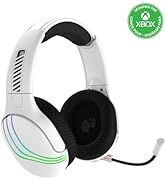
صورة: سماعة الرأس التي تبرز مكبرات الصوت مقاس 50 مم للحصول على جودة صوت غامرة.
معلومات الضمان
منتجات PDP مشمولة بضمان الشركة المصنعة. للاطلاع على التفاصيل الخاصة بفترة ضمان سماعة الرأس اللاسلكية PDP Afterglow Wave وشروطها، يرجى الرجوع إلى موقع PDP الرسمي. webالموقع أو تواصل مع خدمة العملاء. احتفظ بإثبات الشراء لطلبات الضمان.
يدعم
للحصول على مزيد من المساعدة أو الدعم الفني أو لتنزيل تطبيق PDP Control Hub، يرجى زيارة موقع PDP الرسمي webموقع:
يمكنك أيضًا العثور على الأسئلة الشائعة والموارد الإضافية على صفحات الدعم الخاصة بهم.


