1. المقدمة
Thank you for choosing the Silvergear Bluetooth Meat Thermometer, Model 3784. This device is designed to help you achieve perfectly cooked meat every time, whether you are grilling, smoking, or baking. With its advanced features, including two stainless steel probes, a 40-meter Bluetooth range, and seamless integration with the Tuya Smart Life app, monitoring your food's temperature has never been easier or more precise. Please read this manual carefully to ensure proper use and maintenance of your thermometer.
2. انتهى المنتجview والميزات
The Silvergear Bluetooth Meat Thermometer provides accurate temperature readings and smart monitoring capabilities. Key features include:
- نظام المسبار المزدوج: Equipped with two 1-meter stainless steel probes, allowing simultaneous monitoring of two different food items or different parts of a large cut of meat.
- الاتصال عبر البلوتوث: Offers a reliable wireless range of up to 40 meters, enabling you to monitor cooking progress from a distance.
- Tuya Smart Life App Integration: Connects to the intuitive Tuya Smart Life app for remote temperature tracking, customizable alerts, and cooking history.
- عرض رقمي: Clear, easy-to-read digital display on the main unit shows current and preset temperatures.
- بطارية قابلة لإعادة الشحن: Convenient USB rechargeable design for sustained use.

Image: The Silvergear Bluetooth Meat Thermometer displaying current and preset temperatures, alongside a smartphone screen showing the connected app interface for food selection.

Image: A detailed diagram labeling the components of the Silvergear Bluetooth Meat Thermometer, including the current temperature display, preset temperature display, probe index, sensor sockets, charge socket, ON/OFF button, Bluetooth 5.0 indicator, and alarms for probes 1 & 2.
3. ماذا يوجد في الصندوق
Upon opening your Silvergear Bluetooth Meat Thermometer package, you should find the following items:
- 1 x Silvergear Bluetooth Meat Thermometer Unit
- 2 x Stainless Steel Temperature Probes (1 meter each)
- 1 × كابل شحن USB
- 1 × دليل المستخدم
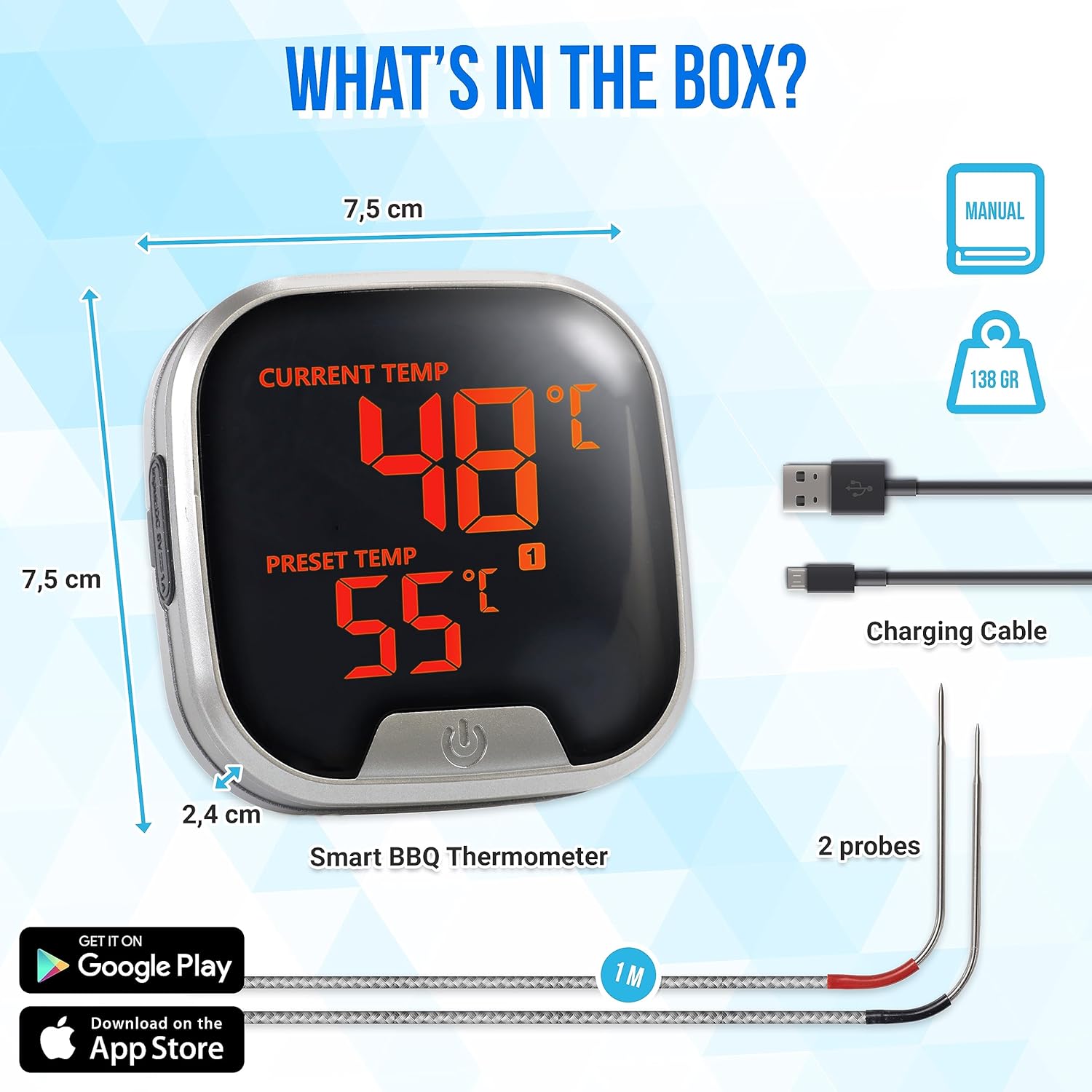
Image: A visual representation of the Silvergear Bluetooth Meat Thermometer package contents, including the main thermometer unit, two temperature probes, a USB charging cable, and the user manual.
4. الإعداد
4.1 شحن الجهاز
Before first use, fully charge the thermometer unit. Connect the provided USB charging cable to the charging port on the device and plug the other end into a standard USB power adapter (not included) or a computer USB port. The charging indicator will show the charging status.
4.2 تنزيل التطبيق
The Silvergear Bluetooth Meat Thermometer operates with the Tuya Smart Life app. Download the app from your smartphone's app store:
- For iOS devices: Search 'Tuya Smart Life' in the Apple App Store.
- For Android devices: Search 'Tuya Smart Life' in the Google Play Store.
اتبع التعليمات التي تظهر على الشاشة لإنشاء حساب أو تسجيل الدخول إذا كان لديك حساب بالفعل.
4.3 الاقتران عبر البلوتوث
- تأكد من تمكين البلوتوث على هاتفك الذكي.
- Power on the Silvergear thermometer unit by pressing the ON/OFF button. The Bluetooth icon on the display will flash, indicating it's ready for pairing.
- Open the Tuya Smart Life app. The app should automatically detect the thermometer. If not, tap 'Add Device' or the '+' icon and select the thermometer from the list of available devices.
- Follow the app's prompts to complete the pairing process. Once connected, the Bluetooth icon on the thermometer's display will stop flashing and remain solid.
4.4 Inserting Probes
Carefully insert the stainless steel probes into the designated sensor sockets on the side of the thermometer unit. Ensure they are fully inserted for accurate readings.
5. تعليمات التشغيل
5.1 تشغيل/إيقاف التشغيل
Press and hold the ON/OFF button located at the bottom of the unit to power the thermometer on or off.
5.2 Using the Probes
Insert the tip of the stainless steel probe into the thickest part of the meat, avoiding bones. For best results when using two probes, place them in different cuts or areas to monitor multiple temperatures simultaneously.
5.3 Setting Target Temperatures via App
- Open the Tuya Smart Life app and select your connected thermometer.
- Navigate to the 'Food' or 'Customize' section.
- Choose from a variety of preset meat types and doneness levels (e.g., Beef Medium, Chicken Well Done) or manually set your desired target temperature.
- Assign the target temperature to Probe 1 or Probe 2 as needed.

Image: The Silvergear Bluetooth Meat Thermometer displaying temperatures, with an adjacent smartphone screen showing a selection of 10 preset food types and doneness levels for easy temperature setting.
5.4 مراقبة درجة الحرارة
Once the probes are inserted and target temperatures are set, the current temperature of your food will be displayed on both the thermometer unit and within the Tuya Smart Life app. The app provides real-time updates and a graphical representation of temperature progression.

Image: A man holding a smartphone, monitoring the Silvergear Bluetooth Meat Thermometer from a distance, highlighting the 40-meter Bluetooth range and the ability to view temperature anytime, anywhere.
5.5 Understanding Alarms
The thermometer and app will provide an audible and/or push notification alarm when the food reaches its preset target temperature. This ensures you are alerted precisely when your meal is ready.

Image: A grill with cooking meat, next to a smartphone displaying push notifications from the Silvergear app, indicating that the ideal temperature for Probe 1 (65°C) and Probe 2 (52°C) has been reached.
6. App Features (Tuya Smart Life)
The Tuya Smart Life app enhances your cooking experience with several useful functions:
- وظيفة التوقيت: Set precise cooking timers for different types of meat to ensure optimal results.
- إنذار درجة الحرارة: Receive instant notifications on your phone when your meat reaches the desired temperature.
- Temperature History: Review past cooking temperatures to analyze patterns and refine your cooking techniques for consistent perfection.

Image: Three smartphone screens illustrating the Tuya Smart Life app's features: a timing function with a countdown, a temperature alarm setting interface, and a temperature history graph showing real-time temperature curves for multiple probes.
7. الصيانة
7.1 تعليمات التنظيف
To ensure the longevity and accuracy of your thermometer:
- المجسات: After each use, clean the stainless steel probes with warm, soapy water. Rinse thoroughly and dry completely before storage. Do not immerse the probe wires or connectors in water.
- الوحدة الرئيسية: Wipe the main thermometer unit with a damp لا تغمر الجهاز في الماء أو تعرضه لرطوبة زائدة.
- تخزين: قم بتخزين مقياس الحرارة والمجسات في مكان نظيف وجاف عند عدم استخدامها.
8. استكشاف الأخطاء وإصلاحها
If you encounter issues with your Silvergear Bluetooth Meat Thermometer, refer to the following common problems and solutions:
| مشكلة | السبب المحتمل | حل |
|---|---|---|
| Thermometer not turning on | بطارية منخفضة | اشحن الجهاز باستخدام كابل USB المرفق. |
| غير قادر على الاتصال بالتطبيق | Bluetooth is off on phone or thermometer; App not installed; Device out of range. | Ensure Bluetooth is enabled on both devices. Download the Tuya Smart Life app. Move closer to the thermometer (within 40m). Restart both the thermometer and the app. |
| قراءات غير دقيقة لدرجة الحرارة | Probe not fully inserted; Probe damaged; Probe tip touching bone. | Ensure probes are fully inserted into the meat's thickest part, avoiding bones. Check probes for visible damage. If damaged, replacement probes may be needed. |
| No alarm notification | App notifications disabled; Volume too low; Device out of range. | Check app notification settings on your phone. Increase phone volume. Ensure device is within Bluetooth range. |
9. المواصفات
| ميزة | التفاصيل |
|---|---|
| رقم الموديل | 3784 |
| ماركة | سيلفر جير |
| تكنولوجيا الاتصال | بلوتوث |
| مدى البلوتوث | حتى 40 أمتار |
| عدد المجسات | 2 |
| مادة التحقيق | الفولاذ المقاوم للصدأ |
| نوع العرض | رقمي |
| مصدر الطاقة | تعمل بالبطارية (قابلة للشحن عبر USB) |
| ميزة خاصة | وظيفة التنبيه |
| تعليمات العناية | Clean (refer to Maintenance section) |
| الشركة المصنعة | كارستن إنترناشونال |
| بلد المنشأ | الصين |
10. الضمان والدعم
Warranty information for the Silvergear Bluetooth Meat Thermometer (Model 3784) is not explicitly provided in the product details. For specific warranty terms, support, or replacement parts, please contact the retailer or the manufacturer, Karsten International, directly. Information regarding the availability of spare parts is currently unavailable.


