1. المقدمة
This manual provides detailed instructions for the proper use and maintenance of your Arlec Remote SS3136. This remote control is specifically designed to operate the Arlec Wall Fan AWDC001HA, offering convenient and effortless control over your fan's functions. Please read this manual thoroughly before first use to ensure optimal performance and longevity of your device.
2. مواصفات المنتج
- التحكم السهل: Utilizes Infrared technology for seamless communication with your Arlec Wall Fan AWDC001HA from up to 10 meters away.
- قوة تدوم طويلاً: Requires 3 alkaline batteries for extended use.
- تصميم أنيق: Finished in a sophisticated black color.
- توافق متعدد الاستخدامات: Designed to control Arlec Wall Fans, specifically model AWDC001HA.
- عملية بسيطة: Features 3 intuitive buttons for easy fan control.
3. محتويات العبوة
تأكد من وجود جميع العناصر في العبوة:
- 1 x Arlec Remote SS3136
- 1 x Wall Mount Holder
- 2 × مسامير التثبيت
- 2 × مقابس الحائط
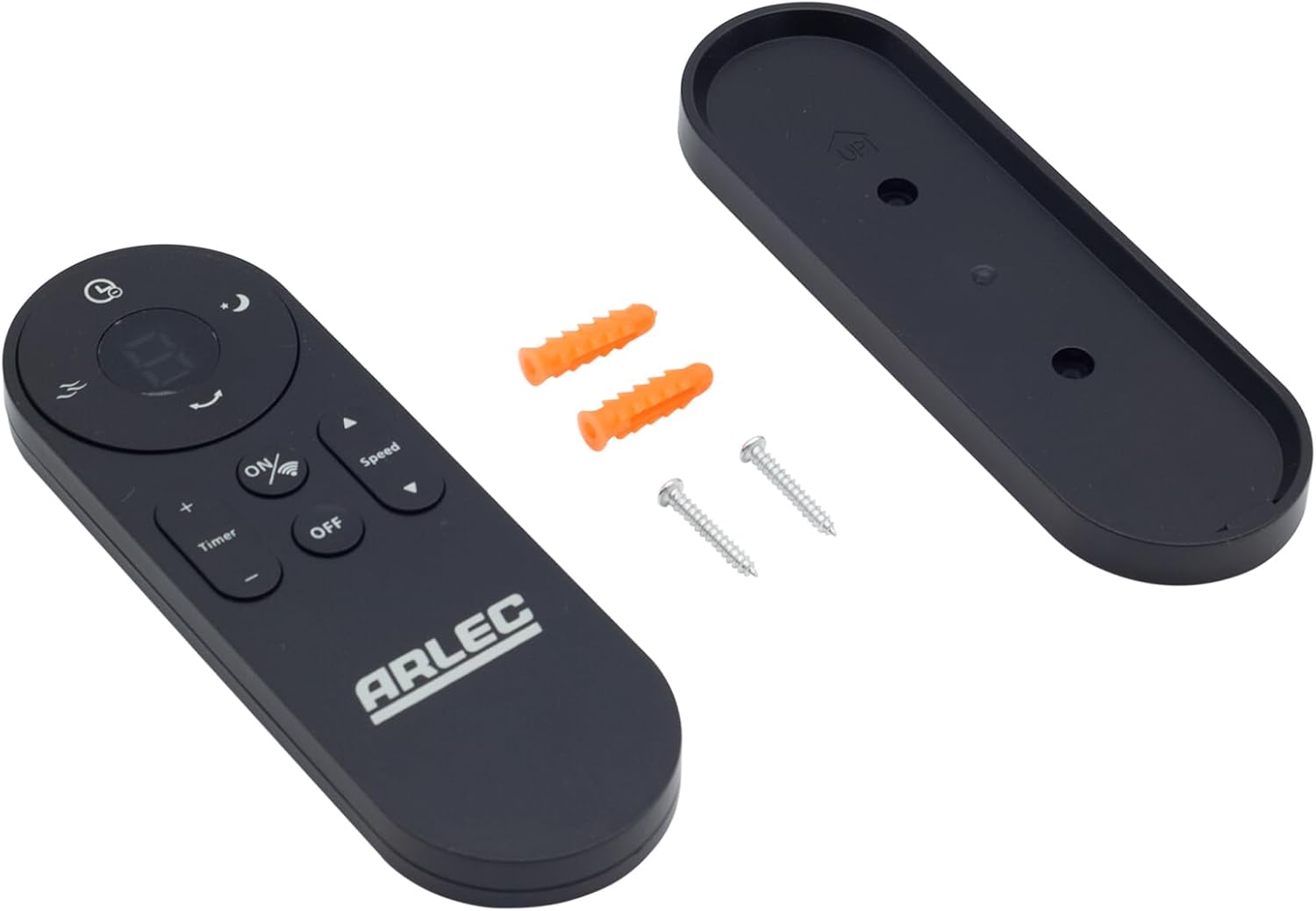
Image: Arlec Remote SS3136 shown with its included wall mount holder, two mounting screws, and two wall plugs, indicating the complete package contents.
4. الإعداد
4.1 تركيب البطارية
- حدد موقع حجرة البطارية في الجزء الخلفي من جهاز التحكم عن بعد.
- افتح غطاء حجرة البطارية.
- Insert 3 Alkaline batteries (not included) into the compartment, ensuring the correct polarity (+ and -) as indicated inside the compartment. The remote requires 3 Volts (DC).
- أغلق غطاء حجرة البطارية جيدًا.
4.2 التركيب على الحائط (اختياري)
- Choose a suitable location on a wall for the remote holder.
- Mark the positions for the two mounting screws using the holder as a template.
- Drill pilot holes at the marked positions. Insert the wall plugs if drilling into drywall or masonry.
- Secure the wall mount holder to the wall using the provided screws.
- Place the remote control into the installed holder for convenient storage.
5. تعليمات التشغيل
The Arlec Remote SS3136 features a simple 3-button layout for controlling your Arlec Wall Fan AWDC001HA. Ensure there is a clear line of sight between the remote and the fan's infrared receiver for optimal performance.

الصورة: عن قرب view of the Arlec Remote SS3136, highlighting its three main control buttons: ON/OFF, Speed, and Timer.
- زر التشغيل/الإيقاف: اضغط على هذا الزر لتشغيل أو إيقاف تشغيل المروحة.
- زر السرعة: Use this button to cycle through the available fan speed settings (e.g., Low, Medium, High).
- زر المؤقت: Press this button to set or adjust the fan's timer function. Refer to your Arlec Wall Fan AWDC001HA manual for specific timer intervals.
The remote operates using Infrared (IR) technology. Point the remote directly towards the fan's IR receiver. The effective operating range is up to 10 meters (approximately 33 feet).
6. الصيانة
- تنظيف: امسح جهاز التحكم عن بُعد بقطعة قماش ناعمة وجافة. لا تستخدم منظفات أو مذيبات كاشطة.
- استبدال البطارية: Replace batteries when the remote's performance degrades or it stops responding. Always replace all 3 batteries at the same time with new alkaline batteries.
- تخزين: في حال عدم استخدام جهاز التحكم عن بُعد لفترة طويلة، انزع البطاريات لمنع التسريب. خزّنه في مكان بارد وجاف.
7. استكشاف الأخطاء وإصلاحها
| مشكلة | السبب المحتمل | حل |
|---|---|---|
| Remote not responding to fan. |
|
|
| الأزرار ملتصقة أو لا تستجيب. | الأوساخ أو الحطام تحت الأزرار. | Clean the remote surface with a soft, dry cloth. Avoid liquids. |
8. المواصفات
| يصف | التفاصيل |
|---|---|
| نموذج | اس اس 3136 |
| الشركة المصنعة | أرليك |
| الأجهزة المتوافقة | Arlec Wall Fan AWDC001HA |
| تكنولوجيا الاتصال | الأشعة تحت الحمراء (IR) |
| عدد الأزرار | 3 |
| نوع وحدة التحكم | التحكم بالأزرار |
| نوع البطارية | Alkaline (3 required) |
| المجلدtage | 3 فولت (تيار مستمر) |
| نطاق التشغيل | حتى 10 أمتار |
9. الضمان والدعم
For warranty information and technical support, please refer to the documentation provided with your Arlec Wall Fan AWDC001HA or contact Arlec customer service directly. Keep your purchase receipt as proof of purchase.
For further assistance, please visit the manufacturer's official webالموقع أو الاتصال بخط دعم العملاء الخاص بهم.


