1. المقدمة
This manual provides detailed instructions for the installation, configuration, and operation of the Grandstream GWN7003 11-Port Wired Gigabit VPN Router. The GWN7003 is designed to establish robust wired, wireless, and VPN networks for various environments, offering advanced features for network management and security.
2. انتهى المنتجview
2.1 الميزات الرئيسية
- 1x GbE RJ45 port with IEEE 802.3af/at PoE Input.
- 2x GbE RJ45 ports with 48V Passive PoE output or IEEE802.3af.
- Multiple Gigabit RJ45 ports and Gigabit SFP ports for flexible connectivity.
- Integrated VPN support for secure remote access to corporate networks.
- Built-in firewall for enhanced network security.
- Multi-WAN capabilities for load balancing and failover.
2.2 تخطيط اللوحة الأمامية
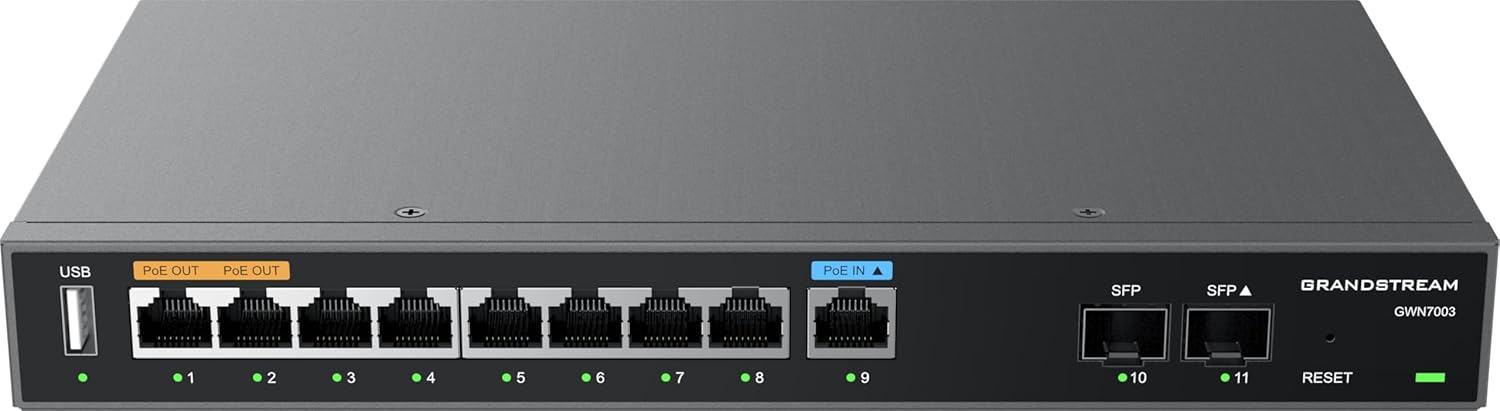
الشكل 1: أمام view of the Grandstream GWN7003 router, showing the USB port, PoE OUT ports, PoE IN port, standard Ethernet ports, SFP ports, and reset button.
- منفذ USB: For future use or external storage.
- PoE OUT Ports (Orange): Provide Power over Ethernet to compatible devices.
- PoE IN Port (Blue): Receives Power over Ethernet to power the router itself.
- منافذ إيثرنت (1-9): Standard Gigabit Ethernet ports for network connections.
- منافذ SFP (10-11): Gigabit SFP ports for fiber optic connections.
- زر إعادة الضبط: تُستخدم لإعادة ضبط الجهاز إلى إعدادات المصنع الافتراضية.
- مؤشرات LED: Indicate port status (link/activity) and device power.
2.3 أعلى View

الشكل 2: قمة view of the Grandstream GWN7003 router, showcasing its compact and durable metal casing.
3. دليل الإعداد
3.1 محتويات العبوة
قبل المتابعة، تأكد من وجود جميع العناصر:
- Grandstream GWN7003 Router
- Power Adapter (if not using PoE IN)
- كابل إيثرنت
- دليل التثبيت السريع
3.2 التثبيت المادي
- توصيل الطاقة: Connect the provided power adapter to the router's power input port, or connect an 802.3af/at compliant PoE source to the PoE IN port (blue).
- اتصال WAN: Connect your internet service provider's modem or main network cable to one of the WAN-configured Gigabit Ethernet ports. The GWN7003 supports multiple WAN ports for redundancy or load balancing.
- اتصال الشبكة المحلية: Connect your local network devices (computers, switches, access points) to the available LAN Gigabit Ethernet ports. Use the PoE OUT ports (orange) for devices requiring Power over Ethernet.
- SFP Connections (Optional): If using fiber optic connections, insert compatible SFP modules into the SFP ports and connect fiber cables.
3.3 الوصول الأولي إلى Web الواجهة
- تأكد من توصيل جهاز الكمبيوتر الخاص بك بأحد منافذ الشبكة المحلية (LAN) الخاصة بجهاز التوجيه (الراوتر).
- افتح web المتصفح (على سبيل المثال، Chrome، Firefox).
- Enter the default IP address of the router in the address bar. The default IP address is typically
192.168.1.1. Refer to the Quick Installation Guide for the exact default IP. - أدخل اسم المستخدم وكلمة المرور الافتراضيين (عادةً
adminلكليهما، أو كما هو محدد في الدليل). - Follow the on-screen wizard for initial configuration, including changing the default password for security.
4. تعليمات التشغيل
4.1 تكوين الشبكة
ال web interface allows for comprehensive network configuration:
- إعدادات الشبكة الواسعة (WAN): Configure internet connection type (DHCP, Static IP, PPPoE).
- إعدادات الشبكة المحلية: Manage IP address range, DHCP server, and VLANs.
- Multi-WAN: Set up load balancing or failover policies for multiple internet connections.
4.2 إعداد VPN
The GWN7003 supports various VPN protocols for secure remote access:
- Navigate to the VPN section in the web واجهة.
- Configure VPN server or client settings based on your network requirements (e.g., OpenVPN, IPsec).
- Ensure proper firewall rules are in place to allow VPN traffic.
4.3 PoE Output Management
The router's PoE OUT ports can power compatible devices:
- Connect PoE-powered devices (e.g., IP cameras, VoIP phones, Wi-Fi access points) to the orange PoE OUT ports.
- Monitor PoE status and power consumption through the web واجهة.
5. الصيانة
5.1 تحديثات البرامج الثابتة
Regularly update the router's firmware to ensure optimal performance, security, and access to new features:
- Visit the Grandstream website for the latest firmware for the GWN7003.
- تنزيل البرامج الثابتة file إلى جهاز الكمبيوتر الخاص بك.
- الوصول إلى جهاز التوجيه web interface and navigate to the System Maintenance or Firmware Upgrade section.
- قم بتحميل البرنامج الثابت الذي تم تنزيله file and follow the on-screen instructions. Do not power off the device during the update process.
5.2 إعادة ضبط المصنع
لإعادة جهاز التوجيه إلى إعدادات المصنع الافتراضية:
- With the router powered on, press and hold the Reset button (located on the front panel) for approximately 10 seconds.
- Release the button when the LED indicators flash. The router will reboot with factory default settings.
- Alternatively, a factory reset option is available within the web interface under System Maintenance.
6. استكشاف الأخطاء وإصلاحها
6.1 لا يوجد اتصال بالإنترنت
- Verify that the WAN cable is securely connected to the correct port and that your modem is operational.
- Check WAN settings in the web interface to ensure they match your ISP's requirements.
- أعد تشغيل كل من المودم وجهاز التوجيه (الراوتر).
6.2 لا يمكن الوصول Web الواجهة
- Ensure your computer is connected to a LAN port and has obtained an IP address from the router (or has a static IP in the same subnet).
- Verify the router's IP address. Try
192.168.1.1. - قم بمسح ذاكرة التخزين المؤقت للمتصفح الخاص بك أو جرب متصفحًا آخر.
- إذا فشلت كل المحاولات الأخرى، فقم بإجراء إعادة ضبط المصنع (انظر القسم 5.2).
6.3 PoE Devices Not Powering On
- Ensure the device connected to the PoE OUT port is PoE-compatible.
- تحقق من توصيل الكابل.
- Verify PoE settings in the router's web واجهة.
7. المواصفات
| ميزة | التفاصيل |
|---|---|
| نموذج | GWN7003 |
| أبعاد المنتج | 10.24 × 11.81 × 2.17 بوصة |
| وزن العنصر | 3.12 رطل |
| تكنولوجيا الاتصال | Wired (Gigabit Ethernet, SFP) |
| إدخال PoE | 1x GbE RJ45 port with IEEE 802.3af/at |
| إخراج PoE | 2x GbE RJ45 ports with 48V Passive PoE or IEEE802.3af |
| ميزة خاصة | QoS, VPN Support, Multi-WAN |
| نظام التشغيل | Grandstream GWN OS |
| الشركة المصنعة | جراندستريم |
8. معلومات السلامة
Please read and follow these safety guidelines to prevent damage to the device or injury:
- لا تعرض الجهاز للماء أو الرطوبة.
- لا تضع الجهاز بالقرب من مصادر الحرارة أو في ضوء الشمس المباشر.
- استخدم فقط محول الطاقة الذي توفره الشركة المصنعة.
- تأكد من التهوية المناسبة حول الجهاز.
- لا تحاول فتح أو إصلاح الجهاز بنفسك. أحل جميع أعمال الصيانة إلى فنيين مؤهلين.
9. الضمان والدعم
The Grandstream GWN7003 router comes with a manufacturer's warranty. For detailed warranty information, technical support, or service inquiries, please visit the official Grandstream website or contact their customer support. Keep your purchase receipt for warranty validation.


