مقدمة
شكرا لك على الشراءasing the Denver KMS-20B Karaoke Speaker. This manual provides essential information for the safe and efficient operation of your device. Please read these instructions carefully before use and retain them for future reference.
معلومات هامة حول السلامة
- لا تعرض الجهاز للمطر أو الرطوبة أو درجات الحرارة العالية.
- تجنب إسقاط الجهاز أو تعريضه لصدمات قوية.
- لا تحاول تفكيك الجهاز أو إصلاحه بنفسك. قم بإحالة جميع أعمال الصيانة إلى فنيين مؤهلين.
- احفظ الجهاز بعيدًا عن مصادر الحرارة وأشعة الشمس المباشرة.
- استخدم فقط كابل الشحن ومحول الطاقة المحددين.
- تخلص من البطاريات بطريقة مسؤولة وفقًا للوائح المحلية.
محتويات الحزمة
تأكد من وجود جميع العناصر في العبوة:
- Denver KMS-20B Karaoke Speaker
- دليل البدء السريع
- Power Cable (USB Type A)
المنتج انتهىview
Familiarize yourself with the components and controls of your Denver KMS-20B Karaoke Speaker.
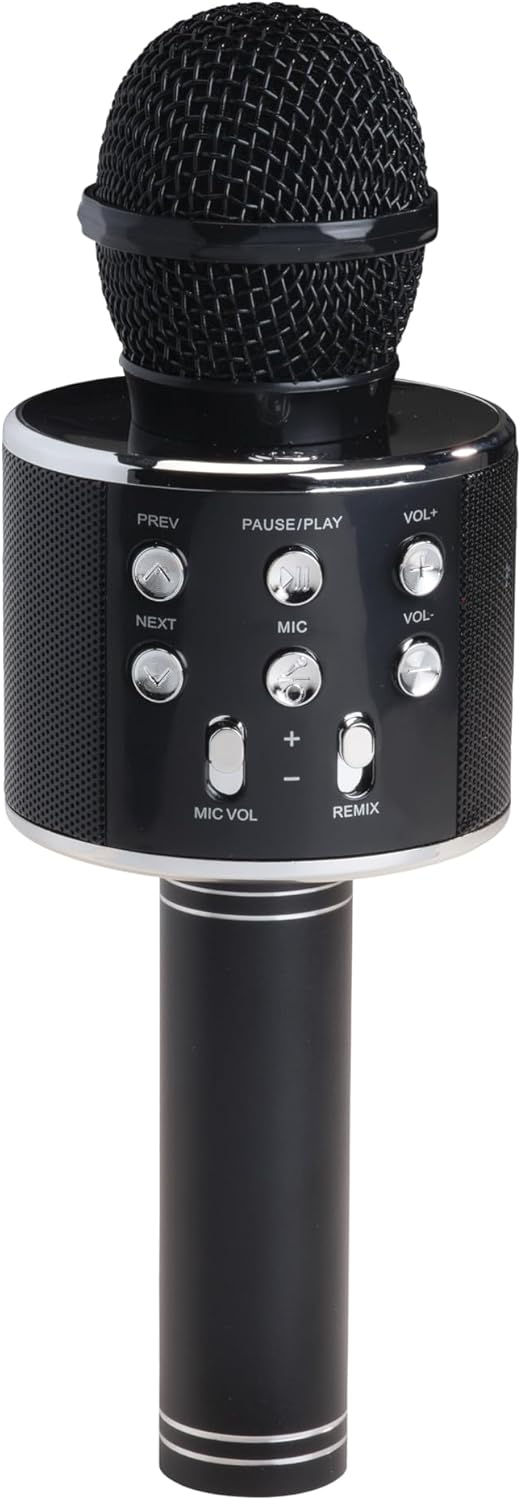
الشكل 1: الجبهة View. This image displays the main body of the karaoke speaker, featuring the microphone grille at the top and the central control panel with various buttons for playback and volume adjustments.
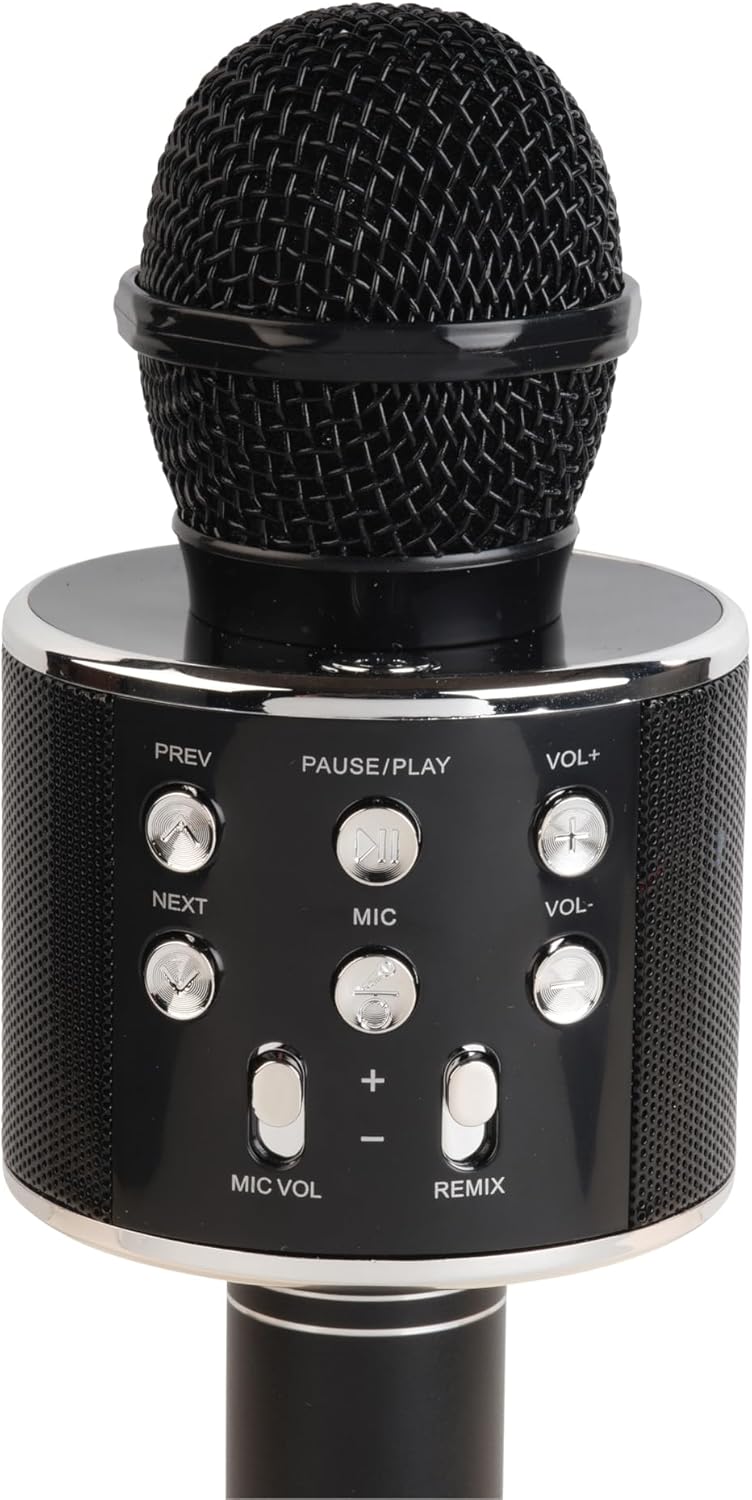
الشكل 2: تفاصيل لوحة التحكم. A closer look at the control panel, highlighting buttons such as PREV, NEXT, PAUSE/PLAY, VOL+, VOL-, MIC, MIC VOL, and REMIX. The power button is also visible.

الشكل 3: المنافذ السفلية. This image shows the bottom section of the speaker handle, revealing the charging port (5V 0.5A), a USB port, and a 3.5mm headphone jack for external connections.
وظائف لوحة التحكم:
- زر الطاقة: اضغط مع الاستمرار لتشغيل/إيقاف تشغيل مكبر الصوت.
- وقفة / تشغيل: اضغط لتشغيل الموسيقى أو إيقافها مؤقتًا.
- PREV (Previous): اضغط للانتقال إلى المسار السابق.
- التالي: اضغط للانتقال إلى المسار التالي.
- VOL+ (رفع مستوى الصوت): اضغط لرفع مستوى صوت السماعة.
- VOL- (خفض مستوى الصوت): اضغط لخفض مستوى صوت السماعة.
- ميك: Press to activate/deactivate the microphone.
- MIC VOL (+/-): يضبط مستوى صوت الميكروفون.
- REMIX: Activates/deactivates the echo effect for the microphone.
الموانئ:
- Charging Port (5V 0.5A): لشحن البطارية الداخلية.
- منفذ USB: لتشغيل الموسيقى من ذاكرة فلاش USB.
- مقبس سماعة رأس مقاس 3.5 ملم: لتوصيل سماعات الرأس أو أجهزة الصوت الخارجية.
يثبت
1. شحن مكبر الصوت
- Connect the provided power cable to the charging port (5V 0.5A) on the speaker.
- Connect the other end of the cable to a compatible USB power adapter (not included) or a USB port on a computer.
- The charging indicator (if present) will illuminate during charging and turn off or change color when fully charged.
- اترك البطارية تشحن بالكامل لمدة ساعتين إلى ثلاث ساعات تقريبًا قبل الاستخدام الأول.
2. تشغيل / إيقاف التشغيل
- To turn ON: Press and hold the Power button until the indicator light illuminates and you hear an audible prompt.
- To turn OFF: Press and hold the Power button again until the indicator light turns off and you hear an audible prompt.
3. اقتران بلوتوث
- تأكد من تشغيل السماعة. ستدخل تلقائيًا في وضع الاقتران عبر البلوتوث، ويُشار إلى ذلك بضوء LED وامض وإشارة صوتية.
- على جهازك المحمول (الهاتف الذكي، الجهاز اللوحي، وما إلى ذلك)، قم بتمكين البلوتوث وابحث عن الأجهزة المتاحة.
- Select "KMS-20B" from the list of found devices.
- Once successfully paired, the LED indicator will stop flashing, and you will hear a confirmation sound.
- The speaker will automatically connect to the last paired device when powered on, if it is within range and Bluetooth is enabled.
تعليمات التشغيل
Music Playback (Bluetooth/USB)
- بلوتوث: After successful pairing, start playing music on your connected device. The audio will stream through the KMS-20B speaker.
- USB: أدخل محرك أقراص فلاش USB يحتوي على ملف صوتي MP3 fileأدخله في منفذ USB. سيكتشف مكبر الصوت الموسيقى تلقائيًا ويبدأ تشغيلها من محرك الأقراص.
- وقفة / تشغيل: Press this button to pause or resume music playback.
- السابق / التالي: Press these buttons to skip to the previous or next track.
- المجلد + / المجلد-: Press these buttons to adjust the main speaker volume.
استخدام الميكروفون
- Activating Microphone: اضغط على ميك button to turn on the microphone function. Press it again to turn off.
- حجم صوت الميكروفون: استخدم MIC VOL (+/-) buttons to increase or decrease the microphone's output volume.
- Echo Effect (REMIX): اضغط على ريمكس button to activate or deactivate the echo effect for your voice. This adds a reverberation effect, common in karaoke.
صيانة
- تنظيف: استخدم قطعة قماش ناعمة وجافة لتنظيف الجزء الخارجي من مكبر الصوت. لا تستخدم منظفات أو مذيبات كاشطة.
- تخزين: عند عدم الاستخدام لفترات طويلة، قم بتخزين السماعة في مكان بارد وجاف، بعيدًا عن أشعة الشمس المباشرة ودرجات الحرارة القصوى.
- العناية بالبطارية: To prolong battery life, fully charge the speaker at least once every three months, even if not in regular use.
استكشاف الأخطاء وإصلاحها
| مشكلة | السبب المحتمل | حل |
|---|---|---|
| مكبر الصوت لا يعمل. | بطارية منخفضة. | اشحن السماعة بالكامل. |
| لا يمكن الاقتران عبر البلوتوث. | Bluetooth is off on your device; speaker is not in pairing mode; too far from device. | Ensure Bluetooth is enabled on your device. Power cycle the speaker to enter pairing mode. Move device closer to speaker (within 10 meters). |
| لا يوجد صوت من مكبر الصوت. | مستوى الصوت منخفض جدًا؛ الجهاز غير متصل؛ مصدر الإدخال غير صحيح. | Increase speaker and device volume. Ensure Bluetooth is connected or USB is properly inserted. |
| الميكروفون لا يعمل. | Microphone function is off; MIC VOL is too low. | Press the MIC button to activate. Increase MIC VOL. |
تحديد
- نموذج: KMS-20B
- ماركة: دنفر
- الاتصال: Bluetooth, USB Type A, 3.5mm Jack
- مصدر الطاقة: تعمل بالبطارية
- نوع البطارية: أيون الليثيوم (قابل لإعادة الشحن)
- مدخل الشحن: 5V 0.5A (via USB Type A)
- أبعاد: 7.8 × 7.8 × 23 سم (تقريبًا 3.07 × 3.07 × 9.06 بوصة)
- وزن: 340 جرام (حوالي 0.75 رطل)
- المكونات المتضمنة: Quick Start Guide, Power Cable
الضمان والدعم
للحصول على معلومات الضمان والدعم الفني، يرجى الرجوع إلى بطاقة الضمان المرفقة مع المنتج أو زيارة موقع Denver الرسمي webالموقع. احتفظ بإيصال الشراء كإثبات للشراء.


