1. المقدمة
This manual provides instructions for the proper installation, operation, and maintenance of the Alphacool Y-Splitter aRGB 3-pin to 3X 3-pin Cable, 30cm. This cable is designed to expand your Addressable RGB (aRGB) lighting setup by allowing multiple aRGB components to be connected to a single 3-pin aRGB header on a mainboard or controller. Please read this manual thoroughly before use to ensure correct and safe operation.
2. انتهى المنتجview
2.1 محتويات الصندوق
- Alphacool Y-Splitter aRGB 3-Pin to 3x 3-Pin Cable - 30cm (Model 18708)
2.2 المميزات
- High-quality sleeved aRGB 3-pin to 3x 3-pin Y-splitter cable.
- Compatible with all Alphacool aRGB products and most mainboards and aRGB controllers.
- طول الكابل: 30 سم.
- Connections: One 3-pin input to three 3-pin outputs.
- اللون: أسود.
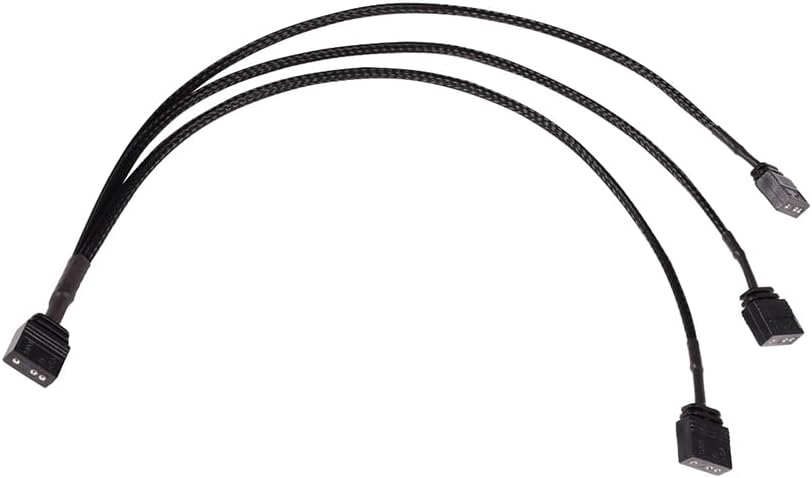
Figure 1: Alphacool Y-Splitter aRGB 3-pin to 3X 3-pin Cable. This image shows the overall design of the Y-splitter cable, featuring one input connector splitting into three output connectors, all with black sleeving.
3. الإعداد
- تحديد الموصلات: Locate the 3-pin aRGB header on your mainboard or aRGB controller. Identify the 3-pin aRGB connectors on your aRGB devices (e.g., fans, LED strips).
- توصيل المدخلات: Connect the single 3-pin male connector of the Alphacool Y-splitter cable to the 3-pin aRGB header on your mainboard or aRGB controller. Ensure the pins align correctly to avoid damage. The connector is typically keyed to prevent incorrect insertion.

Figure 2: Close-up of the male 3-pin aRGB connector (input). This image highlights the male connector that plugs into the mainboard or controller.
- توصيل أجهزة الإخراج: Connect up to three aRGB devices to the three female 3-pin connectors of the Y-splitter cable. Again, ensure correct pin alignment.

Figure 3: Close-up of a female 3-pin aRGB connector (output). This image shows one of the three female connectors where aRGB devices are attached.

الشكل 4: مثالample of 3-pin male-to-male pin connectors. These are often used to connect female aRGB headers on devices to the female outputs of the splitter.
- التحقق من الاتصالات: Double-check all connections to ensure they are secure and correctly oriented. Incorrect connection of aRGB devices can lead to damage. This cable operates at 5V. Do not connect to 12V RGB headers.
4. تعليمات التشغيل
Once the Alphacool Y-splitter cable and your aRGB devices are correctly connected, the connected devices will operate in unison, receiving the same aRGB signal from your mainboard or controller. The lighting effects and colors are controlled via the software provided by your mainboard manufacturer or the dedicated software for your aRGB controller.
- التحكم في البرنامج: Use your mainboard's aRGB software (e.g., ASUS Aura Sync, MSI Mystic Light, Gigabyte RGB Fusion, ASRock Polychrome Sync) or your external aRGB controller's software to customize lighting effects.
- دورة الطاقة: After making connections, power on your system. The aRGB devices should illuminate according to the default or previously set lighting profile.
5. الصيانة
The Alphacool Y-splitter cable requires minimal maintenance. Follow these guidelines to ensure longevity:
- تنظيف: Keep the cable and connectors free from dust and debris. Use a soft, dry cloth for cleaning. Do not use liquid cleaners directly on the connectors.
- التعامل: Avoid excessive bending or pulling of the cable, especially near the connectors, to prevent internal wire damage.
- تخزين: If not in use, store the cable in a dry, cool place away from direct sunlight and extreme temperatures.
6. استكشاف الأخطاء وإصلاحها
6.1 No Lighting or Incorrect Colors
- التحقق من الاتصالات: Ensure all 3-pin aRGB connectors are fully seated and correctly oriented. Verify that the Y-splitter's input is securely connected to the mainboard/controller and that all output devices are connected to the splitter.
- تحقق من المجلدtage: Confirm that the aRGB header on your mainboard or controller is a 5V Addressable RGB header. Connecting to a 12V RGB header will damage 5V aRGB devices and the splitter.
- إعدادات البرنامج: Open your mainboard's aRGB software or aRGB controller software. Ensure that the connected devices are detected and that the desired lighting effects are selected. Sometimes a software restart or driver update may be necessary.
- توافق الجهاز: Ensure your aRGB devices are compatible with 3-pin 5V aRGB standards.
- Test Individual Devices: If possible, test the aRGB devices directly connected to the mainboard/controller (without the splitter) to rule out issues with the devices themselves.
6.2 Loose Connections
- تناسب آمن: Ensure all connectors are pushed in firmly. Some aRGB connectors may require a small amount of force to fully seat.
- Pin Integrity: Inspect the pins on both the cable and the devices for any bends or damage. Straighten bent pins carefully if possible, or replace damaged components.
7. المواصفات
| ميزة | التفاصيل |
|---|---|
| ماركة | ألفاكول |
| رقم الموديل | 18708 |
| طول الكابل | 30 سنتيمتر |
| نوع الموصل | 3-pin aRGB (1 input to 3 outputs) |
| المجلدtage | 5V |
| مادة | Plastic, Sleeved |
| لون | أسود |
| وزن العنصر | 0.02 كيلوغرام (حوالي 0.704 أونصة) |
8. الضمان والدعم
For warranty information and technical support, please refer to the documentation provided with your purchase or visit the official Alphacool webالموقع. احتفظ بإثبات الشراء الخاص بك لتقديم مطالبات الضمان.
For further assistance, you may contact Alphacool customer support directly through their official channels.


