1. تعليمات السلامة الهامة
يرجى قراءة جميع التعليمات بعناية قبل استخدام هذا الجهاز. احتفظ بهذا الدليل للرجوع إليه مستقبلًا.
- هذا الجهاز مخصص للاستخدام المنزلي فقط.
- لا تغمر الجهاز في الماء أو أي سوائل أخرى.
- Keep the appliance away from water sources, especially when charging.
- Do not use the appliance if the cord or plug is damaged. Contact customer support for repair.
- Always ensure the appliance is switched off before cleaning or performing maintenance.
- يحفظ بعيداً عن متناول الأطفال. هذا الجهاز ليس لعبة.
- تجنب ملامسة الأجزاء المتحركة.
- لا تستخدم أداة التشذيب على الجلد المتهيج أو الجروح المفتوحة.
- Only use the charging adapter supplied with the appliance.
2. انتهى المنتجview
The HTC AT-206A is a rechargeable hair trimmer designed for precise grooming tasks such as edging, outlining, dry shaving, and light shaping around areas like the neck, ears, and sideburns.

Image 2.1: HTC AT-206A Trimmer and its retail packaging, showing the device and included accessories.
عناصر:
- Trimmer Unit (HTC AT-206A)
- كابل الشحن
- فرشاة التنظيف
- زجاجة زيت التشحيم
- مرفق مشط
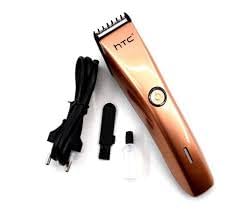
Image 2.2: The HTC AT-206A trimmer displayed with its charging cable, cleaning brush, oil bottle, and comb attachment.
3. الإعداد والشحن
3.1 الشحن الأولي
- Before first use, fully charge the trimmer for approximately 8-10 hours.
- تأكد من إيقاف تشغيل أداة التشذيب.
- Connect the charging cable to the trimmer's charging port.
- قم بتوصيل المحول بمأخذ كهربائي مناسب.
- The charging indicator light (if present) will illuminate to show charging is in progress.
- Once fully charged, disconnect the charger from the outlet and the trimmer.
3.2 Attaching the Comb Attachment
- تأكد من إيقاف تشغيل أداة التشذيب.
- Align the comb attachment with the trimmer blade.
- Gently push the comb attachment onto the blade until it clicks into place.
- To remove, gently pull the comb attachment away from the blade.
4. تعليمات التشغيل
4.1 التشغيل الأساسي
- تأكد من شحن أداة التشذيب.
- اضغط على زر التشغيل لتشغيل أداة التشذيب.
- Press the power button again to turn the trimmer off.
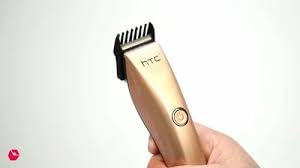
Image 4.1: The HTC AT-206A trimmer held in hand, demonstrating its ergonomic design for ease of use.
4.2 تقنيات التشذيب
- للحصول على أفضل النتائج، استخدمي أداة التشذيب على شعر نظيف وجاف.
- أمسك أداة التشذيب بزاوية طفيفة على الجلد.
- حرك أداة التشذيب ببطء وثبات عكس اتجاه نمو الشعر.
- Use the comb attachment for longer hair lengths (0.5mm-13mm).
- For edging and outlining, use the trimmer without the comb attachment for a closer trim.
- Stretch the skin taut with your free hand to ensure a smooth surface for trimming.
5. الصيانة والتنظيف
سيضمن التنظيف والصيانة المنتظمان الأداء الأمثل وإطالة عمر جهاز التشذيب الخاص بك.
5.1 تنظيف الشفرات
- Ensure the trimmer is switched off and disconnected from the charger.
- Use the provided cleaning brush to remove any loose hairs from the blades.
- For a more thorough clean, you may carefully detach the blade head (refer to specific instructions if provided with your model for blade removal).
- Do not rinse the entire trimmer under water unless explicitly stated as waterproof.
5.2 تشحيم الشفرات
- After cleaning, apply 1-2 drops of the provided lubricating oil onto the blades.
- قم بتشغيل أداة التشذيب لبضع ثوانٍ للسماح للزيت بالتوزيع بالتساوي.
- امسح أي زيت زائد بقطعة قماش ناعمة.
- Oiling the blades regularly (e.g., after every few uses) helps maintain cutting efficiency and prevents rust.
5.3 التخزين
Store the trimmer in a cool, dry place, away from direct sunlight and moisture. Ensure it is fully charged before storing for extended periods.
6. استكشاف الأخطاء وإصلاحها
If you encounter any issues with your trimmer, refer to the following common problems and solutions:
- لا يعمل جهاز التشذيب:
Ensure the trimmer is fully charged. Check if the charging cable is properly connected and the power outlet is functional. - Poor trimming performance / pulling hair:
The blades may be dull or clogged with hair. Clean and oil the blades as described in the Maintenance section. Ensure the trimmer is adequately charged. - البطارية لا تحتفظ بالشحن:
Ensure the trimmer is charged for the recommended duration. If the issue persists, the battery may need replacement. Contact customer support. - الضوضاء المفرطة أو الاهتزاز:
The blades might be misaligned or require oiling. Clean and oil the blades. If the problem continues, discontinue use and contact customer support.
7. المواصفات
| ميزة | مواصفة |
|---|---|
| رقم الموديل | AT-206A (SA-144) |
| مصدر الطاقة | بطارية قابلة لإعادة الشحن |
| مادة الشفرة | Stainless Steel (Metal) |
| Cutting Length Range | 0.5mm - 13mm (with comb attachment) |
| الأبعاد (الطول × العرض × الارتفاع) | 18.7 × 4.9 × 11.2 سم |
| الاستخدامات الموصى بها | Dry Shaving, Edging, Light Shaping, Outlining (Neck, Ears, Sideburns, Face) |
| لون | أسود |
| الشركة المصنعة | الصين |
8. الضمان والدعم
This product is covered by a standard manufacturer's warranty. Please refer to the product packaging or contact your retailer for specific warranty terms and conditions.
للحصول على الدعم الفني، أو المساعدة في حل المشكلات، أو لتقديم مطالبات الضمان، يرجى الاتصال مباشرةً بالبائع أو الشركة المصنعة. احتفظ بإثبات الشراء لأي استفسارات متعلقة بالضمان.


