مقدمة
Thank you for choosing the GOBOULT Z60 Wireless Earbuds. This manual provides detailed instructions to help you set up, operate, and maintain your earbuds for an optimal audio experience. Please read this manual thoroughly before use and retain it for future reference.

Image: GOBOULT Z60 Earbuds, illustrating the brand transition from BOULT to GOBOULT, highlighting the new logo and packaging while assuring consistent product performance.
ماذا يوجد في الصندوق
تأكد من وجود جميع العناصر في العبوة:
- GOBOULT Z60 Wireless Earbuds (Left and Right)
- حافظة الشحن
- كابل شحن USB من النوع C
- أطراف الأذن (أحجام مختلفة)
- دليل المستخدم
- بطاقة الضمان

Image: The GOBOULT Z60 Wireless Earbuds and their charging case, showcasing the product's design and included accessories.
المنتج انتهىview
The GOBOULT Z60 earbuds are designed for comfort and high-quality audio. Each earbud features a 13mm bass driver and multiple microphones for clear calls. The charging case provides extended battery life.
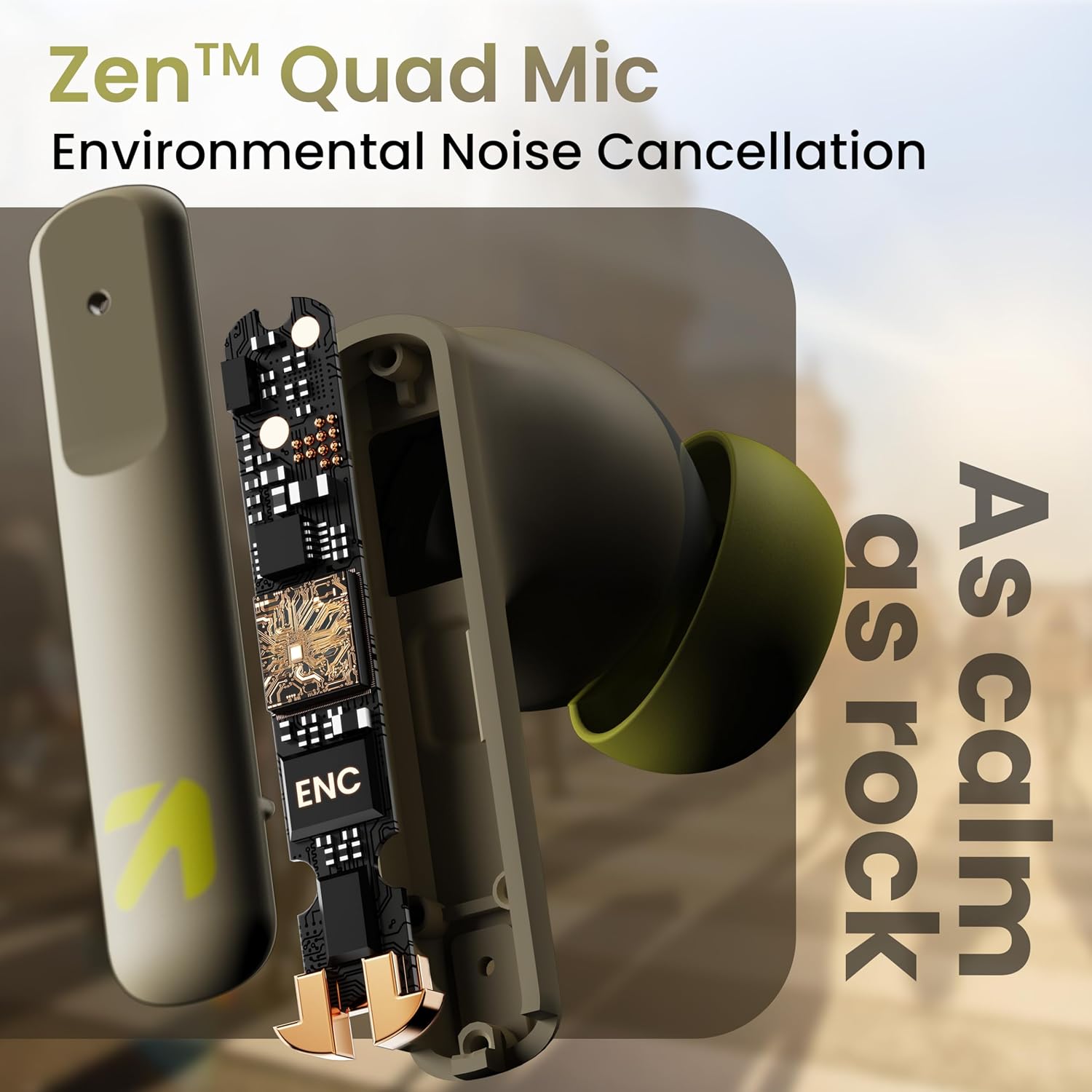
الصورة: داخلية view of a GOBOULT Z60 earbud, highlighting the Zen Quad Mic Environmental Noise Cancellation (ENC) technology for clear audio.

Image: A close-up of a GOBOULT Z60 earbud, emphasizing the 13mm BoomX Drivers responsible for rich bass and superior sound quality.
الشحن
To charge your GOBOULT Z60 earbuds and charging case:
- ضع سماعات الأذن في علبة الشحن. تأكد من تثبيتها بشكل صحيح.
- قم بتوصيل كابل الشحن من النوع C USB بمنفذ الشحن الموجود على العلبة وبمصدر الطاقة.
- سيُظهر مؤشر LED الموجود على العلبة حالة الشحن.
A full charge provides up to 60 hours of total playtime with the charging case. A quick 10-minute charge can provide up to 150 minutes of playtime.

Image: The GOBOULT Z60 charging case connected via a Type-C cable, illustrating the fast charging capability with indicators for 10 minutes charge yielding 150 minutes playtime.

Image: GOBOULT Z60 earbuds in their charging case, highlighting the impressive 60 hours of total playtime and 8 hours of playtime on a single earbud charge.
Setup: Pairing with Your Device
The GOBOULT Z60 earbuds utilize Bluetooth 5.3 for stable and efficient wireless connectivity.
- الاقتران الأولي:
- افتح علبة الشحن. ستدخل سماعات الأذن تلقائيًا في وضع الاقتران.
- على جهازك (الهاتف الذكي، الجهاز اللوحي، الكمبيوتر المحمول)، قم بتمكين البلوتوث.
- بحث عن "GOBOULT Z60" in the list of available Bluetooth devices and select it to connect.
- Once connected, you will hear an audio prompt, and the LED indicator on the case will change.
- إصلاح: ستتصل سماعات الأذن تلقائيًا بآخر جهاز مقترن بها عند إخراجها من العلبة، إذا تم تمكين تقنية البلوتوث على الجهاز.

Image: GOBOULT Z60 earbuds and their open charging case next to a smartphone, illustrating the Bluetooth 5.3 "Blink & Pair" feature for quick and stable connection.
تشغيل سماعات الأذن الخاصة بك
عناصر التحكم باللمس
The GOBOULT Z60 earbuds feature intuitive touch controls. The specific functions are:
- تشغيل الموسيقى:
- نقرة واحدة: تشغيل/إيقاف مؤقت
- Double tap (Right earbud): Next track
- Double tap (Left earbud): Previous track
- Triple tap (Right earbud): Volume Up
- Triple tap (Left earbud): Volume Down
- إدارة المكالمات:
- Single tap: Answer/End call
- Long press: Reject call
- مساعد صوت: Long press (either earbud) to activate Google Assistant or Siri.
- وضع الألعاب: Tap 4 times on either earbud to activate/deactivate Combat Gaming Mode (50ms low latency).

Image: A visual guide to the GOBOULT Z60's touch controls, detailing actions for music playback (play/pause, next/back, volume), call management, activating voice assistance, and toggling game/music mode.
وضع اللعب
Activate the 50ms low latency Combat Gaming Mode for a synchronized audio-visual experience during gaming. Tap 4 times on either earbud to switch between gaming and normal modes.

Image: GOBOULT Z60 earbuds in use with a smartphone displaying a racing game, emphasizing the "Combat Gaming Mode" with 50ms ultra-low latency, activated by tapping the earbud 4 times.
مساعد صوتي
Access your device's voice assistant (Google Assistant or Siri) by long-pressing either earbud. This allows for hands-free control of your device.

Image: GOBOULT Z60 earbuds and their charging case, illustrating how to activate voice assistance (Ok Google, Hey Siri) with a long press on an earbud.
صيانة
To ensure the longevity and optimal performance of your GOBOULT Z60 earbuds:
- تنظيف: نظّف سماعات الأذن وعلبة الشحن بانتظام بقطعة قماش ناعمة وجافة. تجنّب استخدام المواد الكيميائية القاسية أو المواد الكاشطة.
- نصائح الأذن: Remove and clean the eartips periodically. Ensure they are dry before reattaching.
- مقاومة الماء: The earbuds are IPX5 water-resistant, meaning they can withstand sweat and light rain. Do not submerge them in water or expose them to heavy downpours. Ensure the charging port is dry before charging.
- تخزين: عندما لا تكون قيد الاستخدام، قم بتخزين سماعات الأذن في علبة الشحن الخاصة بها لحمايتها والحفاظ عليها مشحونة.

Image: A GOBOULT Z60 earbud with water droplets on its surface, illustrating its IPX5 water resistance, suitable for protection against sweat, rain, and splashes.
استكشاف الأخطاء وإصلاحها
If you encounter issues with your GOBOULT Z60 earbuds, refer to the following common solutions:
| مشكلة | الحل المحتمل |
|---|---|
| سماعات الأذن لا تقترن |
|
| لا يوجد صوت من سماعة أذن واحدة |
|
| سماعات الأذن لا تشحن |
|
| مستوى صوت منخفض أو جودة صوت رديئة |
|
تحديد
| ميزة | التفاصيل |
|---|---|
| اسم الموديل | AirBass (Z60) |
| تكنولوجيا الاتصال | لاسلكي (بلوتوث) |
| نسخة البلوتوث | 5.3 |
| مدى البلوتوث | 10 أمتار |
| حجم برنامج تشغيل الصوت | 13 مليمتر |
| نوع برنامج تشغيل الصوت | سائق ديناميكي |
| عمر البطارية (الإجمالي) | حتى 60 ساعة (مع علبة الشحن) |
| وقت الشحن | حوالي 90 دقيقة |
| الشحن السريع | شحن لمدة 10 دقائق = 150 دقيقة من وقت اللعب |
| منفذ الشحن | النوع-C |
| الميكروفونات | 4 ENC Mics for Clear Calling |
| الكمون الصوتي | 50 ميلي ثانية (وضع الألعاب) |
| مقاومة الماء | IPX5 (مقاوم للعرق، مقاوم للمطر، مقاوم للرذاذ) |
| طريقة التحكم | المس، صوت |
| وزن العنصر | 41.5 جرام |
| بلد المنشأ | الهند |
الضمان والدعم
Your GOBOULT Z60 Wireless Earbuds come with a ضمان الشركة المصنعة لمدة عام واحد من تاريخ الشراء.
For any support, warranty claims, or technical assistance, please refer to the contact information provided on your warranty card or visit the official GOBOULT support webموقع.


