1. المقدمة
This manual provides instructions for the safe and effective operation of your iJoy Stitch Speaker. Please read this manual thoroughly before using the device and retain it for future reference.

Image 1.1: The iJoy Stitch Speaker, showcasing the Stitch Hula Dancing design. This portable Bluetooth speaker is designed for wireless audio playback and features a silicone loop for portability.
2. محتويات العبوة
تأكد من وجود جميع العناصر في العبوة:
- iJoy Stitch Speaker
- دليل المالك (هذه الوثيقة)
- كابل الشحن (Micro USB)

Image 2.1: The iJoy Stitch Speaker alongside its retail packaging, illustrating the product and its box.
3. ميزات المنتج ومكوناته
The iJoy Stitch Speaker is equipped with various features for versatile audio playback and portability.
3.1 أزرار تحكم
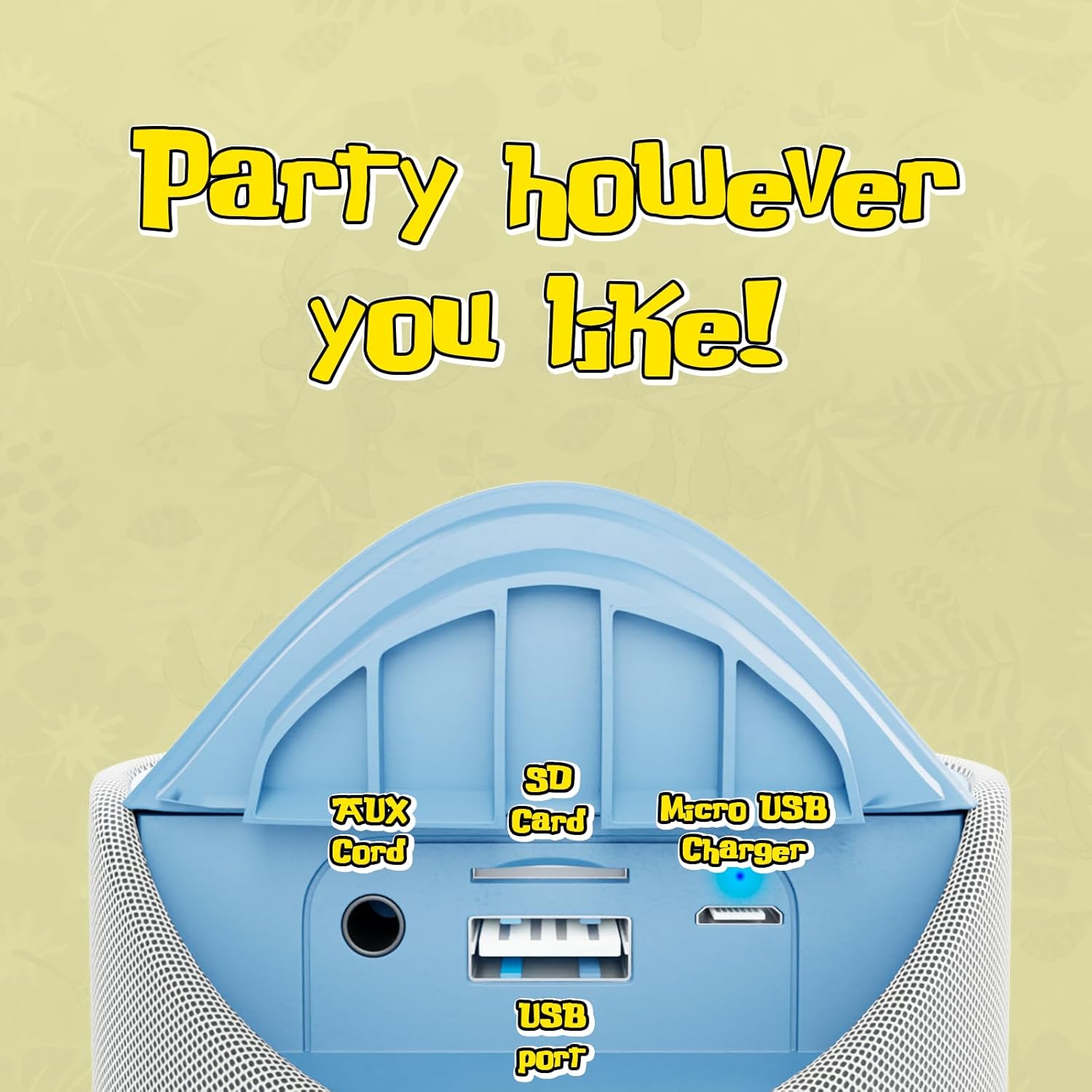
Image 3.1: Top panel of the speaker displaying the control buttons. These include Volume Down (-), Volume Up (+), Play/Pause/Call Answer, Mode Switch (M), and Power On/Off.
- زر الطاقة (⏻): اضغط مع الاستمرار لتشغيل السماعة أو إيقاف تشغيلها.
- Play/Pause/Call Button (⏸): Press to play or pause audio. Press to answer or end a phone call.
- زر خفض الصوت (-): اضغط لخفض مستوى الصوت.
- زر رفع الصوت (+): اضغط لرفع مستوى الصوت.
- زر تبديل الوضع (M): Press to cycle through available modes (Bluetooth, FM Radio, SD Card, AUX).
3.2 الموانئ والمؤشرات

Image 3.2: Rear panel of the speaker revealing the various input ports. These include the AUX port, SD Card slot, USB port, and Micro USB charging port.
- منفذ AUX: لتوصيل أجهزة الصوت الخارجية عبر كابل صوت مقاس 3.5 ملم.
- فتحة بطاقة SD: لتشغيل الصوت files directly from an SD memory card.
- منفذ USB: لتشغيل الصوت files مباشرة من محرك أقراص فلاش USB.
- منفذ شحن Micro USB: لشحن البطارية الداخلية للسماعة.
- مؤشر LED: يشير إلى حالة الشحن وحالة اقتران البلوتوث.
4. الإعداد والشحن
4.1 شحن السماعة
- Connect the Micro USB end of the charging cable to the speaker's Micro USB charging port.
- قم بتوصيل الطرف USB-A من كابل الشحن بمحول طاقة USB (غير متضمن) أو بمنفذ USB الخاص بالكمبيوتر.
- The LED indicator will illuminate to show charging is in progress.
- Charging typically takes approximately 2 hours. The LED indicator will change or turn off once fully charged.
تتيح لك الشحنة الكاملة الحصول على ما يصل إلى 3 ساعة من اللعب.
4.2 تشغيل/إيقاف التشغيل
- لتشغيل الجهاز: اضغط مع الاستمرار على زر الطاقة (⏻) until the speaker indicates it is on (e.g., a sound prompt or LED illumination).
- لإيقاف التشغيل: اضغط مع الاستمرار على زر الطاقة (⏻) again until the speaker indicates it is off.
5. تعليمات التشغيل
5.1 اقتران بلوتوث
- Ensure the speaker is powered on and in Bluetooth mode. If not, press the Mode Switch (M) button until the speaker enters Bluetooth pairing mode (indicated by a flashing LED).
- على جهازك (على سبيل المثال، الهاتف الذكي أو الجهاز اللوحي)، قم بتمكين Bluetooth وابحث عن الأجهزة المتاحة.
- Select "iJoy Stitch Speaker" from the list of found devices.
- Once paired, the speaker will indicate a successful connection (e.g., a sound prompt or solid LED).
- يبلغ مدى البلوتوث حوالي 30 قدمًا (9 أمتار).
5.2 SD Card / USB Playback
- Insert a formatted SD card or USB flash drive containing audio fileقم بإدخالها في الفتحة المخصصة لها على مكبر الصوت.
- Press the Mode Switch (M) button to select SD Card mode or USB mode.
- سيبدأ مكبر الصوت تلقائيًا في تشغيل الصوت fileمن الوسائط المدرجة.
5.3 راديو FM
- Press the Mode Switch (M) button to select FM Radio mode.
- In FM mode, press the Play/Pause button (⏸) لمسح وحفظ محطات الراديو المتاحة تلقائيًا.
- استخدم زر رفع الصوت (+) وخفض مستوى الصوت (-) أزرار للتنقل بين المحطات المحفوظة.
5.4 مدخل ايه يو اكس
- قم بتوصيل أحد طرفي كابل الصوت 3.5 ملم (غير مرفق) بمنفذ AUX الموجود على السماعة.
- قم بتوصيل الطرف الآخر من كابل الصوت بمقبس سماعة الرأس أو مخرج الصوت الخاص بالجهاز الخارجي.
- Press the Mode Switch (M) button to select AUX mode.
- سيتم الآن تشغيل الصوت عبر مكبر الصوت من جهازك المتصل.
5.5 وظائف الاتصال
- When a call is incoming while connected via Bluetooth, press the Play/Pause button (⏸) للرد على المكالمة.
- اضغط على زر التشغيل/الإيقاف المؤقت (⏸) مرة أخرى لإنهاء المكالمة.
- To reject an incoming call, press and hold the Play/Pause button (⏸).
6. الصيانة
6.1 التنظيف
امسح السماعة بقطعة قماش ناعمة وجافة. لا تستخدم المنظفات الكاشطة أو المذيبات.
6.2 مقاومة الماء
The speaker has an IPX4 water resistance rating, meaning it is protected against splashing water from any direction. It is not designed for submersion in water.
7. استكشاف الأخطاء وإصلاحها
| مشكلة | حل |
|---|---|
| لا يتم تشغيل مكبر الصوت. | Ensure the battery is charged. Connect the speaker to a power source using the Micro USB cable. |
| لا يوجد صوت من مكبر الصوت. | Check the volume level on both the speaker and your connected device. Ensure the correct mode (Bluetooth, SD, FM, AUX) is selected. |
| لا يمكن الاقتران عبر البلوتوث. | Ensure the speaker is in Bluetooth pairing mode (flashing LED). Make sure your device's Bluetooth is enabled and within 30 feet of the speaker. Try restarting both devices. |
| استقبال راديو FM ضعيف. | Relocate the speaker to an area with better signal. Ensure automatic station scanning has been performed. |
8. المواصفات

Image 8.1: Visual representation of the speaker's dimensions, indicating it is approximately 6.3 inches tall and 2.9 inches across.
| ميزة | التفاصيل |
|---|---|
| اسم الموديل | Stitch Speaker |
| ماركة | اي جوي |
| تكنولوجيا الاتصال | بلوتوث |
| تكنولوجيا الاتصالات اللاسلكية | بلوتوث |
| مدى البلوتوث | 30 قدم (9 متر) |
| نوع السماعة | مكبر صوت بلوتوث محمول |
| الحد الأقصى لقوة خرج السماعة | 5 واط |
| وضع إخراج الصوت | ستيريو |
| مصدر الطاقة | تعمل بالبطارية |
| سعة البطارية | 800 مليamp ساعات |
| وقت الشحن | 2 ساعة |
| وقت اللعب | حتى ساعتين |
| مستوى مقاومة الماء | IPX4 (مقاوم للماء) |
| أبعاد المنتج | 3 بوصة عمق × 3 بوصة عرض × 6 بوصة ارتفاع (تقريبًا 7.6 سم عمق × 7.6 سم عرض × 15.2 سم ارتفاع) |
| وزن العنصر | 8 أونصة (حوالي 227 جرامًا) |
| مادة | سيليكون |
| طريقة التحكم | Touch (Button Controls) |
| رمز المنتج الموحد | 810116713943 |
9. الضمان والدعم
The iJoy Stitch Speaker comes with a 90-Day Manufacturer Warranty. For warranty claims or technical support, please contact the manufacturer, Quest USA Corp, or refer to the contact information provided with your purchase documentation.
لمزيد من المساعدة، يرجى زيارة iJoy Store on Amazon.


