مقدمة
This user manual provides comprehensive instructions for the safe and efficient operation of your Nubia Pad 3D. Please read this manual thoroughly before using the device and keep it for future reference.
The Nubia Pad 3D is an advanced tablet featuring a unique 12.4-inch 3D display, powerful processing capabilities, and high-resolution cameras, designed for an immersive visual experience.
معلومات هامة حول السلامة
لتجنب الإصابة أو تلف جهازك، يرجى مراعاة الاحتياطات التالية:
- لا تعرض الجهاز لدرجات حرارة عالية، أو أشعة الشمس المباشرة، أو الرطوبة العالية.
- تجنب إسقاط الجهاز أو تعريضه لصدمة شديدة.
- استخدم فقط أجهزة الشحن والملحقات المعتمدة من قبل الشركة المصنعة.
- لا تحاول تفكيك الجهاز أو إصلاحه بنفسك. استشر فني صيانة مؤهلًا.
- احتفظ بالجهاز بعيدًا عن الماء والسوائل الأخرى.
دليل الإعداد
1. فك الصندوق والفحص الأولي
أزل جميع المكونات من العبوة بعناية. تأكد من وجود جميع العناصر المذكورة أدناه وعدم تلفها:
- Nubia Pad 3D Tablet
- كابل شحن USB-C
- محول الطاقة
- دليل البدء السريع

Figure 1: The Nubia Pad 3D tablet showcasing its immersive 3D display with an astronaut and floral scene.
2. شحن الجهاز
Before first use, fully charge the Nubia Pad 3D. Connect the USB-C cable to the tablet's charging port and the other end to the power adapter. Plug the adapter into a wall outlet.
- سوف يضيء مؤشر الشحن.
- تستغرق عملية الشحن الكامل عادةً ما يقرب من 2 إلى 3 ساعات.
- The device features a 9070 mAh battery for extended use.

Figure 2: An illustration highlighting the 9070 mAh battery capacity of the Nubia Pad 3D, indicating its long endurance.
3. معالج التشغيل الأولي والإعداد
Press and hold the power button (located on the side of the tablet) until the Nubia logo appears. Follow the on-screen instructions to complete the initial setup, including language selection, Wi-Fi connection, and account setup.
تعليمات التشغيل
1. تصفح الواجهة
The Nubia Pad 3D runs on iOS (as per specifications). Use touch gestures to navigate:
- مقبض: حدد عنصرًا أو افتح تطبيقًا.
- انتقاد: التمرير خلال الصفحات أو القوائم.
- الضغط للتكبير: تكبير أو تصغير الصور و web الصفحات.
2. Understanding the 3D Display
The Nubia Pad 3D features a 12.4-inch IPS display with 3D technology and a 120Hz refresh rate. It allows seamless switching between 2D and 3D modes.
To activate 3D mode, locate the dedicated 3D button or setting within the display options. For optimal 3D viewing, ensure you are positioned directly in front of the screen.
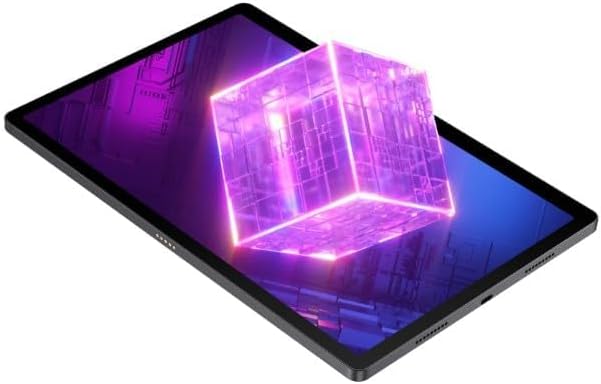
Figure 3: The Nubia Pad 3D screen displaying a vibrant 3D cube, illustrating its stereoscopic capabilities.
3. استخدام الكاميرا
The tablet is equipped with a 16 MP rear camera and 8 MP front cameras. Open the Camera application to capture photos and videos.
- الكاميرا الخلفية: Ideal for high-resolution photos and scanning.
- الكاميرات الأمامية: Suitable for video calls and selfies.

الشكل 4: خلفي view of the Nubia Pad 3D, highlighting the dual camera setup and the "3D" branding near the camera module.
4. ميزات الصوت
The Nubia Pad 3D features quad stereo speakers with Dolby Atmos technology, providing an enhanced audio experience for media consumption.

Figure 5: A diagram illustrating the placement of the quad stereo speakers on the Nubia Pad 3D, emphasizing Dolby Atmos technology for superior sound.
صيانة
1. تنظيف الجهاز
استخدم قطعة قماش ناعمة وخالية من الوبر لتنظيف شاشة وجسم الجهاز اللوحي. لإزالة البقع العنيدة، افركها برفق.ampامسح قطعة القماش بالماء أو بمنظف شاشات مصمم خصيصًا للأجهزة الإلكترونية. تجنب استخدام المواد الكيميائية القاسية أو المواد الكاشطة.
2. تحديثات البرامج
Regularly check for and install software updates to ensure optimal performance, security, and access to new features. Navigate to Settings > General > Software Update to check for available updates.
3. العناية بالبطارية
لإطالة عمر البطارية:
- تجنب تفريغ البطارية بالكامل بشكل متكرر.
- لا تترك الجهاز قيد الشحن لفترات طويلة بعد شحنه بالكامل.
- Store the device in a cool, dry place when not in use for long periods.
استكشاف الأخطاء وإصلاحها
This section addresses common issues you might encounter with your Nubia Pad 3D.
| مشكلة | السبب المحتمل | حل |
|---|---|---|
| الجهاز لا يعمل. | بطارية منخفضة؛ تعطل البرنامج. | Charge the device for at least 30 minutes. Perform a force restart by holding the power button for 10-15 seconds. |
| الشاشة لا تستجيب. | خلل مؤقت في البرنامج. | أعد تشغيل الجهاز. تأكد من أن الشاشة نظيفة وجافة. |
| 3D effect is not visible or distorted. | غير صحيح viewing angle; 3D mode not activated. | تأكد من أنك viewing the screen directly. Check display settings to confirm 3D mode is enabled. |
| يتم استنزاف البطارية بسرعة. | Too many apps running in background; high screen brightness. | Close unused apps. Reduce screen brightness. Disable unnecessary features like Bluetooth/Wi-Fi when not in use. |
إذا استمرت المشكلة، يرجى الاتصال بدعم العملاء.
تحديد
Below are the key technical specifications for the Nubia Pad 3D:
- اسم الموديل: Nubia Pad 3D
- عرض: 12.4 Inches, 3D IPS, 120Hz refresh rate
- المعالج: Snapdragon 888 (Note: Product specifications also list Intel Processor Brand, but Snapdragon 888 is mentioned in the product description.)
- كبش: 12 جيجا بايت
- تخزين: 256 جيجا بايت
- نظام التشغيل: iOS (Note: This is unusual for a Snapdragon device, but stated in provided data.)
- الكاميرا الخلفية: 16 ميجا بكسل
- الكاميرا الأمامية: 8 ميجا بكسل
- بطارية: 9070 mAh (up to 20 hours battery life)
- صوتي: Quad Stereo Speakers with Dolby Atmos
- الاتصال: Cellular, 802.11g Wireless
- وزن: 1.3 كيلوغرام
- أبعاد: 31.5 × 22 × 4 سم (أبعاد العبوة)
الضمان والدعم
For warranty information and customer support, please refer to the warranty card included with your product or visit the official Nubia webالموقع. احتفظ بإثبات الشراء الخاص بك لتقديم مطالبات الضمان.
الدعم عبر الإنترنت: Visit the official Nubia Store on Amazon


