1. المقدمة
Welcome to the user manual for your Hoppstar Expert Digital Camera. This manual provides essential information on how to set up, operate, and maintain your camera, ensuring a fun and creative experience for young photographers. Please read this manual carefully before using the camera and keep it for future reference.
The Hoppstar Expert is designed specifically for children, offering a user-friendly interface, durable construction with interchangeable silicone covers, and a range of exciting features including a selfie camera, video recording, picture frames, photo filters, and face detection.
2. معلومات السلامة
- This product is intended for children aged 3 years and older. Adult supervision is recommended during use.
- لا تعرض الكاميرا للماء أو الرطوبة الزائدة.
- Avoid dropping the camera or subjecting it to strong impacts, even with the protective silicone cover.
- Keep small parts, such as memory cards, out of reach of very young children to prevent choking hazards.
- Use only the charging cable provided or a compatible USB charger.
- Do not attempt to disassemble or repair the camera yourself. Contact customer support if issues arise.
3. محتويات العبوة
يرجى تحديد المربع للعناصر التالية:
- Hoppstar Expert Digital Camera
- دليل التعليمات
- كابل شحن USB
- Lanyard/Strap
- محول USB-C إلى USB-A
- USB-C to Micro-USB Adapter
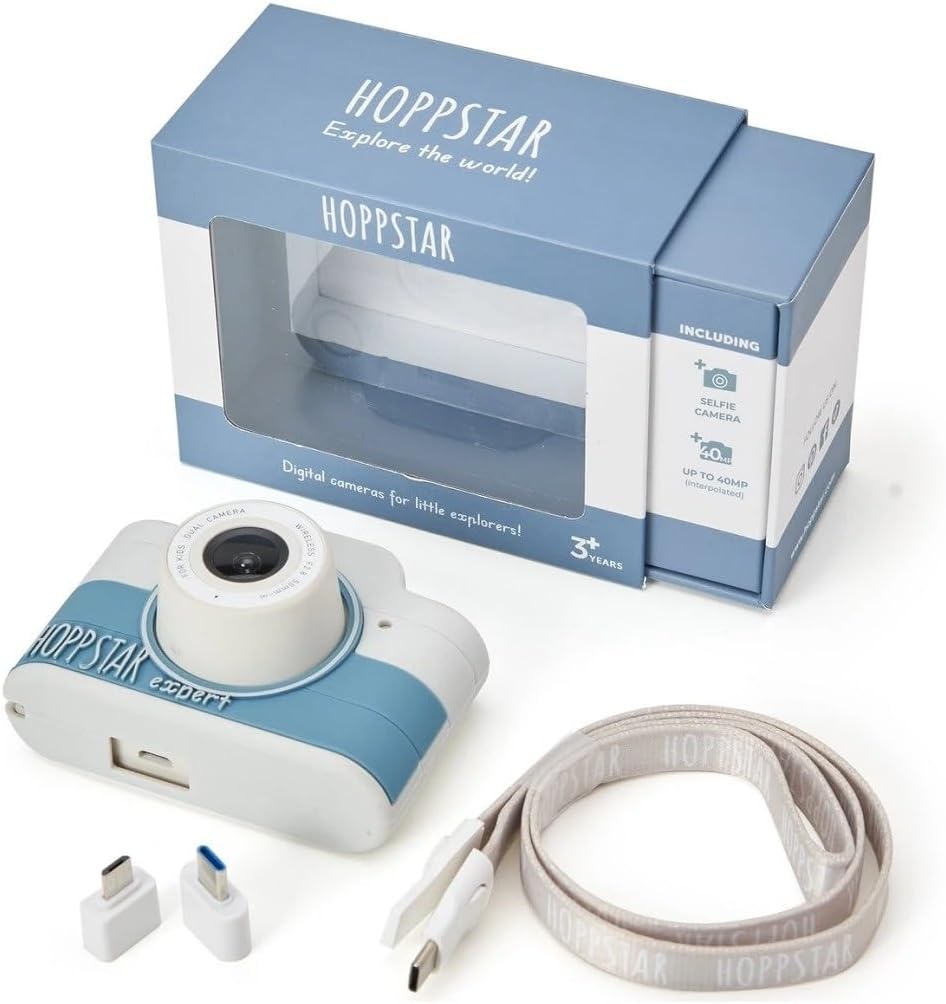
Image: Hoppstar Expert camera shown with its retail packaging, USB charging cable, lanyard, and two USB adapters.
4. انتهى المنتجview
أمام View

Image: The front of the Hoppstar Expert camera, featuring the main lens, flash, and the 'Hoppstar Expert' branding on the blue and white body.
- العدسة الرئيسية: For taking standard photos and videos.
- Flash/Light: يوفر الإضاءة في ظروف الإضاءة المنخفضة.
- ميكروفون: يلتقط الصوت أثناء تسجيل الفيديو.
مؤخرة View

Image: The back of the Hoppstar Expert camera, displaying the LCD screen and the control buttons on either side.
- شاشة LCD: يعرض القوائم مباشرة view, and playback.
- كاميرا سيلفي: Located above the screen for self-portraits.
- أزرار التحكم: Navigation, OK, Menu, and other function buttons.
5. الإعداد
5.1 شحن الكاميرا
Before first use, fully charge the camera's internal battery. Connect the provided USB charging cable to the camera's USB port and to a USB power source (e.g., computer, wall adapter). The charging indicator light will show the charging status and turn off when fully charged.
5.2 إدخال بطاقة الذاكرة
The Hoppstar Expert comes with 16 GB of internal storage. If you wish to expand storage, locate the memory card slot (usually on the side or bottom) and insert a compatible microSD card (not included) until it clicks into place. Ensure the camera is powered off before inserting or removing the card.
5.3 تشغيل/إيقاف التشغيل
Press and hold the Power button (usually located on the top or side) for a few seconds to turn the camera on or off.
6. تعليمات التشغيل
6.1 الضوابط الأساسية
- زر موافق: Confirms selections in menus, takes photos, or starts/stops video recording.
- أزرار التنقل: Used to move through menu options (Up, Down, Left, Right).
- زر القائمة: Accesses the camera's settings and feature options.
- زر الوضع: Switches between photo, video, and playback modes.
6.2 التقاط الصور
In photo mode, frame your shot using the LCD screen. Press the OK button to capture a photo. The camera supports both front and selfie cameras. To switch between cameras, navigate to the camera settings in the menu or use a dedicated button if available.
6.3 تسجيل مقاطع الفيديو
Switch to video mode. Press the OK button once to start recording and press it again to stop. Videos are saved to the internal memory or inserted memory card.
6.4 Using Creative Features
The Hoppstar Expert includes several creative features:
- Picture Frames: Apply fun borders to your photos. Access this feature through the camera's menu.
- Photo Filters: Change the look and feel of your photos with various color and effect filters.
- الكشف عن الوجه: The camera can automatically detect faces in the frame, assisting with focus.
Explore these options within the camera's menu settings to enhance your photos and videos.
7. الصيانة
- تنظيف: Use a soft, dry cloth to clean the camera body and screen. For the lens, use a specialized lens cleaning cloth. Do not use liquid cleaners.
- غطاء سيليكون: The interchangeable silicone cover can be removed and cleaned with mild soap and water if necessary. Ensure it is completely dry before reattaching.
- العناية بالبطارية: لإطالة عمر البطارية، تجنب تفريغها بالكامل بشكل متكرر. اشحن الكاميرا بانتظام، حتى في حال عدم استخدامها لفترات طويلة.
- تخزين: قم بتخزين الكاميرا في مكان بارد وجاف بعيدًا عن أشعة الشمس المباشرة ودرجات الحرارة القصوى.
8. استكشاف الأخطاء وإصلاحها
الكاميرا لا تعمل
- Ensure the battery is charged. Connect the camera to a power source and try again.
- Press and hold the Power button for a longer duration (5-10 seconds).
جودة الصورة/الفيديو رديئة
- تأكد من أن العدسة نظيفة وخالية من البقع أو الغبار.
- Check lighting conditions. Optimal results are achieved in well-lit environments.
- Ensure the camera is held steady during capture.
Camera Freezes/Unresponsive
- Try resetting the camera by pressing the reset button (if available, often a small pinhole) or by holding the Power button until it turns off and then restarting.
لا يمكن حفظ الصور/الفيديوهات
- Check if the internal memory or inserted memory card is full. Delete unnecessary files or insert a new card.
- Ensure the memory card is properly inserted and not corrupted.
If you encounter issues not listed here or if troubleshooting steps do not resolve the problem, please contact Hoppstar customer support.
9. المواصفات
| ميزة | مواصفة |
|---|---|
| العلامة التجارية | هوبستار |
| اسم الموديل | Hoppstar Expert Yale |
| رقم الموديل | 76893 |
| لون | ييل |
| أبعاد الحزمة | 14.3 × 8.7 × 5.1 سم |
| سرعة التصوير المستمر | 30 إطارًا في الثانية |
| المكونات المضمنة | Camera + Instruction Manual |
| سنة الموديل | 2023 |
| لون الفيلم | لون |
| نوع التحكم في التعرض | اوتوماتيكي |
| نوع الغالق | الكتروني |
10. الضمان والدعم
The Hoppstar Expert Digital Camera comes with a standard manufacturer's warranty. Please refer to the warranty information provided with your purchase or visit the official Hoppstar webيرجى زيارة الموقع للاطلاع على تفاصيل شروط وأحكام الضمان.
For technical support, product inquiries, or warranty claims, please contact Hoppstar customer service through their official webالموقع أو معلومات الاتصال المقدمة في وثائق الشراء الخاصة بك.


