1. المقدمة
The Ankilo Mini Bluetooth 5.3 Receiver/Transmitter is a versatile 2-in-1 audio adapter designed to add Bluetooth functionality to non-Bluetooth devices. Featuring the latest Bluetooth 5.3 technology, it ensures stable connections and a transmission range of up to 33 feet (10 meters). This device is suitable for use with cars, speakers, stereo systems, and headphones, allowing you to enjoy wireless audio streaming and hands-free calling.

Figure 1: Ankilo Mini Bluetooth 5.3 Receiver/Transmitter.

Figure 2: Highlighting Bluetooth 5.3 for stable connections, auto reconnect in RX mode, 33 ft signal range, and fast transmission.
2. انتهى المنتجview
تعرف على مكونات الجهاز:
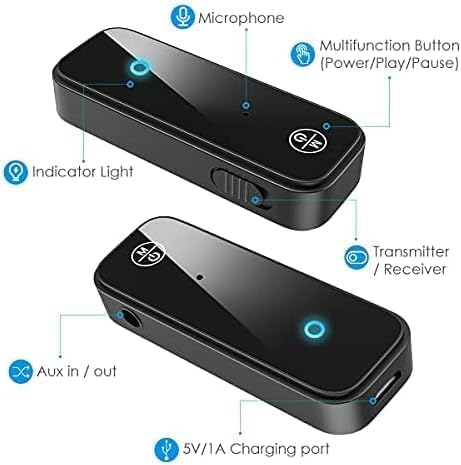
Figure 3: Labeled diagram of the Ankilo Bluetooth adapter. Key components include the Microphone, Multifunction Button (Power/Play/Pause), Indicator Light, Transmitter/Receiver (TX/RX) switch, Aux in/out port, and 5V/1A Charging port.
3. محتويات العبوة
تأكد من وجود جميع العناصر في العبوة:
- 1 x Ankilo Mini Bluetooth 5.3 Receiver/Transmitter
- 1 x 3.5mm Audio Connector (new and old versions may be sent randomly)
- 1 × كابل شحن USB
- 1 × دليل المستخدم
4. الإعداد والاتصال
4.1. وضع الاستقبال (RX)
Use Receiver Mode to stream audio from your Bluetooth-enabled device (e.g., smartphone, laptop) to a non-Bluetooth audio system (e.g., car stereo, wired speakers, wired headphones).
- التبديل إلى وضع الاستقبال (RX): Locate the TX/RX switch on the side of the adapter and slide it to the "RX" position.
- الاتصال بالنظام الصوتي: Plug the 3.5mm audio connector into the Aux in/out port of the Bluetooth adapter. Then, plug the other end of the 3.5mm audio connector into the auxiliary input port of your non-Bluetooth audio system.
- التشغيل والاقتران: Press and hold the Multifunction Button (power button) for 3 seconds to turn on the device. The indicator light will flash red and blue alternately, indicating it is in pairing mode.
- الاقتران بجهازك: On your smartphone or other Bluetooth-enabled device, go to Bluetooth settings and search for "Ankilo" or "ZF-360" (or similar device name). Select it to connect. Once connected, the indicator light on the adapter will turn solid blue.

Figure 4: Step-by-step visual guide for connecting in both Receiver (RX) and Transmitter (TX) modes.
4.2. Transmitter Mode (TX)
Use Transmitter Mode to stream audio from a non-Bluetooth audio source (e.g., TV, computer, MP3 player) to your Bluetooth headphones or speakers.
- التبديل إلى وضع الإرسال: Locate the TX/RX switch on the side of the adapter and slide it to the "TX" position.
- الاتصال بمصدر الصوت: Plug the 3.5mm audio connector into the Aux in/out port of the Bluetooth adapter. Then, plug the other end of the 3.5mm audio connector into the auxiliary output port of your non-Bluetooth audio source (e.g., TV headphone jack).
- التشغيل والاقتران: Press and hold the Multifunction Button (power button) for 3 seconds to turn on the device. The indicator light will flash red and blue alternately, indicating it is in pairing mode.
- قم بإقرانها مع سماعات الرأس/مكبرات الصوت التي تعمل بتقنية البلوتوث: Put your Bluetooth headphones or speakers into pairing mode. The adapter will automatically search and connect to your headphones/speakers. Once connected, the indicator light on the adapter will turn solid red.
Video 1: General guide on how to use an Aux Bluetooth Adapter for Car. (Note: Product shown may vary slightly from Ankilo model.)
Video 2: Demonstration of ensuring the audio plug is firmly inserted for optimal sound quality. (Note: Product shown may vary slightly from Ankilo model.)
5. أوضاع التشغيل والوظائف
5.1. الاتصال بدون استخدام اليدين
The adapter features a built-in HD microphone for convenient hands-free calling while driving or performing other tasks.
- الرد / قطع الاتصال: اضغط على الزر متعدد الوظائف مرة واحدة.
- رفض المكالمة: اضغط مع الاستمرار على الزر متعدد الوظائف لمدة ثانيتين.
- إعادة الاتصال بالرقم الأخير: Double-press the Multifunction Button.
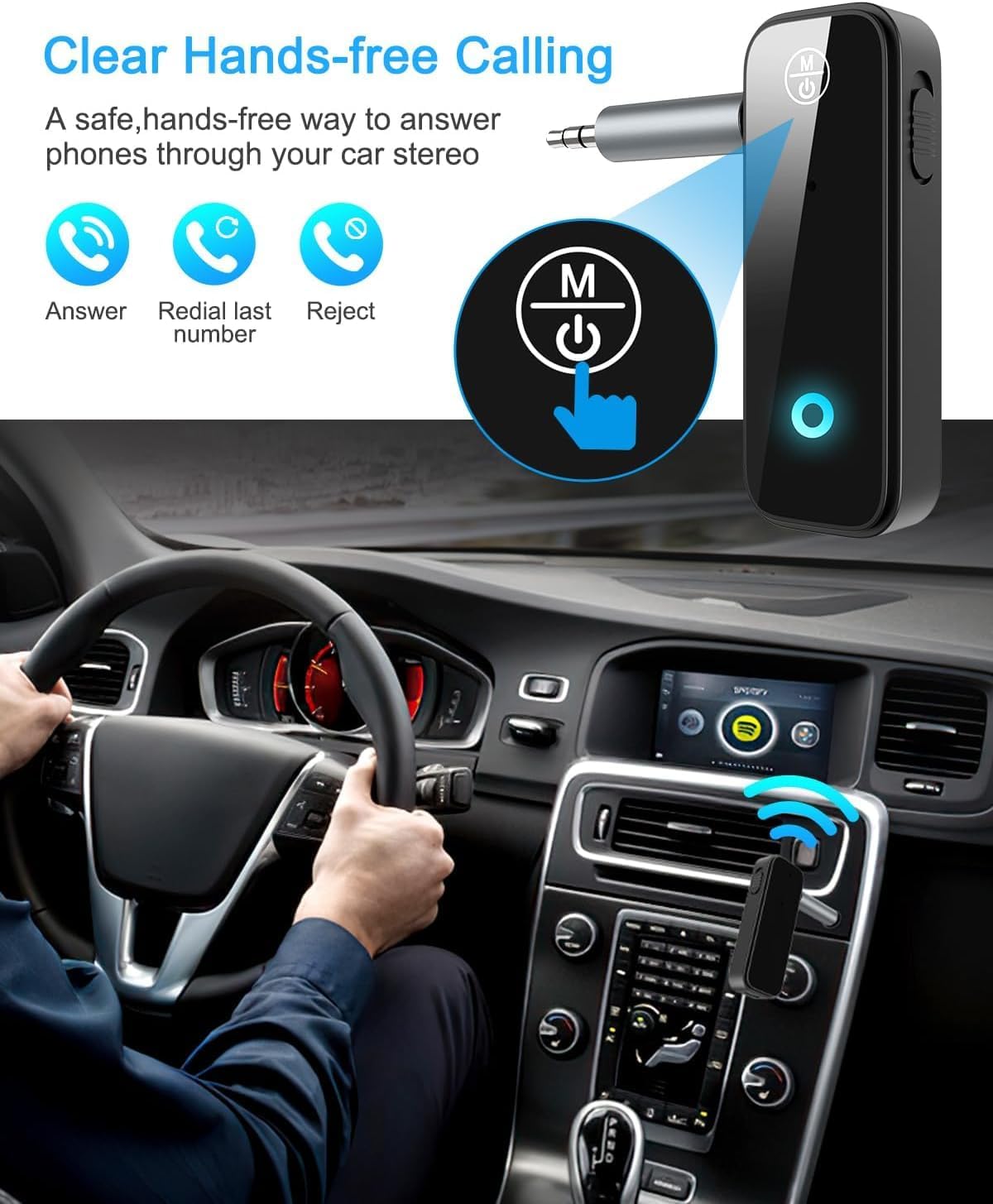
Figure 5: Visual representation of hands-free calling functionality in a vehicle.
5.2. التحكم في تشغيل الموسيقى
- تشغيل/إيقاف مؤقت: اضغط على الزر متعدد الوظائف مرة واحدة.
- المسار التالي: اضغط على زر "+" مرة واحدة.
- المسار السابق: اضغط على زر "-" مرة واحدة.
- رفع الصوت: اضغط مع الاستمرار على زر "+".
- اخفض الصوت: اضغط مع الاستمرار على زر "-".
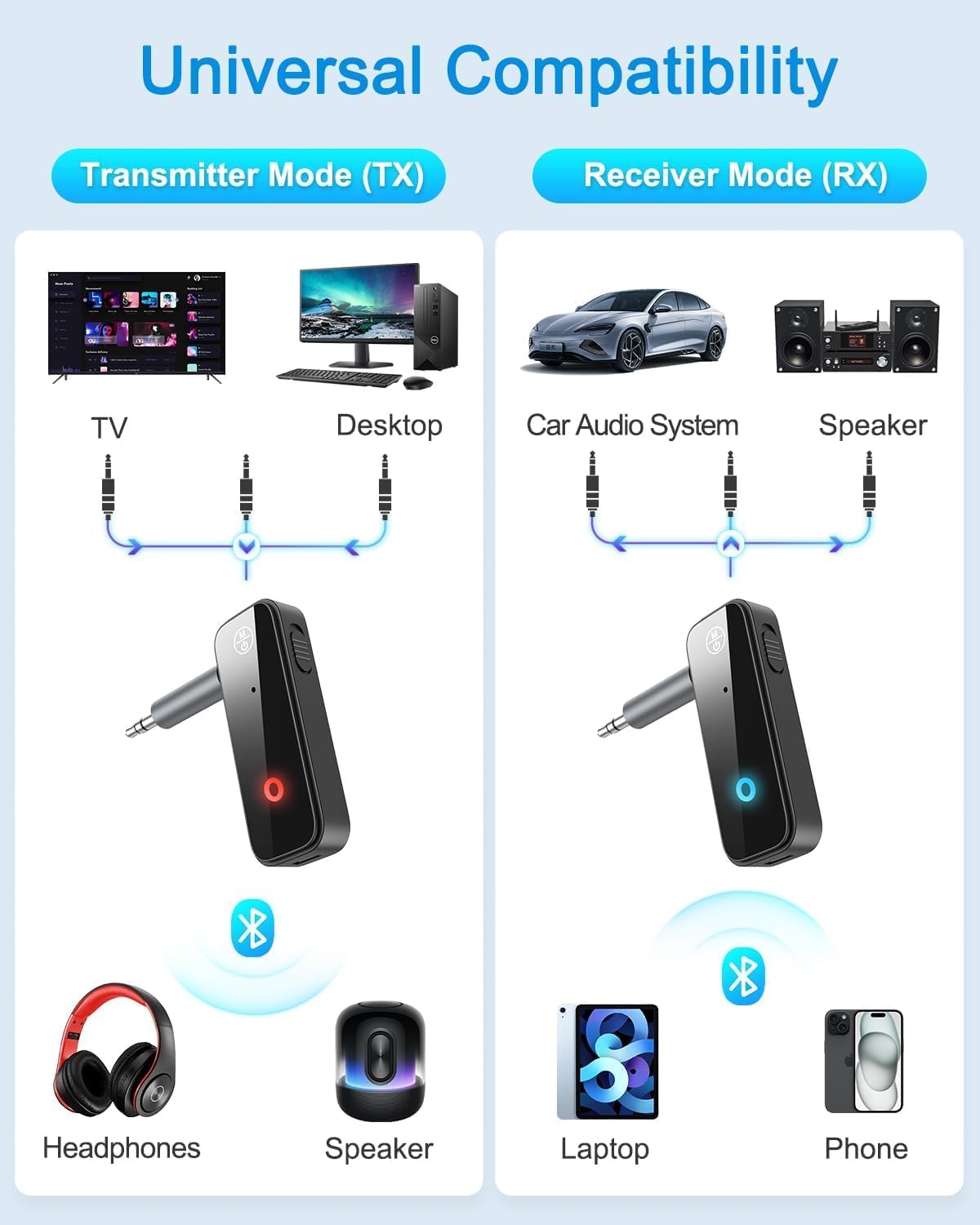
Figure 6: Illustrates the universal compatibility of the device in both Transmitter (TX) and Receiver (RX) modes with various devices like TVs, desktops, car audio systems, speakers, headphones, laptops, and phones.
6. الشحن وعمر البطارية
The Ankilo Mini Bluetooth adapter is equipped with a built-in rechargeable battery. A full charge takes approximately 2 hours and provides up to 8 hours of music playback or call time.
- الشحن: Connect the provided USB charging cable to the 5V/1A Charging port on the adapter and to a USB power source. The red indicator light will be solid during charging and turn off when fully charged.
- مؤشر انخفاض البطارية: When the battery is low, the red indicator light will flash.

Figure 7: Details on the device's 8-hour battery life, 2-hour fast charging, and USB charging port.
7. المواصفات
| ميزة | التفاصيل |
|---|---|
| ماركة | أنكيلو |
| نموذج | CP210-MA06CA-KH |
| نسخة البلوتوث | 5.3 |
| أوضاع التشغيل | Receiver (RX) & Transmitter (TX) |
| انتقال المدى | حتى 33 قدم (10 أمتار) |
| عمر البطارية | Approx. 8 hours (music/call) |
| وقت الشحن | حوالي 2 ساعات |
| منفذ الشحن | 5 فولت / 1 أمبير (USB) |
| إدخال/إخراج الصوت | 3.5 ملم مساعد |
| ميكروفون مدمج | Yes (HD) |
| مادة | بلاستيك |
| أبعاد المنتج | 6.7 x 1.8 x 10 cm ؛ 30 ز |
8. استكشاف الأخطاء وإصلاحها
- الجهاز لا يعمل: Ensure the device is fully charged. Connect it to a power source using the USB cable.
- لا يمكن الاقتران بجهاز:
- Ensure the adapter is in the correct TX or RX mode.
- Make sure the adapter is in pairing mode (red and blue lights flashing alternately).
- Ensure the target device (phone, headphones, speaker) is also in pairing mode.
- Turn off and on the Bluetooth function on your device and try searching again.
- Clear previous Bluetooth connections on both devices if necessary.
- No audio or low audio:
- Check that the 3.5mm audio connector is fully and firmly inserted into both the adapter and the audio system/source.
- تأكد من رفع مستوى الصوت في كل من المحول وجهاز الصوت المتصل.
- Verify that the adapter is correctly connected to the audio source/system (TX mode for output, RX mode for input).
- اتصال متقطع: Ensure there are no significant obstacles (like walls) between the adapter and the connected Bluetooth device. Keep devices within the 33-foot (10-meter) range.
9. معلومات السلامة
- لا تعرض الجهاز لدرجات حرارة قصوى أو رطوبة أو بيئات أكالة.
- لا تقم بتفكيك الجهاز أو محاولة إصلاحه بنفسك.
- يحفظ بعيدًا عن متناول الأطفال.
- Note: This adapter is not suitable for SONY devices. Please confirm compatibility before purchase.
10. الضمان والدعم
Ankilo offers a 12-month quality protection warranty and 60 days free replacement for this product. For any questions or concerns, please contact our customer support. We are committed to responding within 24 hours to assist you.


