1. المقدمة وما فوقview
The Buffbee Sound Machine & Alarm Clock is a versatile 2-in-1 device designed to enhance your sleep and wake-up experience. It combines a high-quality sound machine with a precise digital alarm clock, offering a range of features to create a peaceful environment and ensure timely waking.

Image 1.1: The Buffbee device highlighting its dual functionality as a sound machine and an alarm clock.
المميزات الرئيسية:
- وظيفة 2 في 1: Combines a sound machine and a digital alarm clock in one compact unit.
- 18 أصوات مهدئة: Includes 5 white noises, 3 fan sounds, and 10 nature sounds (ocean, lullaby, waves, rain, thunderstorm, stream, croaks, bird chirps, summer night, campfire) to aid sleep and relaxation.
- سطوع العرض قابل للتعديل: Clock face brightness can be dimmed from 0% to 100% to suit your preference.
- التحكم الدقيق في مستوى الصوت: Offers 30 levels of volume adjustment for optimal sound output.
- مؤقت النوم: Set the sound machine to automatically turn off after 15, 30, 60, 90, or 120 minutes, or allow continuous play.
- ضوء ليلي بـ 7 ألوان: Features a soothing colored light at the base with 7 color options and ON/OFF functionality.
- مكبر صوت عالي الجودة: Equipped with a 5W speaker for rich, detailed sound.

الصورة 1.2: الجبهة view of the Buffbee Sound Machine & Alarm Clock, displaying the time and the top control panel.
2. الإعداد
2.1 فتح العلبة والمحتويات
Carefully remove the Buffbee Sound Machine & Alarm Clock from its packaging. Verify that all components are present:
- Buffbee Sound Machine & Alarm Clock unit
- Power Adapter (USB cable and wall adapter)
- دليل المستخدم (هذا المستند)
2.2 توصيل الطاقة
The device is powered by an electrical cable.
- Insert the small end of the USB power cable into the DC IN port on the back of the Buffbee unit.
- Plug the larger end of the USB cable into the provided wall adapter.
- قم بتوصيل محول الحائط بمأخذ كهربائي قياسي.
The device will power on automatically, and the digital display will illuminate.
2.3 ضبط الوقت
Upon initial power-on or after a power outage, you may need to set the correct time.
- اضغط مع الاستمرار على الوقت المحدد button (usually indicated by a clock icon) on the top panel until the hour digits begin to flash.
- استخدم +/- buttons (or arrow buttons) to adjust the hour.
- اضغط على الوقت المحدد اضغط على الزر مرة أخرى للتبديل إلى ضبط الدقائق.
- استخدم +/- أزرار لضبط الدقائق.
- اضغط على الوقت المحدد اضغط على الزر مرة أخرى للتأكيد والخروج من وضع ضبط الوقت.
3. تعليمات التشغيل
3.1 Sound Machine Function
The Buffbee Sound Machine offers 18 soothing sounds to help you relax and sleep.

الصورة 3.1: داخلي view illustrating the upward-firing speaker for enhanced sound quality.
تشغيل الأصوات:
- اضغط على وضع الصوت button (often a music note icon) to cycle through the available sound categories (White Noise, Fan Sounds, Nature Sounds).
- استخدم Next/Previous Sound buttons (arrow icons) to select a specific sound within the chosen category.
- The sound will begin playing automatically.
ضبط مستوى الصوت:
The device features 30 levels of precise volume control.
- اضغط على رفع الصوت (+) or اخفض الصوت (-) buttons to increase or decrease the sound volume.

Image 3.2: Illustration of the auto-off timer and 30-level precise volume control features.
ضبط مؤقت النوم:
The sleep timer allows the sound machine to turn off automatically after a set duration.
- اضغط على الموقت button (often an hourglass icon) repeatedly to cycle through the available timer options: 15 minutes, 30 minutes, 60 minutes, 90 minutes, 120 minutes, or continuous play (indicated by 'ON' or no timer display).
- The selected timer duration will be displayed briefly on the screen.
3.2 وظيفة المنبه
The Buffbee device functions as a digital alarm clock with customizable wake-up sounds.
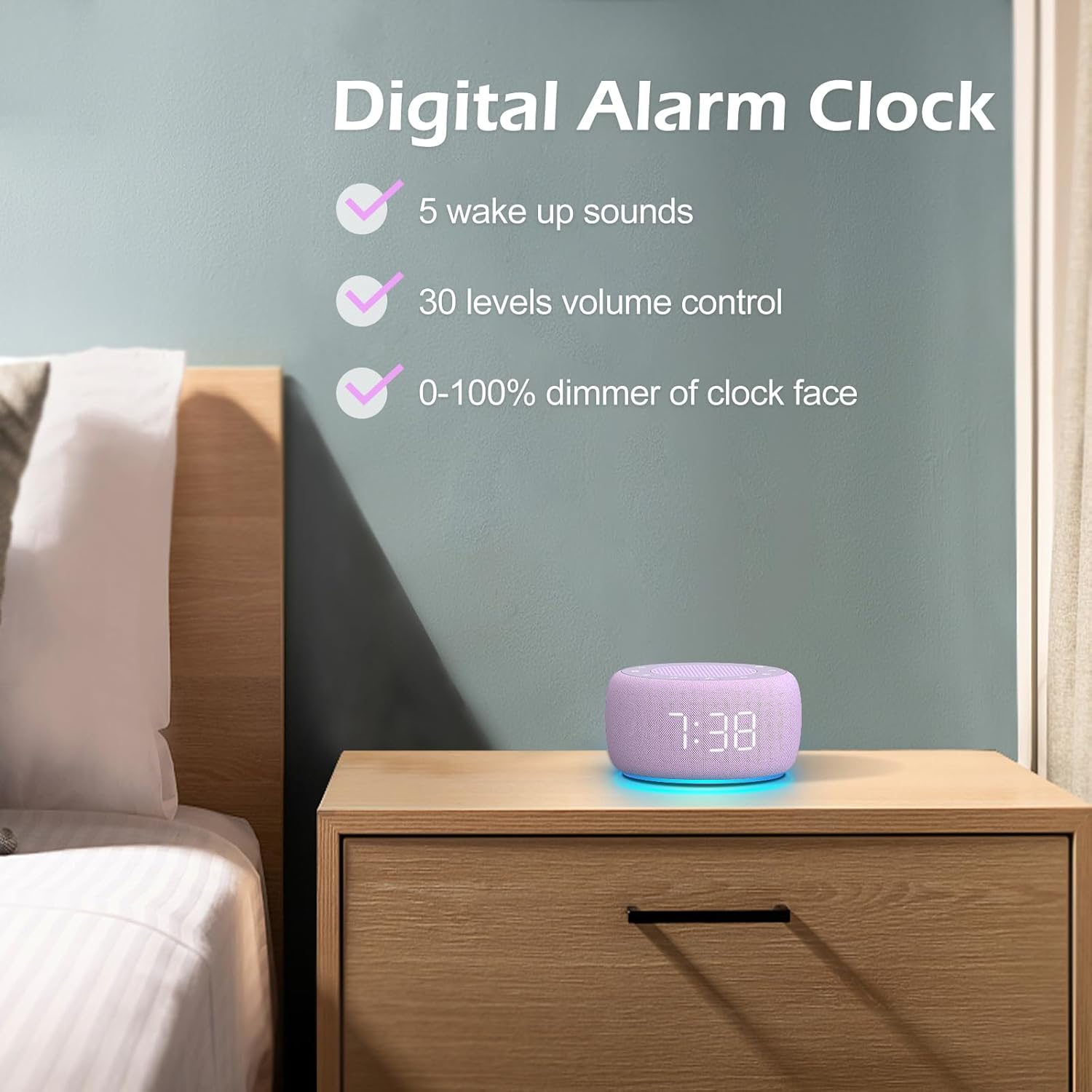
الصورة 3.3: انتهىview of the digital alarm clock features, including wake-up sounds, volume control, and display dimmer.
ضبط المنبه:
- اضغط مع الاستمرار على مجموعة التنبيه button (often an alarm clock icon) until the alarm hour digits begin to flash.
- استخدم +/- أزرار لضبط ساعة التنبيه.
- اضغط على مجموعة التنبيه اضغط على الزر مرة أخرى للتبديل إلى ضبط الدقائق.
- استخدم +/- أزرار لضبط دقائق التنبيه.
- اضغط على مجموعة التنبيه button one more time to confirm the alarm time.
- After setting the time, you can select the wake-up sound by pressing the تحديد الصوت button (if available, or use +/- buttons while alarm sound is flashing). There are 5 wake-up sounds available.
- اضغط على مجموعة التنبيه button again to activate the alarm. An alarm icon will appear on the display.
قيلولة بعد الظهر وظيفة:
عندما يصدر صوت التنبيه ، اضغط على غفوة button (usually a large button on top or a dedicated snooze icon) to temporarily silence the alarm for a few minutes (typically 9 minutes). The alarm will sound again after the snooze period.
إطفاء المنبه:
لإيقاف تشغيل المنبه تمامًا، اضغط على تشغيل / إيقاف التنبيه button (often the same as the Alarm Set button, or a dedicated toggle). The alarm icon will disappear from the display.
3.3 Display & Light Functions
ضبط سطوع الشاشة:
The digital display brightness can be adjusted from 0% (completely dark) to 100% (brightest).

Image 3.4: Demonstration of the 0-100% display dimmer feature, showing various brightness levels.
- اضغط على باهتة button (often a sun icon) repeatedly to cycle through different brightness levels.
- امسك باهتة button to smoothly adjust the brightness from 0% to 100% and vice versa. Release the button at your desired brightness.
استخدام ضوء الليل:
The device features a colored night light at its base with 7 color options.

Image 3.5: The Buffbee device showcasing its 7-color night light feature in a bedroom setting.
- اضغط على ضوء button (often a light bulb icon) to turn the night light ON.
- اضغط على ضوء اضغط على الزر بشكل متكرر للتنقل بين الألوان السبعة المتاحة.
- اضغط على ضوء button one more time after cycling through all colors to turn the night light OFF.
4. الصيانة
4.1 التنظيف
To maintain the appearance and functionality of your Buffbee device:
- افصل الجهاز دائمًا عن مأخذ الطاقة قبل التنظيف.
- استخدم قطعة قماش ناعمة وجافة وخالية من الوبر لمسح الأسطح الخارجية.
- لا تستخدم المنظفات الكاشطة أو الشمع أو المذيبات، لأنها قد تتلف الطبقة النهائية.
- تجنب دخول الرطوبة إلى أي فتحات.
4.2 التخزين
عند عدم استخدام الجهاز لفترات طويلة، قم بتخزينه في مكان بارد وجاف، بعيدًا عن أشعة الشمس المباشرة ودرجات الحرارة القصوى.
4.3 تحذيرات السلامة
يرجى مراعاة احتياطات السلامة التالية:
- هذا المنتج ليس لعبة. يُحفظ بعيدًا عن متناول الأطفال.
- Handle with care to avoid electric shock. Do not expose the device to water or excessive moisture.
- Use within recommended noise exposure limits to prevent hearing damage.
- لا تحاول تفكيك الجهاز أو إصلاحه بنفسك. قم بإحالة جميع أعمال الصيانة إلى فنيين مؤهلين.
5. استكشاف الأخطاء وإصلاحها
If you encounter issues with your Buffbee Sound Machine & Alarm Clock, please refer to the following common problems and solutions:
| مشكلة | السبب المحتمل | حل |
|---|---|---|
| الجهاز لا يعمل. | لا يوجد اتصال بالكهرباء أو أن المحول معطل. | Ensure the power cable is securely plugged into the device and the wall outlet. Try a different outlet. |
| لا يوجد صوت من السماعة. | مستوى الصوت منخفض جدًا أو مكتوم. تم اختيار صوت غير صحيح. | قم بزيادة مستوى الصوت باستخدام رفع الصوت (+) button. Ensure a sound is selected and not paused. |
| لا يصدر صوت الإنذار. | Alarm is not set or not activated. Alarm volume is too low. | Verify that the alarm time is set correctly and the alarm icon is displayed. Increase the alarm volume (if separate from main volume). |
| الشاشة إما خافتة جداً أو ساطعة جداً. | Display dimmer setting is incorrect. | اضغط أو استمر في الضغط على باهتة button to adjust the brightness to your preference. |
| ضوء الليل لا يعمل. | Night light is turned off. | اضغط على ضوء button to turn on and cycle through colors. |
6. المواصفات
Detailed technical specifications for the Buffbee Sound Machine & Alarm Clock (Model BK11):
| ميزة | مواصفة |
|---|---|
| ماركة | بوفبي |
| رقم الموديل | بي كيه 11 |
| لون | بنفسجي |
| مادة | بلاستيك |
| مصدر الطاقة | كهرباء سلكية |
| أبعاد المنتج | 14.3 x 11.2 x 7.7 cm (5.6 x 4.4 x 3.0 inches) |
| وزن العنصر | 322 جرامًا (0.71 رطلاً) |
| مخرج مكبر الصوت | 5W |
| خيارات الصوت | 18 Soothing Sounds (5 White Noise, 3 Fan, 10 Nature) |
| مستويات الصوت | 30 Precise Levels |
| عرض باهتة | 0-100% Adjustable Brightness |
| ألوان الإضاءة الليلية | 7 لونًا |
| خيارات مؤقت النوم | 15, 30, 60, 90, 120 minutes, or Continuous Play |
| Wake-up Sounds | 5 Alarm Sounds |
7. الضمان والدعم
7.1 معلومات الضمان
This product comes with a standard manufacturer's warranty. Please refer to the product packaging or the seller's webللاطلاع على شروط وأحكام الضمان المحددة، بما في ذلك مدة الضمان وتفاصيل التغطية، يرجى زيارة الموقع الإلكتروني.
7.2 دعم العملاء
For any questions, technical assistance, or warranty claims, please contact Buffbee customer support through the retailer's platform or the official Buffbee website. Have your product model number (BK11) and purchase details ready when contacting support.


