1. المقدمة
This user manual provides comprehensive instructions for the installation, operation, and maintenance of the Turing TP-MFD8M28 Smart 8MP IR Dome IP Camera. This advanced surveillance camera features 8MP resolution, a 2.8mm lens, and integrates with Turing SMART Series NVR, Bridge, and Cloud for advanced AI capabilities including Face, Human, and Vehicle detection. Designed for both indoor and outdoor use, it boasts IP67 weather resistance and IK10 vandal resistance, ensuring reliable performance in various environments.
2. انتهى المنتجview
The Turing TP-MFD8M28 is a high-performance dome IP camera engineered for superior surveillance. Its robust design and intelligent features make it suitable for a wide range of security applications.
2.1 الميزات الرئيسية
- Face/Human/Vehicle AI: Advanced detection capabilities when integrated with Turing SMART Series NVR, Bridge, and Cloud.
- دقة عالية: Max. 8MP (3840x2160) at 20fps resolution for clear imaging.
- TwilightVision: Ensures optimal image clarity even in low-light conditions.
- تصميم متين: IP67 rated for weather resistance and IK10 rated for vandal resistance.
- الطاقة عبر إيثرنت (PoE): يُسهّل عملية التركيب من خلال توفير الطاقة والبيانات عبر كابل واحد.
- النطاق الديناميكي الواسع (WDR): 120 dB WDR for balanced images in challenging lighting.
- التخزين على متن الطائرة: Supports up to 256GB microSD card (not included) for local recording.
2.2 مكونات الكاميرا
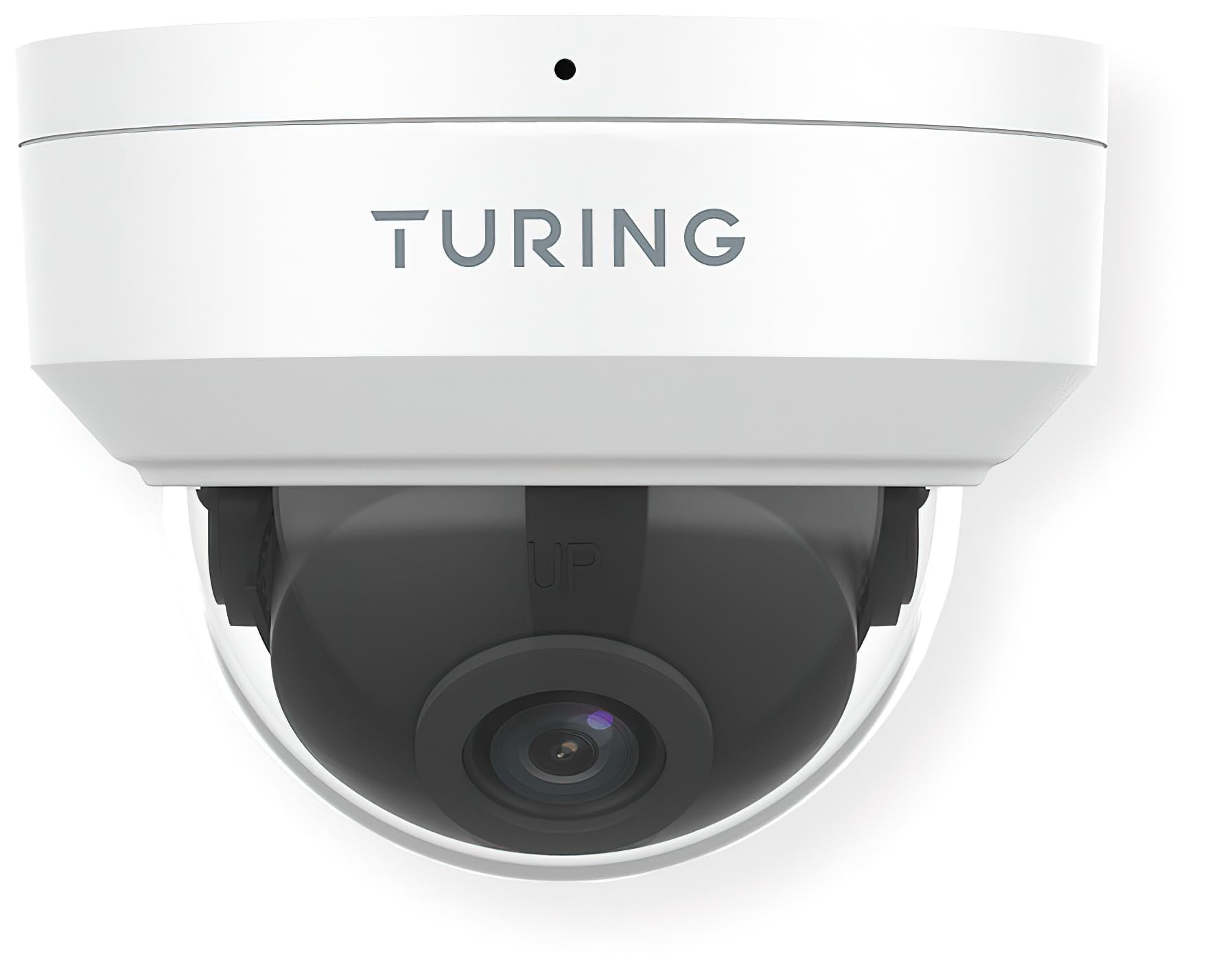
الشكل 1: أمام view of the Turing TP-MFD8M28 Smart 8MP IR Dome IP Camera. The image displays the white dome camera with the Turing logo on the top housing and the dark lens assembly visible through the clear dome cover. A small black dot, likely an indicator light or microphone, is visible at the top center.
The camera consists of a main housing, a clear dome cover, and an internal camera module with the lens. The housing is designed for secure mounting, and the dome protects the sensitive camera components while allowing for a wide field of view.
3. الإعداد والتثبيت
Proper installation is crucial for optimal performance and longevity of your camera.
3.1 محتويات العبوة
- Turing TP-MFD8M28 IP Camera
- مسامير التثبيت ومقابس الحائط
- موصل مقاوم للماء (لكابل إيثرنت)
- دليل البدء السريع
3.2 تعليمات التركيب
- اختيار موقع: Select a suitable indoor or outdoor location, ensuring a clear field of view and access to network cabling. Consider the camera's 2.8mm fixed lens angle of view (H: 112.4°, V: 60.1°, D: 146.1°).
- تحضير السطح: Mark drilling points using the provided mounting template (if applicable). Drill holes for the wall plugs.
- قاعدة آمنة: Attach the camera's mounting base securely to the surface using the provided screws.
- توصيل الكابلات: Connect the Ethernet cable to the camera's PoE port. Use the waterproof connector for outdoor installations to protect the connection.
- ضبط الزاوية: Once mounted, adjust the camera's lens angle to cover the desired surveillance area.
- Secure Dome: Reattach the clear dome cover, ensuring it is properly sealed.
3.3 اتصال الشبكة
The TP-MFD8M28 supports Power over Ethernet (PoE). Connect the camera to a PoE-enabled switch or NVR using a standard Ethernet cable. The camera will power on automatically. For initial setup and configuration, refer to the Turing Vision software or your NVR's user manual.
4. تشغيل الكاميرا
The camera's primary functions are managed through the Turing Vision software or a compatible Turing SMART Series NVR/Bridge.
4.1 مباشر View والتسجيل
- Access the live feed through the Turing Vision application or connected NVR.
- Configure recording schedules (continuous, motion-triggered, event-based) via the software interface.
- تشغيل سجلت فوtage from the NVR or the camera's microSD card (if installed).
4.2 AI Features (with Turing SMART Series NVR/Bridge)
- تمييز الوجوه: Set up and manage known faces for alerts or access control.
- اكتشاف الأشخاص: Receive alerts when human figures are detected in specified zones.
- كشف السيارة: Get notifications for vehicle presence or movement.
- Configure detection zones and sensitivity settings within the Turing Vision software.
أبدا الإعدادات المتقدمة
- إعدادات الصورة: Adjust brightness, contrast, saturation, and WDR settings.
- إعدادات الشبكة: Configure IP address, port forwarding, and other network parameters.
- تحديثات البرامج الثابتة: Regularly check for and apply firmware updates to ensure optimal performance and security.
5. الصيانة
تساعد الصيانة الدورية على ضمان طول عمر الكاميرا وأدائها الأمثل.
- تنظيف العدسات: Gently wipe the clear dome and lens with a soft, lint-free cloth. For stubborn dirt, use a mild lens cleaning solution. Avoid abrasive materials.
- تفتيش السكن: Periodically check the camera housing for any signs of damage, cracks, or loose components.
- وصلات الكابلات: Ensure all cable connections are secure and free from corrosion, especially for outdoor installations.
- تحديثات البرامج: Keep the camera's firmware and associated Turing Vision software updated to the latest versions.
6. استكشاف الأخطاء وإصلاحها
إذا واجهت مشاكل مع الكاميرا، فراجع المشاكل والحلول الشائعة التالية.
| مشكلة | السبب المحتمل | حل |
|---|---|---|
| No Power/Camera Offline | No PoE power; faulty Ethernet cable; network issue. | Check PoE switch/NVR status. Verify Ethernet cable connection. Ensure network is operational. |
| لا يوجد بث للصور/الفيديو | Network connectivity issue; incorrect IP settings; camera malfunction. | Verify network connection. Check camera's IP address. Restart camera/NVR. |
| ضعف جودة الصورة | Dirty lens/dome; low light conditions; incorrect image settings. | Clean lens/dome. Ensure sufficient lighting or check TwilightVision settings. Adjust image parameters (WDR, brightness). |
| AI Features Not Working | Not connected to Turing SMART Series NVR/Bridge; incorrect AI settings; outdated firmware. | Confirm connection to compatible Turing hardware. Review AI detection zone and sensitivity settings. Update firmware. |
If the problem persists after attempting these solutions, please contact Turing technical support.
7. المواصفات
Detailed technical specifications for the Turing TP-MFD8M28 Smart 8MP IR Dome IP Camera.
| نموذج | TP-MFD8M28 |
| المستشعر | 1/2.7-in 8MP 16:9 Progressive Scan CMOS |
| عدسة | 2.8mm عدسة ثابتة |
| زاوية View | H: 112.4 degrees; V: 60.1 degrees; D: 146.1 degrees |
| الحد الأقصى للدقة | 8MP (3840x2160) at 20fps |
| الحد الأدنى من الإضاءة | اللون: 0.0025 لوكس (F1.6، تشغيل التحكم التلقائي في الكسب)؛ 0 لوكس مع تشغيل الأشعة تحت الحمراء |
| ترميز الفيديو | الترا 265، H.265، H.264، MJPEG |
| المعالجة الرقمية | 120 dB WDR; 2D/3D DNR; Defog |
| ميزات الذكاء الاصطناعي | Face Recognition, People and Car Detection (with SMART series NVR/Bridge) |
| حماية الدخول | IP67 (مقاوم للغبار والماء) |
| مقاومة التخريب | اي كيه10 |
| قوة | DC 12V, PoE (IEEE 802.3af); up to 6.0W |
| حماية من زيادة التيار الكهربائي | 4 كيلو فولت |
| التخزين على متن الطائرة | microSD (up to 256 GB, not included) |
| Smart IR Range | ما يصل إلى 30 أمتار (98.43 قدمًا) |
| الأبعاد (القطر × الارتفاع) | 4.3 × 3.2 بوصة |
| وزن | 0.93 أرطال (14.9 أوقية) |
| بروتوكول الاتصال | إيثرنت |
| نوع التركيب | التركيب على السقف |
| الاستخدام الداخلي والخارجي | خارجي، داخلي |
8. الضمان والدعم
Turing products are designed for reliability and performance.
8.1 معلومات الضمان
This product comes with a standard manufacturer's warranty. Please refer to the warranty card included in your product packaging or visit the official Turing webللاطلاع على شروط وأحكام الضمان المفصلة، يُرجى الاحتفاظ بإيصال الشراء لتقديم مطالبات الضمان.
8.2 الدعم الفني
For technical assistance, troubleshooting, or any product-related inquiries, please contact Turing technical support.
- الدعم عبر الإنترنت: Visit the official Turing website for FAQs, knowledge base articles, and support resources.
- معلومات الاتصال: Refer to the contact section on the Turing webموقع إلكتروني يحتوي على أرقام هواتف أو عناوين بريد إلكتروني للدعم المباشر.
When contacting support, please have your product model number (TP-MFD8M28) and serial number ready.


