مقدمة
مرحباً بك في سماعات JLab JBuds Air Sport Gen 3 اللاسلكية بتقنية بلوتوث. يوفر هذا الدليل تعليمات مفصلة لمساعدتك في إعداد جهازك الجديد وتشغيله وصيانته وحل أي مشاكل قد تواجهها. يُرجى قراءة هذا الدليل جيداً لضمان الأداء الأمثل وطول عمر جهازك.

صورة: سماعات JLab JBuds Air Sport Gen 3 باللون الأسود، تسلط الضوء على تصميمها الذي يعكس نمط الحياة النشط من خلال عبارة "هيا نتحرك".
ماذا يوجد في الصندوق
تتضمن حزمة JLab JBuds Air Sport Gen 3 العناصر التالية:
- سماعات أذن لاسلكية حقيقية JBuds Air Sport (يسار ويمين)
- علبة شحن مزودة بكابل شحن مدمج
- 3 مجموعات من أطراف الجل (بأحجام مختلفة)
- مجموعة واحدة من أطراف الأذن المصنوعة من رغوة كلاود فوم™
- معلومات عن ضمان جي لاب لمدة عامين

صورة: تمثيل مرئي لمحتويات عبوة JLab JBuds Air Sport Gen 3، تُظهر سماعات الأذن السوداء، وعلبة الشحن، وأحجام مختلفة من أطراف الأذن المصنوعة من رغوة السحاب الزرقاء والجل الأسود.
تعليمات الإعداد
1. الشحن الأولي
قبل الاستخدام الأول، اشحن سماعات الأذن وعلبة الشحن بالكامل. تحتوي علبة الشحن على كابل شحن USB-A مدمج. ما عليك سوى توصيل هذا الكابل بأي منفذ USB-A متوافق (مثل الكمبيوتر أو محول الحائط).
- تحتوي علبة الشحن على مؤشرات LED لعرض مستوى البطارية.
- عند وضع سماعات الأذن في العلبة، تشير الأضواء الزرقاء إلى أنها قيد الشحن.

صورة: سماعات JLab JBuds Air Sport من الجيل الثالث موضوعة في علبة الشحن المفتوحة. تشير أضواء LED الزرقاء على العلبة إلى أن السماعات قيد الشحن حاليًا.
2. تركيب سماعات الأذن
يُعدّ تحقيق ملاءمة آمنة ومريحة أمرًا بالغ الأهمية لجودة الصوت وثباته، لا سيما أثناء النشاط البدني. تأتي سماعات JBuds Air Sport Gen 3 مزودة بأطراف أذن متنوعة وخطافات أذن مريحة.
- خطافات الأذن: يتناسب تصميم خطاف الأذن المريح مع أذنك للحفاظ على سماعات الأذن في مكانها بشكل آمن.
- أطراف جل: جرب الأحجام الثلاثة لأطراف الجل للعثور على أفضل إحكام لقناة أذنك.
- أطراف أذن من رغوة كلاود فوم™: للحصول على راحة معززة وعزل سلبي للضوضاء، جرب أطراف Cloud Foam™ المرفقة.

الصورة: لقطة مقربة view من سماعات الأذن JLab JBuds Air Sport Gen 3، مع تسليط الضوء على تصميمها الذي يثبت فوق الأذن لتوفير ملاءمة آمنة.
3. اقتران بلوتوث
تدعم سماعات JBuds Air Sport Gen 3 تقنية Bluetooth Multipoint للاتصال بأجهزة متعددة في وقت واحد وتقنية Dual Connect لاستخدام سماعات الأذن بشكل مستقل.
- أخرج كلا السماعتين من علبة الشحن. ستدخلان تلقائيًا في وضع الاقتران (يُشار إلى ذلك بأضواء زرقاء/بيضاء وامضة).
- على جهازك (الهاتف الذكي، الكمبيوتر المحمول، إلخ)، افتح إعدادات البلوتوث وحدد "JLab JBuds Air Sport Gen 3".
- بمجرد الاتصال، ستسمع رسالة صوتية تؤكد الاتصال.
- لتفعيل خاصية الاتصال المتعدد عبر البلوتوث، قم بتوصيل السماعات بجهازك الأول، ثم أعدها إلى علبتها لفترة وجيزة. أخرجها، وقم بتوصيلها بجهازك الثاني. ستتولى السماعات إدارة الاتصالات بين الجهازين.

الصورة: تظهر امرأة وهي ترفع أوزاناً خفيفة أثناء ارتدائها سماعات الأذن JLab JBuds Air Sport Gen 3، مما يوضح ملاءمتها الآمنة أثناء التمرين.
4. تكامل تطبيق JLab
حسّن تجربة استخدام سماعات الأذن الخاصة بك عن طريق تنزيل تطبيق JLab. يتيح لك التطبيق تخصيص الصوت، والتحكم باللمس، وتحديث البرامج الثابتة.
- قم بتنزيل تطبيق JLab من متجر Google Play أو متجر تطبيقات Apple.
- قم بتوصيل سماعات الأذن بجهازك عبر البلوتوث.
- افتح تطبيق JLab للوصول إلى إعدادات وضع Be Aware، وإعدادات EQ المسبقة، وعناصر التحكم باللمس المخصصة، وتحديثات البرامج.

الصورة: شاشة هاتف ذكي تعرض واجهة تطبيق JLab، والتي توفر إعدادات متنوعة مثل إلغاء الضوضاء/كن على دراية، ومعادل الصوت، وتخصيص عناصر التحكم، والتحديثات لسماعات الأذن JBuds Air Sport.
تعليمات التشغيل
1. أدوات التحكم التي تعمل باللمس
تتميز سماعات JBuds Air Sport من الجيل الثالث بأزرار تحكم لمسية سهلة الاستخدام على كل سماعة. راجع تطبيق JLab لتخصيص هذه الأزرار بالكامل.
| فعل | سماعة الأذن اليسرى | سماعة الأذن اليمنى |
|---|---|---|
| نقرة واحدة | خفض الصوت | رفع الصوت |
| الضغط مرتين | مساعد صوتي | تشغيل/إيقاف مؤقت |
| الصنبور الثلاثي | تغيير إعداد EQ | انتبه تشغيل/إيقاف |
| إضغط إمساك | المسار السابق | المسار التالي |
| الرد على المكالمة/إنهائها | انقر مرتين (على أي من سماعتي الأذن) | |
2. إعدادات معادل الصوت
تأتي سماعات الأذن بثلاثة إعدادات مسبقة لمعادل الصوت: JLab Signature، وBalanced، وBass Boost. يمكنك التبديل بين هذه الإعدادات بالنقر ثلاث مرات على سماعة الأذن اليسرى أو تخصيصها عبر تطبيق JLab.
- توقيع جي لاب: تحسينات على الصوت والبيس.
- متوازن: توزيع متساوٍ للصوت لجميع أنواع الصوت.
- تعزيز الجهير: Ampصوت جهير قوي ومضخم.

الصورة: سماعات الأذن JLab JBuds Air Sport Gen 3 في علبة الشحن الخاصة بها، توضح إعدادات الصوت EQ3 الثلاثة المخصصة: Signature و Balanced و Bass Boost.
3. وضع "كن على دراية"
فعّل وضع "كن على دراية" للسماح بمرور الأصوات المحيطة عبر سماعات الأذن، مما يبقيك على دراية بمحيطك. هذه الميزة مفيدة للأنشطة الخارجية أو عندما تحتاج إلى سماع المحادثات.
- انقر ثلاث مرات على سماعة الأذن اليمنى لتشغيل أو إيقاف وضع التنبيه.
- قم بتخصيص مستوى الضوضاء المحيطة في تطبيق JLab.
4. مكالمات صوتية ستيريو
استمتع بمكالمات هاتفية واضحة بفضل الصوت الاستريو، ما يعني أنك ستسمع المكالمة في كلتا السماعتين. تحتوي كل سماعة على ميكروفون MEMS مدمج لإجراء محادثات واضحة.
5. عمر البطارية
توفر سماعات JBuds Air Sport Gen 3 عمر بطارية ممتد:
- توفر كل سماعة أذن مدة تشغيل تصل إلى 9 ساعات أو أكثر.
- توفر علبة الشحن أكثر من 35 ساعة إضافية، ليصل إجمالي وقت اللعب إلى أكثر من 44 ساعة.

صورة: يظهر رجل يشرب من زجاجة ماء، مرتدياً سماعات الأذن JLab JBuds Air Sport Gen 3. تُبرز الصورة عمر البطارية الطويل للمنتج، حيث كُتب عليها "أكثر من 44 ساعة من التشغيل".
6. البحث باستخدام البلاط
تم دمج سماعات JBuds Air Sport Gen 3 بتقنية Tile، مما يسمح لك بتحديد موقع سماعات الأذن الخاصة بك في حالة فقدانها.
- قم بتنزيل تطبيق Tile المجاني على هاتفك الذكي.
- اتبع التعليمات الموجودة داخل التطبيق لتفعيل خاصية Tile لسماعات الأذن الخاصة بك.
- استخدم تطبيق Tile للعثور على سماعات الأذن الخاصة بك في مكان قريب أو لتتبع آخر موقع معروف لها.

صورة: يعرض هاتف ذكي تطبيق Tile، ويظهر أنه مفعل لسماعات JLab، موضوعة بجوار علبة الشحن المفتوحة التي تحتوي على السماعات.
الميزات الرئيسية
- مقاومة للعرق بمعيار IP66: صُممت هذه الأحذية لتحمل العرق والأوساخ، مما يجعلها مناسبة للتمارين الرياضية والأنشطة الخارجية.
- بلوتوث متعدد النقاط: قم بالاتصال بجهازين في وقت واحد (مثل الهاتف المحمول والكمبيوتر المحمول) وقم بالتبديل بينهما بسلاسة.
- الاتصال المزدوج: استخدم سماعة الأذن بشكل مستقل أو كلتيهما معًا للحصول على مرونة في الاستماع.
- كابل شحن مدمج: تتضمن علبة الشحن كابل USB-A مدمجًا لإعادة الشحن بسهولة.
- صوت EQ3 مخصص: اختر من بين أوضاع الصوت JLab Signature أو Balanced أو Bass Boost، أو قم بتخصيصها بشكل أكبر باستخدام تطبيق JLab.
- تنبيه صوتي: يسمح بدخول الضوضاء المحيطة لزيادة الوعي الظرفي.
- ميكروفونات MEMS: تضمن الميكروفونات المدمجة في كل سماعة أذن جودة مكالمات واضحة.
- تكامل البلاطات: حدد موقع سماعات الأذن المفقودة باستخدام تطبيق Tile.
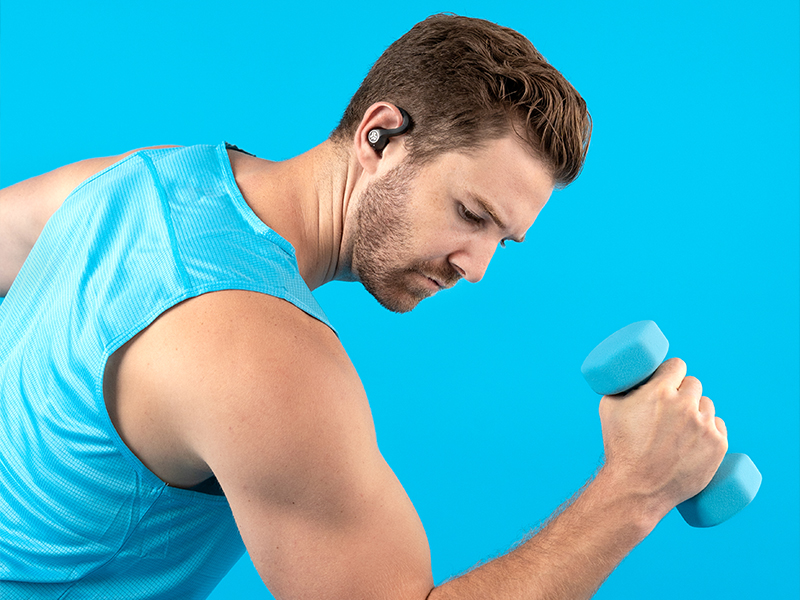
الصورة: يظهر رجل وهو يرفع دمبل، مرتدياً سماعات الأذن JLab JBuds Air Sport Gen 3، مما يسلط الضوء على تصميمها المقاوم للعرق والمناسب للاستخدام في صالة الألعاب الرياضية.
صيانة
تضمن العناية المناسبة طول عمر سماعات الأذن وأدائها:
- تنظيف: امسح سماعات الأذن ونقاط الشحن بانتظام بقطعة قماش جافة وناعمة لمنع تراكم العرق والأوساخ، خاصة بعد التمارين الرياضية.
- تخزين: قم بتخزين سماعات الأذن في علبة الشحن الخاصة بها عندما لا تكون قيد الاستخدام لحمايتها والحفاظ على شحنها.
- تجنب الظروف القاسية: لا تعرض سماعات الأذن لدرجات حرارة شديدة أو رطوبة عالية أو سوائل أكالة.
- مقاومة الماء: على الرغم من مقاومتها للعرق بمعيار IP66، تجنب غمر سماعات الأذن في الماء.
استكشاف الأخطاء وإصلاحها
إذا واجهت مشاكل، فجرب الخطوات التالية:
- لا يوجد صوت/اتصال:
- تأكد من شحن سماعات الأذن وتشغيلها.
- تحقق من إعدادات البلوتوث على جهازك للتأكد من الاتصال.
- حاول إعادة ضبط سماعات الأذن: ضعها في علبة الشحن، ثم انقر بسرعة على كل سماعة أذن أربع مرات.
- انسى الجهاز في إعدادات البلوتوث لديك وأعد إقرانه.
- حجم منخفض:
- اضبط مستوى الصوت على كل من جهازك المتصل وسماعات الأذن باستخدام عناصر التحكم باللمس.
- تأكد من أن أطراف الأذن توفر ختمًا جيدًا لقناة الأذن لديك.
- ملاءمة سماعات الأذن:
- جرب أحجامًا مختلفة من أطراف الجل أو أطراف Cloud Foam™ للحصول على ملاءمة أفضل.
- تأكد من وضع خطافات الأذن بشكل صحيح حول أذنيك.
- مشاكل تطبيق JLab:
- تأكد من توصيل سماعات الأذن بجهازك عبر البلوتوث.
- تحقق من وجود تحديثات للتطبيق في متجر التطبيقات الخاص بجهازك.
- أعد تشغيل التطبيق أو جهازك.
- تحديثات البرامج الثابتة: تحقق بانتظام من تطبيق JLab بحثًا عن تحديثات البرامج الثابتة المتاحة لضمان الأداء الأمثل والميزات الجديدة.
تحديد
| ميزة | التفاصيل |
|---|---|
| اسم الموديل | سماعات JBuds Air Sport |
| تكنولوجيا الاتصال | لاسلكي (بلوتوث 5) |
| عمر البطارية (سماعات الأذن) | 9 ساعة |
| إجمالي وقت اللعب (مع الحقيبة) | 44+ ساعات |
| مستوى مقاومة الماء | مقاوم للعرق بمعيار IP66 |
| طريقة التحكم | يلمس |
| نوع برنامج تشغيل الصوت | سائق ديناميكي |
| شكل سماعة الأذن | طرف مستدير مع خطاف للأذن |
| الأجهزة المتوافقة | أجهزة الكمبيوتر، والهواتف المحمولة، والهواتف الذكية |
| مادة | البلاستيك، المطاط، السيليكون |
| وزن العنصر | 3.53 أونصة (100 جرامًا) |
| أبعاد المنتج | 6 × 4 × 2 بوصة |
الضمان والدعم
تأتي سماعات JLab JBuds Air Sport Gen 3 اللاسلكية بتقنية بلوتوث مع ضمان لمدة عامين من JLab. لتقديم مطالبات الضمان أو للحصول على الدعم الفني أو أي مساعدة إضافية، يرجى زيارة موقع JLab الرسمي. webالموقع أو اتصل بخدمة العملاء الخاصة بهم مباشرة.
للحصول على معلومات وموارد إضافية ، قم بزيارة متجر JLab على أمازون.


