1. المقدمة وما فوقview
Welcome to the world of personal electric transportation with your new Jetson All Terrain Hoverboard. This manual provides essential information for the safe and effective operation, maintenance, and troubleshooting of your device. Please read it thoroughly before first use.
The Jetson Dash Hoverboard is designed for riders aged 12 and up, offering a fun and stable riding experience. It features:
- Active-Balance Technology: Provides a stable base for confident learning and riding.
- Anti-Slip Standing Pads: Ensures secure footing during operation.
- Durable, Supportive Tires: Built for various terrains.
- أضواء LED متعددة الألوان: Integrated into the wheel rims for enhanced visibility and fun.
- أضواء مؤشر البطارية: Keeps you informed about the charge level.
- UL-2272 Certified: Ensures safety and compliance with electrical and fire safety standards.

Figure 1: Jetson All Terrain Hoverboard - Dash Black. This image displays the hoverboard's overall appearance, highlighting its black body, teal footpads, and the vibrant LED lights on the wheel.
2. الإعداد
2.1 فك الصندوق والفحص الأولي
Carefully remove all components from the packaging. Verify that all parts are present: the Jetson Dash Hoverboard, charging adapter, and this user manual. Inspect the hoverboard for any signs of damage during transit. Do not use the hoverboard if any damage is observed.
2.2 شحن لوح التحويم
Before first use, fully charge your hoverboard. Locate the charging port, typically on the underside or side of the device. Connect the charging adapter to the hoverboard, then plug it into a standard electrical outlet. The battery indicator lights will show the charging status. A full charge typically takes several hours. Disconnect the charger once the battery is full to prolong battery life.

الشكل 2: خلفي view of the hoverboard, indicating the location of the charging port and other connectors.
3. تعليمات التشغيل
3.1 تشغيل/إيقاف التشغيل
To power on the hoverboard, press and hold the power button located near the charging port. The LED lights will illuminate, and the hoverboard will self-balance. To power off, press and hold the power button again until the lights turn off.
3.2 التركيب والفك
- ضع لوح التزلج الكهربائي على سطح مستوٍ وثابت.
- Step onto one footpad with one foot, ensuring the hoverboard remains level.
- Quickly and confidently step onto the second footpad with your other foot. Maintain a relaxed posture and keep your body centered.
- To dismount, step off one foot at a time, preferably backward, ensuring the hoverboard remains stable.
3.3 تقنيات الركوب
The Jetson Dash Hoverboard is controlled by shifting your weight. Lean slightly forward to move forward, and lean backward to slow down or move in reverse. To turn, apply more pressure to the footpad on the side you wish to turn towards. Practice in an open, safe area until you are comfortable with the controls.
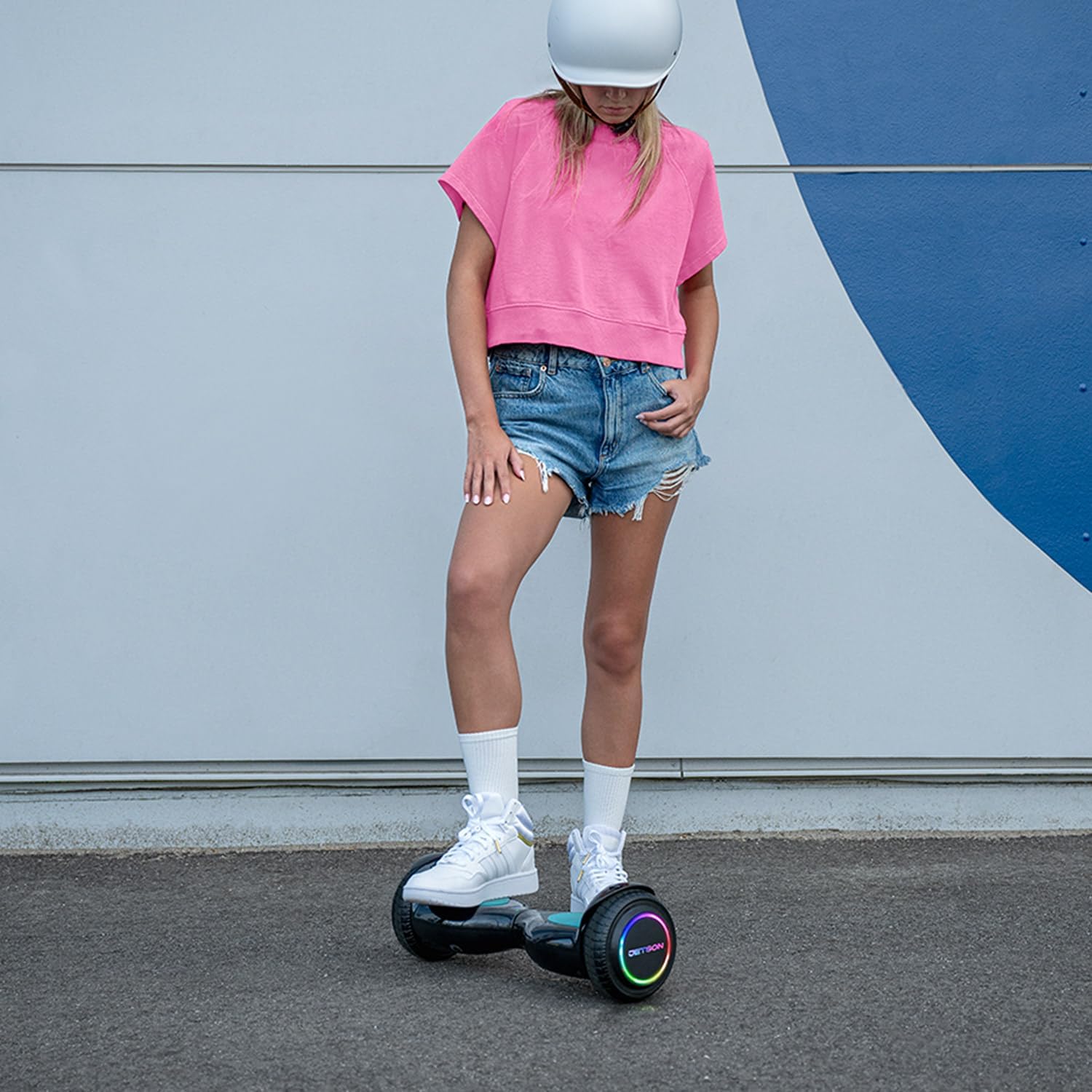
Figure 3: A rider demonstrating the use of the Jetson Dash Hoverboard, highlighting the active balance technology and the LED lights in action.

الشكل 4: آخر view of a rider on the hoverboard, emphasizing the comfortable and stable stance provided by the anti-slip footpads.
3.4 إرشادات السلامة
- قم دائمًا بارتداء معدات السلامة المناسبة، بما في ذلك الخوذة، ومنصات الركبة، ومنصات الكوع.
- Do not exceed the maximum weight limit of 220 pounds (approximately 100 kg).
- The maximum speed is 5 mph. Ride at a safe speed appropriate for your skill level and surroundings.
- تجنب القيادة على الأسطح غير المستوية أو المنحدرات الحادة أو بالقرب من حركة المرور.
- لا تركب تحت تأثير الكحول أو المخدرات.
- Supervise younger riders.
4. الصيانة
4.1 التنظيف
To clean your hoverboard, wipe it with a damp cloth. Do not use harsh chemicals or abrasive cleaners. Ensure the charging port and other electrical components remain dry.
4.2 التخزين
خزّن لوح التزلج الطائر في مكان بارد وجاف بعيدًا عن أشعة الشمس المباشرة ودرجات الحرارة العالية. في حال تخزينه لفترة طويلة، تأكد من شحن البطارية جزئيًا (حوالي ٥٠٪) للحفاظ على سلامتها.
4.3 العناية بالبطارية
Regularly charge the hoverboard, even if not in frequent use, to prevent deep discharge. Avoid overcharging. If the battery indicator shows low charge, recharge it promptly to avoid performance issues or damage.
5. استكشاف الأخطاء وإصلاحها
This section addresses common issues you might encounter with your Jetson Dash Hoverboard.
5.1 Hoverboard Not Turning On
- Ensure the battery is fully charged. Connect the charger and check the indicator lights.
- Verify the power button is being pressed correctly and held for a few seconds.
5.2 Beeping Sound During Operation
A continuous beeping sound, as demonstrated in the provided video, typically indicates a low battery charge. Recharge the hoverboard immediately. It may also beep if the hoverboard is not level or if the weight distribution is incorrect. Adjust your stance to ensure even pressure on both footpads.
5.3 مصابيح LED لا تعمل
- Check if the hoverboard is powered on.
- تأكد من أن البطارية بها شحن كافٍ.
- إذا استمرت المشكلة ، فاتصل بدعم العملاء.
6. المواصفات
| ميزة | التفاصيل |
|---|---|
| أبعاد حزمة السلعة (الطول × العرض × الارتفاع) | 21.5 × 8.1 × 7.1 بوصة |
| وزن الحزمة | 13.2 رطل |
| أبعاد العنصر (الطول × العرض × الارتفاع) | 20.1 × 6.25 × 6.5 بوصة |
| وزن العنصر | 11 رطل |
| العلامة التجارية | جيتسون |
| اسم الموديل | داش |
| لون | أسود |
| مادة | بلاستيك |
| الشركة المصنعة | جيتسون |
| رقم القطعة | JDASH-BLK |
| أسلوب | داش |
| المكونات المضمنة | hoverboard, manual, charger |
| الفئة العمرية (الوصف) | شباب |
| ميزة خاصة | LED Light, Non-Slip Deck, Portable, Rechargeable |
7. الضمان والدعم
7.1 معلومات الضمان
للحصول على معلومات مفصلة حول الضمان، يرجى الرجوع إلى الموقع الرسمي للشركة المصنعة. website. The product is UL-2272 certified, ensuring compliance with safety standards.
7.2 دعم العملاء
If you have any questions, require assistance, or need to report an issue, please visit the official Jetson store or contact their customer support directly. You can find more information and products at the Jetson Store on Amazon.


