1. المقدمة
The Fodsports F1 PRO is a motorcycle Bluetooth headset designed to enhance communication and safety during rides. It features a unique safety light, intercom capabilities for two riders, high-fidelity audio with EQ sound modes, and a robust waterproof design. This manual provides detailed instructions for installation, operation, and maintenance to ensure optimal performance and user experience.

Image 1.1: Fodsports F1 PRO Headset highlighting key features.
2. ماذا يوجد في الصندوق
تأكد من وجود جميع المكونات في العبوة:
- F1 PRO Bluetooth Headset Unit
- مكبرات الصوت والميكروفون الأنبوبي الصلب
- كابل شحن USB
- مقطع الكابل
- قاعدة مغناطيسية (x2)
- 3M Glue Velcro (x2)
- Velcro (for speakers)
- وسادات تقوية مكبر الصوت
- User Manual (Start Guide)

Image 2.1: Package contents of the Fodsports F1 PRO.
3. مواصفات المنتج
- Integrated Safety Light: Features 3 light colors (red, blue, green) and 9 light effects (long light, flashing, breathing) for enhanced visibility during night riding.
- 2-Rider Bluetooth Intercom: Supports communication between two riders with Bluetooth 5.0 technology, offering stable connectivity up to 1000 meters (0.62 miles).
- CVC Noise Cancellation & Hi-Fi Stereo Sound: Equipped with a professional noise-canceling microphone and a smart noise cancellation chip. Features 40mm high-fidelity speakers for clear audio even at high speeds.
- نظام التثبيت المغناطيسي: Easy and secure magnetic base design for quick installation and removal on various helmet types.
- عمر بطارية طويل: Built-in 1500 mAh battery provides up to 30 hours of talk time, 40 hours for the warning light, and 2 weeks of standby time.
- أوضاع الصوت EQ: Enjoy 3 different music styles: HiFi Bass, Popular Golden Classic, and Pure Human Voice.
- IP67 مقاوم للماء: Advanced casting process ensures excellent sealing, meeting international IP67 waterproof standards for use in various outdoor weather conditions, even at -15°F.
- راديو FM: Integrated FM radio allows users to listen to their favorite channels.
- Intelligent Battery Display: When paired with a phone, the remaining power level is displayed on the phone screen.

Image 3.1: Advanced technologies in the F1 PRO headset.
4. الإعداد
4.1 Mounting the Headset
The F1 PRO uses a magnetic base for easy attachment to various helmet types, including full-face, modular, and 3/4 open-face helmets.
- Clean the desired mounting area on the back of your helmet thoroughly.
- Peel off the protective film from one of the 3M Glue Velcro pads and firmly attach it to the helmet.
- Attach the magnetic base to the 3M Glue Velcro pad on the helmet.
- Align the F1 PRO headset with the magnetic base and allow it to snap into place. Ensure it is securely attached.

Image 4.1: Magnetic mounting system.

Image 4.2: Helmet compatibility for F1 PRO.
4.2 Speaker and Microphone Installation
Install the speakers and microphone inside your helmet for optimal audio and communication.
- Locate the ear pockets inside your helmet.
- Attach the Velcro pads to the back of the speakers.
- Place the speakers inside the ear pockets, ensuring they are centered over your ears for clear sound. Use speaker booster pads if needed for better fit or volume.
- Route the microphone cable to the front of the helmet, positioning the microphone near your mouth. Secure the cable using the provided cable clips.
- Connect the speaker and microphone cables to the F1 PRO headset unit.
4.3 شحن الجهاز
Before first use, fully charge the F1 PRO headset.
- Connect the USB charging cable to the charging port on the F1 PRO unit.
- قم بتوصيل الطرف الآخر من كابل USB بمحول طاقة USB قياسي (غير متضمن) أو بمنفذ USB بالكمبيوتر.
- سيضيء مؤشر الشحن. تستغرق عملية الشحن الكامل عادةً حوالي 3 ساعات.
- The indicator light will change or turn off once charging is complete.
5. تعليمات التشغيل
5.1 تشغيل/إيقاف التشغيل
- تشغيل الطاقة: اضغط مع الاستمرار على زر الطاقة لمدة 3 ثوانٍ تقريبًا حتى تسمع صوت تنبيه.
- إيقاف التشغيل: اضغط مع الاستمرار على زر الطاقة لمدة 3 ثوانٍ تقريبًا حتى تسمع صوت تنبيه.
5.2 Bluetooth Pairing (with Phone)
- Ensure the F1 PRO is powered off.
- Press and hold the Power button for about 5-7 seconds until the indicator light flashes red and blue alternately, indicating pairing mode.
- على هاتفك المحمول، قم بتفعيل البلوتوث وابحث عن الأجهزة المتاحة.
- Select "Fodsports F1 PRO" from the list of devices.
- Once paired, the indicator light will flash blue slowly, and you will hear a confirmation tone.
5.3 Intercom Pairing (with another F1 PRO)
- Ensure both F1 PRO units are powered off.
- On both units, press and hold the Intercom button (refer to device layout for specific button) for approximately 5 seconds until the indicator lights flash red and blue alternately.
- Briefly press the Intercom button on one of the units. The units will search for each other.
- Once connected, the indicator lights on both units will flash blue slowly, and you will hear a confirmation tone.
5.4 تشغيل الموسيقى
- تشغيل/إيقاف مؤقت: Briefly press the Multi-function button (or designated music control button).
- المسار التالي: اضغط على زر رفع الصوت.
- المسار السابق: اضغط على زر خفض الصوت.
- ضبط مستوى الصوت: Press and hold the Volume Up or Volume Down buttons.
5.5 المكالمات الهاتفية
- الرد على المكالمة: Briefly press the Multi-function button.
- إنهاء المكالمة: Briefly press the Multi-function button.
- رفض المكالمة: اضغط مع الاستمرار على الزر متعدد الوظائف لمدة ثانيتين.
- إعادة الاتصال بالرقم الأخير: اضغط مرتين على الزر متعدد الوظائف.
5.6 Safety Light Modes
The F1 PRO features 3 light colors (red, blue, green) and 9 light effects. Use the dedicated Light Mode button to cycle through options.
- Briefly press the Light Mode button to change the light color (Red > Blue > Green).
- Double-press the Light Mode button to cycle through light effects (Long Light > Flashing > Breathing).
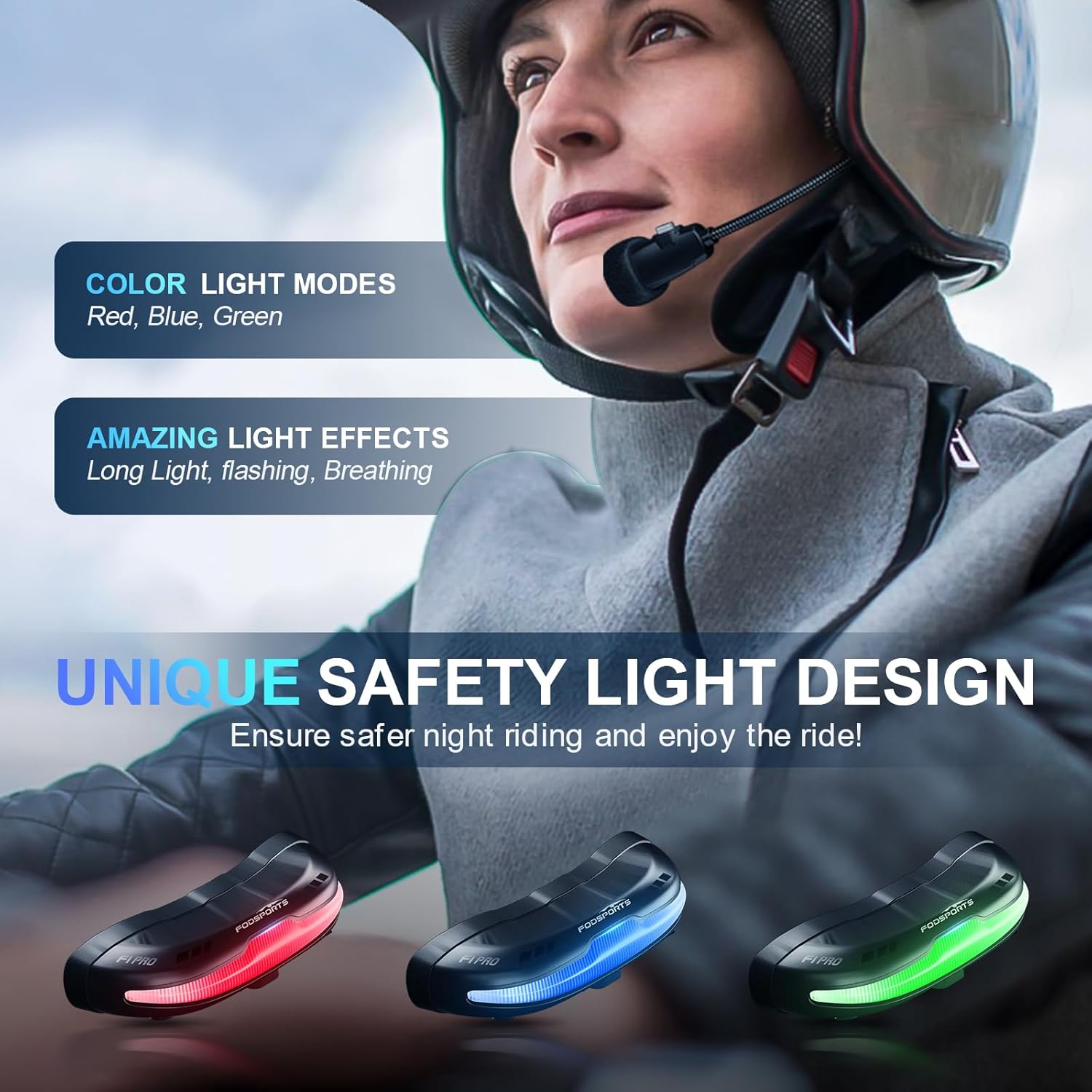
Image 5.1: Available safety light colors.
5.7 أوضاع صوت EQ
The F1 PRO offers three distinct EQ sound modes. Press the EQ button (refer to device layout) to switch between them:
- HiFi Bass
- Popular Golden Classic
- Pure Human Voice

Image 5.2: EQ Sound Effects and Microphone.
5.8 راديو FM
To activate the FM radio, press the FM button (refer to device layout). Use the Volume Up/Down buttons to scan for stations.
5.9 مساعد صوتي
Activate your phone's voice assistant (e.g., Siri) by briefly pressing the Voice Assistant button (refer to device layout).
6. الصيانة
- تنظيف: Wipe the headset unit with a soft, damp قماش. تجنب استخدام المواد الكيميائية القاسية أو المنظفات الكاشطة.
- تخزين: يُحفظ الجهاز في مكان بارد وجاف عند عدم استخدامه. تجنب درجات الحرارة القصوى.
- العناية بالبطارية: لإطالة عمر البطارية، تجنب تفريغها بالكامل بشكل متكرر. اشحن الجهاز بانتظام، حتى في حال عدم استخدامه لفترات طويلة.
- التعرض للماء: While IP67 waterproof, avoid prolonged submersion. Ensure the charging port cover is securely closed before exposure to water.
7. استكشاف الأخطاء وإصلاحها
- الجهاز لا يعمل: تأكد من شحن البطارية. وصّل الجهاز بمصدر طاقة وحاول مرة أخرى.
- Cannot pair with phone/intercom: Ensure the device is in pairing mode (flashing red and blue). Make sure other Bluetooth devices are not interfering. Try resetting the device (refer to specific reset instructions if available in a full manual).
- لا يوجد صوت من مكبرات الصوت: Check speaker connections to the main unit. Ensure volume is not set to minimum. Verify successful Bluetooth connection.
- الميكروفون لا يعمل: Ensure the microphone is properly connected and positioned correctly near your mouth.
- Intercom connection drops: Ensure both units are within the specified range (1000 meters) and there are no significant obstructions.
- Safety light not working: Check if the device is powered on. Cycle through light modes to ensure it's not off or in a very dim setting.
- Magnetic mount not holding: Ensure the helmet surface is clean and dry before applying the 3M adhesive. Allow sufficient time for the adhesive to cure.
8. المواصفات
| ميزة | مواصفة |
|---|---|
| اسم الموديل | اف 1 برو |
| تكنولوجيا الاتصال | بلوتوث، لاسلكي |
| نسخة البلوتوث | 5.0 |
| التحكم في الضوضاء | إلغاء الضوضاء النشط (CVC) |
| سعة البطارية | 1500 مللي أمبير من نوع ليثيوم أيون |
| عمر البطارية (للمكالمات/الموسيقى) | حتى ساعتين |
| Battery Life (Warning Light) | حتى ساعتين |
| وقت الاستعداد | Up to 2 Weeks (350 Hours) |
| وقت الشحن | 3 ساعة |
| مستوى مقاومة الماء | IP67 مقاوم للماء |
| حجم برنامج تشغيل الصوت | 40 ملم |
| نطاق التردد | 20 هرتز - 20,000 هرتز |
| وزن العنصر | 74 جرام (2.61 أونصة) |
| مادة | بلاستيك |
| المميزات الخاصة | 9 Modes Safety Light, EQ Sounds, Magnetic Quick Mount, Noise Cancellation, Rechargeable Battery |
9. الضمان والدعم
Fodsports provides customer support for the F1 PRO Motorcycle Bluetooth Headset. For any issues or inquiries regarding this product, please contact the seller directly. The seller, YUANKUN-US, commits to replying within 12 hours.
To contact support, navigate to the product page on Amazon, locate the seller information (usually under the 'Add to Cart' button), and click on the seller's name (e.g., "YUANKUN-US") then select "Ask a question".
يرجى الاحتفاظ بإثبات الشراء الخاص بك لمطالبات الضمان.


