مقدمة
This manual provides detailed instructions for the setup, operation, maintenance, and troubleshooting of your Makeid L1 Portable Wireless Sticker Label Maker Machine. Please read this manual thoroughly before using the device to ensure proper function and longevity.
ماذا يوجد في الصندوق
تأكد من وجود جميع المكونات في العبوة:
- Makeid L1 Label Maker Machine
- 4-meter roll of label tape
- كابل شحن يو اس بي
- دليل المستخدم (هذا المستند)
المنتج انتهىview
Familiarize yourself with the key components of your Makeid L1 Label Maker.

صورة: زيادةview of the Makeid L1 Label Maker, highlighting the power button, the lid for tape replacement, and the integrated cutter for crisp labels.
- زر الطاقة: Located on the side, used to turn the device on/off.
- غطاء: Opens to access the tape compartment for loading and replacing label rolls.
- القاطع المدمج: Ensures clean and precise cuts of printed labels.
- فتحة إخراج الملصقات: حيث تظهر الملصقات المطبوعة.
- منفذ الشحن: USB port for recharging the device.
يثبت
1. شحن الجهاز
Before first use, ensure the label maker is fully charged. Connect the provided USB charging cable to the device's charging port and a compatible USB power source (e.g., computer USB port, USB wall adapter). The indicator light will show charging status (refer to device specific light indicators for full/charging status).
2. تحميل شريط الملصقات
The Makeid L1 supports various label tape widths (9mm, 12mm, 16mm) and types (continuous, die-cut, transparent, white, colored, pattern). Ensure the tape is correctly oriented.
- Open the lid of the label maker.
- Insert the label roll into the compartment, ensuring the tape feeds out from the bottom and through the output slot.
- أغلق الغطاء جيدًا.
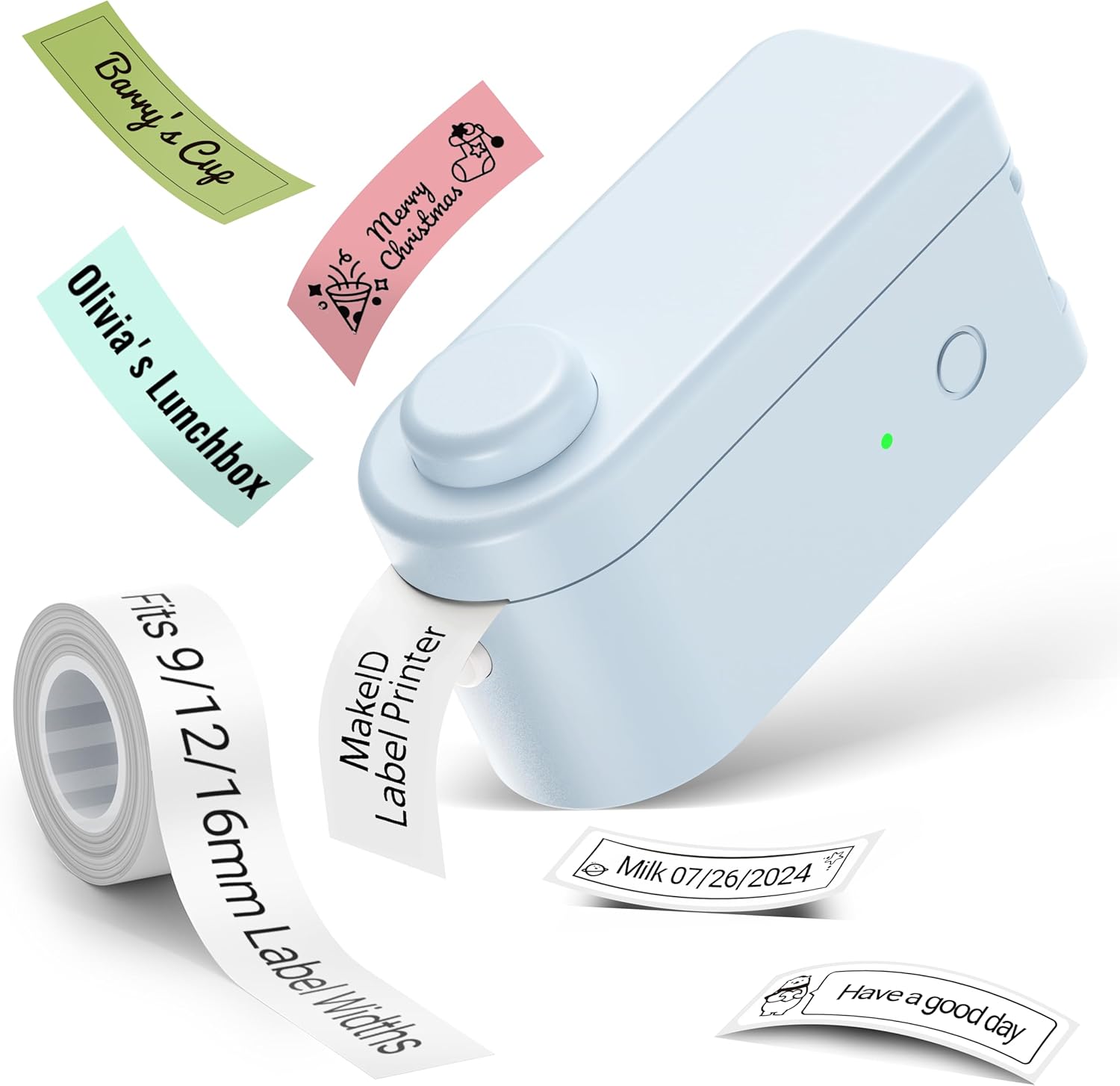
صورة: The Makeid L1 Label Maker demonstrating the label tape roll and examples of printed labels, including continuous and die-cut types.
3. تنزيل التطبيق وتثبيته
The Makeid L1 operates via a dedicated mobile application. بحث عن "MakeID-Life" on your device's app store.

صورة: Screenshots showing the "Get it on Google Play" and "Download on the App Store" buttons, indicating where to find the MakeID-Life application.
4. اقتران بلوتوث
The label maker connects to your smartphone via Bluetooth.
- تأكد من تمكين Bluetooth على هاتفك الذكي.
- Turn on the Makeid L1 Label Maker by pressing the power button. The indicator light will flash, indicating it's ready for pairing.
- Open the "MakeID-Life" app. The app will automatically search for nearby devices.
- Select "L1" from the list of available devices to connect. Once connected, the indicator light on the label maker will become solid.

صورة: A visual guide demonstrating the three steps for Bluetooth connection: turning on Bluetooth, selecting the L1 model within the app, and confirming the device connection.
تعليمات التشغيل
1. Designing Your Label
The "MakeID-Life" app offers extensive customization options:
- إدخال النص: Type your desired text.
- الخطوط: Choose from 88 different font styles.
- الرموز والرموز: Access over 600 icons and various symbols.
- القوالب: Utilize over 400 pre-designed templates for various purposes (e.g., kitchen, office, school).
- Borders & Frames: Add decorative borders.
- وظائف أخرى: Create barcodes, QR codes, tables, dates, and patterns.
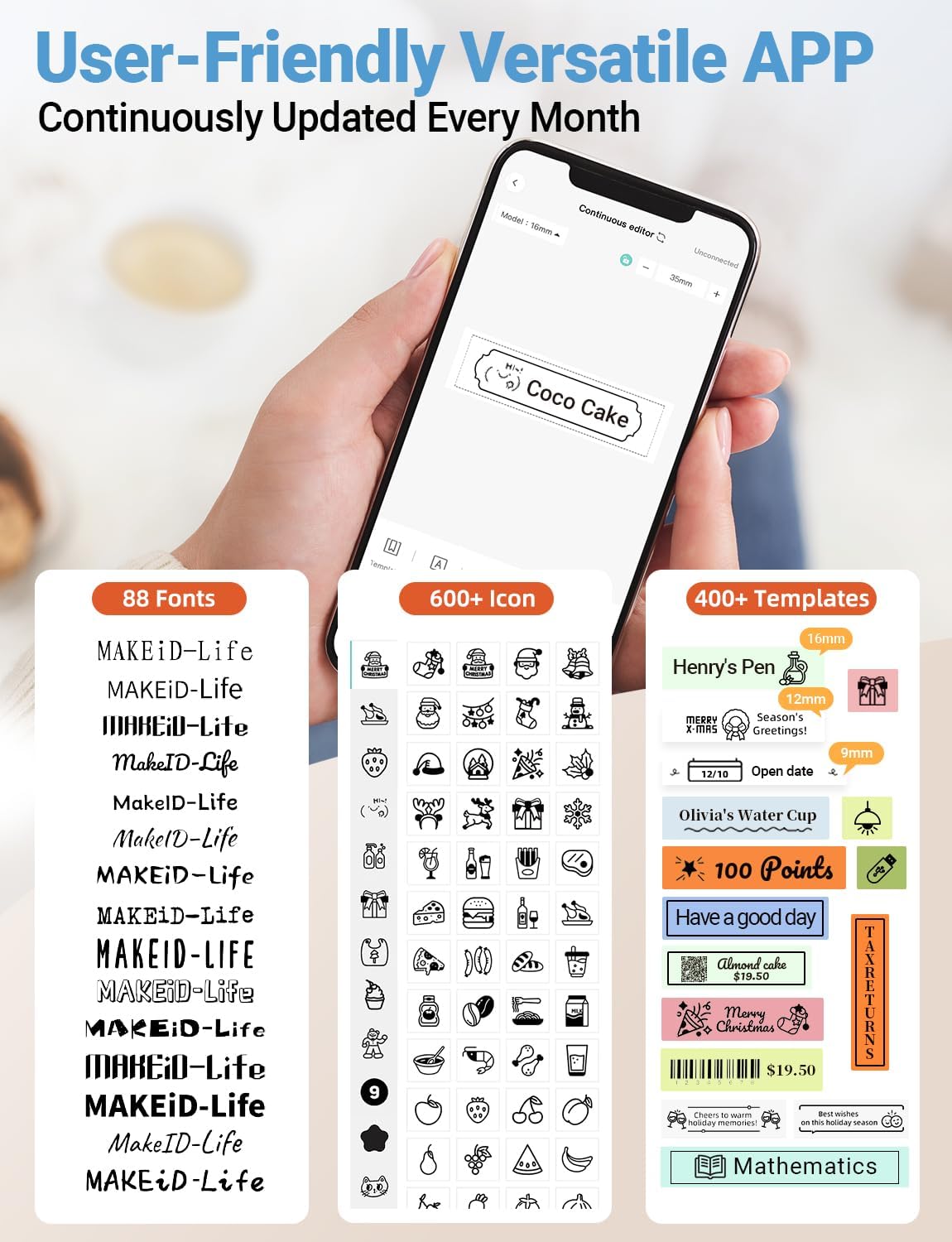
صورة: تفصيلية view of the MakeID-Life app interface, showcasing the wide selection of 88 fonts, over 600 icons, and more than 400 templates available for label customization.
2. طباعة الملصقات
Once your design is complete in the app:
- Review your label design on the app screen.
- انقر على زر "طباعة" داخل التطبيق.
- The label will be thermally printed and emerge from the output slot.
3. Cutting Labels
The Makeid L1 features a built-in cutter for clean edges.
- After printing, gently pull the label forward slightly.
- Press the cutting button (refer to the Product Overview image for location) to cleanly cut the label.

صورة: Illustration of the Makeid L1's built-in cutter, demonstrating how it provides professional and safe cutting of labels, eliminating messy torn edges.
4. Types of Label Printing
The L1 supports two primary types of label printing:
- ملصقات متصلة: Ideal for custom lengths, allowing you to print text of any length and cut it precisely.
- Die-Cut Labels: Pre-sized labels with specific shapes, perfect for consistent labeling of items like jars or files.

صورة: Visual representation of continuous labels, which can be cut to any length, and die-cut labels, which are pre-shaped for specific applications.
صيانة
تنظيف رأس الطباعة
To ensure optimal print quality, periodically clean the thermal print head.
- Turn off the label maker and disconnect it from the power source.
- Open the lid and remove the label tape.
- Gently wipe the print head with a soft, lint-free cloth dampened with isopropyl alcohol. Do not use water or abrasive cleaners.
- Allow the print head to dry completely before reinserting the tape and closing the lid.
تخزين
Store the label maker in a cool, dry place away from direct sunlight and extreme temperatures. Remove the label tape if storing for extended periods.
استكشاف الأخطاء وإصلاحها
يرجى الرجوع إلى الجدول أدناه للتعرف على المشكلات الشائعة وحلولها.
| مشكلة | السبب المحتمل | حل |
|---|---|---|
| الجهاز لا يعمل. | بطارية منخفضة. | اشحن الجهاز باستخدام كابل USB المرفق. |
| لا يمكن الاتصال عبر البلوتوث. | Bluetooth is off on phone; device not in pairing mode; app issue. | Ensure Bluetooth is enabled on your phone. Turn the label maker off and on again to re-enter pairing mode. Restart the "MakeID-Life" app. |
| جودة طباعة رديئة / مطبوعات باهتة. | Print head dirty; incorrect label tape; low battery. | Clean the print head. Ensure you are using Makeid compatible thermal label tape. Charge the device. |
| Label tape not feeding. | Tape incorrectly loaded; tape jammed. | Open the lid and re-insert the label tape correctly, ensuring it's not jammed. |
| Labels are not cutting cleanly. | Cutter blade dull or obstructed. | Ensure no debris is obstructing the cutter. If issues persist, contact customer support. |
تحديد
Detailed technical specifications for the Makeid L1 Label Maker Machine:
| ميزة | التفاصيل |
|---|---|
| ماركة | Makeid |
| اسم الموديل | L1 |
| تكنولوجيا الاتصال | بلوتوث |
| تكنولوجيا الطباعة | حراري |
| مخرجات الطابعة | أحادي اللون |
| دقة | 203 x 203 DPI (also 300 x 300 DPI for other variants) |
| الحد الأقصى لحجم الوسائط | 0.63 بوصة (16 مم) |
| الأجهزة المتوافقة | الهواتف الذكية (أندرويد و iOS) |
| طريقة التحكم | برنامج |
| واجهة الأجهزة | USB |
| مصدر الطاقة | 1 بطارية ليثيوم أيون (مضمنة) |
| أبعاد المنتج | 3.93 بوصة عمق × 1.6 بوصة عرض × 1.96 بوصة ارتفاع (10 × 4.06 × 4.98 سم) |
| وزن العنصر | 4.4 أونصة (126 جرامًا) |
| المميزات الخاصة | Continuous & Pre-cut Label Tapes, Waterproof, Oil-proof, Friction Resistant, Light Resistant, No Fading, Rich Font Icon Pattern, Portable, Inkless, Wireless, Rechargeable, Creative Print Functions (Barcode, Text, Picture, QR 2D Code, Table, Date, Border, Icon, Shape, Pattern, Template) |
الضمان والدعم
The Makeid L1 Label Maker comes with a ضمان مدى الحياة. For technical support, warranty claims, or further assistance, please contact Makeid customer service through the official Makeid webالموقع أو معلومات الاتصال المقدمة في عبوة المنتج الخاص بك.
للحصول على موارد إضافية وأسئلة شائعة، تفضل بزيارة Makeid Store on Amazon.
معلومات السلامة
- لا تقم بتفكيك الجهاز أو محاولة إصلاحه بنفسك.
- احفظ الجهاز بعيدًا عن الماء والرطوبة العالية.
- Use only original or certified compatible label tapes and charging cables.
- يحفظ بعيدًا عن متناول الأطفال.
- تجنب تعريض الجهاز لدرجات حرارة شديدة أو لأشعة الشمس المباشرة.


