1. تعليمات السلامة الهامة
يرجى قراءة جميع تعليمات السلامة وفهمها جيدًا قبل استخدام هذا المنتج. قد يؤدي عدم اتباع هذه التعليمات إلى صدمة كهربائية أو حريق أو إصابة خطيرة.
- لا تعرض الجهاز لدرجات حرارة عالية، أو أشعة الشمس المباشرة، أو الرطوبة العالية.
- Keep the device away from water and other liquids. If it gets wet, turn it off immediately and allow it to dry completely before reuse.
- لا تحاول تفكيك الجهاز أو إصلاحه أو تعديله. قم بإحالة جميع أعمال الصيانة إلى فنيين مؤهلين.
- Use only specified charging methods (USB-C, solar, hand crank).
- يحفظ بعيدًا عن متناول الأطفال.
- التخلص من البطاريات وفقا للقوانين المحلية.
2. انتهى المنتجview
The FosPower Emergency Weather Radio Model A6 is a versatile device designed for emergency preparedness and outdoor activities. It features multiple power sources, radio reception, lighting, and a power bank function.
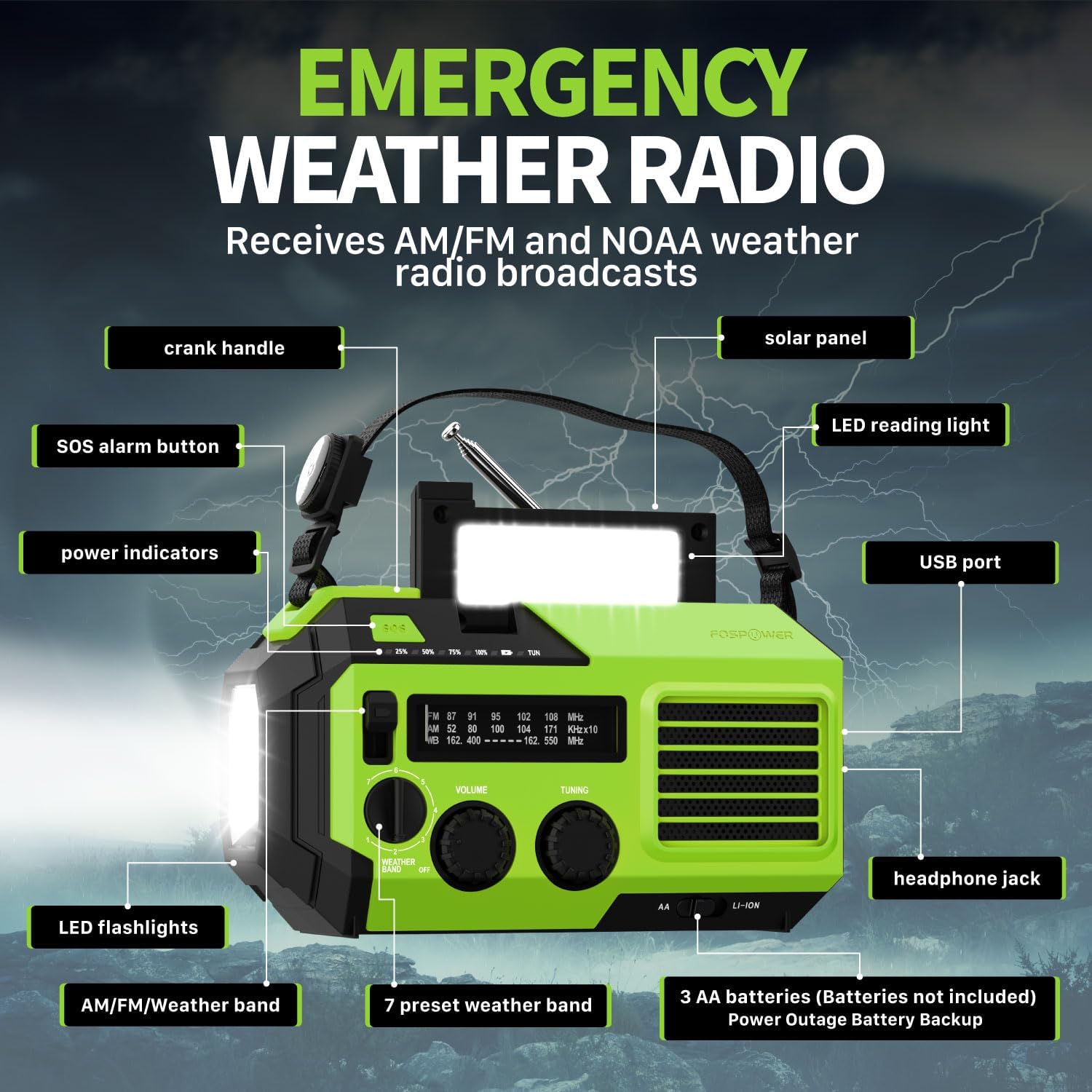
الصورة 2.1: الجبهة view of the FosPower Emergency Weather Radio with key components labeled, including the crank handle, solar panel, SOS alarm button, power indicators, LED reading light, USB port, LED flashlights, AM/FM/Weather band selector, volume and tuning knobs, and headphone jack.
المميزات الرئيسية:
- NOAA/AM/FM Radio: Access local weather information and emergency hazard alerts, as well as standard AM/FM broadcasts.
- 19240mWh (5200mAh) Power Bank: Charge USB devices during power outages or in outdoor settings.
- مصادر طاقة متعددة: Recharge via USB-C cable, solar panel, or hand crank. Can also be powered by AA batteries (not included).
- إنذار SOS: يقوم بتشغيل صفارة إنذار عالية الصوت وضوء وامض للإشارة في حالات الطوارئ.
- الإضاءة المتكاملة: Features a powerful flashlight and a reading light.
- مقاومة الماء IPX3: يوفر الحماية من تناثر الماء.
3. الإعداد
3.1 الشحن الأولي
Before first use, fully charge the internal battery using the provided USB-C cable. Connect the USB-C cable to the radio's USB-C port and the other end to a USB power adapter (not included) or a computer USB port. The power indicators will illuminate to show charging progress.
3.2 AA Battery Installation (Optional)
The radio can also operate on 3 AA batteries (not included) as a backup power source. Open the battery compartment cover on the back of the radio and insert 3 AA batteries, ensuring correct polarity. Close the cover securely.

الصورة 3.1: خلفي view of the radio highlighting the solar panel, hand-crank, AA battery compartment, and USB charging port, illustrating the multiple power sources.
4. تعليمات التشغيل
4.1 تشغيل الراديو
- تشغيل/إيقاف التشغيل: Rotate the 'VOLUME' knob clockwise to turn the radio on and adjust the volume. Rotate counter-clockwise until it clicks to turn off.
- اختيار فرقة: Use the 'WEATHER BAND' switch to select between AM, FM, or WB (Weather Band).
- ضبط: Rotate the 'TUNING' knob to scan for radio stations. Extend the telescopic antenna for improved reception, especially for FM and WB.
- نطاق الطقس NOAA: When WB is selected, the radio will receive NOAA weather alerts. The radio supports 7 preset weather bands.
- مقبس سماعة الرأس: For private listening, connect 3.5mm headphones to the headphone jack.
4.2 Flashlight and Reading Light

Image 4.1: The radio demonstrating its high-power flashlight and cool-tone reading lamp سمات.
- مصباح يدوي: Press the flashlight button located on the front of the radio to turn the flashlight on or off.
- ضوء القراءة: Lift the solar panel to reveal the LED reading light. Press the reading light button to turn it on or off.
4.3 إنذار SOS
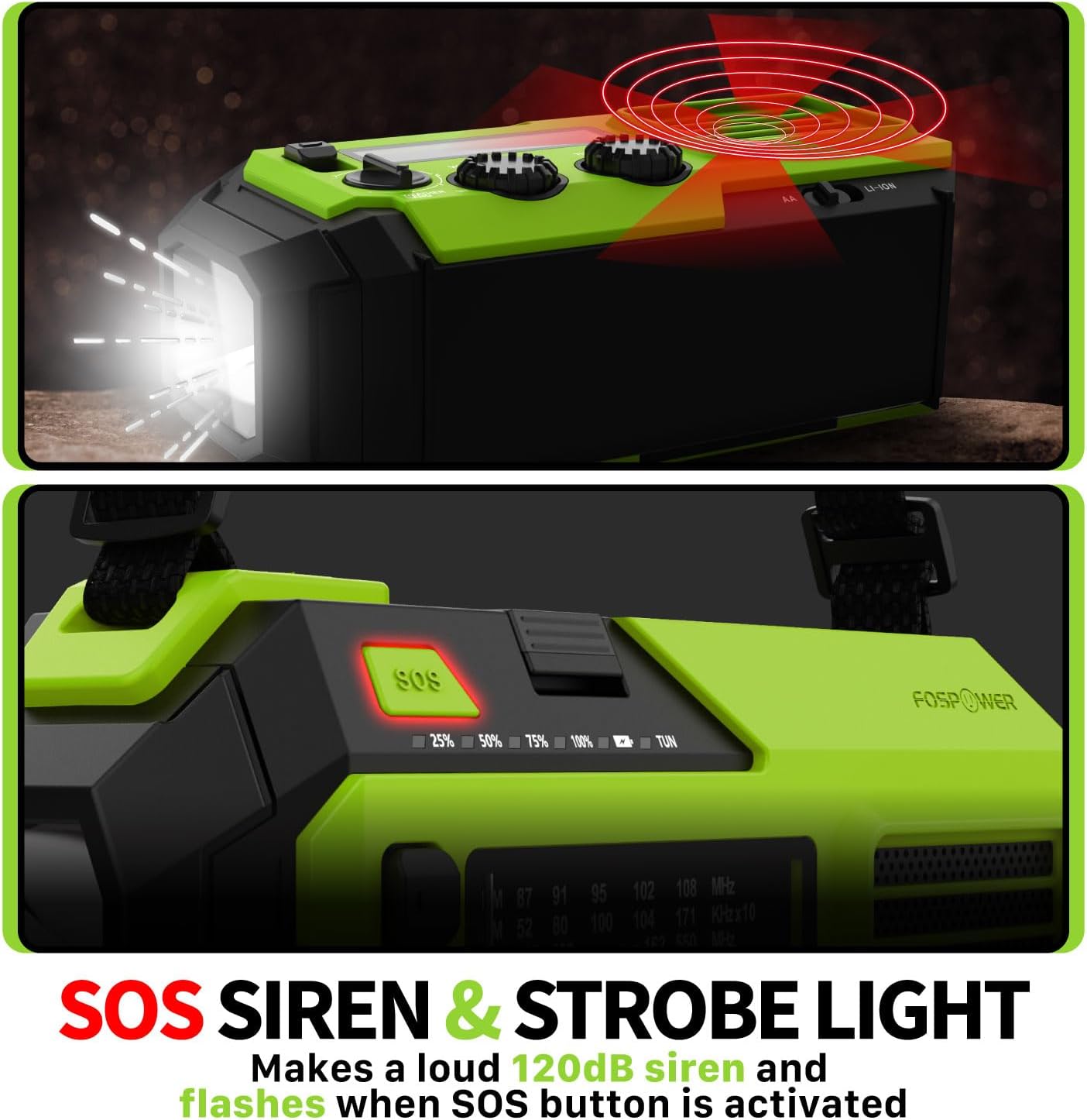
Image 4.2: Close-up of the radio's SOS button and an illustration of the siren and strobe light being activated.
In an emergency, press and hold the 'SOS' button to activate a loud 120dB siren and a flashing strobe light. Press the 'SOS' button again to deactivate.
4.4 شحن الأجهزة الخارجية (بنك الطاقة)

Image 4.3: The radio connected via USB to a smartphone, demonstrating its power bank capability for charging small electronics.
Connect your USB-powered device (e.g., smartphone, tablet) to the radio's USB-A output port using your device's charging cable. The radio's internal battery will begin charging your device.
4.5 شحن الراديو
- شحن USB-C: Connect the provided USB-C cable to the radio's USB-C input port and a USB power source. This is the most efficient charging method.
- الشحن بالطاقة الشمسية: Place the radio with the solar panel facing direct sunlight. The solar panel charges the internal battery, primarily for maintaining charge or slow charging in emergencies.
- الشحن باستخدام كرنك اليد: قم بتدوير ذراع التدوير اليدوي في اتجاه عقارب الساعة أو عكس اتجاه عقارب الساعة بوتيرة ثابتة (حوالي 130-150 دورة في الدقيقة) لمدة 3-5 دقائق لتوليد الطاقة للاستخدام قصير المدى أو لبدء عملية الشحن.
5. الصيانة
- تنظيف: امسح الراديو بقطعة قماش ناعمة وجافة. لا تستخدم المنظفات الكاشطة أو المذيبات.
- تخزين: Store the radio in a cool, dry place away from direct sunlight when not in use for extended periods. For optimal battery health, fully charge the internal battery every 3-6 months.
- العناية بالبطارية: في حالة استخدام بطاريات AA، قم بإزالتها إذا لم يتم استخدام الراديو لفترة طويلة لمنع التسرب.
6. استكشاف الأخطاء وإصلاحها
| مشكلة | السبب المحتمل | حل |
|---|---|---|
| الراديو لا يعمل. | Internal battery is depleted; AA batteries are depleted or incorrectly installed. | Charge the internal battery via USB-C or hand crank. Check and replace AA batteries if used. |
| استقبال راديو ضعيف. | الهوائي غير ممتد؛ منطقة الإشارة ضعيفة؛ التداخل. | Fully extend the telescopic antenna. Adjust radio position. Try tuning to a stronger station. |
| الجهاز الخارجي لا يتم شحنه. | Radio's internal battery is low; incorrect cable; device not compatible. | Ensure the radio's internal battery is sufficiently charged. Use a functional USB charging cable. Verify device compatibility. |
| ذراع التدوير اليدوي صلب أو لا يولد طاقة. | Mechanism obstruction; improper cranking speed. | Ensure no obstructions. Crank at a steady, moderate pace (130-150 RPM). |
7. المواصفات
| ميزة | التفاصيل |
|---|---|
| رقم الموديل | FOSPWB-2419 |
| أبعاد المنتج | 6.76 × 3.52 × 2.59 بوصة |
| وزن العنصر | 1.08 رطل |
| بطارية داخلية | 19240mWh (5200mAh) |
| External Battery Support | 3 بطاريات AA (غير متضمنة) |
| نطاقات الراديو | موجات AM و FM و NOAA Weather Band (WB) |
| طرق الشحن | USB-C, Solar, Hand Crank |
| المميزات الخاصة | Built-In Flashlight, Reading Light, SOS Alarm, Power Bank |
| مقاومة الماء | IPX3 |
8. الضمان والدعم
FosPower provides a limited lifetime warranty for this product. For warranty claims, technical assistance, or customer service inquiries, please contact FosPower's USA-based customer support team. Refer to the official FosPower webقم بزيارة الموقع أو وثائق الشراء الخاصة بك للحصول على تفاصيل الاتصال.


