1. المقدمة
The Laserliner MultiWet-Finder Plus is a versatile diagnostic tool designed for non-destructive measurement of material moisture and ambient conditions. It provides quick and reliable readings for various building materials, along with air temperature, relative humidity, and dew point temperature. This manual provides essential information for the safe and efficient operation of your device.

الشكل 1: The Laserliner MultiWet-Finder Plus device. This image shows the front view of the device, highlighting its large digital display, control buttons, and the spherical sensor at the top.
2. تعليمات السلامة
Please read these safety instructions carefully before using the device. Failure to follow these instructions may result in electric shock, fire, or injury.
- Keep the device away from moisture and direct sunlight.
- Do not open the device. Repairs should only be performed by authorized personnel.
- Use only specified batteries. Ensure correct polarity during installation.
- تجنب الصدمات القوية أو إسقاط الجهاز.
- لا تستخدم الجهاز في الأجواء المتفجرة أو بالقرب من المواد القابلة للاشتعال.
- تخلص من البطاريات والجهاز وفقًا للوائح المحلية.
3. انتهى المنتجview
3.1 مكونات الجهاز
The MultiWet-Finder Plus features a robust design with intuitive controls and a clear display.
- مستشعر كروي: For non-destructive material moisture measurement.
- شاشة LCD: Shows measurement values, modes, and indicators.
- زر الوضع: To switch between measurement modes (Index, CM%, MASS%).
- زر المرجع: To set a reference value.
- MAX/SET Button: ل view maximum/minimum values or confirm settings.
- زر البحث: To activate the measurement.
- Temperature/Humidity Sensors: Located on the side for ambient condition measurements.

الشكل 2: جانب view of the device showing the integrated sensors for air temperature and relative humidity. The image also indicates the measurement ranges for these sensors: air temperature from -10°C to 60°C, relative humidity from 20% to 90% RH, and dew point temperature from -20°C to 60°C.
3.2 عرض المؤشرات
The LCD display provides comprehensive information:
- درجة الحرارة (درجة مئوية): Ambient air temperature.
- Relative Humidity (% RH): Ambient air humidity.
- Dew Point Temperature (°C): Calculated dew point.
- Moisture Index: A relative value indicating moisture content.
- CM% / MASS%: Specific moisture content for selected materials.
- DRY/WET Bar Graph: Visual indication of moisture level (green for dry, red for wet).

الشكل 3: The device's display showing readings in "INDEX MODE". This view includes air temperature, relative humidity, dew point, and a large numerical index value, along with the DRY/WET bar graph.
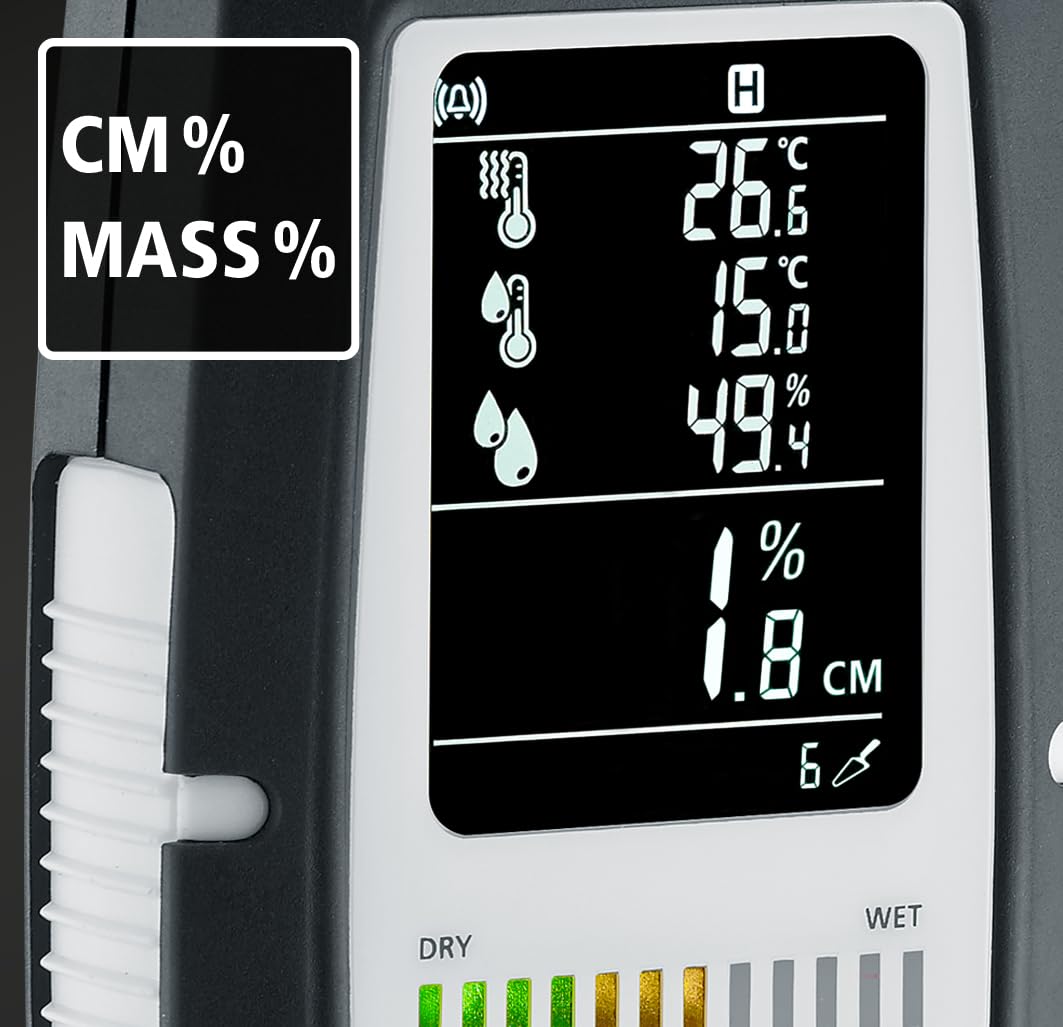
الشكل 4: The device's display showing readings in "CM%" or "MASS%" mode. This view provides specific moisture content percentages, alongside the ambient condition readings.
4. الإعداد
4.1 تركيب البطارية
The MultiWet-Finder Plus requires standard AAA batteries for operation.
- حدد مكان غطاء حجرة البطارية على الجزء الخلفي للجهاز.
- Open the cover by sliding or unscrewing it (refer to the diagram if available).
- Insert the required number of AAA batteries, ensuring correct polarity (+/-).
- أغلق غطاء حجرة البطارية جيدًا.

الشكل 5: The MultiWet-Finder Plus shown alongside its packaging, which indicates the use of AAA batteries. This image implies the battery type required for the device.
5. تعليمات التشغيل
5.1 تشغيل/إيقاف التشغيل
اضغط مع الاستمرار على وضع زر لتشغيل الجهاز أو إيقاف تشغيله.
5.2 اختيار وضع القياس
اضغط لفترة وجيزة على وضع زر للتنقل بين أوضاع القياس المتاحة:
- INDEX Mode: Provides a relative moisture index, useful for quick comparisons and identifying moisture patterns.
- CM% / MASS% Mode: Displays specific moisture content as a percentage for selected material types. Refer to the device's internal material tables for accurate readings.
5.3 Taking a Material Moisture Measurement
- حدد وضع القياس المطلوب باستخدام وضع زر.
- Place the spherical sensor directly onto the surface of the material to be measured. Ensure full contact.
- اضغط على يجد زر لبدء القياس.
- Read the moisture value on the display. The device measures moisture up to a depth of approximately 40 mm.

الشكل 6: Illustration demonstrating the non-destructive measurement capability of the MultiWet-Finder Plus. The image shows the spherical sensor penetrating a material surface, indicating a measurement depth of up to 40 mm.

الشكل 7: Close-up of the device's display, highlighting the DRY/WET bar graph and the control buttons. The bar graph visually represents the moisture level, transitioning from green (dry) to red (wet).
5.4 Ambient Condition Measurement
The device continuously measures air temperature, relative humidity, and calculates the dew point temperature. These values are displayed on the upper part of the LCD screen.
5.5 Reference Function (REF)
ال مرجع button allows you to set a reference value. This is useful for comparing current measurements against a known dry or acceptable moisture level in a specific material.
- Take a measurement on a known dry area of the material.
- اضغط مع الاستمرار على مرجع button to set this value as the reference.
- Subsequent measurements will show the deviation from this reference.
5.6 Max/Min Function (MAX SET)
اضغط على MAX/SET زر ل view the maximum or minimum measured values during a session. This helps in identifying the highest or lowest moisture points.
5.7 Digital Connection (App)
The MultiWet-Finder Plus supports digital connection to a smartphone application for data logging and analysis. Refer to the app's instructions for pairing and usage.
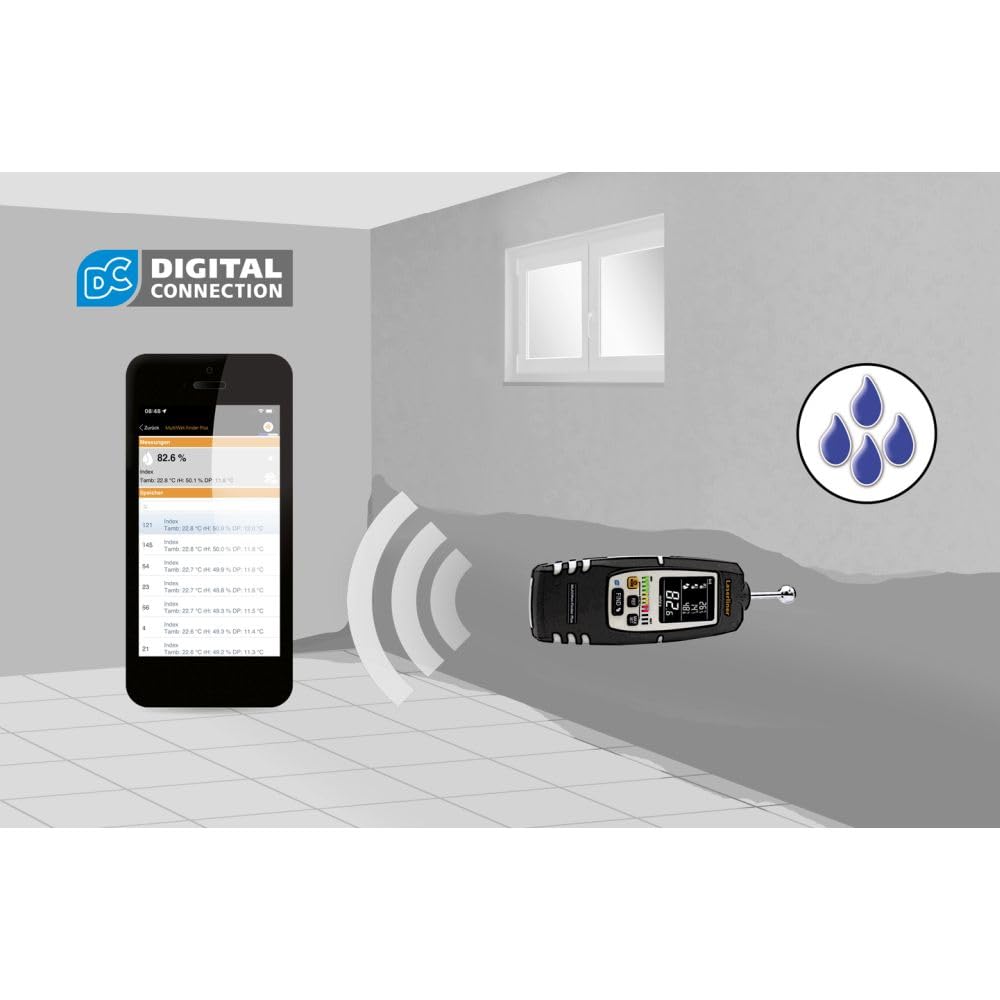
الشكل 8: The MultiWet-Finder Plus wirelessly connected to a smartphone displaying the "DIGITAL CONNECTION" feature. This image illustrates the device's capability to transmit data to a mobile application for further analysis and recording.

الشكل 9: The MultiWet-Finder Plus being used in a bathroom setting, indicating its application in detecting moisture in damp environments. The image shows the device pointed towards a wall, with a water droplet icon suggesting moisture detection.
6. الصيانة
- تنظيف: امسح الجهاز بقطعة ناعمة ، دamp القماش. لا تستخدم المنظفات أو المذيبات الكاشطة.
- تخزين: Store the device in a dry, cool place, away from direct sunlight. Remove batteries if storing for extended periods to prevent leakage.
- معايرة: The device is factory calibrated. If you suspect inaccuracies, contact Laserliner support for recalibration services.
7. استكشاف الأخطاء وإصلاحها
| مشكلة | السبب المحتمل | حل |
|---|---|---|
| الجهاز لا يعمل. | البطاريات الميتة أو المدخلة بشكل غير صحيح. | استبدل البطاريات بأخرى جديدة، مع التأكد من القطبية الصحيحة. |
| قراءات رطوبة غير دقيقة. | Poor contact with material, incorrect mode selected, or material outside measurement range. | Ensure full contact with the spherical sensor. Select the appropriate material mode. Consult specifications for measurement range. |
| العرض فارغ أو وميض. | Low battery power or internal error. | استبدل البطاريات. إذا استمرت المشكلة، فاتصل بخدمة العملاء. |
8. المواصفات
| ميزة | التفاصيل |
|---|---|
| رقم الموديل | 082.091 أمبير |
| أبعاد المنتج | 5.51 × 5.51 × 8.66 بوصة |
| وزن | 1.32 رطل |
| الشركة المصنعة | Laserliner |
| مادة | Stainless Steel (sensor ball, device body is likely plastic) |
| عمق القياس | Approx. 40 mm (non-destructive) |
| نطاق درجة حرارة الهواء | -10 درجة مئوية إلى 60 درجة مئوية |
| نطاق الرطوبة النسبية | 20% إلى 90% رطوبة نسبية |
| نطاق درجة حرارة نقطة الندى | -20 درجة مئوية إلى 60 درجة مئوية |
9. الضمان والدعم
For warranty information, technical support, or service inquiries, please contact Laserliner customer service or visit their official webالموقع. احتفظ بإيصال الشراء كإثبات للشراء.
الشركة المصنعة: Laserliner
Webموقع: www.laserliner.com (مثالampالرابط، قد يختلف الرابط الفعلي)


