1. المقدمة
Welcome to the Titan Evoke Smart Watch user manual. This guide provides essential information for setting up, operating, maintaining, and troubleshooting your new smart watch. The Titan Evoke combines advanced technology with elegant design, featuring a vibrant AMOLED display, Bluetooth calling, and comprehensive health tracking capabilities.
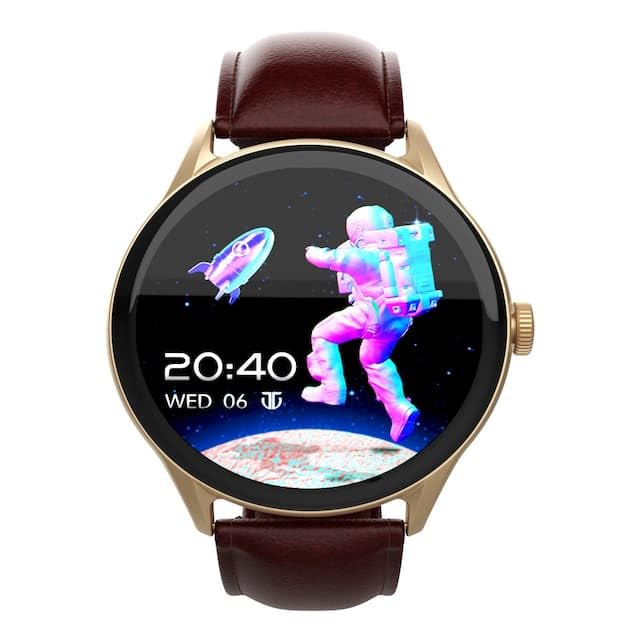
الصورة: الجبهة view of the Titan Evoke Smart Watch displaying a digital clock and an astronaut graphic.

Image: A Titan Evoke Smart Watch with a colorful watch face, accompanied by the text 'Titan Evoke: Function Meets Fashion'.
2. ماذا يوجد في الصندوق
يرجى التحقق من محتويات الحزمة للتأكد من وجود جميع العناصر:
- Titan Evoke Smart Watch
- كابل الشحن المغناطيسي
- دليل البدء السريع
- بطاقة الضمان
3. الإعداد
3.1. شحن الجهاز
Before initial use, fully charge your Titan Evoke Smart Watch. Connect the magnetic charging cable to the charging points on the back of the watch and plug the USB end into a compatible power adapter (not included) or a computer's USB port. The watch display will indicate charging status.
3.2. تشغيل/إيقاف التشغيل
- تشغيل الطاقة: Press and hold the functional crown (side button) for a few seconds until the Titan logo appears.
- إيقاف التشغيل: From the watch face, swipe down to access quick settings, or navigate to 'Settings' > 'System' > 'Power Off'. Alternatively, press and hold the functional crown and select 'Power Off'.
3.3. الاقتران بهاتفك الذكي
To unlock the full functionality of your Titan Evoke Smart Watch, pair it with your smartphone via Bluetooth.
- Download and install the companion app (e.g., 'Titan Smart' app) from your smartphone's app store (Google Play Store for Android, Apple App Store for iOS).
- تأكد من تمكين Bluetooth على هاتفك الذكي.
- افتح التطبيق المصاحب واتبع التعليمات التي تظهر على الشاشة لإنشاء حساب أو تسجيل الدخول.
- اختر "إضافة جهاز" أو "إقران جهاز جديد" داخل التطبيق.
- The app will search for available devices. Select 'Titan Evoke' from the list.
- قم بتأكيد طلب الاقتران على كل من ساعتك والهاتف الذكي.
4. تشغيل ساعتك الذكية
4.1. الملاحة
- شاشة تعمل باللمس: اسحب لليسار أو اليمين أو لأعلى أو لأسفل للتنقل بين القوائم والإشعارات والأدوات. انقر لتحديد العناصر.
- Functional Crown: Rotate the crown to scroll through lists or adjust settings. Press the crown to return to the watch face or confirm selections.
4.2. SingleSync Bluetooth Calling
The Titan Evoke supports direct Bluetooth calling, allowing you to make and receive calls directly from your wrist.
- إجراء مكالمة: Access the 'Phone' or 'Dialer' app on your watch. You can dial numbers directly or select contacts synced from your smartphone.
- استقبال مكالمة: عند ورود مكالمة، ستعرض الساعة هوية المتصل. انقر على الرمز الأخضر للرد أو الرمز الأحمر لرفض المكالمة.
- Ensure your watch is connected to your smartphone via Bluetooth for calling functionality.

Image: Two Titan Evoke Smart Watches, one displaying an incoming call and the other a dial pad, illustrating the SingleSync BT Calling feature.
4.3. مشاهدة الوجوه
Personalize your watch with over 100 available watch faces. To change the watch face, press and hold the current watch face, then swipe left or right to browse and tap to select your preferred design.
4.4. Health Suite
The Titan Evoke monitors various health metrics:
- مراقب معدل ضربات القلب: يوفر قراءات مستمرة أو عند الطلب لمعدل ضربات القلب.
- متتبع النشاط: Records steps, distance, and calories burned throughout the day.
- تتبع الإجهاد: Monitors stress levels based on heart rate variability.
- مراقب النوم: يتتبع أنماط النوم والجودة.
Access these features by swiping on the watch face or through the main menu. For detailed analysis, refer to the companion app.
4.5. Multisport Modes
Engage in your favorite activities with dedicated multisport modes. The watch offers over 60 sports modes to accurately track your workouts.
- To start a workout, navigate to the 'Workout' or 'Sports' app on your watch.
- Select your desired activity (e.g., running, cycling, basketball).
- Tap to begin tracking. The watch will display real-time metrics such as duration, heart rate, and calories.

Image: A Titan Evoke Smart Watch with a basketball player on its screen, surrounded by icons representing various sports modes, illustrating the 'Aspire to Excel' feature.
4.6. ميزات إضافية
- حماية كلمة المرور: تأمين ساعتك بكلمة مرور.
- SOS Emergency Dial: Configure emergency contacts for quick access in critical situations.
- In-Built Calculator and Games: Access these utilities from the main menu.
5. الميزات الرئيسيةview
5.1. 1.43" AMOLED Display
Experience clear visuals on the 1.43-inch AMOLED display with a resolution of 466 x 466 pixels and up to 1000 Nits brightness, ensuring readability even in bright sunlight.

Image: A close-up of the Titan Evoke Smart Watch screen, highlighting its 1000 Nits Brightness and 466x466 pixel resolution, with the text 'A Screen Made For Greatness'.
5.2. Functional Crown
The integrated functional crown provides an intuitive way to navigate menus, scroll through content, and interact with your watch, complementing the touchscreen interface.

Image: A close-up of the Titan Evoke Smart Watch, emphasizing its functional crown and a vibrant watch face displaying health metrics, with the text 'Dial Up The Function & Style'.
5.3. 24x7 Health Suite
The watch continuously monitors your heart rate, tracks your activity, and assesses stress levels, providing a comprehensive overview من صحتك.
6. الصيانة
6.1. تنظيف ساعتك
Regularly clean your watch to maintain its appearance and functionality. Use a soft, lint-free cloth to wipe the screen and watch body. For stubborn dirt, slightly dampاغسل قطعة القماش بالماء. تجنب استخدام المواد الكيميائية القاسية أو المواد الكاشطة.
6.2. العناية بالحزام
If your watch has a leather strap, avoid prolonged exposure to water or direct sunlight to prevent damage. Clean with a dry, soft cloth. For silicone or metal straps, a damp cloth is suitable.
7. استكشاف الأخطاء وإصلاحها
If you encounter issues with your Titan Evoke Smart Watch, refer to the following common solutions:
- الساعة لا تعمل: Ensure the watch is fully charged. Connect it to the magnetic charging cable and allow it to charge for at least 30 minutes before attempting to power on again.
- لا يمكن الاقتران بالهاتف الذكي:
- تأكد من تمكين البلوتوث على كل من ساعتك وهاتفك الذكي.
- تأكد من أن الساعة ضمن نطاق البلوتوث الخاص بهاتفك.
- أعد تشغيل كل من ساعتك وهاتفك الذكي.
- قم بمسح ذاكرة التخزين المؤقت للبلوتوث على هاتفك (إن وجدت) وحاول الاقتران مرة أخرى.
- بيانات صحية غير دقيقة: تأكد من ارتداء الساعة بإحكام على معصمك، على بعد عرض إصبع واحد تقريبًا فوق عظمة المعصم. نظّف المستشعر الموجود في الجزء الخلفي من الساعة.
- عمر بطارية قصير: Reduce screen brightness, disable unnecessary notifications, and limit continuous heart rate monitoring if not required. Ensure background app usage is optimized on your phone.
- شاشة اللمس لا تستجيب: أعد تشغيل الساعة. إذا استمرت المشكلة، فاتصل بدعم العملاء.
8. المواصفات
| ميزة | التفاصيل |
|---|---|
| ماركة | تيتان |
| اسم الموديل | Titan Evoke |
| رقم الموديل | 90172AL01 |
| نوع العرض | أموليد |
| حجم الشاشة | 1.43 بوصة |
| دقة | 466 × 466 بكسل |
| سطوع | يصل إلى 1000 نيت |
| الاتصال | بلوتوث |
| نوع البطارية | بوليمر الليثيوم |
| سعة البطارية | 300 مللي أمبير |
| متوسط عمر البطارية | 5 يوما |
| المميزات الخاصة | Activity Tracker, Heart Rate Monitor, Multisport Tracker, Phone Call, Stress Tracking, Password Protection, SOS Emergency Dial |
| الأجهزة المتوافقة | الهاتف الذكي |
| أبعاد المنتج | 9.4 × 5.9 × 9.5 سم |
| وزن العنصر | 48.5 جرام |
9. الضمان والدعم
9.1. معلومات الضمان
The Titan Evoke Smart Watch comes with a ضمان لمدة سنتين from the date of purchase. Please retain your purchase receipt and the warranty card for any warranty claims. The warranty covers manufacturing defects but does not cover damage caused by misuse, accidents, or unauthorized repairs.
9.2. دعم العملاء
For any queries, technical assistance, or warranty claims, please contact Titan customer care:
- هاتف: 1800-266-0123
- بريد إلكتروني: خدمة العملاء@titan.co.in
- الصانع / المستورد: Titan Company Limited, 3 Sipcot Industries complex, Hosur- 635126


