1. المقدمة
Thank you for choosing the FLYLINKTECH BD10 6000A 12V Car Jump Starter and Power Bank. This device is designed to provide emergency jump-starting for vehicles and serve as a portable power bank for various electronic devices. Please read this manual thoroughly before use to ensure safe and optimal operation.

Image 1.1: The FLYLINKTECH BD10 Jump Starter unit with its smart battery clamps.
2. معلومات السلامة
يرجى دائمًا مراعاة احتياطات السلامة التالية لمنع الإصابة أو تلف الجهاز أو المركبة:
- لا تحاول إعادة تشغيل البطارية المجمدة.
- تأكد من توصيل القطبية الصحيحة (اللون الأحمر)amp إلى إيجابي ، أسود clamp to negative). Reverse polarity can cause damage.
- Do not allow the smart clamps to touch each other when connected to the jump starter.
- احتفظ بالجهاز بعيدًا عن متناول الأطفال.
- Do not expose the device to extreme temperatures (above 60°C / 140°F or below -20°C / -4°F) or direct sunlight for extended periods.
- لا تقم بتفكيك الجهاز أو تعديله.
- استخدم فقط السحابة الذكية المرفقةamps and charging cables.
- If the device becomes excessively hot during use, disconnect it immediately.

Image 2.1: The jump starter incorporates multiple safety features such as spark-proof, reverse polarity, overvoltage, short circuit, overload, and high-temperature protection.
3. محتويات العبوة
تأكد من وجود جميع العناصر في العبوة:
- FLYLINKTECH BD10 Jump Starter Unit
- البطارية الذكية Clamps
- كابل USB-C إلى USB-C
- كابل USB-A إلى USB-C
- 12V DC Car Charger Adapter
- دليل المستخدم
- حقيبة التخزين

Image 3.1: The complete package includes the jump starter, smart clamps, various cables, user manual, and a protective storage case.
4. الإعداد والشحن
4.1 الرسوم الأولية
Before first use, fully charge the jump starter. The device features a 26800mAh battery capacity.
- Connect the provided USB-C cable to the jump starter's USB-C input port.
- Connect the other end of the cable to a compatible USB wall charger (not included). For fastest charging, use a PD 45W charger.
- The LED screen will display the charging status and battery percentage.
4.2 أوقات الشحن
| تقييم الشاحن | وقت الشحن التقريبي |
|---|---|
| 5W | 18 ساعة |
| 18 واط | 7 ساعة |
| 45 واط | 2 ساعة |
Note: A 45W wall charger is not included in the package.

Image 4.1: The device supports PD 45W fast charging, significantly reducing recharge time when using a compatible charger.
5. تعليمات التشغيل
5.1 القفز في تشغيل السيارة
The FLYLINKTECH BD10 is capable of jump-starting all gas engines and diesel engines up to 12.0L.
- Ensure Sufficient Charge: Check the jump starter's LED screen to ensure it has at least 50% charge.
- اتصل بالأجهزة الذكيةamps: أدخل القابس الأزرق الخاص بالجهاز الذكيamps into the jump starter's 12V output port. Ensure a firm connection.
- قم بتوصيله ببطارية السيارة:
- قم بإرفاق أحمر (+) clamp to the vehicle's positive battery terminal.
- قم بإرفاق أسود (-) clamp إلى الطرف السالب لبطارية السيارة.
- مؤشر التحقق: الذكية clamp indicator light should turn solid green, indicating a correct connection. If it flashes or shows red, check connections and battery status.
- Press BOOST (if needed): If the vehicle battery is extremely low or completely dead, press the 'BOOST' button on the jump starter. Wait for the indicator light on the smart clamps to turn solid green.
- بدء تشغيل السيارة: Attempt to start your vehicle. If it doesn't start on the first try, wait 30 seconds before trying again. Do not attempt more than 3 consecutive starts.
- إزالة Clamps: بمجرد تشغيل السيارة، قم بإزالة القفل الذكي على الفورamps from the car battery, then disconnect them from the jump starter.

Image 5.1: The jump starter connected to a car battery, ready for operation. It supports 6000A peak current, 12V output, and is suitable for a wide range of engines.

Image 5.2: Visual guide illustrating the four steps to jump-start a vehicle: connect the plug, attach clamps, press boost, and start the engine.
5.2 وظيفة بنك الطاقة
The BD10 can charge multiple electronic devices via its USB-A and USB-C ports.
- مخرج USB1: Up to 18W (max)
- مخرج USB2: Up to 18W (max)
- مخرج USB-C: حتى 45 واط (PD)
Connect your device using the appropriate USB cable to the desired output port. The LED screen will show 'OUT' and the wattage being drawn.

Image 5.3: The jump starter functioning as a power bank, simultaneously charging a smartphone and a tablet via its USB ports.
5.3 مصباح LED
The built-in LED flashlight offers three modes: constant light, SOS signal, and strobe light.
- Press and hold the flashlight button to turn on the constant light.
- Press the button again to cycle through SOS and strobe modes.
- اضغط مع الاستمرار مرة أخرى لإيقاف التشغيل.

Image 5.4: The integrated LED flashlight provides illumination, an SOS signal, and a strobe function for emergency situations.
5.4 Informative LED Screen
The 6.0-inch LED screen provides real-time information about the device's status:
- مستوى البطارية: يعرض نسبة البطارية المتبقيةtage.
- IN/OUT Indicator: Shows whether the device is charging (IN) or discharging (OUT).
- واتtagالعرض الإلكتروني: Indicates the power (W) being drawn or supplied.
- تحذيرات الخطأ: Displays specific error codes or symbols if an issue occurs.
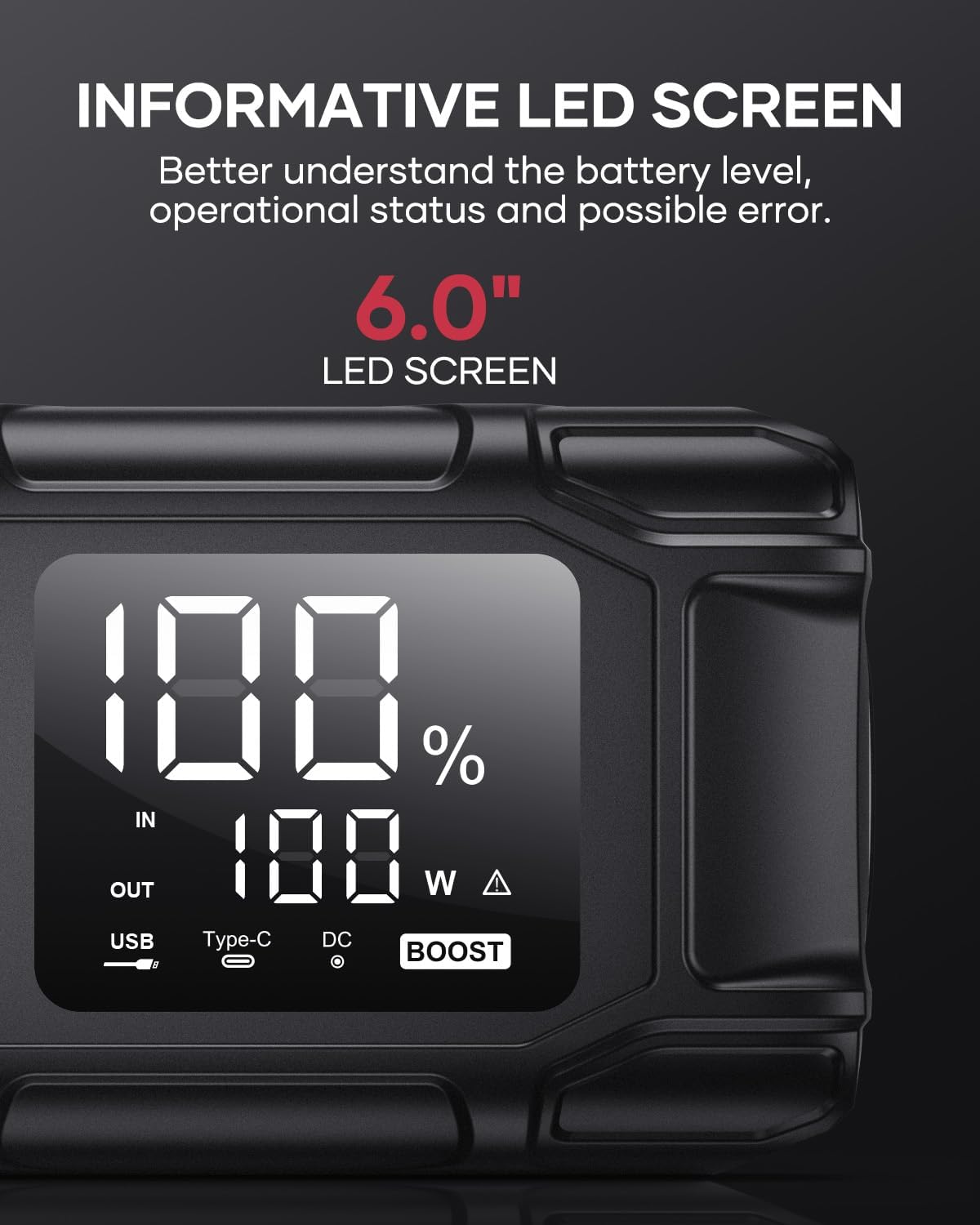
Image 5.5: The 6.0-inch LED screen provides clear information on battery percentage, input/output status, and power consumption.
6. الصيانة
- إعادة الشحن بانتظام: To prolong battery life, recharge the jump starter every 3-6 months, even if not in use.
- تخزين: Store the device in its protective case in a cool, dry place, away from direct sunlight and moisture.
- تنظيف: امسح الجهاز بقطعة قماش ناعمة وجافة. لا تستخدم مواد كيميائية قاسية أو مواد كاشطة.
- Clamp العناية: تأكد من القفل الذكيampتكون نظيفة وخالية من التآكل قبل وبعد كل استخدام.
7. استكشاف الأخطاء وإصلاحها
The device features multiple alarm situations indicated by audible signals and screen displays:
- حجم منخفضtagهـ- الحماية: Audible signal "3". Recharge the device.
- المجلد الخارجيtage Exceeds Vehicle Voltage: Audible signal "4". Check vehicle battery voltage.
- حماية من الدوائر القصيرة: Audible signal "5". Check clamp connections for short circuits.
- Safety Mode Activated: Audible signal "6". Device has entered safety mode due to an issue.
- حماية التيار الزائد: Audible signal "7". Reduce load or check connections.
- إنذار درجة حرارة عالية / منخفضة: Audible signal "8". Allow device to return to operating temperature range (-20°C to 60°C).
- الاتصال العكسي: Audible signal "9". Correct the clamp قطبية.

الصورة 7.1: انتهىview of the device's multi-alarm system, indicating various protection states with unique audible signals.
إذا استمرت المشاكل بعد اتباع هذه الخطوات، يرجى الاتصال بدعم العملاء.
8. المواصفات
| ميزة | مواصفة |
|---|---|
| ماركة | فلاي لينك تيك |
| نموذج | دينار بحريني 10 |
| تيار إخراج الذروة | 6000 Ampهنا |
| سعة البطارية | 26800 مللي أمبير |
| حجم الإخراجtage | 12 فولت |
| مدخل/مخرج USB-C | PD 45 واط |
| إخراج USB-A | 18 وات (الحد الأقصى) |
| أنواع المحركات المناسبة | All Gas, up to 12.0L Diesel |
| درجة حرارة التشغيل | -20 درجة مئوية إلى 60 درجة مئوية (-4 درجة فهرنهايت إلى 140 درجة فهرنهايت) |
| أبعاد المنتج | 23.95 × 10 × 5.69 سم |
| وزن العنصر | 920 جرام |

Image 8.1: The device is designed to operate reliably in extreme climates, from -20°C (-4°F) to 60°C (140°F).
9. الضمان والدعم
FLYLINKTECH is committed to providing high-quality products. For any questions, technical assistance, or warranty claims, please refer to the contact information provided with your purchase or visit the official FLYLINKTECH webيرجى الاحتفاظ بإثبات الشراء لأغراض الضمان.


