المنتج انتهىview
The Steinberg 100 Series Basin Mixer Faucet (Model 1001010S) is a high-quality single-lever faucet designed for basin installation. It features a modern matte black finish and is constructed from durable brass. This faucet is designed for standing installation and includes a fixed spout, a ceramic cartridge, and flexible G 3/8" connection hoses. It is compatible with instantaneous water heaters from 21 kW.

Image: The Steinberg 100 Series Basin Mixer Faucet in matte black, showcasing its sleek design and single-lever operation.
محتويات الحزمة
يرجى التأكد من وجود جميع المكونات قبل البدء في التثبيت:
- 1 x Steinberg 100 Series Basin Mixer Faucet (Model 1001010S)
- 2 x Flexible connection hoses (G 3/8")
- Mounting hardware (nuts, washers, seals)
- تعليمات التثبيت
الإعداد والتثبيت
Professional installation is recommended. Before installation, ensure the water supply is turned off. This faucet requires a single tap hole for mounting.
الأدوات المطلوبة (غير مدرجة):
- مفتاح قابل للتعديل
- مفك البراغي
- شريط مانع للتسرب (شريط PTFE)
- Bucket and cloth for spills
خطوات التثبيت:
- تحضير بasin: Ensure the mounting surface is clean and dry. The basin should have a single tap hole with a diameter suitable for the faucet's base.
- ربط الخراطيم: Screw the flexible G 3/8" connection hoses into the base of the faucet. Hand-tighten first, then use a wrench for a snug fit, being careful not to overtighten.
- جبل الصنبور: Insert the faucet's threaded rod and hoses through the tap hole in the basin. From underneath the basin, slide the rubber washer, metal washer, and then the mounting nut onto the threaded rod.
- تأمين الصنبور: Align the faucet correctly on the basin and tighten the mounting nut securely with a wrench.
- الاتصال بإمدادات المياه: Connect the flexible hoses to the hot and cold water supply lines. Use sealant tape on the threads of the supply lines for a watertight seal. Ensure the hot and cold connections are correct (typically red for hot, blue for cold).
- التحقق من التسريبات: Slowly turn on the main water supply. Check all connections for leaks. If leaks are present, tighten the connections slightly.
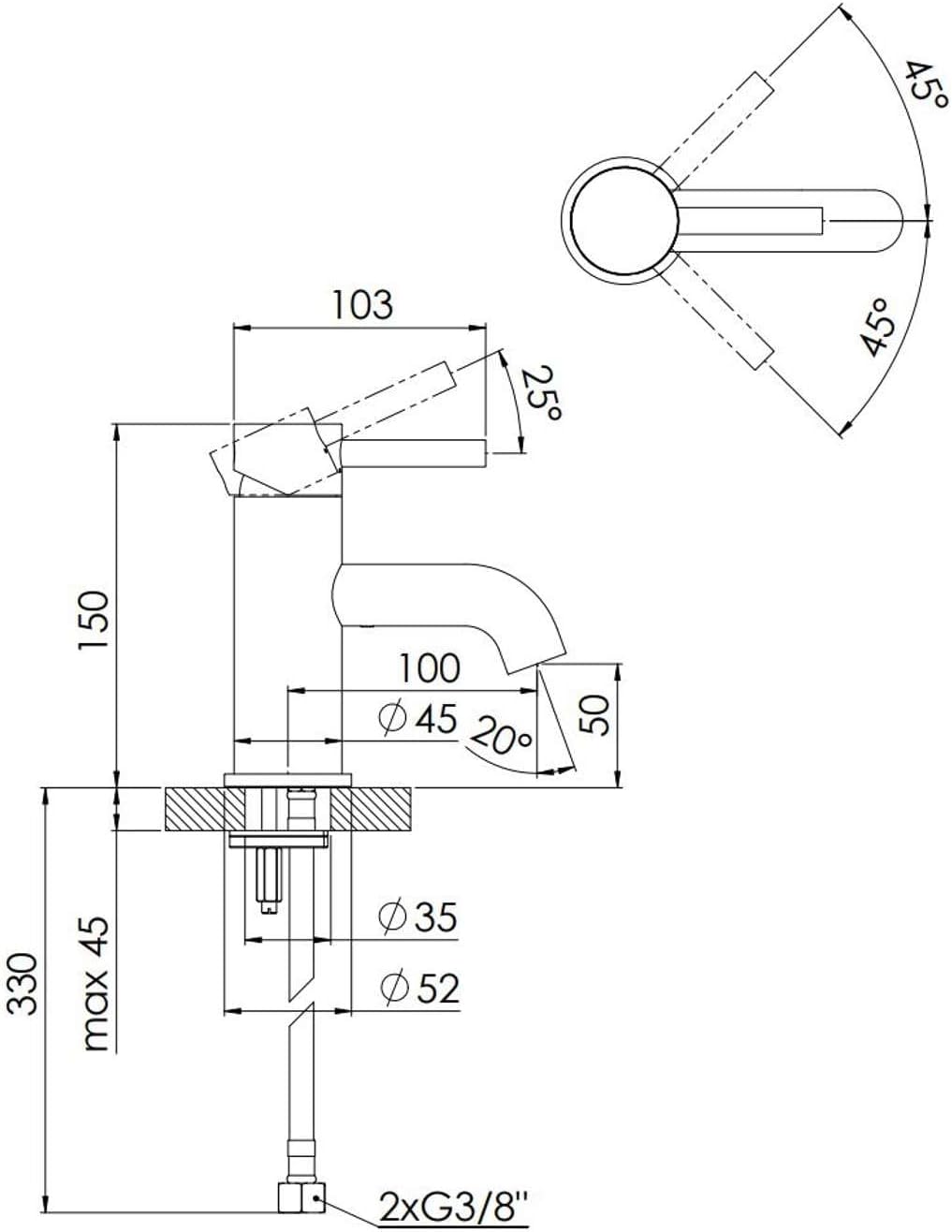
Image: Technical drawing illustrating the dimensions and installation requirements of the Steinberg 100 Series Basin Mixer Faucet, including spout length and overall height.
تعليمات التشغيل
The Steinberg 100 Series Basin Mixer Faucet features a single lever for controlling both water flow and temperature.
- تدفق المياه: ارفع الرافعة للأعلى لزيادة تدفق الماء. ادفعها للأسفل لتقليل التدفق وإيقاف الماء.
- التحكم في درجة الحرارة: حرك الرافعة إلى اليسار للماء الساخن وإلى اليمين للماء البارد. تضمن الخرطوشة الخزفية ضبطًا سلسًا ودقيقًا لدرجة الحرارة.
The integrated aerator ensures a soft, splash-free water stream and helps conserve water.
الصيانة والعناية
To ensure the longevity and appearance of your Steinberg faucet, follow these care instructions:
- تنظيف: Clean the faucet regularly with a soft cloth and mild soap or a non-abrasive cleaner specifically designed for bathroom fixtures. Avoid using abrasive sponges, scouring pads, or harsh chemical cleaners, as these can damage the matte black finish.
- تجفيف: After cleaning, always dry the faucet thoroughly with a soft, dry cloth to prevent water spots and mineral buildup.
- صيانة المهوية: If water flow becomes weak or uneven, the aerator may be clogged with mineral deposits. Unscrew the aerator from the spout, clean it under running water, and remove any debris. Reinstall the aerator securely.
- خرطوشة السيراميك: The ceramic cartridge is designed for long-lasting, drip-free performance. If you experience persistent dripping or difficulty in adjusting temperature, it may indicate a need for cartridge replacement. This should be performed by a qualified professional.
استكشاف الأخطاء وإصلاحها
| مشكلة | السبب المحتمل | حل |
|---|---|---|
| انخفاض تدفق المياه | Clogged aerator; partially closed shut-off valves; kinked supply hose. | Clean or replace aerator; fully open shut-off valves; straighten supply hose. |
| تسرب في القاعدة | Loose mounting nut; damaged seal. | Tighten mounting nut; inspect and replace seals if damaged. |
| Dripping from Spout | خرطوشة سيراميك بالية. | اتصل بفني سباكة مؤهل لاستبدال الخراطيش. |
| مشاكل درجة حرارة الماء | Incorrect hot/cold connections; issue with water heater. | Verify hose connections; check water heater functionality. |
If the problem persists after attempting these solutions, please contact Steinberg customer support or a qualified plumber.
تحديد
| ميزة | التفاصيل |
|---|---|
| رقم الموديل | 1001010 ثانية |
| ماركة | شتاينبرغ |
| لون | مات الأسود |
| مادة | نحاس |
| أسلوب | خلاط بمقبض واحد |
| طريقة التثبيت | Single Hole (Standing) |
| الارتفاع الكلي | 150 ملم |
| Spout Reach (Projection) | 100 ملم |
| منطقة الراحة | 50 ملم |
| نوع خرطوشة | سيراميك |
| خراطيم التوصيل | 2x Flexible G 3/8" |
| معدل التدفق (عند ضغط 3 بار) | 6 لتر/دقيقة |
| التوافق | Suitable for instantaneous water heaters from 21 kW |
| أبعاد المنتج | 7.5 × 18.5 × 29.5 سم |
معلومات الضمان
Steinberg products are manufactured to high quality standards. For specific warranty terms and conditions, please refer to the warranty card included with your product or visit the official Steinberg website. Typically, warranty covers manufacturing defects under normal use and service.
يرجى الاحتفاظ بإثبات الشراء الخاص بك لاستخدامه في أي مطالبات بالضمان.
دعم العملاء
For technical assistance, spare parts, or any questions regarding your Steinberg 100 Series Basin Mixer Faucet, please contact Steinberg customer support.
Webموقع: www.steinberg-armaturen.de
When contacting support, please have your model number (1001010S) and purchase date ready.


