مقدمة
This user manual provides detailed instructions for the operation and maintenance of your Jensen CD-660 Portable Stereo CD Player Boombox. Please read this manual thoroughly before using the device to ensure proper function and to maximize your listening experience. Keep this manual for future reference.
تعليمات السلامة الهامة
لتقليل خطر التعرض لصدمة كهربائية أو حريق أو إصابة، اتبع دائمًا احتياطات السلامة الأساسية التالية:
- لا تعرض هذا الجهاز للمطر أو الرطوبة.
- لا تسد أي فتحات تهوية.
- لا تقم بالتثبيت بالقرب من أي مصادر للحرارة مثل المشعات أو فتحات التدفئة أو المواقد أو أي أجهزة أخرى (بما في ذلك ampالمُضخِّمات) التي تنتج الحرارة.
- حماية سلك الطاقة من أن يمشي عليه أحد أو يضغط عليه.
- استخدم فقط المرفقات/الملحقات المحددة من قبل الشركة المصنعة.
- افصل هذا الجهاز أثناء العواصف الرعدية أو عند عدم استخدامه لفترات طويلة.
- قم بإحالة جميع أعمال الصيانة إلى موظفي الخدمة المؤهلين.
محتويات الحزمة
تأكد من تضمين جميع العناصر المدرجة أدناه في الحزمة الخاصة بك:
- Jensen CD-660 Portable Stereo CD Player Boombox
- AC Adapter (120V)
- دليل المالك
المنتج انتهىview
Familiarize yourself with the various parts and controls of your Jensen CD-660 boombox.
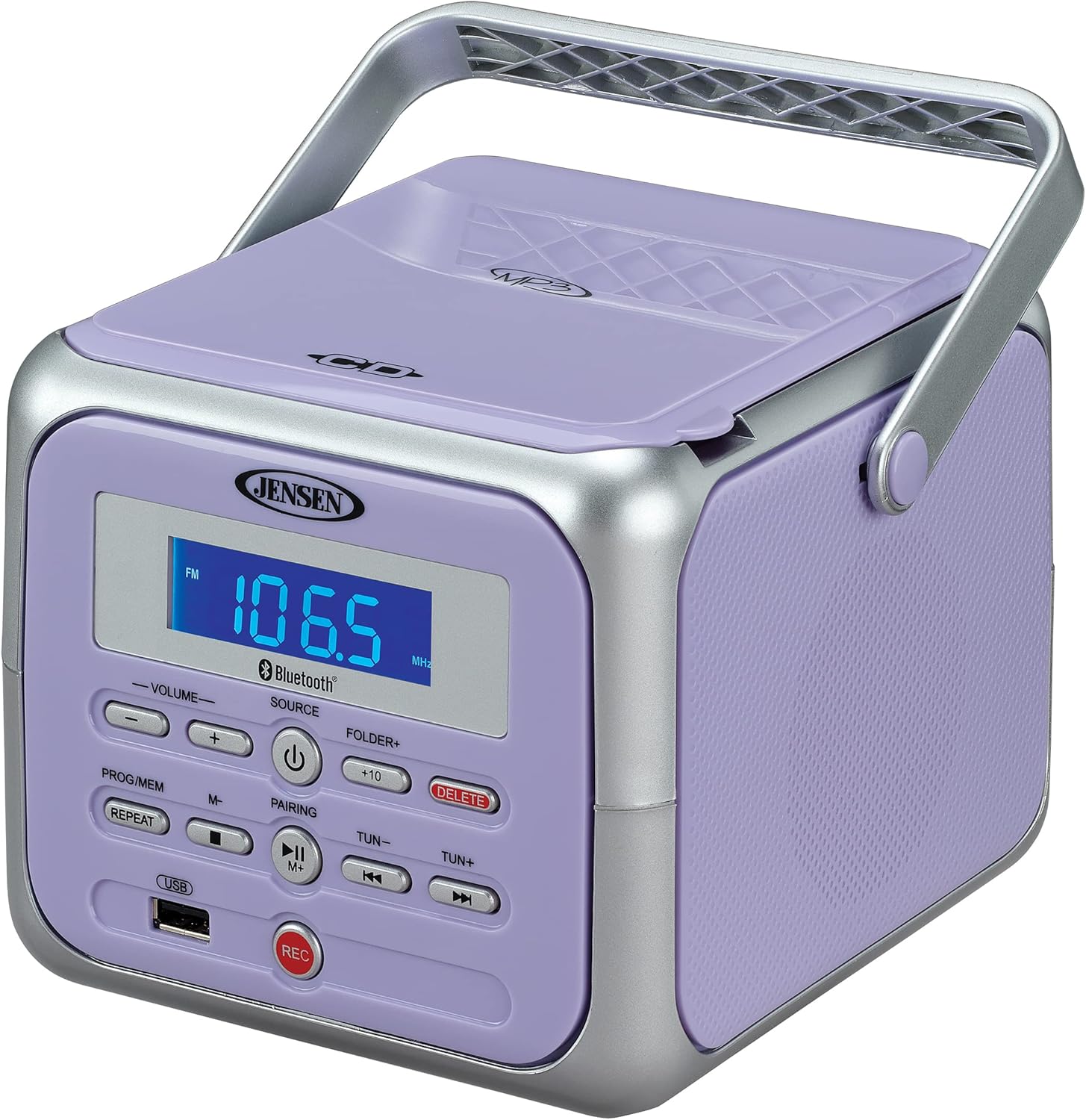
الشكل 1: الجبهة view of the Jensen CD-660 with the carrying handle extended. This image displays the main control panel, including the display screen, volume controls, source selection, and playback buttons.

الشكل 2: الجبهة view of the Jensen CD-660 with the carrying handle folded down. This perspective highlights the compact design and the arrangement of buttons and the LCD display.

الشكل 3: الجزء العلوي view of the Jensen CD-660 with the CD compartment lid open, revealing the CD tray. This illustrates the top-loading mechanism for disc insertion.
ميزات لوحة التحكم:
- شاشة LCD: يعرض الوضع الحالي، ورقم المسار، والتردد، ومعلومات أخرى.
- أزرار رفع وخفض مستوى الصوت: ضبط مستوى إخراج الصوت.
- زر المصدر: Selects between CD, Bluetooth, FM Radio, and Aux-in modes.
- زر الطاقة: يقوم بتشغيل الوحدة أو إيقاف تشغيلها.
- PROG/MEM Button: Programs CD tracks or stores FM radio presets.
- زر التكرار: يكرر المسار الحالي أو جميع المسارات.
- PAIRING Button: يبدأ وضع الاقتران عبر البلوتوث.
- زر التشغيل / الإيقاف المؤقت: يبدأ التشغيل أو يوقفه مؤقتًا.
- زر التوقف: يوقف التشغيل.
- أزرار التخطي/البحث (◀◀ / ▶▶): يتخطى المسارات أو يبحث داخل المسار.
- TUN +/- Buttons: ضبط تردد الراديو FM.
- FOLDER+ Button: Navigates to the next folder on a USB device.
- +10 Button: Skips 10 tracks forward on CD/USB.
- زر الحذف: حذف التسجيل fileق من USB.
- زر REC: Initiates recording to a USB flash drive.
- منفذ USB: لتشغيل وتسجيل الملفات من ذاكرة فلاش USB.
- مقبس إضافي: يربط أجهزة الصوت الخارجية.
- مقبس سماعة الرأس: للاستماع الخاص.
يثبت
تشغيل الوحدة
The Jensen CD-660 can be powered by either the included AC adapter or batteries.
تشغيل الطاقة المترددة:
- Plug the AC adapter into the AC IN jack located on the back of the unit.
- قم بتوصيل الطرف الآخر من محول التيار المتردد بمأخذ حائط قياسي بجهد 120 فولت تيار متردد.
تشغيل طاقة البطارية:
For portable use, the unit requires 6 x 'C' (UM-2) batteries (not included).
- افتح غطاء حجرة البطارية الموجود في الجزء السفلي من الوحدة.
- Insert 6 'C' size batteries, ensuring correct polarity (+/-) as indicated inside the compartment.
- أغلق غطاء حجرة البطارية جيدًا.
ملحوظة: Disconnect the AC adapter when operating on battery power. Remove batteries if the unit will not be used for an extended period.
تعليمات التشغيل
التشغيل العام:
- اضغط على قوة الزر لتشغيل الوحدة.
- اضغط على مصدر button repeatedly to select your desired mode (CD, Bluetooth, FM, USB, AUX).
- اضبط مستوى الصوت باستخدام ملف الحجم +/- أزرار.
تشغيل القرص المضغوط:
The unit supports CD, CD-R/RW, MP3, and WMA disc formats.
- افتح غطاء حجرة الأقراص المضغوطة.
- ضع قرصًا مضغوطًا بحيث يكون جانب الملصق متجهًا لأعلى على محور القرص.
- أغلق غطاء حجرة القرص المضغوط.
- اضغط على مصدر زر لتحديد وضع القرص المضغوط.
- اضغط على تشغيل/إيقاف مؤقت زر لبدء التشغيل.
- استخدم تخطي / بحث أزرار (◀◀ / ▶▶) للتنقل بين المسارات.
- اضغط على قف زر لإيقاف التشغيل.
تشغيل البلوتوث:
قم ببث الصوت لاسلكيًا من جهازك المزود بتقنية البلوتوث.
- اضغط على مصدر button to select Bluetooth mode. The display will show "BT" and flash, indicating pairing mode.
- على جهاز Bluetooth الخاص بك، قم بتمكين Bluetooth وابحث عن الأجهزة المتاحة.
- Select "JENSEN CD-660" from the list of devices.
- Once paired, the display will stop flashing and show "BT".
- Start playing audio on your connected device.
- استخدم تشغيل/إيقاف مؤقت و تخطي / بحث buttons on the boombox or your device to control playback.
راديو FM:
استمع إلى محطات الراديو المفضلة لديك على موجة FM.
- اضغط على مصدر الزر لتحديد وضع الراديو FM.
- Extend the FM wire antenna for optimal reception.
- اضغط على تون +/- أزرار لضبط المحطة يدويًا.
- اضغط مع الاستمرار على تون +/- buttons for automatic scanning to the next available station.
تخزين واسترجاع الإعدادات المسبقة:
The unit can store up to 30 FM presets.
- قم بالضبط على محطة FM المطلوبة.
- اضغط على PROG / MEM button. The display will show a flashing preset number.
- استخدم تخطي / بحث buttons (◀◀ / ▶▶) to select the desired preset number.
- اضغط على PROG / MEM اضغط على الزر مرة أخرى لتأكيد المحطة وحفظها.
- لاستدعاء إعداد مسبق، اضغط على PROG / MEM اضغط على الزر بشكل متكرر للتنقل بين المحطات المخزنة.
تشغيل USB:
Play MP3, WAV, or FLAC audio files من محرك أقراص فلاش USB.
- أدخل محرك أقراص فلاش USB في منفذ USB.
- اضغط على مصدر زر لتحديد وضع USB.
- ستبدأ الوحدة تلقائيًا في تشغيل أول ملف صوتي متوافق file.
- استخدم تخطي / بحث أزرار (◀◀ / ▶▶) للتنقل بين المسارات.
- استخدم المجلد+ button to navigate between folders on the USB drive.
- ال +10 button can be used to skip 10 tracks forward.
تسجيل يو اس بي:
Record audio directly to a USB flash drive from CD, FM Radio, Aux-in, or Bluetooth sources.
- أدخل محرك أقراص فلاش USB في منفذ USB.
- Select the desired audio source (CD, FM, AUX, or Bluetooth).
- Start playback of the audio you wish to record.
- اضغط على ريك button to begin recording. The display will indicate recording status.
- اضغط على ريك زر مرة أخرى لإيقاف التسجيل.
- لحذف مسجلة file، انتقل إلى file in USB playback mode and press the يمسح زر.
Aux-in Connection:
Connect external audio devices like smartphones or tablets.
- Connect one end of a 3.5mm audio cable (not included) to the Aux-in jack on the boombox.
- قم بتوصيل الطرف الآخر من الكابل بمقبس سماعة الرأس أو مخرج الصوت الخاص بجهازك الخارجي.
- اضغط على مصدر button to select Aux-in mode.
- Start playing audio on your external device.
- اضبط مستوى الصوت على كل من جهاز التسجيل المحمول وجهازك الخارجي للحصول على صوت مثالي.
صيانة
تنظيف الوحدة:
- امسح الجزء الخارجي من الوحدة بقطعة قماش ناعمة دamp القماش. لا تستخدم المنظفات أو المذيبات الكاشطة.
- بالنسبة لعدسة الأقراص المضغوطة، استخدم قرص تنظيف عدسة الأقراص المضغوطة المتخصص.
العناية بالبطارية:
- قم بإزالة البطاريات إذا لم يتم استخدام الوحدة لفترة طويلة لمنع التسرب.
- لا تخلط بين البطاريات القديمة والجديدة أو أنواع مختلفة من البطاريات.
استكشاف الأخطاء وإصلاحها
If you encounter issues with your Jensen CD-660, refer to the following table for common problems and solutions.
| مشكلة | السبب المحتمل | حل |
|---|---|---|
| لا يوجد طاقة | محول التيار المتردد غير متصل؛ البطاريات فارغة أو تم إدخالها بشكل غير صحيح. | Ensure AC adapter is securely plugged in; Replace batteries or check polarity. |
| لا يوجد صوت | مستوى الصوت منخفض جدًا؛ تم اختيار مصدر غير صحيح؛ تم توصيل سماعات الرأس. | Increase volume; Select correct source; Disconnect headphones. |
| القرص المضغوط لا يعمل | CD inserted incorrectly; Disc is dirty or scratched; CD compartment not closed. | Insert CD with label side up; Clean or replace disc; Close compartment securely. |
| فشل اقتران البلوتوث | Device too far; Bluetooth not enabled on external device; Boombox not in pairing mode. | Move device closer; Enable Bluetooth; Ensure boombox is in BT pairing mode. |
| استقبال FM ضعيف | الهوائي غير ممتد، الإشارة ضعيفة. | Fully extend the FM wire antenna; Reposition the unit for better reception. |
| مشاكل تشغيل USB | غير مدعوم file format; USB drive not properly inserted or corrupted. | يضمن files are MP3/WAV/FLAC; Reinsert USB drive; Try a different USB drive. |
تحديد
| ميزة | التفاصيل |
|---|---|
| رقم الموديل | القرص المضغوط رقم 660 |
| مصدر الطاقة | AC 120V (included adapter) or 6 x 'C' (UM-2) batteries (not included) |
| الاتصال | Bluetooth 5.1 (A2DP, AVRCP), USB, Aux-in |
| التوافق مع القرص المضغوط | قرص مضغوط، قرص مضغوط قابل للتسجيل/القراءة والكتابة، MP3، WMA |
| تشغيل USB | MP3 ، WAV ، FLAC |
| راديو اف ام | Stereo Receiver with 30 Presets, PLL Digital Tuning |
| الأبعاد (العرض × الارتفاع × العمق) | 6.38 بوصة × 5.2 بوصة × 6.57 بوصة (16.2 سم × 13.2 سم × 16.7 سم) |
| وزن | حوالي 2.46 رطل (1.12 كجم) |
الضمان والدعم
This Jensen CD-660 Portable Stereo CD Player Boombox comes with a manufacturer's warranty. Please refer to the included Owner's Manual for specific details regarding warranty coverage, terms, and conditions. For technical support or service inquiries, please contact Jensen customer service directly. Contact information can typically be found in the Owner's Manual or on the official Jensen webموقع.


