1. المقدمة
Thank you for choosing the GenMachine Mini PC. This compact yet powerful computer is designed to deliver exceptional performance for a variety of tasks, including gaming, office productivity, and creative design. Equipped with an AMD Ryzen 7 3750H processor, ample memory, and fast storage, it offers a seamless computing experience. This manual provides essential information for setting up, operating, maintaining, and troubleshooting your new Mini PC.
2. ماذا يوجد في الصندوق
يرجى التأكد من وجود جميع العناصر وأنها في حالة جيدة عند فتح العلبة.
- 1 x GenMachine Mini PC
- 1 × كابل HDMI
- 1 × محول الطاقة
- 1 × دليل المستخدم (هذه الوثيقة)
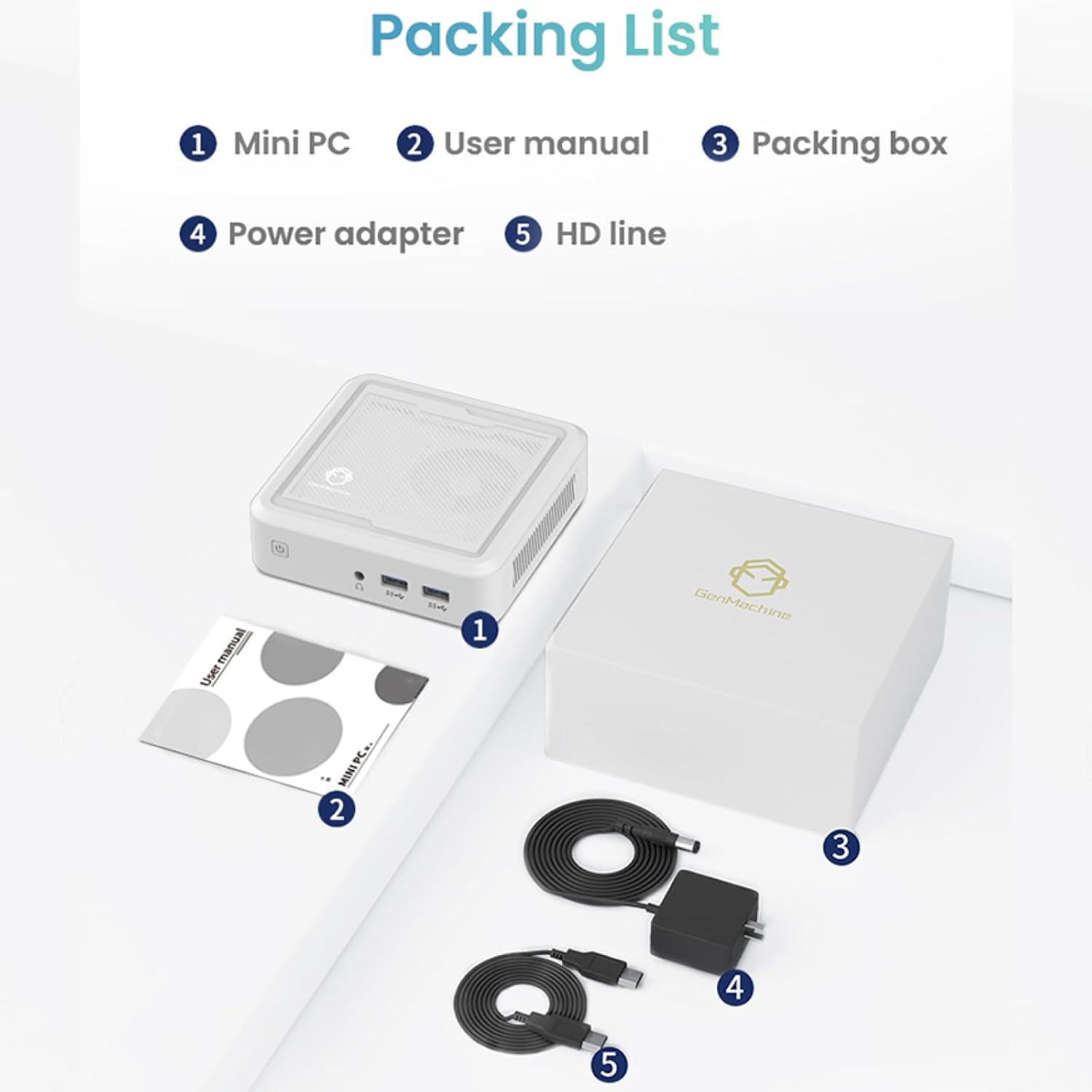
Figure 2.1: Packaging contents of the GenMachine Mini PC.
3. مواصفات المنتج
The GenMachine Mini PC is engineered with features to enhance your computing experience:
- أداء قوي: Equipped with an AMD Ryzen 7 3750H processor, delivering speeds up to 4.0GHz with 4 cores and 8 threads for demanding tasks.
- Ampالذاكرة والتخزين: Features 8GB of DDR4 RAM and a 256GB SSD with M.2 NVMe support for seamless multitasking and quick file وصول.
- اتصال متعدد الاستخدامات: Advanced WiFi 6 and Bluetooth 5.2 capabilities ensure high-speed internet and smooth device pairing.
- تصميم مضغوط: A sleek, small form factor that fits easily into any workspace or gaming setup.
- خيارات العرض المتعددة: HDMI and DisplayPort outputs support dual 4K displays for expanded productivity and immersive visuals.

الشكل 3.1: الجبهة view of the GenMachine Mini PC.
3.1 Rich Interface for Easy Connection
The Mini PC offers a comprehensive set of ports to meet various connectivity needs:
- يو اس بي 3.0 × 4
- HDMI X 1
- DisplayPort (DP) x 1
- LAN (Ethernet) x 1
- 3.5mm Audio Jack x 1
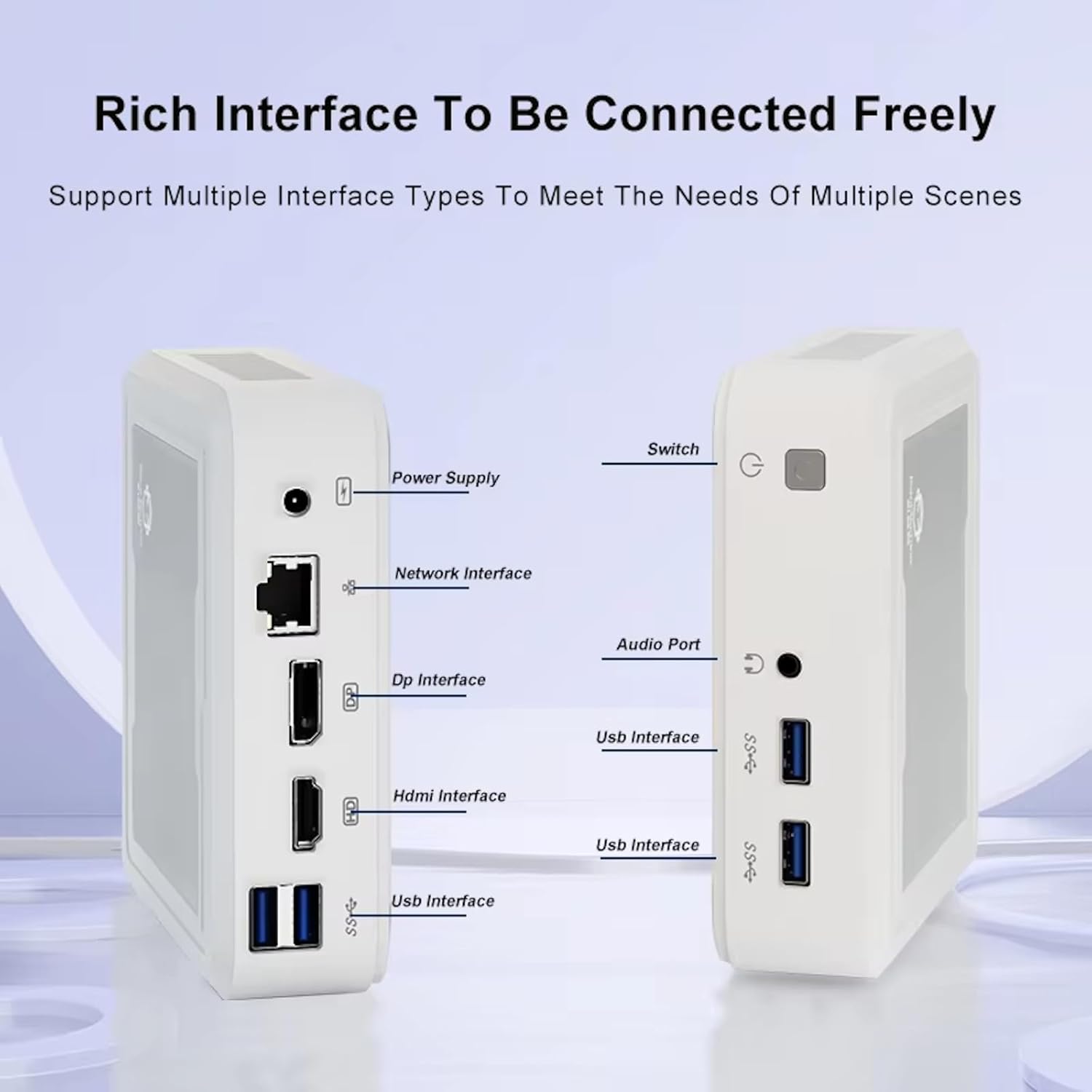
Figure 3.2: Available ports on the GenMachine Mini PC.
3.2 دعم الشاشة المزدوجة
Enhance your productivity or gaming experience by connecting up to two 4K displays simultaneously using the HDMI and DisplayPort outputs.

Figure 3.3: Dual 4K display setup with the GenMachine Mini PC.
Video 3.1: Demonstration of the GenMachine Mini PC supporting two monitors simultaneously.
3.3 Energy Efficiency and Quiet Operation
Designed for low noise operation, the Mini PC maintains a quiet environment, making it suitable for various settings.

Figure 3.4: Noise level comparison of the GenMachine Mini PC.
3.4 تصميم صغير الحجم ومتين
The Mini PC features an ultra-durable, lightweight metal casing, making it space-saving and robust for any work environment.
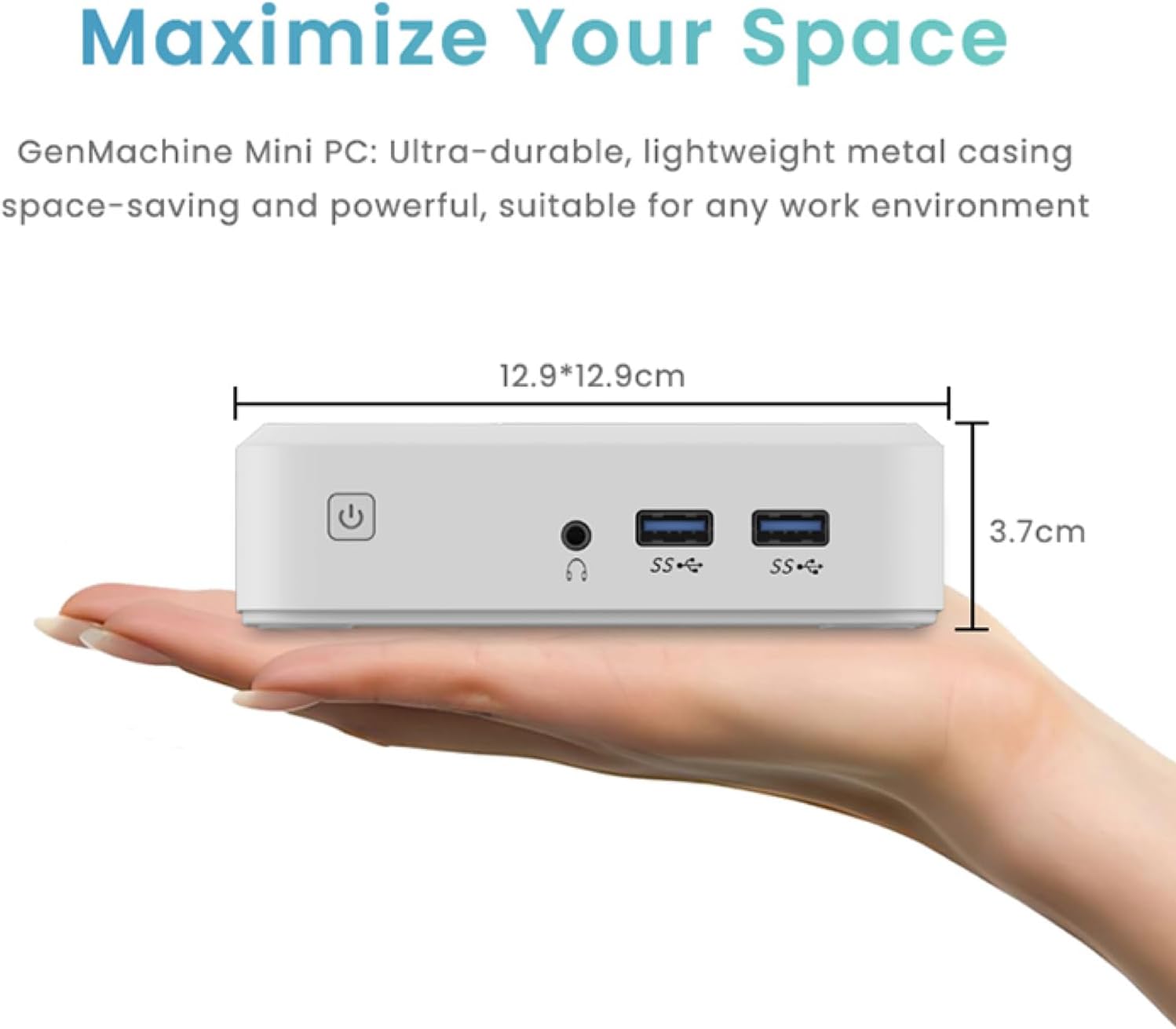
Figure 3.5: Compact size of the GenMachine Mini PC.
الفيديو 3.2: انتهىview of the GenMachine Mini PC's features and compact design.
4. دليل الإعداد
Follow these steps to set up your GenMachine Mini PC:
- Unpack the Mini PC: قم بإزالة جميع المكونات بعناية من العبوة.
- الاتصال بشاشة العرض: Use the provided HDMI cable to connect the Mini PC to your monitor or TV. If using a DisplayPort monitor, use a compatible DP cable (not included).
- توصيل الأجهزة الطرفية: قم بتوصيل لوحة المفاتيح والماوس وأي أجهزة USB أخرى بمنافذ USB 3.0 المتوفرة.
- الاتصال بالشبكة (اختياري): للاتصال بالإنترنت عبر كابل، قم بتوصيل كابل إيثرنت بمنفذ الشبكة المحلية (LAN). أما للاتصال اللاسلكي، فتأكد من توفر شبكة الواي فاي الخاصة بك أثناء الإعداد الأولي.
- توصيل الطاقة: قم بتوصيل محول الطاقة بمنفذ DC-in الموجود على جهاز الكمبيوتر الصغير، ثم قم بتوصيل المحول بمأخذ الطاقة.
- تشغيل الطاقة: Press the power button on the front of the Mini PC. The system should boot up.
5. تعليمات التشغيل
5.1 التمهيد الأولي وإعداد نظام التشغيل
Upon first power-on, the Mini PC will guide you through the operating system setup process. Follow the on-screen prompts to configure language, region, user accounts, and network settings.
5.2 إدارة الطاقة
- تشغيل الطاقة: اضغط على زر الطاقة مرة واحدة.
- اغلق: Access the power options through the operating system's start menu and select 'Shut down'.
- إعادة تشغيل: Access the power options through the operating system's start menu and select 'Restart'.
- وضع السكون: Access the power options through the operating system's start menu and select 'Sleep'.
5.3 الاتصال بشبكة Wi-Fi و Bluetooth
To connect to a wireless network or Bluetooth device, use the respective settings within your operating system. The Mini PC supports WiFi 6 and Bluetooth 5.2 for fast and reliable connections.
6. الصيانة
Regular maintenance helps ensure the longevity and optimal performance of your Mini PC:
- تنظيف: Use a soft, dry cloth to clean the exterior. For dust in vents, use compressed air. Ensure the device is powered off and unplugged before cleaning.
- تهوية: تأكد من وضع جهاز الكمبيوتر الصغير في مكان جيد التهوية. لا تسد فتحات التهوية.
- تحديثات البرامج: Regularly update your operating system, drivers, and applications to ensure security and performance.
- النسخ الاحتياطي للبيانات: قم بعمل نسخة احتياطية دورية للبيانات المهمة على محرك أقراص خارجي أو تخزين سحابي.
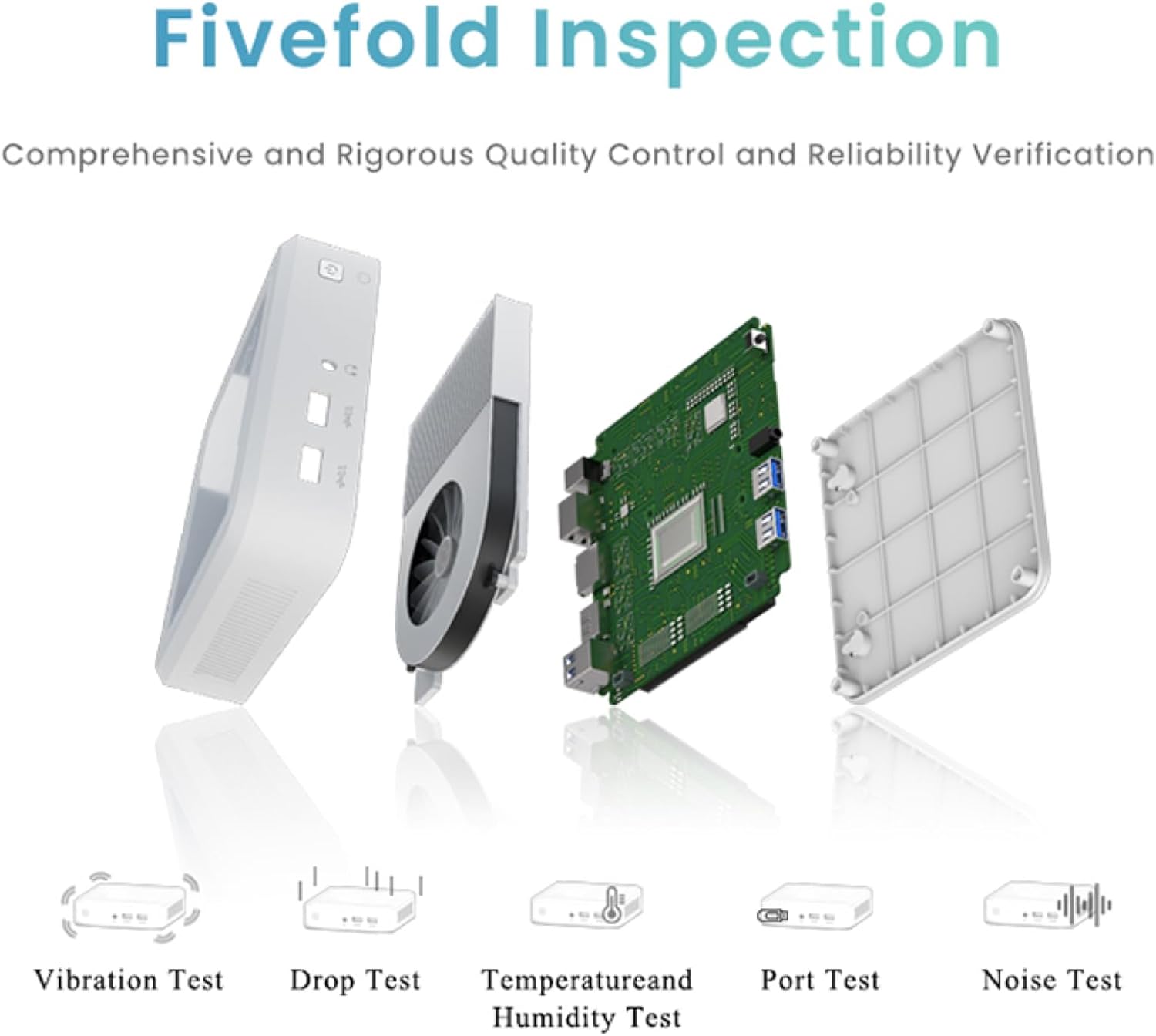
Figure 6.1: GenMachine's Fivefold Inspection process for quality control.
7. استكشاف الأخطاء وإصلاحها
إذا واجهت مشاكل مع جهاز الكمبيوتر المصغر الخاص بك، فراجع المشاكل والحلول الشائعة التالية:
- لا يوجد طاقة:
- تأكد من توصيل محول الطاقة بشكل آمن بكل من جهاز الكمبيوتر الصغير ومأخذ الطاقة العامل.
- حاول استخدام منفذ طاقة مختلف.
- لا يوجد عرض:
- Verify that the HDMI or DisplayPort cable is securely connected to both the Mini PC and the monitor.
- تأكد من تشغيل الشاشة وضبطها على مصدر الإدخال الصحيح.
- جرب استخدام كابل عرض أو شاشة عرض مختلفة إن أمكن.
- System Freezes or Unresponsive:
- Perform a hard reset by holding the power button for 5-10 seconds until the device powers off, then restart.
- Ensure the operating system and drivers are up to date.
- تحقق من عدم ارتفاع درجة الحرارة؛ وتأكد من التهوية المناسبة.
- Run a system diagnostic or memory test if the issue persists.
- لا يوجد اتصال بالإنترنت:
- بالنسبة للاتصالات السلكية، تحقق من حالة كابل الإيثرنت وجهاز التوجيه.
- For Wi-Fi, ensure Wi-Fi is enabled in the operating system and you are connected to the correct network with the correct password.
- أعد تشغيل جهاز التوجيه/المودم الخاص بك.
8. المواصفات
| ميزة | مواصفة |
|---|---|
| المعالج | AMD Ryzen 7 3750H (4 cores, 8 threads, up to 4.0GHz) |
| كبش | 8 جيجا بايت DDR4 |
| تخزين | 256GB SSD (with M.2 NVMe support) |
| معالج الرسوميات المساعد | رسومات AMD Radeon Vega 10 |
| أقصى دقة للشاشة | 3840 × 2160 بكسل (4K) |
| نوع لاسلكي | 802.11ac (WiFi 6), Bluetooth 5.2 |
| منافذ USB | 4 × يو اس بي 3.0 |
| مخرجات الفيديو | HDMI ، ديسبلايبورت |
| نظام التشغيل | نظام التشغيل (مثبت مسبقًا) |
| وزن العنصر | 2.1 رطل |
| أبعاد المنتج | 4.9 × 4.9 × 1.4 بوصة |
| لون | أسود |
9. الضمان والدعم
For warranty information and technical support, please refer to the warranty card included with your product or visit the official GenMachine webالموقع. احتفظ بإيصال الشراء الخاص بك كإثبات للشراء في حالة مطالبات الضمان.
If you require further assistance, please contact GenMachine customer support through the channels provided on their official webموقع.


