1. المقدمة
The TOPENS CK2500 Automatic Sliding Gate Opener is designed for heavy-duty sliding gates, providing a secure and convenient access solution. This chain-driven electric gate motor is capable of operating gates up to 5700 pounds in weight and 40 feet in length. It features a 1-1/4 HP 1000W AC motor, ensuring reliable and quiet performance for residential, commercial, courtyard, farm, and ranch applications. This manual provides detailed instructions for installation, operation, maintenance, and troubleshooting to ensure safe and efficient use of your gate opener.

Figure 1.1: The TOPENS CK2500 Automatic Sliding Gate Opener in use, demonstrating its application for property access.
2. معلومات هامة حول السلامة
Please read and understand all safety instructions before installation and operation. Failure to follow these instructions may result in serious injury or property damage. Keep this manual for future reference.
- تأكد من أن جميع التوصيلات الكهربائية تتوافق مع القوانين واللوائح المحلية.
- افصل الطاقة عن جهاز فتح البوابة قبل إجراء أي صيانة أو إصلاحات.
- احتفظ بالأطفال والحيوانات الأليفة بعيدًا عن منطقة البوابة، خاصة أثناء التشغيل.
- لا تسمح للأطفال بتشغيل جهاز فتح البوابة أو اللعب بأجهزة التحكم عن بعد.
- Install the gate opener on a structurally sound gate and post system.
- Ensure the gate moves freely and smoothly before installing the opener.
- Use the provided photo eye sensor to prevent the gate from closing on obstructions.
- In case of power failure, use the manual release key to operate the gate manually.
- Do not attempt to repair the gate opener yourself. Contact qualified personnel for service.
3. محتويات العبوة
Verify that all items listed below are included in your package. If any parts are missing or damaged, please contact TOPENS customer support.

Figure 3.1: Main components included with the TOPENS CK2500 Automatic Sliding Gate Opener.
- Sliding Gate Opener Unit (CK2500)
- 20ft Roller Chain
- جهازي تحكم عن بعد
- TC102 Photo Eye Beam Sensor (Pair)
- مفاتيح التحرير اليدوي
- Magnet Assembly (Limit Switches)
- أدوات التثبيت (مسامير، صواميل، حلقات معدنية)
- دليل التعليمات
4. دليل التثبيت
This section provides step-by-step instructions for installing your TOPENS CK2500 gate opener. It is recommended to have basic mechanical and electrical knowledge for this installation. No welding is required.
4.1. تركيب المشغل
The gate opener should be mounted on a stable, level concrete pad or a sturdy post adjacent to the gate. Ensure sufficient clearance for the gate's movement and the chain installation.
- Determine the optimal mounting position, ensuring the drive sprocket aligns with the gate's chain path.
- Securely fasten the gate opener unit to the mounting surface using appropriate bolts and anchors.
- Verify the unit is level and stable.
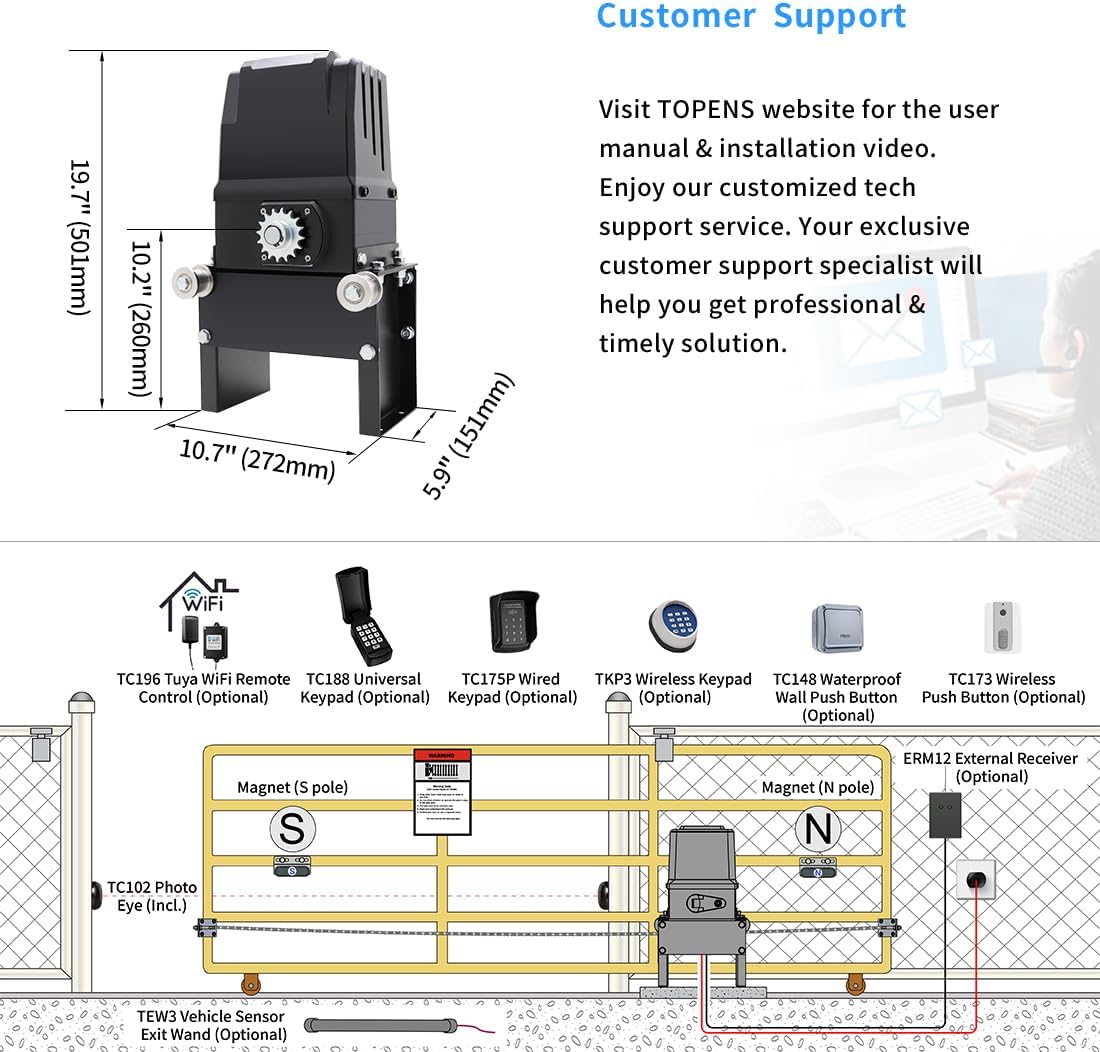
Figure 4.1: Dimensions of the CK2500 unit and a general installation diagram including optional accessories like the photo eye and external receiver.
4.2. Installing the Drive Chain
The 20ft roller chain connects the gate to the opener's drive sprocket, facilitating movement.
- Attach one end of the chain securely to the gate.
- Route the chain around the drive sprocket of the opener.
- Attach the other end of the chain to the gate, ensuring proper tension. The chain should be taut but not overly tight.
- Adjust the chain length as needed to fit your gate.

Figure 4.2: Illustration of the robust chain drive system.
4.3. الأسلاك الكهربائية
The CK2500 operates on 110-120VAC electricity ONLY. Ensure power is OFF before making any connections.
- Connect the AC power supply to the designated terminals inside the control box.
- Ensure all wiring is secure and properly insulated.
- Refer to the wiring diagram provided in the full manual for specific connections.

Figure 4.3: Power connection for the 110-120VAC system.
4.4. Adjusting Limit Switches
The electromagnetism limit switches define the gate's open and closed positions.
- Mount the magnet assembly to the gate at the desired open and closed positions.
- Ensure the magnets are correctly oriented to trigger the internal sensors.
- Test the gate's movement and adjust magnet positions for precise stopping points.

Figure 4.4: Magnet assembly for setting gate limits.
4.5. Installing Photo Eye Sensor (TC102)
The TC102 Photo Eye Beam Sensor is a crucial safety feature that reverses the gate if an obstruction is detected during closing.
- Mount the transmitter and receiver units of the photo eye sensor on opposite sides of the gate opening, ensuring they are aligned.
- Connect the photo eye sensor wiring to the control board as per the detailed wiring diagram.
- Test the sensor by breaking the beam during gate closing to ensure it reverses.

Figure 4.5: TC102 Photo Eye Beam Sensor and remote control.
5. التشغيل
This section details how to operate your TOPENS CK2500 Automatic Sliding Gate Opener.
5.1. الاقتران التحكم عن بعد
To operate the gate opener with a remote control, it must first be paired with the system. Refer to the full manual for specific pairing instructions for your remote model.
5.2. Basic Gate Operation
Pressing the paired remote button will initiate the gate's movement. A single press will open or close the gate. Pressing again during movement will stop the gate.

الشكل 5.1: انتهىview of key operational features including self-closing, midway mode, and safety mechanisms.
5.3. Midway Mode
The "midway mode" allows for partial gate opening, useful for pedestrian access or when only a small opening is required for vehicles.
- Activate midway mode via a specific remote button or setting (refer to full manual).
- The gate will open to a pre-set partial position.

Figure 5.2: Visual representation of self-closing, midway mode, and obstruction reversal.
5.4. Auto-Close Function
The "auto-close" function automatically closes the gate after a set period, enhancing property security.
- This feature can be enabled and configured for a specific delay time through the control board settings.
- Ensure the photo eye sensor is correctly installed and functioning when using auto-close.
5.5. الإصدار اليدوي
في حالة انقطاع الطاقةtages or remote control loss, the gate can be operated manually using the provided release key.
- Insert the manual release key into the lock cylinder on the opener unit.
- Turn the key to disengage the motor, allowing the gate to be pushed open or closed by hand.
- Remember to re-engage the motor after manual operation for automatic functionality.

Figure 5.3: Manual release key for operating the gate during power outagإِسْ
6. الصيانة
Regular maintenance ensures the longevity and optimal performance of your TOPENS CK2500 gate opener.
- شهريا: Inspect the gate's movement for any obstructions or friction. Ensure the gate wheels and hinges are clean and lubricated.
- ربع سنوي: Check the drive chain tension and lubricate it if necessary. Inspect all electrical connections for corrosion or looseness.
- سنويا: Test the photo eye sensor and other safety features to ensure they are functioning correctly. Clean the exterior of the opener unit.
- Keep the area around the gate opener clear of debris, snow, or ice.

Figure 6.1: The gate opener features a waterproof design for outdoor use, but regular cleaning is still recommended.
7. استكشاف الأخطاء وإصلاحها
This section addresses common issues you might encounter with your gate opener. For more complex problems, refer to the full user manual or contact customer support.
| مشكلة | السبب المحتمل | حل |
|---|---|---|
| البوابة لا تستجيب للتحكم عن بعد. | Dead remote battery, remote not paired, power outage. | Replace remote battery, re-pair remote, check power supply. |
| تتوقف البوابة أو تنعكس بشكل غير متوقع. | Obstruction detected by photo eye, limit switch issue, excessive friction. | Clear obstruction, check photo eye alignment, inspect gate path, adjust limit switches. |
| المحرك يعمل لكن البوابة لا تتحرك. | Chain disengaged or broken, manual release engaged. | Check chain connection and tension, disengage manual release. |
| Gate opens partially. | Midway mode activated, limit switch misadjusted. | Deactivate midway mode, re-adjust open limit switch. |
8. المواصفات
Technical specifications for the TOPENS CK2500 Automatic Sliding Gate Opener.
- نموذج: سي كيه 2500
- الأعلى. وزن البوابة: 5700 رطل
- الأعلى. طول البوابة: 40 قدم
- قوة المحرك: 1-1/4 HP (1000W) AC Motor
- مزود الطاقة: 110-120 فولت تيار متردد
- وضع القيادة: Chain Drive (20ft chain included)
- درجة حرارة التشغيل: 0 درجة فهرنهايت إلى 120 درجة فهرنهايت
- وزن السلعة: 55.9 رطل
- أبعاد المنتج: 10.7 × 5.9 × 19.7 بوصة
- Batteries (for remotes): 6 بطاريات CR2 مطلوبة (مضمنة)
- مميزات السلامة: Photo Eye Beam Sensor, Auto-Close, Midway Mode, Manual Release Key
9. الضمان ودعم العملاء
TOPENS products come with a 12-month warranty against defects and a 30-day exchange & return policy. For technical assistance, user manuals, installation videos, or personalized service, please visit the official TOPENS webالموقع أو الاتصال بفريق دعم العملاء.
معلومات الاتصال:
- Webموقع: www.topens.com (مثالample link, actual link not provided in JSON, so using a generic one)
- بريد إلكتروني: Refer to TOPENS webموقع للدعم بالبريد الإلكتروني.
- هاتف: Refer to TOPENS webموقع إلكتروني لرقم هاتف الدعم.

Figure 9.1: TOPENS offers professional customer support for all inquiries.


