دليل مستخدم نظام مكبرات الصوت Blaupunkt SBW250 200 واط
Model: SBW250
مقدمة
This manual provides detailed instructions for the setup, operation, and maintenance of your Blaupunkt SBW250 200W Soundbar System. Please read this manual thoroughly before using the product to ensure proper functionality and to maximize your audio experience. Keep this manual for future reference.
تعليمات السلامة الهامة
لتقليل خطر الصدمة الكهربائية أو الحريق أو تلف الوحدة، يرجى مراعاة احتياطات السلامة التالية:
- لا تعرض هذا الجهاز للمطر أو الرطوبة.
- لا تضع أشياء مملوءة بالسوائل، مثل المزهريات، على الجهاز.
- لا تسد أي فتحات تهوية. ثبّت المنتج وفقًا لتعليمات الشركة المصنعة.
- لا تقم بالتثبيت بالقرب من أي مصادر للحرارة مثل المشعات أو فتحات التدفئة أو المواقد أو أي أجهزة أخرى (بما في ذلك ampالمُضخِّمات) التي تنتج الحرارة.
- احمِ سلك الطاقة من أن يدوس عليه أحد أو يضغط عليه، وخاصةً عند المقابس ومنافذ التوصيل الكهربائية ونقطة خروجها من الجهاز.
- استخدم فقط المرفقات/الملحقات المحددة من قبل الشركة المصنعة.
- افصل هذا الجهاز أثناء العواصف الرعدية أو عند عدم استخدامه لفترات طويلة من الزمن.
- قم بإحالة جميع أعمال الصيانة إلى موظفي الخدمة المؤهلين. الصيانة مطلوبة في حالة تعرض الجهاز للتلف بأي شكل من الأشكال.
محتويات الحزمة
تأكد من وجود جميع المكونات في العبوة:
- Blaupunkt SBW250 Soundbar
- مكبر صوت لاسلكي
- جهاز التحكم عن بعد
- محول الطاقة/الكابلات
- دليل المستخدم (هذا المستند)
- Wall Mount Kit (if included)
المنتج انتهىview
The Blaupunkt SBW250 system consists of a soundbar and a wireless subwoofer, designed to enhance your audio experience with powerful sound and deep bass.

Image: The Blaupunkt SBW250 soundbar, wireless subwoofer, and remote control, showcasing the complete audio system.
مميزات شريط الصوت
- Integrated full-range speakers for clear audio.
- Multiple connectivity options: HDMI (ARC), AUX, USB, Bluetooth.
- Front panel controls for basic functions.
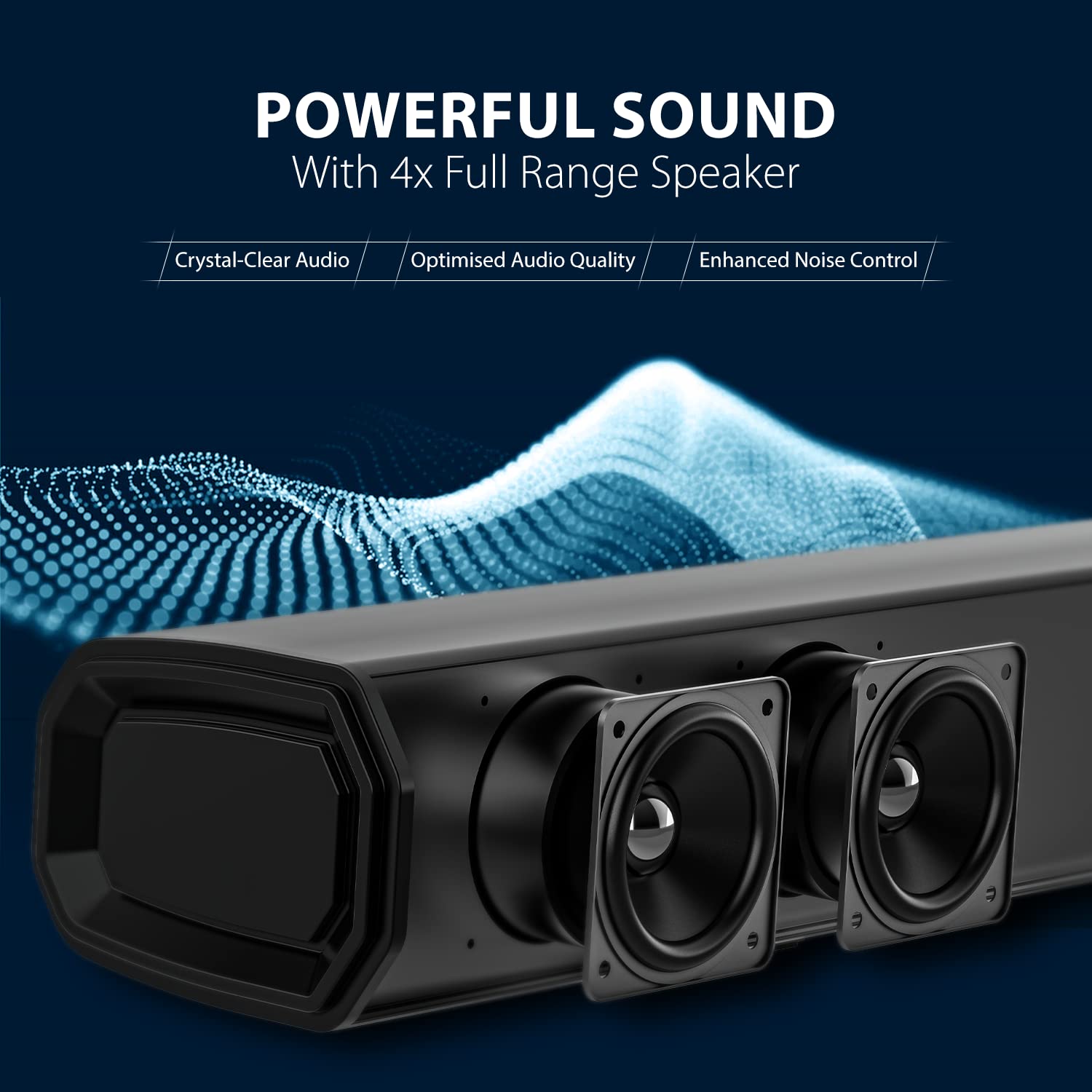
الصورة: لقطة مقربة view of the soundbar's internal speakers, highlighting the audio components.
ميزات مضخم الصوت
- 8-inch wireless subwoofer for deep bass.
- Automatic pairing with the soundbar.

الصورة: تفصيلية view of the 8-inch subwoofer, illustrating its design for powerful bass output.
جهاز التحكم عن بعد
The included remote control provides full functionality for managing your soundbar system, including power, volume, input selection, and equalizer modes.
دليل الإعداد
1. تحديد مستوى
للحصول على أفضل أداء صوتي، يرجى مراعاة إرشادات وضع السماعات التالية:
- شريط الصوت: Place the soundbar centrally below your television. Ensure there are no obstructions in front of the soundbar.
- مضخم الصوت: The wireless subwoofer can be placed anywhere in the room, preferably on the floor, to achieve the best bass response. Avoid placing it in enclosed cabinets.

Image: The soundbar positioned below a television and the subwoofer placed next to a TV cabinet in a typical living room environment, demonstrating ideal placement for surround sound.
2. الاتصالات
Connect the soundbar to your audio source using one of the available methods:
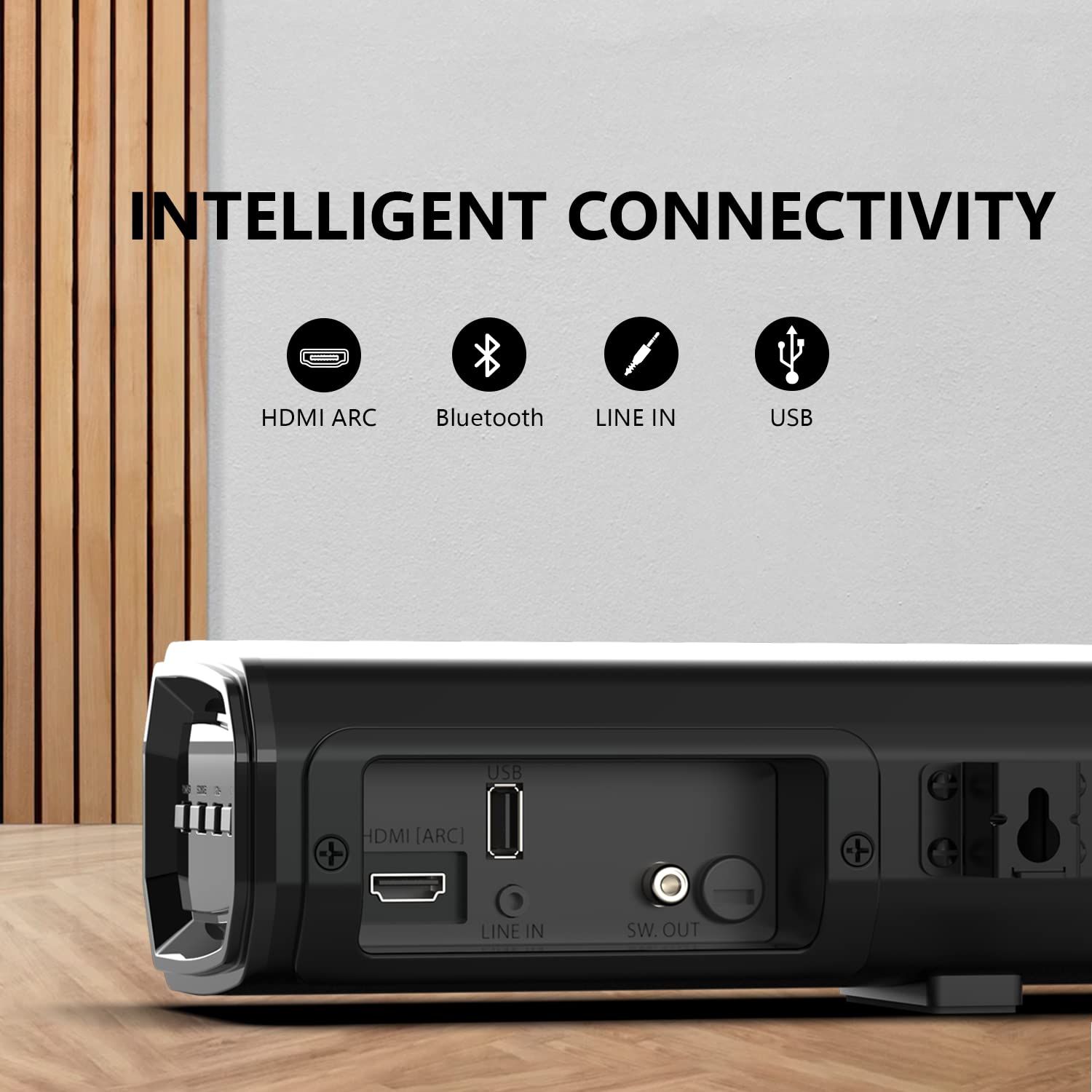
Image: A close-up of the soundbar's rear panel, showing the HDMI ARC, USB, Line In (AUX), and SW. OUT ports for various connectivity options.
- HDMI (ARC) Connection:
Connect an HDMI cable from the HDMI (ARC) port on the soundbar to the HDMI (ARC) port on your television. This allows audio to be sent from the TV to the soundbar and enables control of the soundbar with your TV remote (if supported by your TV).
- AUX (Line In) Connection:
Use a 3.5mm audio cable to connect the AUX (Line In) port on the soundbar to the audio output (headphone jack or AUX out) of your device (e.g., TV, smartphone, MP3 player).
- اتصال USB:
أدخل محرك أقراص فلاش USB يحتوي على الصوت files into the USB port on the soundbar for direct playback.
- اتصال بلوتوث:
For wireless audio streaming, refer to the "Bluetooth Pairing" section under Operating Instructions.
3. توصيل الطاقة
Connect the power cable to the soundbar and the subwoofer, then plug them into a wall outlet. The soundbar and subwoofer will automatically attempt to pair.
تعليمات التشغيل
1. تشغيل/إيقاف التشغيل
- اضغط على قوة زر على مكبر الصوت أو جهاز التحكم عن بعد لتشغيل الوحدة أو إيقاف تشغيلها.
2. اختيار المدخلات
- اضغط على مدخل or مصدر button on the soundbar or remote control repeatedly to cycle through available input sources: HDMI (ARC), AUX, USB, Bluetooth.
3. التحكم في مستوى الصوت
- استخدم حجم + و الصوت - أزرار على مكبر الصوت أو جهاز التحكم عن بعد لضبط مستوى الصوت.
- اضغط على صامت اضغط على الزر الموجود على جهاز التحكم عن بعد لكتم الصوت مؤقتًا. اضغط عليه مرة أخرى لإلغاء كتم الصوت.
4. اقتران بلوتوث
- Turn on the soundbar and select the Bluetooth input mode. The indicator light will flash, indicating it is in pairing mode.
- قم بتمكين البلوتوث على جهازك المحمول (الهاتف الذكي، والكمبيوتر اللوحي، وما إلى ذلك) وابحث عن الأجهزة المتاحة.
- يختار "Blaupunkt SBW250"من قائمة الأجهزة.
- Once paired, the indicator light on the soundbar will stop flashing and remain solid. You can now stream audio wirelessly.
5. Equalizer Modes
The soundbar features multiple equalizer modes to optimize audio for different content types:

Image: A visual representation of the four equalizer modes (Song, Cinema, Dialog, 3D) available on the soundbar, designed to match various entertainment types.
- اضغط على EQ button on the remote control to cycle through the available modes: أغنية, سينما, الحوار، و 3D.
صيانة
تنظيف
- افصل دائمًا مكبر الصوت ومضخم الصوت الفرعي من مأخذ الطاقة قبل التنظيف.
- استخدم قطعة قماش ناعمة وجافة لمسح أسطح مكبر الصوت ومضخم الصوت الفرعي.
- Do not use liquid cleaners, abrasive cleaners, or sprays, as these may damage the finish or internal components.
دليل اصلاح الاخطاء
If you encounter issues with your Blaupunkt SBW250 Soundbar System, refer to the following common problems and solutions:
| مشكلة | السبب المحتمل | حل |
|---|---|---|
| لا يوجد طاقة | كابل الطاقة غير متصل؛ منفذ الطاقة غير نشط. | Ensure power cables are securely connected to the soundbar, subwoofer, and a working power outlet. |
| لا يوجد صوت | Incorrect input source selected; Volume too low; Cables not connected properly. | Select the correct input source. Increase the volume. Check all audio cables for secure connections. Ensure the soundbar is not muted. |
| مكبر الصوت الفرعي غير مقترن | Subwoofer too far from soundbar; Interference; Pairing issue. | Ensure the subwoofer is within range of the soundbar. Power cycle both the soundbar and subwoofer. Refer to the manual for manual pairing instructions if automatic pairing fails. |
| مشاكل اتصال البلوتوث | Device not in pairing mode; Interference; Device too far. | Ensure the soundbar is in Bluetooth pairing mode. Move your device closer to the soundbar. Disconnect and re-pair the device. Clear previous Bluetooth connections on your device. |
| جهاز التحكم عن بعد لا يعمل | Batteries depleted; Obstruction; Remote not pointed correctly. | Replace the batteries in the remote control. Ensure there are no obstructions between the remote and the soundbar's sensor. Point the remote directly at the soundbar. |
تحديد
Technical specifications for the Blaupunkt SBW250 Soundbar System:
- اسم الموديل: إس بي دبليو 250
- ماركة: بلاوبونكت
- نوع السماعة: 3D, Soundbar, Surround Sound
- واتtage: 200 واط
- قطر مضخم الصوت: 8 بوصة
- قطر مكبر الصوت: 1 بوصة
- تقنية الاتصال: Auxiliary, Bluetooth, HDMI (ARC), USB
- تكنولوجيا الاتصالات اللاسلكية: بلوتوث
- وضع إخراج الصوت: محيط
- طريقة التحكم: بعيد
- مادة: معدن
- لون: أسود
- الأجهزة المتوافقة: هاتف ذكي، جهاز لوحي، تلفزيون
الضمان والدعم
للحصول على معلومات الضمان والدعم الفني، يرجى الرجوع إلى بطاقة الضمان المرفقة مع المنتج أو زيارة موقع Blaupunkt الرسمي. webالموقع. احتفظ بإيصال الشراء الخاص بك كإثبات للشراء في حالة مطالبات الضمان.
الشركة المصنعة: Envent World Wide Pvt Ltd


