مقدمة
This manual provides instructions for the proper setup, operation, and maintenance of your Motorola Talkabout T460 Two Way Radio. Please read this manual thoroughly before using your device to ensure optimal performance and safety.
The Motorola Talkabout T460 is designed for reliable communication with features such as IP54 weatherproof rating, 22 channels, 121 privacy codes, and various power options.
محتويات الحزمة
The Motorola Talkabout T460 8-Pack includes the following items:
- 8 Motorola T460 2-Way Radios
- 8 NiMH Rechargeable Battery Packs
- 4 Micro USB Wall Charging Cables
- 8 مشبك حزام
- 4 دليل المستخدم
يثبت
1. تركيب البطارية
Your T460 radio can be powered by either the included NiMH rechargeable battery pack or three AA alkaline batteries (not included).
- تأكد من إيقاف تشغيل الراديو.
- حدد مكان غطاء حجرة البطارية على الجزء الخلفي من الراديو.
- اضغط على المزلاج واسحب الغطاء لإزالته.
- Insert the NiMH battery pack or three AA batteries, observing the polarity markings (+/-).
- قم باستبدال غطاء حجرة البطارية، وتأكد من تثبيته بشكل آمن في مكانه.
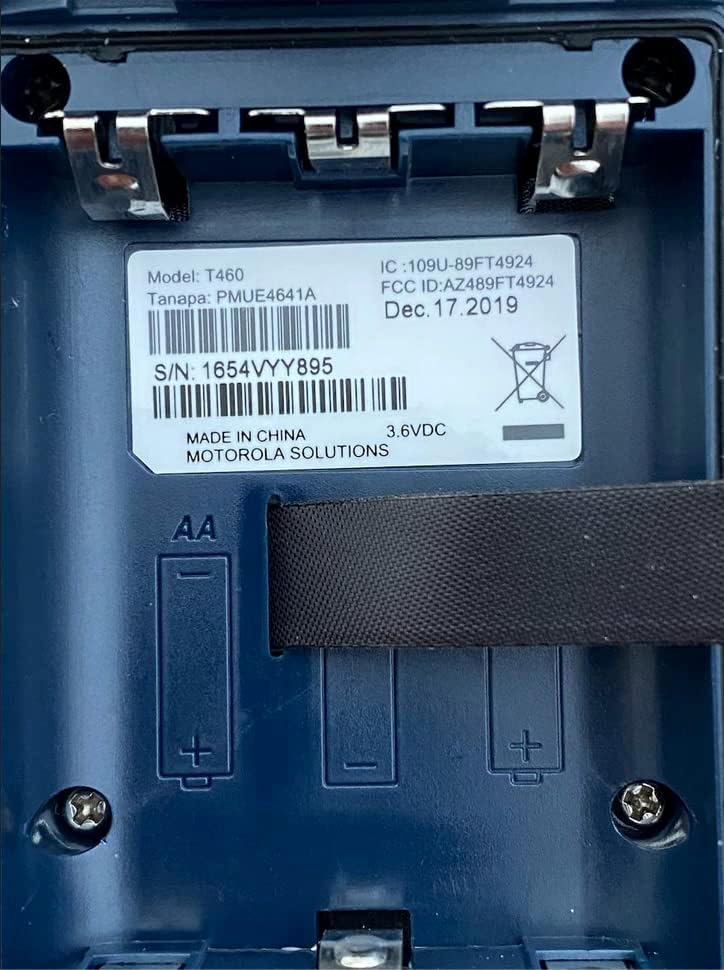
الشكل 1: Battery compartment of the Motorola T460 radio, showing the label with model information and slots for AA batteries.
2. Charging the NiMH Battery Pack
The included NiMH battery packs can be charged using the micro-USB wall charging cables. Charging can be done via a standard wall outlet, a vehicle adapter, or a computer USB port.
- Connect the micro-USB cable to the charging port on the radio.
- Connect the other end of the cable to a power source (wall adapter, vehicle adapter, or computer).
- The battery indicator on the radio display will show charging status.
- تستغرق عملية الشحن الكاملة عادةً عدة ساعات.
3. إرفاق مشبك الحزام
To attach the belt clip, align the clip with the grooves on the back of the radio and slide it downwards until it locks into place.
تعليمات التشغيل
1. تشغيل/إيقاف التشغيل
To turn the radio on or off, rotate the On/Off/Volume knob clockwise or counter-clockwise until you hear a click.
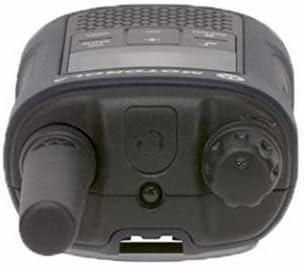
الشكل 2: قمة view of the Motorola T460 radio, highlighting the On/Off/Volume knob on the right side.
2. ضبط الحجم
Rotate the On/Off/Volume knob to adjust the listening volume.
3. اختيار القناة
Your T460 radio has 22 channels. Use the قائمة طعام الزر و أعلى/أسفل أزرار لتحديد القناة.
4. رموز الخصوصية
The radio supports 121 privacy codes per channel, totaling 2,662 combinations. This helps reduce interference from other users. To set a privacy code, enter the menu and navigate to the privacy code setting for the selected channel.
5. الإرسال والاستقبال
- للإرسال: Press and hold the Push-to-Talk (PTT) button located on the side of the radio. Speak clearly into the microphone. Release the PTT button to listen.
- للاستلام: Ensure the PTT button is not pressed. The radio will automatically receive transmissions on the selected channel and privacy code.

الشكل 3: قاع view of the Motorola T460 radio, displaying the 'Talkabout' branding. The PTT button is on the side, not visible in this view.
6. PTT Power Boost
The PTT power boost feature allows you to temporarily increase the transmitter power output to extend transmission range when needed. This feature also helps conserve battery life when maximum range is not required.
7. iVOX/VOX (Hands-Free Communication)
The iVOX/VOX feature enables hands-free communication by detecting your voice and automatically transmitting. This is useful when your hands are occupied. Refer to the radio's on-screen menu for activation and sensitivity settings.
8. VibraCall™ Alert
Activate the VibraCall feature for silent alerts in situations where an audible ring tone might be disruptive.
9. نغمات الاتصال
Customize your radio's call tone by selecting from the available options in the menu settings.
10. Weather Alert and NOAA Weather Radio
The T460 can receive real-time weather conditions and alerts. Turn on the weather channel or enable weather alerts to stay informed. Note: NOAA radio service availability may vary by region. Consult your local weather office for details.
11. Emergency Alert Button
In an emergency, press the dedicated emergency alert button. The radio will transmit an alert siren followed by spoken or incidental sounds, signaling distress to other radios within range.
12. مصباح يدوي LED مدمج
Activate the integrated LED flashlight for illumination during low-light conditions or emergencies.
صيانة
1. العناية بالبطارية
- Always use genuine Motorola NiMH battery packs or recommended AA alkaline batteries.
- Charge NiMH batteries fully before first use.
- Do not overcharge or leave batteries discharged for extended periods.
- Remove batteries if the radio will not be used for a long time.
2. التنظيف
امسح الجزء الخارجي من الراديو بقطعة قماش ناعمة و...amp cloth. Do not use harsh chemicals or abrasive cleaners. Ensure the charging port cover is securely closed to maintain the IP54 weatherproof rating.
3. Weatherproofing
The T460 radio has an IP54 weatherproof rating, meaning it is protected against dust and splashing water from any direction. While it can withstand rain and snow, it is not designed for submersion. Ensure all port covers are sealed to maintain water resistance.
استكشاف الأخطاء وإصلاحها
| مشكلة | الحل المحتمل |
|---|---|
| الراديو لا يعمل. |
|
| لا يمكن الإرسال أو الاستقبال. |
|
| جودة الصوت رديئة. |
|
| عمر البطارية قصير. |
|
تحديد
| نموذج | ت460 |
| القنوات | 22 قنوات FRS |
| رموز الخصوصية | 121 (CTCSS/DCS) |
| مقاومة الطقس | IP54 مانعة لتسرب الماء |
| نوع البطارية | NiMH Rechargeable Pack (included) or 3 AA Alkaline Batteries (not included) |
| عمر البطارية (تقريبًا) | Up to 10 hours (NiMH), Up to 26 hours (AA) |
| المجلدtage | 9 فولت |
| نوع العرض | قاد |
| المميزات الخاصة | Weather Alert, Emergency Alert, iVOX/VOX, VibraCall, LED Flashlight, PTT Power Boost |
| وزن المنتج (عبوة من 8 قطع) | 5.52 رطل |
| Package Dimensions (8-pack) | 10.63 × 9.96 × 9.84 بوصة |
معلومات الضمان
The Motorola Talkabout T460 Two Way Radio comes with a ضمان الشركة المصنعة لمدة عامين من تاريخ الشراء. يغطي هذا الضمان عيوب المواد والتصنيع في ظل الاستخدام العادي. يُرجى الاحتفاظ بإيصال الشراء للمطالبة بالضمان.
For full warranty terms and conditions, please refer to the separate warranty document included with your product or visit the official Motorola Solutions webموقع.
يدعم
For technical assistance, troubleshooting beyond this manual, or to inquire about replacement parts, please contact Motorola Solutions customer support.
- الدعم عبر الإنترنت: Visit the official Motorola Solutions webالموقع للأسئلة الشائعة وموارد الدعم.
- الدعم عبر الهاتف: يرجى الرجوع إلى معلومات الاتصال الموجودة في عبوة المنتج أو على الموقع الرسمي webموقع.


