1. المقدمة
This manual provides detailed instructions for the IINE Wireless Pro Controller, designed for use with Nintendo Switch, Switch OLED, and Switch Lite consoles. Please read this manual carefully before use to ensure proper operation and to maximize your gaming experience.

Image 1: The IINE Wireless Pro Controller, featuring a gold and green design with various buttons and joysticks.
2. محتويات العبوة
يرجى التحقق من محتويات العبوة عند فتحها للتأكد من وجود جميع العناصر:
- 1 x IINE Wireless Pro Controller
- كابل شحن 1 x USB-C
- 1 × دليل التعليمات (هذه الوثيقة)

Image 2: Visual representation of the controller and its packaging, indicating the included items.
3. تصميم وحدة التحكم
Familiarize yourself with the buttons and features of your IINE Wireless Pro Controller:
- عصا التحكم التناظرية اليسرى: للتحكم في الحركة والكاميرا.
- عصا التحكم التناظرية اليمنى: للتحكم بالكاميرا وتوجيهها.
- لوحة الاتجاهات (D-Pad): للتنقل عبر القائمة وإجراءات محددة في اللعبة.
- أزرار A/B/X/Y: أزرار العمل.
- أزرار اليسار/اليمين: أزرار الكتف.
- أزرار ZL/ZR: أزرار التشغيل.
- زر الطرح (-): Select/Back button.
- زر الزائد (+): زر Start / Pause.
- زر الصفحة الرئيسة: Returns to the Switch Home menu.
- زر التقاط الشاشة: يلتقط لقطات الشاشة.
- Turbo (T) Button: تفعيل/إلغاء تفعيل وظيفة Turbo.
- NFC Sensor: For Amiibo functionality (located near the center of the controller).
- منفذ USB-C: للشحن والاتصال السلكي.
- أضواء المؤشر: عرض حالة الاتصال ومستوى البطارية.
4. الإعداد والاتصال
4.1 Initial Pairing with Nintendo Switch
- على جهاز نينتندو سويتش الخاص بك، انتقل إلى قائمة الصفحة الرئيسية.
- حدد "وحدات التحكم" > "تغيير القبضة/الترتيب".
- أثناء وجودك على شاشة "تغيير القبضة/الترتيب"، اضغط مع الاستمرار على زر الصفحة الرئيسية on the IINE Pro Controller for 3-5 seconds until the indicator lights start flashing rapidly.
- Once the controller is successfully paired, the corresponding player indicator light(s) on the controller will remain solid.
4.2 Reconnecting to Nintendo Switch
If the controller has been previously paired, simply press the زر الصفحة الرئيسية to wake it up. It will automatically attempt to reconnect to the last paired Switch console.
4.3 اتصال سلكي
You can connect the controller to your Nintendo Switch dock using the provided USB-C cable. Ensure "Pro Controller Wired Communication" is enabled in the Switch System Settings (System > Controllers and Sensors > Pro Controller Wired Communication).
4.4 PC Steam Connection
The controller also supports PC Steam. Connect the controller to your PC via the USB-C cable. Your PC should recognize it as a gamepad. You may need to configure controller settings within Steam's Big Picture Mode or specific game settings.

Image 3: The controller shown alongside various Nintendo Switch models and a PC monitor, illustrating its broad compatibility.
5. تعليمات التشغيل
5.1 وظيفة التنبيه
When the Switch console is in sleep mode, press the زر الصفحة الرئيسية on the controller to wake up the console and automatically reconnect the controller.
5.2 وظيفة توربو
The Turbo function allows for rapid, automatic pressing of a button. It supports both auto-fire and manual fire dual modes.
- To set Manual Turbo: اضغط مع الاستمرار على زر T, then press any of the A/B/X/Y/L/R/ZL/ZR buttons once. The button will now activate Turbo when held down.
- To set Auto Turbo: اضغط مع الاستمرار على زر T, then press the desired A/B/X/Y/L/R/ZL/ZR button twice. The button will now continuously activate Turbo without needing to be held.
- To cancel Turbo for a specific button: اضغط مع الاستمرار على زر T, then press the desired A/B/X/Y/L/R/ZL/ZR button a third time.
- To cancel all Turbo functions: اضغط مع الاستمرار على زر T لمدة 5 ثواني.
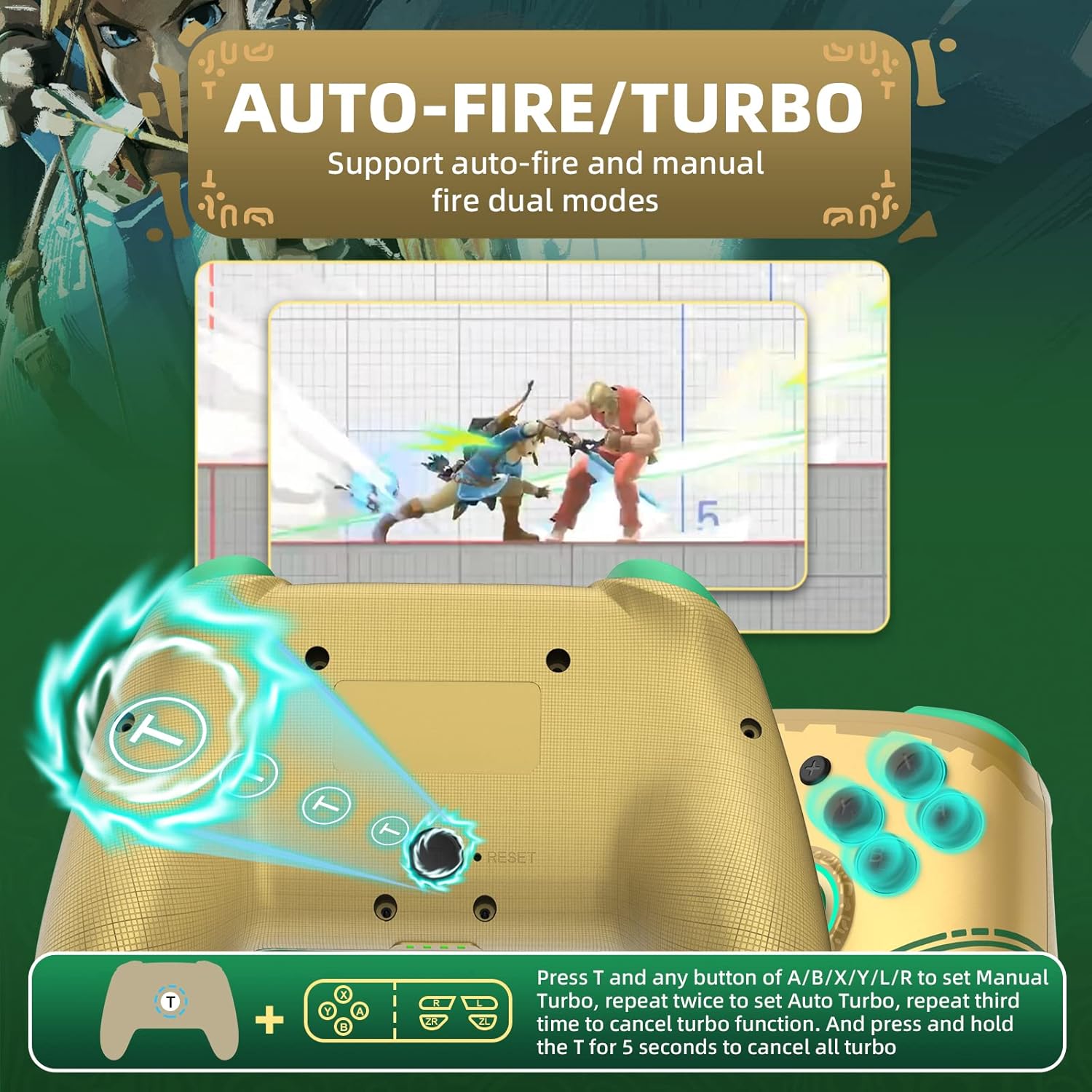
Image 4: Diagram illustrating the button combinations for setting and canceling the Turbo function on the controller.
5.3 ضبط الاهتزاز
The controller features dual vibration feedback with 5 adjustable levels (0%, 30%, 50%, 70%, 100%).
- لضبط شدة الاهتزاز: اضغط مع الاستمرار على زر Tثم اضغط على Directional Button Up to increase vibration or Directional Button Down to decrease vibration.
- مستوى الاهتزاز الافتراضي هو 50%.

Image 5: Graphic showing the T button and directional buttons used to adjust the vibration intensity, with a scale from 0% to 100%.
5.4 ضبط إضاءة RGB
The controller features RGB lighting around the analog sticks, which can be customized.
- To change monochromatic light color: اضغط مع الاستمرار على زر Tثم اضغط على العصا التناظرية اليسرى (L3) once. Repeat to cycle through colors.
- To activate colorful light mode: اضغط مع الاستمرار على زر T, then double-press the العصا التناظرية اليسرى (L3).
- لضبط السطوع: اضغط مع الاستمرار على زر Tثم اضغط على العصا التناظرية اليمنى (R3) لضبط مستويات السطوع.

Image 6: Instructions for changing the RGB light color and adjusting brightness using the T button and analog stick presses.
5.5 NFC/Amiibo Function
The controller supports NFC functionality for scanning Amiibo figures and cards.
- Ensure the NFC function is enabled in your game or Switch system settings.
- Place your Amiibo figure or card over the NFC sensor area, typically located near the center of the controller, between the analog sticks.
- The console will register the Amiibo data.

Image 7: Graphic highlighting the NFC area on the controller, indicating support for Amiibo scanning.
5.6 Motion Control (6-Axis Gyro)
The built-in 6-axis gyroscope provides precise motion control for compatible games, enhancing gameplay through features like visual angle adjustment, direction control, and aim shooting.

Image 8: Illustrations demonstrating the 6-axis gyro functionality for visual angle adjustment, direction control, and aim shooting in games.
6. شحن وحدة التحكم
The controller is equipped with a 600mAh high-capacity rechargeable battery.
- Connect the provided USB-C charging cable to the USB-C port on the controller.
- Connect the other end of the cable to a USB power source (e.g., Nintendo Switch dock, USB wall adapter, computer USB port).
- The indicator lights on the controller will show charging status. They will typically blink while charging and turn solid or off when fully charged.
- تستغرق عملية الشحن الكامل عادة ما يقرب من 2-3 ساعات.
7. الصيانة
- حافظ على وحدة التحكم جافة وبعيدة عن الرطوبة.
- تجنب تعريض وحدة التحكم لدرجات حرارة قصوى.
- نظّف وحدة التحكم بقطعة قماش ناعمة وجافة. لا تستخدم مواد كيميائية قاسية أو مواد كاشطة.
- Store the controller in a safe place to prevent damage from drops or impacts.
8. استكشاف الأخطاء وإصلاحها
- لا يتم الاتصال بوحدة التحكم:
- تأكد من شحن وحدة التحكم.
- Repeat the initial pairing process (Section 4.1).
- Ensure the Switch console is updated to the latest firmware.
- Try connecting the controller via USB-C cable to the Switch dock.
- Reset the controller by inserting a thin object into the small reset hole (if present, usually on the back).
- الأزرار أو عصا التحكم لا تستجيب:
- تأكد من توصيل وحدة التحكم بشكل صحيح.
- Test the controller in Switch's "Calibrate Control Sticks" or "Test Input Devices" settings.
- تأكد من عدم وجود أي حطام يعيق الأزرار أو العصي.
- Vibration is not working:
- Check the vibration adjustment settings (Section 5.3) to ensure it's not set to 0%.
- تأكد من أن اللعبة التي تلعبها تدعم خاصية الاهتزاز.
- NFC/Amiibo not detected:
- Ensure the Amiibo is placed correctly over the NFC sensor.
- Verify that the game or Switch system settings have NFC enabled.
9. المواصفات
| ميزة | التفاصيل |
|---|---|
| رقم الموديل | وحدة التحكم |
| التوافق | Nintendo Switch, Switch OLED, Switch Lite, PC (Steam) |
| الاتصال | لاسلكي (بلوتوث)، سلكي (USB-C) |
| سعة البطارية | 600 مللي أمبير (قابلة لإعادة الشحن) |
| منفذ الشحن | يو اس بي-سي |
| المميزات الخاصة | NFC, Turbo, Adjustable Vibration, RGB Lighting, Wake Up Function, 6-Axis Gyro Motion Control |
| أبعاد | 16.7 × 15.6 × 6.6 سم (تقريبًا) |
| وزن | 280 جم (تقريبًا) |
10. الضمان والدعم
For warranty information or technical support, please refer to the official IINE webالموقع أو تواصل مع خدمة العملاء مباشرةً. احتفظ بإيصال الشراء كإثبات للشراء.
For further assistance, you may visit the IINE Store on Amazon: IINE Official Store


