
1. المقدمة
Thank you for choosing the Saiyin 24-inch Sound Bar. This manual provides detailed instructions for setting up, operating, and maintaining your new sound bar to ensure optimal performance and longevity. Please read this manual thoroughly before use and retain it for future reference.

Image: The Saiyin 24-inch Sound Bar shown with its included remote control, highlighting its sleek black design.
2. معلومات السلامة
لتقليل خطر التعرض لصدمة كهربائية أو حريق أو تلف الوحدة، يرجى مراعاة احتياطات السلامة التالية:
- لا تعرض هذا الجهاز للمطر أو الرطوبة.
- لا تضع أشياء مملوءة بالسوائل، مثل المزهريات، على الجهاز.
- تأكد من التهوية الجيدة. لا تسد أي فتحات تهوية.
- لا تقم بالتثبيت بالقرب من أي مصادر للحرارة مثل المشعات أو فتحات التدفئة أو المواقد أو أي أجهزة أخرى (بما في ذلك ampالمُضخِّمات) التي تنتج الحرارة.
- احمِ سلك الطاقة من السير عليه أو الضغط عليه ، خاصةً عند القوابس ومآخذ التوصيل ونقطة خروجها من الجهاز.
- استخدم فقط المرفقات/الملحقات المحددة من قبل الشركة المصنعة.
- افصل هذا الجهاز أثناء العواصف الرعدية أو عند عدم استخدامه لفترات طويلة من الزمن.
- أحل جميع أعمال الصيانة إلى موظفي الصيانة المؤهلين. يلزم إجراء الصيانة عند تعرض الجهاز للتلف بأي شكل من الأشكال، مثل تلف سلك مصدر الطاقة أو القابس، أو انسكاب السوائل أو سقوط الأشياء داخل الجهاز، أو تعرض الجهاز للمطر أو الرطوبة، أو عدم تشغيله بشكل طبيعي، أو سقوطه.
3. محتويات العبوة
يرجى تحديد المربع للعناصر التالية:
- مكبر صوت قابل للفصل
- سلك الطاقة
- جهاز التحكم عن بعد
- كابل بصري
- كابل صوت 3.5 ملم إلى 3.5 ملم
- دليل المستخدم
- Mount Screws (for wall mounting)

Image: A visual representation of all items included in the Saiyin Sound Bar package, such as the sound bar, remote, cables, power adapter, user manual, and mount screws.
4. انتهى المنتجview
4.1. Sound Bar Components
The Saiyin Sound Bar features a sleek design with integrated controls and various input ports for versatile connectivity.

الصورة: لقطة مقربة view of the sound bar's central display, showing LED indicators for different input modes: OPT (Optical), ARC (HDMI ARC), BT (Bluetooth), and AUX.
4.2. أبعاد
The sound bar measures approximately 24 inches (L) x 3.5 inches (W) x 2.5 inches (H), making it suitable for various TV sizes.

Image: A visual comparison demonstrating the Saiyin Sound Bar's compact size relative to various TV screen sizes, including 24, 32, 40, and 42 inches.
5. الإعداد
5.1. تحديد مستوى
The sound bar can be placed on a desktop or mounted on a wall. Ensure it is positioned centrally below your TV for the best audio experience.
- التنسيب على سطح المكتب: Place the sound bar on a stable, flat surface in front of your TV. Ensure it does not block the TV's remote sensor.
- التثبيت على الحائط: Use the included mount screws to secure the sound bar to the wall. Refer to the wall mounting template (if provided in packaging) for precise drilling locations.

Image: The Saiyin Sound Bar positioned neatly on a media console beneath a wall-mounted television in a living room setting.
5.2. الاتصال بالتلفزيون الخاص بك
The Saiyin Sound Bar offers multiple connection options:

Image: An illustration showing the various connectivity options for the Saiyin Sound Bar: Optical, HDMI (ARC), Bluetooth, and AUX.
- اتش دي ام اي (ارك): For the best audio quality and TV remote control integration, connect an HDMI cable (not supplied) from your TV's HDMI ARC port to the sound bar's HDMI ARC port. The sound bar's indicator will light up أبيض for this input.
- بصري: Connect the supplied optical cable from your TV's optical output to the sound bar's optical input. The sound bar's indicator will light up أرجواني for this input.
- مساعد: Connect the supplied 3.5mm audio cable from your TV's headphone jack or AUX output to the sound bar's AUX input. The sound bar's indicator will light up أخضر for this input.
5.3. اقتران بلوتوث
لتوصيل جهازك المحمول عبر البلوتوث:
- Press the 'BT' button on the remote control or the sound bar to switch to Bluetooth mode. The sound bar's indicator will light up أزرق and flash, indicating it's in pairing mode.
- On your mobile device, enable Bluetooth and search for 'Saiyin Sound Bar'.
- Select 'Saiyin Sound Bar' from the list of available devices to pair. Once connected, the blue indicator will stop flashing and remain solid.

Image: The Saiyin Sound Bar connected via Bluetooth, with a smartphone displaying music playback, illustrating wireless audio streaming.
5.4. TV Audio Settings
For optimal sound quality, especially when using Optical or HDMI ARC connections, ensure your TV's audio output settings are configured correctly. The Saiyin Sound Bar is not compatible with Dolby and DTS audio formats.
- Navigate to your TV's audio settings menu.
- Select the sound output to either HDMI (قوس) or بصري, depending on your connection.
- Change the Digital Output Audio Format to PCM or ستيريو.

Image: A diagram illustrating how to adjust TV audio settings, specifically selecting HDMI(ARC)/Optical as sound output and setting Digital Output Audio Format to PCM, along with a depiction of a TV's rear panel showing HDMI ARC and Optical ports.
6. تعليمات التشغيل
6.1. تشغيل/إيقاف التشغيل
Press the power button on the sound bar or the remote control to turn the unit on or off.
6.2. اختيار المدخلات
Press the 'Input' button on the sound bar or the corresponding input buttons (OPT, ARC, BT, AUX) on the remote control to switch between different audio sources. The LED indicator on the sound bar will change color to reflect the active input:
- بصري: أرجواني
- اتش دي ام اي (ارك): أبيض
- بلوتوث: أزرق
- مساعد: أخضر
6.3. التحكم في مستوى الصوت
Use the 'Volume +' and 'Volume -' buttons on the sound bar or the remote control to adjust the volume level.
6.4. أوضاع الصوت
The sound bar features three customized sound modes optimized for different content types:
- وضع الموسيقى: Enhances musical clarity and bass.
- وضع الفيلم: Provides a more immersive cinematic experience with enhanced dialogue and surround effects.
- وضع الأخبار: Optimizes vocal clarity for news broadcasts and talk shows.
Press the 'Music', 'Movie', or 'News' buttons on the remote control to select the desired sound mode.

Image: A hand holding the Saiyin Sound Bar remote control, with a TV screen in the background displaying three distinct sound modes: Music, Movie, and News, each with corresponding visual content.
6.5. جهاز التحكم عن بعد
The included remote control provides full functionality for the sound bar. Ensure the remote is pointed directly at the sound bar's sensor for optimal response.

Image: A close-up of the Saiyin Sound Bar's remote control, showing its various buttons for power, volume, input selection, and sound modes.
7. الصيانة
To keep your Saiyin Sound Bar in optimal condition:
- نظّف السطح بقطعة قماش ناعمة وجافة. لا تستخدم منظفات أو مذيبات كاشطة.
- Avoid exposing the sound bar to extreme temperatures or humidity.
- لا تحاول تفكيك الوحدة. قم بإحالة جميع أعمال الصيانة إلى فنيين مؤهلين.
8. استكشاف الأخطاء وإصلاحها
If you encounter issues with your sound bar, please refer to the following common solutions:
| مشكلة | السبب المحتمل / الحل |
|---|---|
| لا يصدر أي صوت من مكبر الصوت. |
|
| Sound is distorted or buzzing. |
|
| جهاز التحكم عن بعد لا يعمل. |
|
| فشل اقتران البلوتوث. |
|
9. المواصفات
| ميزة | وصف |
|---|---|
| اسم الموديل | Detachable Sound Bar for Smart TV |
| نوع السماعة | شريط الصوت |
| الحد الأقصى لقوة خرج السماعة | 100 واط |
| تكنولوجيا الاتصال | HDMI (ARC), Optical, AUX, Bluetooth |
| تكنولوجيا الاتصالات اللاسلكية | بلوتوث 5.3 |
| مدى البلوتوث | 10 مترا |
| وضع إخراج الصوت | ستيريو |
| تكوين قناة الصوت المحيطي | 2.0 |
| أبعاد المنتج | 5 بوصة عمق × 24 بوصة عرض × 4 بوصة ارتفاع |
| وزن العنصر | 3.75 رطل |
| طريقة التحكم | زر التحكم عن بعد |
| مصدر الطاقة | كهرباء سلكية |
| نوع التركيب | حامل الحائط |
| الأجهزة المتوافقة | Desktop, Gaming Console, Home Theater, Projector, Television |
10. الضمان ودعم العملاء
Saiyin provides lifetime technical support for its products. For any inquiries, technical assistance, or warranty claims, please contact our customer support team.
- ضمان: Up to 12-month warranty.
- سياسة العائدات: إمكانية الإرجاع مجاناً خلال 30 يوماً.
- خدمات: 24/7 E-mail assistance.
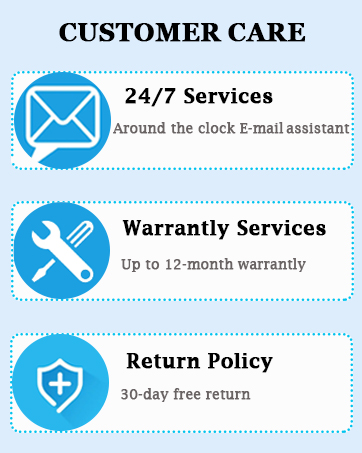
Image: A graphic detailing Saiyin's customer care services, including 24/7 email support, up to 12-month warranty services, and a 30-day free return policy.
Please refer to the contact information provided in your product packaging or visit the official Saiyin webالموقع للحصول على أحدث تفاصيل الدعم.


