1. المقدمة
This manual provides comprehensive instructions for the setup, operation, maintenance, and troubleshooting of your BIGBIG WON C1S Wired Gaming Controller. Please read this manual carefully before using the product to ensure optimal performance and longevity.
The BIGBIG WON C1S is a versatile wired gaming controller designed for multi-platform compatibility, offering advanced features such as 6-axis gyro, customizable macro and turbo functions, dual vibration, and RGB lighting. Its transparent design allows for a unique visual experience.
2. دليل الإعداد
2.1 محتويات العبوة
- BIGBIG WON C1S Wired Gaming Controller
- 1.8m Ultra-Soft Type-C Cable
- دليل المستخدم
2.2 توصيل وحدة التحكم
The C1S controller connects via a wired USB Type-C cable. Ensure the cable is securely connected to both the controller and your gaming device.
- Connect the USB Type-C end of the provided cable to the controller's port.
- Connect the standard USB-A end of the cable to an available USB port on your PC, Nintendo Switch dock, or PS4 (requires R90 converter, sold separately).
- The controller's RGB lighting will illuminate upon successful connection.
2.3 توافق النظام الأساسي
- الكمبيوتر الشخصي: Compatible with Windows 7/8/10/11. Plug and play functionality.
- نينتندو سويتش: Connect directly to the Switch dock. Supports one-key wake-up for the console.
- بلاي ستيشن 4: Requires a BIGBIG WON R90 converter (sold separately) for compatibility.
- الأجهزة المحمولة: Compatible with iOS MFi and Android HID Model devices.

Image: The BIGBIG WON C1S controller connected to various platforms, including a PC and a Nintendo Switch, demonstrating its multi-platform compatibility.
3. تعليمات التشغيل
3.1 تخطيط وحدة التحكم
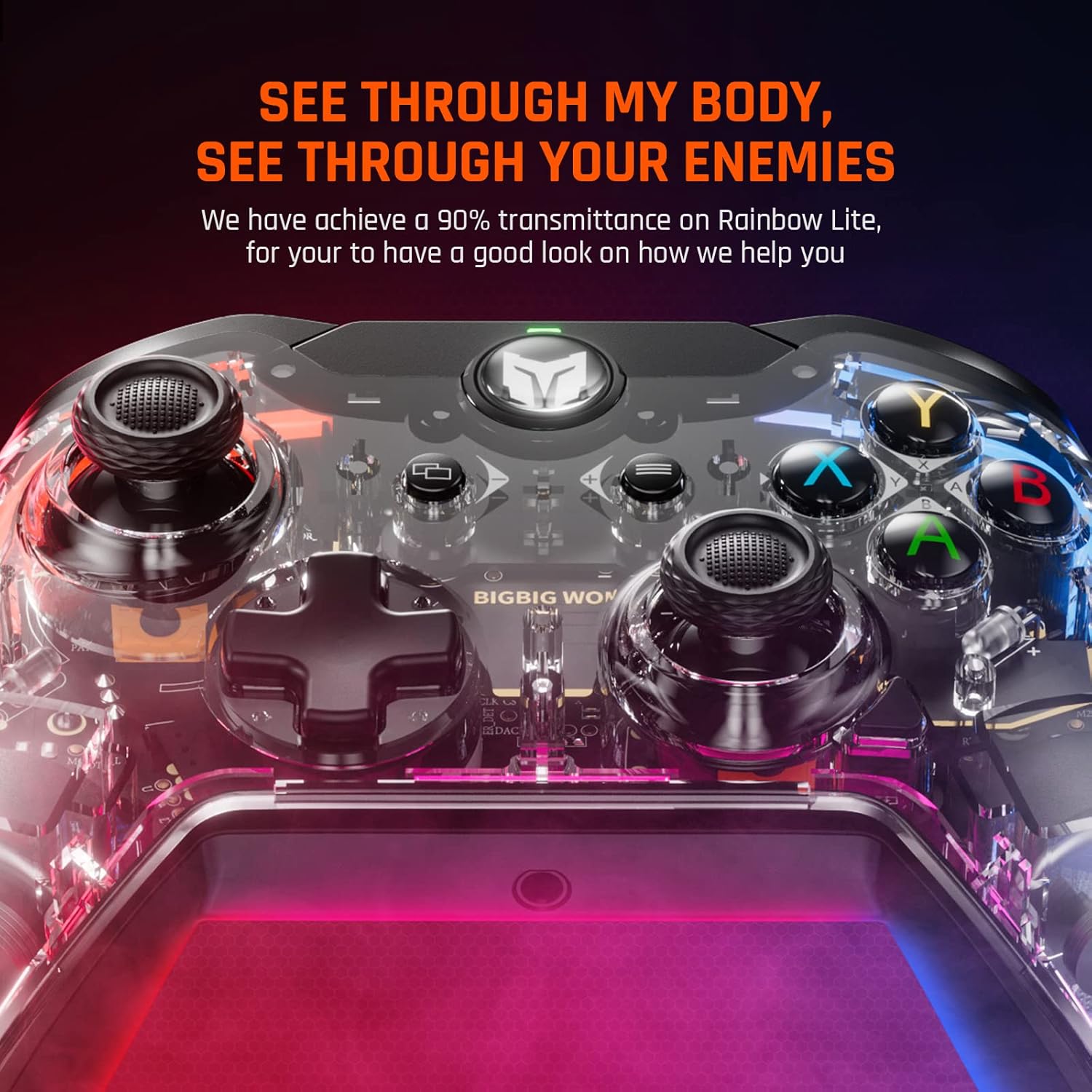
الصورة: الجبهة view of the BIGBIG WON C1S controller, highlighting its transparent casing and illuminated internal components, along with the main buttons and joysticks.
The C1S controller features a standard layout with two analog sticks, a D-pad, A/B/X/Y face buttons, L/R shoulder buttons, ZL/ZR triggers, and additional customizable back buttons (M1/M2).
3.2 الميزات والوظائف الرئيسية
- مستشعر جيروسكوب سداسي المحاور: Provides motion control capabilities, enhancing gameplay immersion and allowing for quick, responsive actions in compatible games.
- Customizable M1/M2 Back Buttons: These two remappable buttons on the back of the controller can be programmed for single or multiple key functions (A/B/X/Y/L/ZL/R/ZR/L3/R3/D-pad keys). This allows for advanced game techniques and personalized control schemes.

الصورة: الخلفية view of the BIGBIG WON C1S controller, illustrating the placement of the M1 and M2 remappable back buttons for custom configurations.
- وظيفة التوربو القابلة للتعديل: Supports both Auto TURBO and Manual TURBO modes. You can set TURBO with A/B/X/Y/L/R/ZL/ZR buttons. There are three adjustable speeds: 5 shots/s, 12 shots/s, and 20 shots/s.
- محركات اهتزاز مزدوجة: Built-in motors provide haptic feedback with four adjustable levels: None, Weak, Medium, and Strong. This enhances game immersion by providing tactile responses to in-game events.
- One Key Wake-up: Allows you to quickly wake up your connected console with a single button press.
- إضاءة RGB: The controller features customizable RGB lighting effects, allowing you to personalize its appearance and create a dynamic gaming atmosphere.

Image: Three BIGBIG WON C1S controllers showcasing various RGB lighting effects, demonstrating the customizable illumination feature.
- Linear and Hair Triggers: The triggers can function as linear triggers for precise control in racing games or as hair triggers for rapid fire in FPS games, adapting to different gaming needs.

Image: A visual representation explaining the functionality of linear triggers versus hair triggers, showing how the C1S controller can switch between these modes for different game genres.
- Zero Deadzone Joysticks: Equipped with an optimized joystick algorithm, the controller offers precise accuracy with zero deadzone, ensuring responsive and natural motion control.

Image: A close-up of the controller's joystick, emphasizing its precision and zero deadzone capability with glowing visual effects.
3.3 Mobile Application for Customization
The dedicated mobile application allows users to easily configure mapping settings, adjust turbo speeds, and customize other controller functions for different games or scenarios. A dedicated button on the controller facilitates fast switching between configurations.

Image: A user interacting with the BIGBIG WON mobile application on a smartphone to customize controller settings, with the C1S controller visible.
4. الصيانة
4.1 التنظيف
- استخدم قطعة قماش ناعمة وجافة لمسح سطح وحدة التحكم.
- بالنسبة للأوساخ العنيدة، قم بإزالة الأوساخ برفق.ampامسح بقطعة قماش مبللة بالماء أو بمحلول تنظيف خفيف. تجنب المواد الكيميائية القاسية أو المواد الكاشطة.
- لا تسمح بدخول السوائل إلى فتحات وحدة التحكم.
- Clean the transparent casing gently to maintain its clarity.
4.2 التخزين
- قم بتخزين وحدة التحكم في مكان بارد وجاف بعيدًا عن أشعة الشمس المباشرة ودرجات الحرارة القصوى.
- تجنب وضع أشياء ثقيلة على وحدة التحكم.
- When not in use, coil the 1.8m Ultra-Soft Type-C cable neatly to prevent kinks or damage.

الصورة: لقطة مقربة view of the anti-slip textured grips on the controller, designed for enhanced handling during gameplay.
5. استكشاف الأخطاء وإصلاحها
5.1 مشاكل الاتصال
- لم يتم التعرف على وحدة التحكم: Ensure the USB Type-C cable is fully inserted into both the controller and the device. Try a different USB port or restart your device.
- No response on PS4: Confirm that you are using the BIGBIG WON R90 converter for PS4 compatibility.
5.2 Button/Joystick Malfunction
- الأزرار لا تستجيب: Check if any custom mappings are active via the mobile app that might be interfering. Reset controller settings if necessary.
- Joystick drift or inaccuracy: The C1S features zero deadzone joysticks. If you experience issues, ensure the controller firmware is up to date via the mobile app.
- Trigger issues (e.g., ZL button): If a trigger button (e.g., ZL/L2) does not maintain a consistent signal when held down, this may indicate a hardware issue. Please contact customer support for assistance.
5.3 Vibration Issues
- بدون اهتزاز: Check the vibration intensity settings. Ensure it is not set to 'None'.
- Weak/Strong vibration: Adjust the vibration intensity through the controller's settings or the mobile application.
6. المواصفات
| رقم الموديل | C1S |
| نوع الاتصال | سلكي (USB من النوع C) |
| طول الكابل | 1.8 meters (Ultra-Soft E-Sport Grade Cable) |
| المنصات المدعومة | Windows 7/8/10/11, Nintendo Switch, iOS MFi, Android HID Model, PS4 (with R90 converter) |
| المميزات الخاصة | 6-Axis Gyro, Macro Function (M1/M2), Turbo Function (3 speeds), Dual Vibration (4 levels), One Key Wake-up, RGB Lighting, Linear/Hair Triggers, Zero Deadzone Joysticks, 3.5mm Audio Jack |
| أبعاد المنتج | 0.39 × 0.39 × 1 بوصة |
| وزن العنصر | 11.7 أونصات |
| الشركة المصنعة | فوز كبير |

Image: Various international certification logos, indicating compliance with quality and safety standards.
7. معلومات الضمان
For detailed warranty information, please refer to the official BIGBIG WON webيمكنك الاطلاع على شروط الضمان على الموقع الإلكتروني أو على بطاقة الضمان المرفقة مع المنتج. تغطي شروط الضمان عادةً عيوب التصنيع لفترة محددة تبدأ من تاريخ الشراء.
احتفظ بإيصال الشراء الخاص بك كدليل على الشراء في حالة وجود أي مطالبات بالضمان.
8. دعم العملاء
If you encounter any issues not covered in this manual or require further assistance, please contact BIGBIG WON customer support through their official website. Provide your product model (C1S) and a detailed description of the issue for efficient service.
رسمي Webموقع: https://dwz.cn/fdJI2Z9U


