المنتج انتهىview
The MageGee GK980 is a wired keyboard and mouse combo designed for PC, laptop, and Mac users, featuring RGB backlighting for the keyboard and a 7-color breathing backlight system for the mouse. This combo offers a comfortable typing experience with anti-ghosting technology and adjustable mouse sensitivity.

النفقات العامة view of the MageGee GK980 wired keyboard and matching pink gaming mouse, both featuring vibrant RGB backlighting.
دليل الإعداد
The MageGee GK980 keyboard and mouse combo is designed for plug-and-play functionality.
توصيل جهازك
- Locate an available USB port on your computer (PC, laptop, or Mac).
- Plug the USB connector of the GK980 keyboard into the USB port.
- Plug the USB connector of the gaming mouse into another available USB port.
- Your operating system should automatically detect and install the necessary drivers. No additional software installation is typically required.

The MageGee GK980 pink keyboard and mouse are shown on a desk, connected to a computer, illustrating a typical setup.
تعليمات التشغيل
ميزات ووظائف لوحة المفاتيح
The GK980 keyboard features a full 98-key layout with anti-ghosting technology for responsive typing. It includes multimedia function keys and customizable RGB backlighting.
- Full 98 Keys Anti-ghosting: Ensures all key presses are registered simultaneously for fast and accurate input.
- تصميم مريح: Stepped keycap layout and foldable bracket provide a comfortable typing angle.
- مفاتيح الوسائط المتعددة: Access various functions quickly using FN key combinations (FN+F1-F12).
- أغطية مفاتيح بتقنية الحقن المزدوج: Provide durable, clear, and uniform backlighting.

An illustrative image detailing key features of the GK980 combo, including its 98-key layout, anti-ghosting capability, multimedia keys, ergonomic design, comfortable feel, broad compatibility, and cool lighting.
Keyboard Backlight Control (RGB Version)
The keyboard's RGB backlighting can be adjusted using the following FN key combinations:
| مفتاح الوظيفة | وصف |
|---|---|
| FN + ~ | التنفس الملون في وضع قوس قزح (لون مختلف لكل ضوء) |
| الجبهة الوطنية + 1 | أحادي اللون يدور في تدفق المياه النابض (الخاتم) |
| الجبهة الوطنية + 2 | أحادي اللون يتداول بأسلوب الستائر الدوارة |
| الجبهة الوطنية + 3 | دائما على |
| الجبهة الوطنية + 4 | أحادي اللون يتداول في وضع التنفس |
| الجبهة الوطنية + 5 | التنفس الملون بلون واحد في كل مرة (أحمر/أرجواني/أزرق/سماوي/أخضر/أصفر) |
| الجبهة الوطنية + 6 | وضع الدفع |
| الجبهة الوطنية + 7 | عن |
| FN + Direction Keys | Manually adjust the color of each light |
| الجبهة الوطنية + 0 | Stipple mode: color changes automatically per stroke |

A visual guide to the GK980 keyboard's backlight control, displaying various FN key combinations and their corresponding RGB lighting effects, such as breathing, marquee, and static modes.
Mouse Features and DPI Adjustment
The gaming mouse features a 7-color breathing backlight system and adjustable sensitivity (DPI) to suit various tasks and gaming needs.
- 7 Colors Breathing Backlight: Dazzling color effects enhance your desktop environment.
- DPI قابل للتعديل: Supports 6 levels of sensitivity adjustment (600-3200 DPI) for precise control.
- DPI Indicator Lights: Internal indicator lights show the current DPI setting.
To adjust the mouse DPI, use the dedicated DPI button on the mouse. Each press cycles through the available DPI settings.
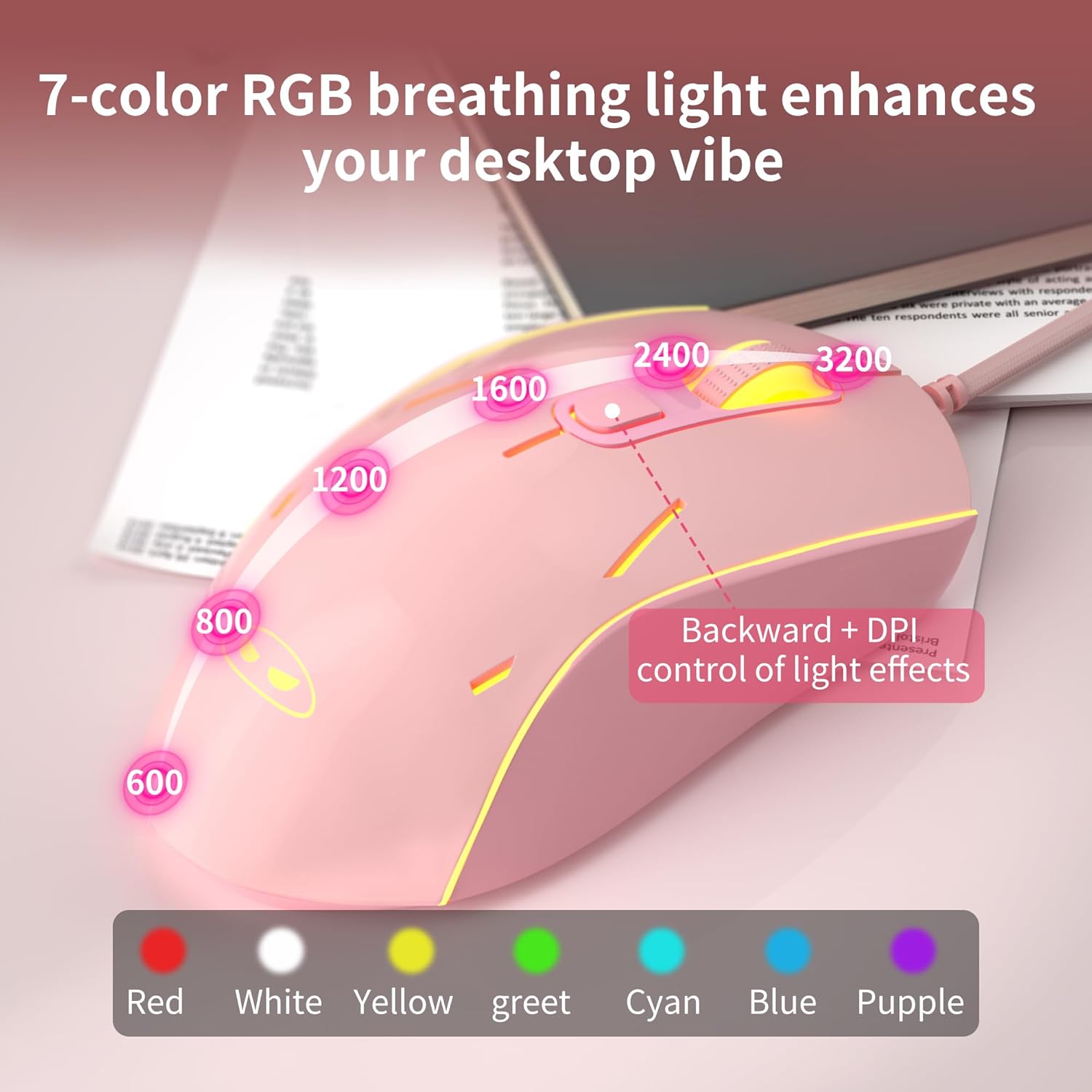
A close-up image of the pink gaming mouse, highlighting its 7-color breathing backlight and the range of adjustable DPI settings from 600 to 3200, with visual indicators for each level.
صيانة
تنظيف
To maintain the performance and appearance of your keyboard and mouse:
- افصل الأجهزة عن الكمبيوتر قبل التنظيف.
- استخدم قطعة قماش ناعمة وخالية من الوبر وامسحها برفق.ampened with water or a mild cleaning solution to wipe down the surfaces.
- For the keyboard, use compressed air to remove dust and debris from between the keycaps.
- تجنب استخدام المواد الكيميائية القاسية أو المنظفات الكاشطة أو المذيبات، لأنها قد تتلف الطبقة النهائية.
تخزين
When not in use for extended periods, store the keyboard and mouse in a dry, cool place away from direct sunlight and extreme temperatures.
استكشاف الأخطاء وإصلاحها
This section addresses common issues you might encounter with your MageGee GK980 keyboard and mouse combo.
المشاكل الشائعة والحلول
لوحة المفاتيح أو الفأرة لا تستجيب
- Ensure both the keyboard and mouse USB cables are securely plugged into your computer's USB ports.
- حاول توصيل الأجهزة بمنافذ USB مختلفة على جهاز الكمبيوتر الخاص بك.
- أعد تشغيل الكمبيوتر الخاص بك.
- Test the keyboard and mouse on another computer to determine if the issue is with the devices or your computer's USB ports.
Backlight Not Working or Incorrect
- For the keyboard, ensure the backlight is not turned off (refer to "Keyboard Backlight Control" section for FN key combinations, specifically FN + 7 to turn off/on).
- For the mouse, the backlight is typically always on and cycles through colors. If it's not lit, ensure the mouse is properly connected.
- If the keyboard backlight resets after restarting the computer, this is normal behavior for some systems.
Mouse Sensitivity (DPI) Issues
- Use the DPI button on the mouse to cycle through the sensitivity settings. Observe the indicator lights to confirm the change.
- Ensure the mouse sensor is clean and free of obstructions. Use the mouse on a clean, non-reflective surface.
Keys Not Registering or Ghosting
- Ensure the keyboard is firmly connected.
- The GK980 features anti-ghosting for all 98 keys, so this should be rare. If persistent, try restarting your computer or testing on another system.
التوافق
The product supports Win2000, Win XP, Win ME, Vista, Win7, Win8, Win10, Android, Linux, and Mac operating systems. It is plug-and-play.

A visual Q&A section addressing common inquiries about the GK980 combo, including details on mouse DPI settings, keyboard backlighting, and the plug-and-play USB connection method.
تحديد
Detailed technical specifications for the MageGee GK980 Keyboard and Mouse Combo.
| ميزة | مواصفة |
|---|---|
| نموذج | جي كيه 980 |
| الاتصال | USB سلكي |
| تخطيط لوحة المفاتيح | 98-key, Full-size |
| الخلفية لوحة المفاتيح | RGB الخلفية |
| الفأرة الخلفية | 7-Color Breathing Backlight |
| إعدادات الماوس DPI | 600-3200 DPI (6 levels) |
| نوع Keycap | Double Injection ABS Keycaps |
| مكافحة التظليل | Full 98-key Anti-ghosting |
| أنظمة التشغيل المتوافقة | Win2000, Win XP, Win ME, Vista, Win7, Win8, Win10, Android, Linux, Mac |
| أبعاد الحزمة | 16.5 × 9.17 × 2.05 بوصة |
| وزن العنصر | 2.25 رطل |
| الشركة المصنعة | ماجي |
محتويات الحزمة
The MageGee GK980 Keyboard and Mouse Combo package includes:
- 1 x GK980 Keyboard
- 1 x Pink Gaming Mouse
- 1 x Magnetic Wrist Rest
- بطاقة وظائف ودليل استخدام واحد
An image displaying the contents of the GK980 product package, including the keyboard, gaming mouse, magnetic wrist rest, and the function card/manual.
الضمان والدعم
MageGee products are designed for reliability and performance. For warranty information or technical support, please refer to the documentation included in your product package or visit the official MageGee webموقع.
For further assistance, you may contact MageGee customer support.


