1. المقدمة
This user manual provides comprehensive instructions for the installation, operation, and maintenance of the Axis Communications AXIS Q6225-LE PTZ Camera. Please read this manual thoroughly before using the product to ensure proper functionality and safety. This camera is designed for robust outdoor surveillance in challenging conditions.
2. معلومات السلامة
Observe the following safety precautions to prevent damage to the product or injury to personnel:
- تثبيت: Installation must be performed by qualified personnel in accordance with all local and national electrical and building codes.
- مزود الطاقة: Use only the specified power supply (60 watts) for this device. Ensure the power source is stable and meets the camera's requirements.
- بيئة: The camera is designed for outdoor use. However, avoid exposing it to extreme conditions beyond its specified operating range.
- تنظيف: افصل الكهرباء قبل التنظيف. استخدم قطعة قماش ناعمة وجافة. لا تستخدم منظفات سائلة أو بخاخات.
- التعديلات: Do not attempt to modify or disassemble the camera. This may void the warranty and pose safety risks.
3. محتويات العبوة
تأكد من وجود جميع العناصر في العبوة:
- كاميرا AXIS Q6225-LE PTZ
- دليل التثبيت
- تركيب القوس والأجهزة
- Network Cable Connector
- Documentation and Software CD (if applicable)
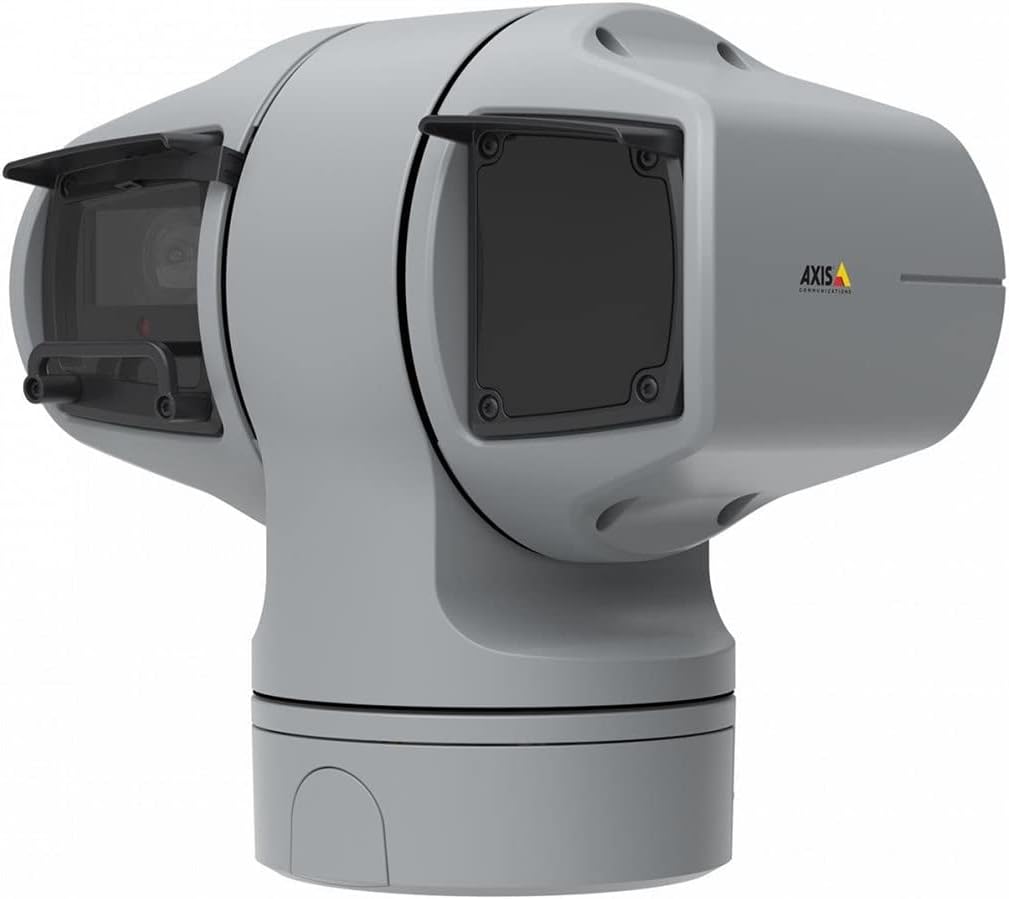
الشكل 1: AXIS Q6225-LE PTZ Camera. This image displays the grey-colored PTZ camera unit, highlighting its robust housing and integrated lens system, designed for outdoor surveillance.
4. الإعداد والتثبيت
4.1 تركيب الكاميرا
The AXIS Q6225-LE is designed for wall mount installation. Ensure the mounting surface is strong enough to support the camera's weight and withstand environmental conditions.
- اختر موقع تركيب مناسب يوفر المجال المطلوب لـ view وهي في متناول الكهرباء وشبكات الاتصال.
- Use the provided mounting template to mark drill holes on the wall.
- Drill pilot holes and secure the mounting bracket using appropriate screws and anchors.
- قم بتثبيت الكاميرا على حامل التثبيت، مع التأكد من تثبيتها بإحكام في مكانها.
4.2 توصيل الطاقة والشبكة
Connect the camera to power and network as follows:
- قوة: Connect the power cable to a 60-watt power source. Ensure the connection is secure and weatherproof.
- شبكة: Connect an Ethernet cable from your network switch or router to the camera's network port. The camera supports Wi-Fi for wireless communication. Refer to the network configuration section for wireless setup.
4.3 التكوين الأولي
After physical installation and connection, access the camera's web interface for initial configuration:
- افتح web browser on a computer connected to the same network as the camera.
- Enter the camera's IP address in the browser's address bar. If the IP address is unknown, use the AXIS IP Utility tool to discover it.
- Follow the on-screen prompts to set up a new password for the administrator account.
- Configure basic network settings, date/time, and video stream settings.
5. تشغيل الكاميرا
5.1 التحكم في الحركة الأفقية والرأسية والتكبير (PTZ)
The AXIS Q6225-LE camera features full PTZ capabilities, allowing remote adjustment of its viewing angle and zoom level. Control is typically performed via the camera's web interface or compatible video management software (VMS).
- بان: Rotate the camera horizontally to cover a wider area.
- الإمالة: Adjust the camera vertically to view objects at different heights.
- التكبير البصري: Use the optical zoom feature to magnify distant objects without loss of image quality.
5.2 اكتشاف الحركة والتنبيهات
The camera supports motion-only alerts. Configure motion detection zones and sensitivity settings in the web interface to trigger recordings or notifications when movement is detected.
5.3 الإضاءة بالأشعة تحت الحمراء (IR)
Equipped with infrared light sources, the camera provides clear video surveillance in low-light or complete darkness. IR illumination activates automatically or can be manually controlled.
6. الصيانة
6.1 التنظيف
Regular cleaning of the camera lens and housing is recommended to ensure optimal performance, especially in dusty or harsh environments.
- Gently wipe the lens with a soft, lint-free cloth. For stubborn dirt, use a lens cleaning solution specifically designed for optical surfaces.
- نظف هيكل الكاميرا باستخدام مزيل البقع.amp القماش. تجنب استخدام المنظفات أو المذيبات الكاشطة.
6.2 تحديثات البرامج الثابتة
Periodically check the Axis Communications website for firmware updates. Keeping the camera's firmware up-to-date ensures access to the latest features, security enhancements, and bug fixes.
7. استكشاف الأخطاء وإصلاحها
This section addresses common issues you might encounter with your AXIS Q6225-LE camera.
| مشكلة | السبب المحتمل | حل |
|---|---|---|
| لا يوجد تغذية الفيديو | Power disconnected, network issue, incorrect IP address. | Check power connection. Verify network cable or Wi-Fi connection. Confirm camera's IP address. |
| جودة الصورة رديئة | Dirty lens, improper focus, low light conditions. | Clean the lens. Adjust focus via web interface. Ensure adequate lighting or verify IR functionality. |
| PTZ controls unresponsive | Network latency, software glitch, motor issue. | Check network connection. Restart the camera. If problem persists, contact support. |
8. المواصفات
| ميزة | التفاصيل |
|---|---|
| رقم الموديل | 02316-002 |
| ماركة | أكسيس كوميونيكيشنز |
| نوع التركيب | حامل الحائط |
| لون | أبيض |
| مادة | معدن |
| واتtage | 60 واط |
| تكنولوجيا الاتصال | لاسلكي، واي فاي |
| الاستخدام الداخلي والخارجي | في الهواء الطلق |
| طريقة التحكم | بعيد |
| تقنية مستشعر الصور | سيموس |
| تنسيق التقاط الفيديو | ام بي اي جي-4 |
| نوع مصدر الضوء | الأشعة تحت الحمراء |
| نوع التنبيه | الحركة فقط |
| نوع التكبير | التكبير البصري |
| وزن العنصر | 0.01 كيلوغرام (0.352 أونصة) |
| المكونات المضمنة | الكاميرا/الملحقات |
9. الضمان والدعم
For warranty information and technical support, please refer to the official Axis Communications webالموقع أو اتصل بالوكيل المعتمد لديك. احتفظ بإيصال الشراء كإثبات للشراء.
الموارد المتاحة على الإنترنت: www.axis.com


