1. المقدمة
Thank you for choosing the HDWR wagPRO-P500 Platform Scale. This manual provides essential information for the safe and efficient operation, setup, and maintenance of your new scale. Please read this manual thoroughly before use and keep it for future reference.
The HDWR wagPRO-P500 is a robust platform scale designed for precise weighing of larger items in industrial, warehouse, agricultural, and logistics environments. It features a high capacity, accurate measurements, and a user-friendly interface.
2. مواصفات المنتج
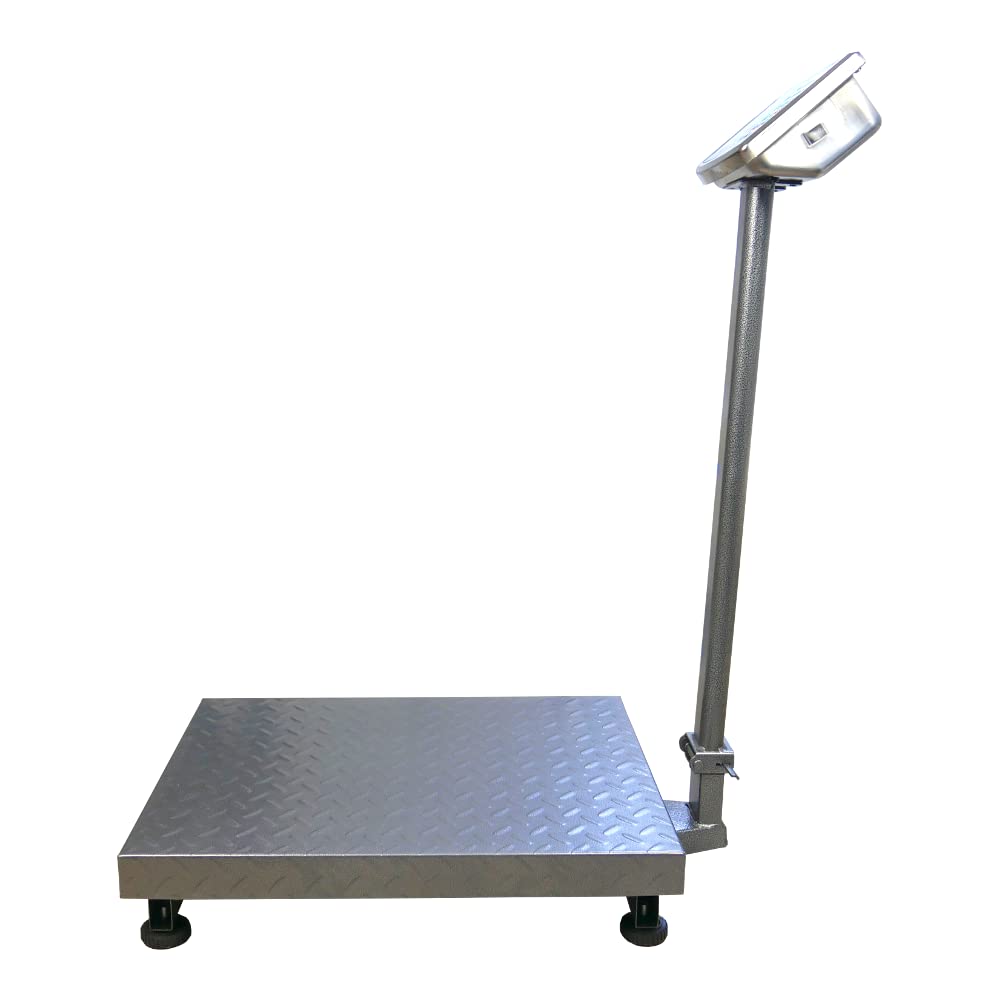
- منصة: The scale features a spacious 60 x 45 cm platform for easy placement of goods, equipped with special tabs to prevent accidental slipping.
- قياس دقيق: Offers precise measurement for items weighing from 200 grams up to a maximum capacity of 500 kg, with an accuracy of 0.2 kg.
- واجهة سهلة الاستخدام: Features three easy-to-read, green backlit LCD digital displays showing product weight and unit price.
- وظائف إضافية: Includes useful functions such as Tare, unit price input, and totalization.
- عملية الطاقة: An integrated 4 Ah battery provides wireless operation for approximately 150 hours.

Image: Key features of the HDWR wagPRO-P500 scale, including display, hold function, unit conversion, accuracy, tare, and battery power.

Image: Details on measurement accuracy, charging process, the robust platform, and the clear display of the scale.
3. تعليمات الإعداد
- فك التعبئة: Carefully remove all components from the packaging. Verify that all parts are present: platform, display unit, support column, power adapter, and user manual.
- Assemble the Support Column: Attach the display support column to the platform base. Ensure it is securely fastened using the provided hardware.
- Attach the Display Unit: Mount the display unit onto the top of the support column. Connect the cable from the platform to the display unit.
- الموقع: Place the scale on a firm, level, and stable surface to ensure accurate readings. Avoid areas with excessive vibration, drafts, or extreme temperature changes.
- الشحن الأولي: Connect the scale to a power outlet using the supplied mains adapter. Allow the internal battery to fully charge before the first wireless use. The charging indicator on the display will show the charging status.

Image: An assembled HDWR wagPRO-P500 platform scale, ready for use.
4. تعليمات التشغيل
4.1 تشغيل/إيقاف التشغيل
- لتشغيل الميزان، اضغط على الزر [تشغيل/إيقاف] زر.
- To power off the scale, press and hold the [تشغيل/إيقاف] الزر حتى تنطفئ الشاشة.
4.2 الوزن الأساسي
- تأكد من تشغيل الميزان وأن الشاشة تعرض الرقم '0.00'.
- Carefully place the item to be weighed onto the center of the platform.
- اقرأ الوزن المعروض على الشاشة.
4.3 الوظيفة الفارغة
تتيح لك وظيفة الوزن الصافي طرح وزن الحاوية أو العبوة، وبالتالي يتم قياس الوزن الصافي للمحتويات فقط.
- Place the empty container onto the platform. The display will show its weight.
- اضغط على [الفارغ] اضغط على الزر. ستتم إعادة ضبط الشاشة إلى "0.00".
- ضع العناصر المراد وزنها في الحاوية. ستظهر الآن على الشاشة وزن العناصر فقط.
- To clear the tare, remove the container and items, then press [الفارغ] مرة أخرى.
4.4 وحدة التحويل
The scale supports measurement in kilograms (kg) and pounds (lb).
- للتبديل بين الوحدات، اضغط على [الوحدات] button (or similar button as indicated on your display). The active unit will be shown on the display.
4.5 Price Calculation (if applicable)
If your model supports price calculation, follow these steps:
- ضع العنصر على المنصة.
- Using the numeric keypad, enter the unit price.
- The total price will be displayed automatically.
الصورة: تفصيلية view of the scale's green backlit LCD display and control keypad, showing weight, unit price, and total price fields.
5. الصيانة
5.1 التنظيف
- افصل الميزان دائمًا عن مصدر الطاقة قبل التنظيف.
- Wipe the platform and display unit with a soft, damp قماش. استخدم منظفًا معتدلًا إذا لزم الأمر.
- Do not use abrasive cleaners, solvents, or immerse any part of the scale in water.
- Ensure no liquid enters the display unit or internal components.
5.2 العناية بالبطارية
- قم بإعادة شحن البطارية عند ظهور مؤشر انخفاض مستوى البطارية على الشاشة.
- للحصول على عمر بطارية مثالي، تجنب تفريغ البطارية بالكامل بشكل متكرر.
- If the scale is not used for an extended period, charge the battery every 3 months to prevent deep discharge.
5.3 التخزين
- Store the scale in a dry, clean environment, away from direct sunlight and extreme temperatures.
- Avoid placing heavy objects on the platform during storage.

الصورة: لقطة مقربة view of the durable, textured metal platform, designed for secure placement of items.
6. استكشاف الأخطاء وإصلاحها
| مشكلة | السبب المحتمل | حل |
|---|---|---|
| لا يتم تشغيل الميزان. | Battery is discharged or power adapter is not connected. | Connect the power adapter and charge the battery. Ensure the power outlet is functional. |
| قراءات غير دقيقة. | Scale not on a level surface, external vibrations, or overload. | Place the scale on a stable, level surface. Remove any sources of vibration. Do not exceed the maximum weight capacity. |
| Display shows 'Err' or similar error. | Overload, internal error, or unstable reading. | Remove the load from the platform. Power off and restart the scale. If the error persists, contact customer support. |
| العرض خافت أو وميض. | بطارية منخفضة. | Recharge the battery using the provided power adapter. |
7. المواصفات
- نموذج: wagPRO-P500
- ماركة: HDWR
- الأبعاد (الطول × العرض × الارتفاع): 75 × 45 × 88 سم
- أبعاد المنصة: 60 × 45 سم
- وزن: 11.6 كجم
- أقصى سعة للوزن: 500 كجم
- Reading Precision: 200 جرامًا (0.2 كجم)
- دقة القياس: +/- 0.2%
- مادة: معدن
- نوع العرض: شاشة LCD بإضاءة خلفية خضراء
- بطارية: Integrated 4 Ah (approx. 150 hours wireless operation)
- المميزات الخاصة: Backlit display, high load capacity, tare function, large display, portable.
- الاستخدامات الموصى بها: Industry, agriculture, logistics, wholesale.

Image: Dimensions of the wagPRO-P500 platform scale, illustrating its robust design and size.
8. الضمان والدعم
This product is supplied with a user manual. For information regarding warranty coverage, please refer to the documentation provided at the time of purchase or contact your retailer.
For technical support, service, or inquiries about spare parts, please contact HDWR customer service through their official website or the contact information provided with your purchase. Please have your model number (wagPRO-P500) and purchase date ready when contacting support.


