مقدمة
This manual provides essential information for the safe and efficient operation of your Boxlight P8 WX35NXT DLP Projector. Please read this manual thoroughly before using the projector and retain it for future reference. The Boxlight P8 WX35NXT is an Ultra Short Throw DLP projector designed for various applications, offering WXGA resolution and 3500 ANSI lumens brightness.
معلومات هامة حول السلامة
- Do not block ventilation openings: Ensure proper airflow around the projector to prevent overheating.
- Avoid direct eye exposure to the lens: The projector emits a bright light that can cause eye damage.
- Do not place near water or moisture: This can lead to electric shock or fire.
- Use only specified power supply: Refer to the product label for correct voltagو المتطلبات الحالية.
- التعامل معه بحذر: تجنب إسقاط جهاز العرض أو تعريضه لصدمات قوية.
- الخدمة: قم بإحالة جميع أعمال الصيانة إلى موظفي الخدمة المؤهلين.
محتويات الحزمة
تأكد من وجود جميع العناصر في العبوة:
- Boxlight P8 WX35NXT DLP Projector
- سلك الطاقة
- جهاز التحكم عن بعد (بالبطاريات)
- كابل فغا
- دليل المستخدم (هذا المستند)
المنتج انتهىview
مكونات جهاز العرض

الشكل 1: قمة view of the Boxlight P8 WX35NXT projector. This image displays the main lens assembly, the integrated control panel with navigation buttons, and the overall casing design. The projector features an ultra-short throw lens positioned at the top front, allowing for projection from a very short distance.
- عدسة الإسقاط: Located at the front-top, designed for ultra-short throw projection.
- لوحة التحكم: Buttons for power, menu navigation, source selection, and keystone correction.
- شبكات التهوية: Located on the sides and front for heat dissipation.
- حلقة التركيز: Manual adjustment for image sharpness.
منافذ التوصيل
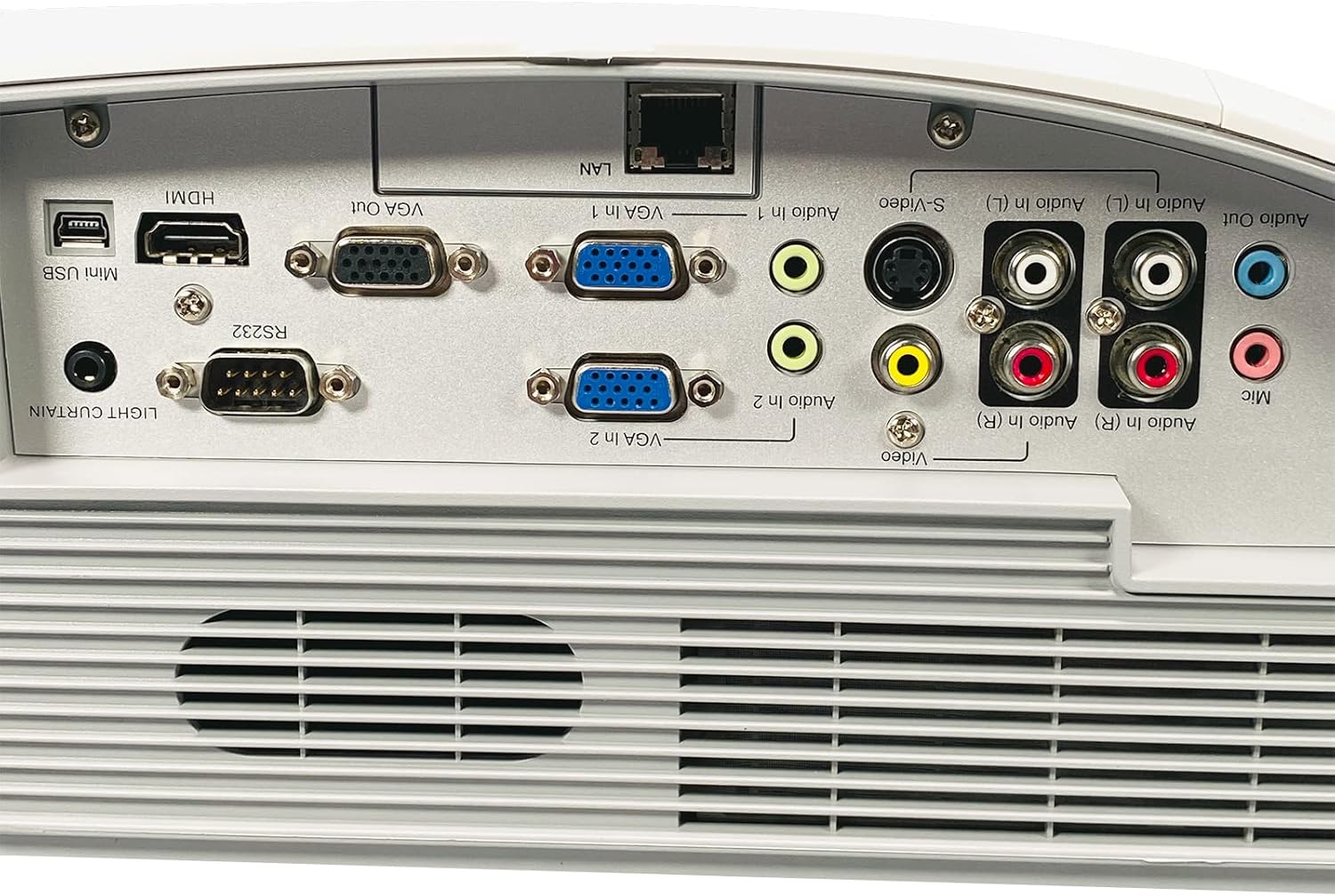
الشكل 2: Rear panel of the Boxlight P8 WX35NXT projector, detailing the various input and output ports. From left to right, ports include Mini USB, HDMI, RS232, VGA Out, VGA In (x2), LAN, S-Video, Composite Video (RCA), Audio In (L/R), Audio Out, and Microphone input.
- HDMI: مدخلات الفيديو والصوت الرقمية.
- VGA In (x2): مدخل فيديو تناظري لأجهزة الكمبيوتر.
- مخرج VGA: Analog video output for a monitor.
- شبكة محلية (RJ-45): Network connection for control and monitoring.
- USB صغير: For service or interactive features.
- RS232 (DB-9pin): منفذ تسلسلي للتحكم بجهاز العرض.
- S- فيديو: إدخال الفيديو التناظري.
- الفيديو المركب (RCA): إدخال الفيديو التناظري.
- Audio In (L/R): RCA audio inputs.
- الصوت خارج: مخرج الصوت.
- هيئة التصنيع العسكري: إدخال الميكروفون.
دليل الإعداد
1. وضع جهاز العرض
As an ultra-short throw projector, the P8 WX35NXT is designed to be placed very close to the projection surface (screen or wall). Position the projector on a stable, flat surface directly in front of the screen. Ensure there are no obstructions to the projection path or ventilation openings.
2. توصيل الطاقة
- قم بتوصيل سلك الطاقة بمدخل الطاقة الخاص بجهاز العرض.
- قم بتوصيل الطرف الآخر من سلك الطاقة بمأخذ كهربائي مؤرض.
3. توصيل مصادر الإدخال
Connect your video source (e.g., computer, Blu-ray player) to the appropriate input port on the projector's rear panel (refer to Figure 2).
- HDMI: للفيديو والصوت الرقميين.
- VGA: For analog computer video. Connect an audio cable separately if needed.
- S-Video/Composite: لمصادر الفيديو ذات الدقة القياسية.
4. التشغيل الأولي
- اضغط على قوة button on the projector's control panel or remote control.
- The power indicator light will change, and the projector will begin its startup sequence.
5. ضبط التركيز
Adjust the focus ring located near the lens until the projected image is clear and sharp.
تعليمات التشغيل
تشغيل/إيقاف الطاقة
- لتشغيل: اضغط على قوة الزر مرة واحدة.
- لإيقاف التشغيل: اضغط على قوة button twice. The projector will display a shutdown confirmation. Confirm to power off.
اختيار مصدر الإدخال
اضغط على مصدر button on the control panel or remote control to cycle through available input sources (HDMI, VGA1, VGA2, S-Video, Video).
التنقل في القائمة
استخدم قائمة طعام button to open the On-Screen Display (OSD) menu. Use the arrow buttons to navigate and the يدخل اضغط على الزر لاختيار الخيارات. قائمة طعام مرة أخرى للخروج.
تعديلات الصورة
- السطوع / التباين: Adjust these settings in the OSD menu to optimize image quality for your viewالبيئة المحيطة.
- نسبة العرض إلى الارتفاع: Select the appropriate aspect ratio (e.g., 16:10, 4:3) from the OSD menu to match your content.
- تصحيح الانحراف: If the image appears trapezoidal, use the keystone correction function (often a dedicated button or in the OSD) to square the image.
صيانة
تنظيف جهاز العرض
- Casing: Use a soft, dry cloth to wipe the projector casing. For stubborn stains, dampبللي القماش بقليل من الماء ومنظف خفيف، ثم امسحي حتى يجف.
- عدسة: Use a professional lens cleaning cloth and lens cleaning solution. Avoid abrasive materials or excessive pressure.
- تهوية: Periodically check and clean the ventilation grilles to ensure proper airflow. Use a soft brush or compressed air to remove dust.
Lamp الاستبدال
The Boxlight P8 WX35NXT uses a DLP light source, which typically has a very long lifespan and does not require frequent lamp replacement like traditional projectors. If a light source issue occurs, contact technical support.
استكشاف الأخطاء وإصلاحها
| مشكلة | السبب المحتمل | حل |
|---|---|---|
| لا توجد صورة معروضة |
|
|
| الصورة ضبابية |
|
|
| الصورة شبه منحرفة |
|
|
| لا يوجد صوت |
|
|
تحديد
| ماركة | صندوق الضوء |
| نموذج | P8 WX35NXT |
| تكنولوجيا العرض | دي إل بي |
| الدقة الأصلية | 1280x800 (WXGA) |
| الدقة القصوى | 1080p (FHD) |
| سطوع | شموم شمعة أنسي |
| نسبة التباين | 3000:1 |
| نسبة العرض إلى الارتفاع | 16: 10 (أصلية) |
| نسبة الرمي | Ultra-short Throw |
| الاتصال | HDMI, VGA In (x2), VGA Out, LAN (RJ-45), Mini USB, RS232, S-Video, Composite Video, Audio In (L/R), Audio Out, Mic |
| مكبرات صوت مدمجة | 10.0 واط أحادي |
| وزن العنصر | 17.7 رطل (8.03 كجم) |
| مدخلات الطاقة | AC 100-240V~ 50/60 Hz 3.6A |
الضمان والدعم
For technical support or warranty inquiries, please contact Boxlight directly. Refer to the product label for specific contact information.

الشكل 3: Product label on the underside of the projector. This label provides essential information including the manufacturer's address, technical support contact details, model number (P8 WX35NXT), input power specifications, and regulatory compliance marks (CE, UL, FC).
- الشركة المصنعة: صندوق الضوء
- الدعم الفني: International +1 360-464-2119, USA and Canada 1-866-972-1549
- Webموقع: www.boxlight.com
- نموذج: P8 WX35NXT
- الرقم التسلسلي: 330901135450075 (مثالample, actual serial number varies per unit)
Please register your product on the Boxlight webالموقع لتفعيل الضمان الخاص بك وتلقي تحديثات المنتج.


