1. المقدمة
This manual provides detailed instructions for the setup, operation, and maintenance of your Adler AD 1196B Digital Alarm Clock. Please read this manual thoroughly before using the device to ensure proper function and longevity.
2. انتهى المنتجview
2.1 الميزات الرئيسية
- Digital time display with 12/24 hour format.
- شاشة بإضاءة خلفية لسهولة الاستخدام viewing, automatically turns off after 4 seconds.
- Three independent alarm time settings.
- Three alarm activation settings: 5 days (weekday), 6 days (weekday + Saturday), 7 days (every day).
- Displays current time, date, indoor temperature, and humidity.
- Battery-powered for portability and backup during power outagإِسْ
2.2 محتويات العبوة
- Adler AD 1196B Digital Alarm Clock Unit
- دليل المستخدم
Note: 2x AA batteries are required and not included in the package.

الشكل 1: الجبهة view of the Adler AD 1196B Digital Alarm Clock, displaying 12:00, 26°C, 56% humidity, and the current date.
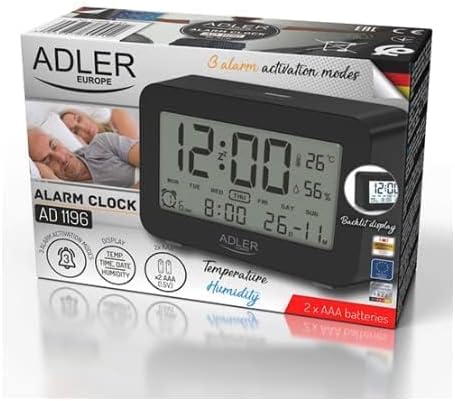
Figure 2: The Adler AD 1196B Digital Alarm Clock shown in its retail packaging, highlighting key features.
3. الإعداد
3.1 تركيب البطارية
- حدد مكان غطاء حجرة البطارية في الجزء الخلفي من ساعة المنبه.
- قم بسحب الغطاء أو رفعه لفتح الحجرة.
- Insert two (2) AA batteries, ensuring the correct polarity (+ and -) as indicated inside the compartment.
- أعد تركيب غطاء حجرة البطارية بشكل آمن.
The clock will power on automatically once batteries are inserted. The display will show default settings or begin flashing.
3.2 التشغيل المبدئي
Upon successful battery installation, the display will illuminate. You may need to press a button (e.g., "MODE" or "SET") to activate the display if it remains blank after battery insertion. The backlight will activate briefly and then turn off.
4. تعليمات التشغيل
Familiarize yourself with the control buttons, typically located on the back or top of the device. Common buttons include: MODE, SET, UP/+, DOWN/-, ALARM.
4.1 ضبط الوقت
- اضغط مع الاستمرار على تعيين الزر (أو وضع button, depending on model) until the hour digits begin to flash.
- استخدم أعلى/+ or تحت/- أزرار لضبط الساعة.
- يضعط تعيين (أو وضع) again to move to the minute setting.
- استخدم أعلى/+ or تحت/- أزرار لضبط الدقائق.
- تواصل الضغط تعيين (أو وضع) to cycle through 12/24 hour format, and then to exit time setting mode.
4.2 ضبط التاريخ
- من عرض الوقت العادي، اضغط على وضع button repeatedly until the date display starts flashing or you enter date setting mode.
- The year digits may flash first. Use أعلى/+ or تحت/- لضبط العام.
- يضعط وضع to move to the month setting, then adjust with أعلى/+ or تحت/-.
- يضعط وضع to move to the day setting, then adjust with أعلى/+ or تحت/-.
- يضعط وضع again to confirm and exit date setting.
4.3 Setting Alarms (Alarm 1, Alarm 2, Alarm 3)
The AD 1196B features three independent alarms. The process is similar for each.
- اضغط على إنذار زر مرة واحدة ل view Alarm 1. Press again for Alarm 2, and a third time for Alarm 3.
- بينما viewing the desired alarm (e.g., AL1), press and hold the تعيين اضغط على الزر حتى تومض أرقام ساعة المنبه.
- يستخدم أعلى/+ or تحت/- لضبط ساعة المنبه.
- يضعط تعيين للانتقال إلى ضبط دقائق المنبه.
- يستخدم أعلى/+ or تحت/- لضبط دقائق التنبيه.
- يضعط تعيين مرة أخرى للتأكد من وقت التنبيه.
- لتفعيل/إلغاء تفعيل جهاز الإنذار، اضغط على إنذار button repeatedly until the alarm icon (e.g., bell symbol) appears or disappears next to the corresponding alarm number (AL1, AL2, AL3).
4.4 Alarm Activation Modes (5, 6, 7 Days)
After setting an alarm time, you can choose its activation frequency:
- While in alarm setting mode (after setting minutes for an alarm), press تعيين one more time. The display will show a day indicator (e.g., "5 DAY", "6 DAY", "7 DAY").
- يستخدم أعلى/+ or تحت/- to cycle through the options:
- يوم واحد: يصدر صوت المنبه من الاثنين إلى الجمعة.
- يوم واحد: Alarm sounds Monday to Saturday.
- يوم واحد: Alarm sounds every day of the week.
- يضعط تعيين to confirm your selection and exit alarm setting for that specific alarm.
4.5 وظيفة الإضاءة الخلفية
The display features a backlight for improved visibility in low light conditions. The backlight automatically activates when a button is pressed and turns off after approximately 4 seconds to conserve battery power.
4.6 عرض درجة الحرارة والرطوبة
The alarm clock continuously displays the current indoor temperature (in Celsius) and relative humidity percentage. No specific action is required to view these readings; they are shown on the main display.
5. الصيانة
5.1 التنظيف
To clean the alarm clock, gently wipe the surface with a soft, dry cloth. Do not use abrasive cleaners, solvents, or chemical sprays, as these may damage the display or casing.
5.2 استبدال البطارية
When the display becomes dim or the clock functions erratically, it is time to replace the batteries. Follow the battery installation steps in Section 3.1. Always replace both batteries with new AA batteries of the same type. Dispose of old batteries responsibly according to local regulations.
6. استكشاف الأخطاء وإصلاحها
| مشكلة | السبب المحتمل | حل |
|---|---|---|
| العرض فارغ أو خافت. | البطاريات منخفضة أو تم تركيبها بشكل غير صحيح. | استبدل البطاريات ببطاريات AA جديدة، مع التأكد من صحة القطبية. |
| لا يصدر صوت الإنذار. | لم يتم تفعيل التنبيه أو تم ضبطه بشكل غير صحيح. | Ensure the alarm icon is visible on the display. Verify the alarm time and activation mode (5, 6, or 7 days) are set correctly. |
| الوقت/التاريخ غير صحيح. | Time/Date was not set or reset after battery change. | Follow instructions in Section 4.1 and 4.2 to set the correct time and date. |
| يبدو أن قراءات درجة الحرارة/الرطوبة غير دقيقة. | Clock is placed near a heat source, vent, or in direct sunlight. | Relocate the clock to a stable environment away from extreme temperature or humidity fluctuations. Allow time for readings to stabilize. |
7. المواصفات
- نموذج: AD 1196B
- مصدر الطاقة: 2 بطاريات AA (غير متضمنة)
- نوع العرض: شاشة LCD رقمية بإضاءة خلفية
- الوظائف: Time, Date, Day of Week, Temperature (°C), Humidity (%), 3 Alarms with 3 Activation Modes
- مدة الإضاءة الخلفية: حوالي 4 ثانية
- مادة: بلاستيك
- الأبعاد (العرض × العمق × الارتفاع): 11 سم × 3.81 سم × 5 سم
- وزن: 1.6 كجم
8. الضمان والدعم
للحصول على معلومات الضمان أو الدعم الفني، يُرجى الرجوع إلى بطاقة الضمان المرفقة مع المنتج أو الاتصال بالشركة المصنعة مباشرةً. احتفظ بإيصال الشراء كإثبات للشراء.
Manufacturer: Adler


