مقدمة
This manual provides detailed instructions for the setup, operation, and maintenance of your BEITONG Asura 2NS Wireless Controller. Please read this manual carefully before using the product to ensure optimal performance and longevity.

الصورة: الجبهة view of the BEITONG Asura 2NS Wireless Controller, showcasinبفضل تصميمه المريح وتخطيط الأزرار.
الإعداد والتوافق
The BEITONG Asura 2NS Wireless Controller offers multi-platform compatibility and various connection methods.
التوافق:
- الكمبيوتر الشخصي: Windows 7/8/10/11, Steam
- نينتندو سويتش: Switch, Switch Lite, Switch OLED
- أندرويد: Mobile & TV (supports native games only)
- سطح بخاري
طرق الاتصال:
- الاتصال السلكي: Connect the controller directly to your PC or Steam Deck using a USB cable.
- اتصال بلوتوث:
- For PC/Steam Deck: بحث عن Bluetooth device name "Xbox Wireless Controller".
- للاندرويد: بحث عن Bluetooth device name "BEITONG 2585NS".
- لجهاز Nintendo Switch: Connection will be automatic once pairing mode is initiated on the controller and console.
ملحوظة: The BEITONG Gamepad Assistant software is available for key testing and firmware upgrades if required. It is not mandatory for basic operation.

الصورة: أكثر منview of key features for Nintendo Switch, including screenshot, Bluetooth, 6-axis gyro, 5 levels vibration, key layout adjust-free, key value switchable, and Turbo function.
تعليمات التشغيل
Motion Control (Nintendo Switch Only):
The controller features a 6-axis gyro sensor and BEITONG somatosensory mapping technology. This supports native Switch sensing games. You can adjust the somatosensory sensitivity to 3 different levels to suit various game requirements. This function is exclusively for Nintendo Switch games.

Image: Visual representation of the 6-axis gyro sensor and somatosensory mapping technology in action, with the controller shown above a Nintendo Switch console.
دقة عصا التحكم:
Equipped with ALPS joysticks from Japan, the controller provides pixel-high accurate positioning, ensuring high accuracy, fine tuning, and easy positioning in games.

Image: Close-up of the ALPS joystick, highlighting its precision and responsiveness for gaming.
Key Layout and HOME Key Function:
- Switch Original Key Layout: The controller maintains the original key layout for seamless integration with Nintendo Switch games.
- مفتاح المنزل: Press the [HOME] key to return to the Switch home page. When connected to PC or Android, the [HOME] key can also be used to switch the function of the left stick and D-pad.
- Auto-Keyed Value: A&B keys automatically adapt to key values depending on the connected platform.

Image: Illustration of the Turbo function setup and the auto-keyed value feature for A&B buttons, adapting to different platforms.
اهتزاز مزدوج:
Built-in double vibrating motors provide immersive feedback. The vibration intensity is adjustable with 5 gears, allowing you to customize the experience according to different game scenes.
وظيفة التربو:
To set the Turbo function, simultaneously press the توربيني button and any of the ABXY, LB, RB, LT, RT keys. This allows for rapid input of commands.
وظيفة لقطة الشاشة:
To take a screenshot on your Nintendo Switch, simultaneously press the توربيني الزر و R3 (right stick click) button. Note that this function is only available on the Nintendo Switch.

Image: Diagram showing the location of the dual vibrate motors within the controller and the function of the HOME key to exchange left stick and D-pad functions in PC mode.
LB/RB Mechanical Switches:
The LB/RB buttons utilize ALPS mechanical point-touch switches, providing a crisp and responsive feel similar to a gaming mouse click.
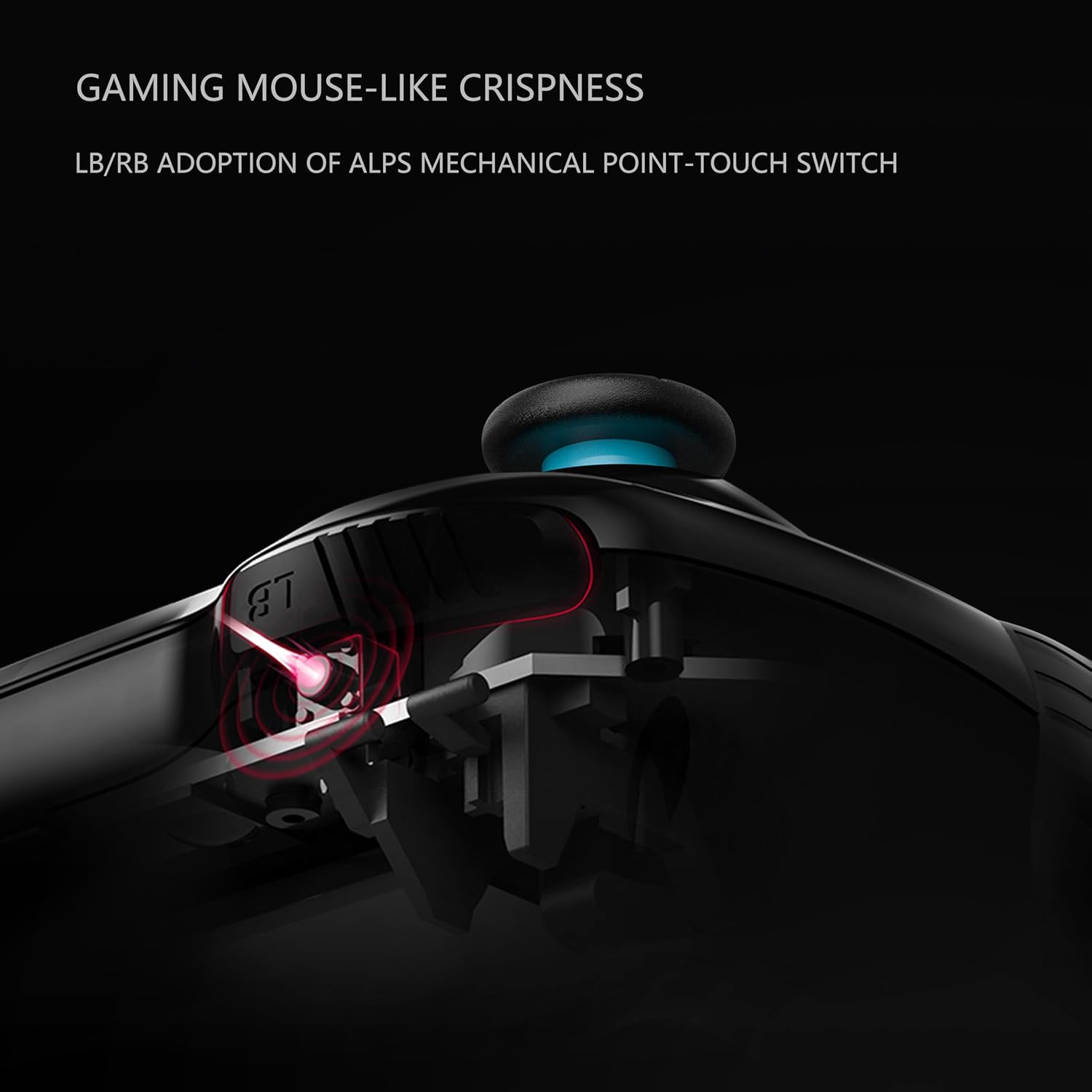
الصورة: المقطع العرضي view illustrating the ALPS mechanical point-touch switch used in the LB/RB buttons, emphasizing their tactile feedback.
صيانة
Proper maintenance ensures the longevity and performance of your controller.
- تنظيف: استخدم قطعة قماش ناعمة وجافة لتنظيف وحدة التحكم. للأوساخ العنيدة، استخدم قطعة قماش جافة قليلاً.amp cloth can be used, but ensure no moisture enters the device. Avoid harsh chemicals or abrasive cleaners.
- تخزين: قم بتخزين وحدة التحكم في مكان بارد وجاف بعيدًا عن أشعة الشمس المباشرة ودرجات الحرارة القصوى.
- العناية بالبطارية: إذا لم يتم استخدام وحدة التحكم لفترة طويلة، فتأكد من شحنها بالكامل قبل تخزينها. تجنب استنزاف البطارية بالكامل بشكل متكرر.
- تجنب القطرات: احمِ وحدة التحكم من الصدمات المادية والسقوط، والتي يمكن أن تتلف المكونات الداخلية.
استكشاف الأخطاء وإصلاحها
If you encounter issues with your BEITONG Asura 2NS Wireless Controller, refer to the following common solutions:
- وحدة التحكم غير متصلة:
- تأكد من شحن وحدة التحكم.
- Verify Bluetooth is enabled on your device (PC, Android, Switch).
- Check that you are searching for the correct Bluetooth device name (e.g., "Xbox Wireless Controller" for PC/Steam Deck, "BEITONG 2585NS" for Android).
- Try restarting both the controller and the host device.
- For wired connection, ensure the USB cable is securely connected.
- الأزرار/عصي التحكم لا تستجيب:
- تأكد من توصيل وحدة التحكم بشكل صحيح.
- أعد تشغيل وحدة التحكم.
- تأكد من عدم وجود عوائق مادية تمنع الضغط على الأزرار أو حركة عصا التحكم.
- الاهتزاز لا يعمل:
- تأكد من أن اللعبة تدعم خاصية الاهتزاز.
- Check the vibration intensity settings on the controller.
- تحديث البرامج الثابتة: If issues persist, consider checking for and installing the latest firmware using the BEITONG Gamepad Assistant software.
تحديد
| ميزة | التفاصيل |
|---|---|
| رقم الموديل | بي تي بي-2585NS |
| أبعاد المنتج | 16.51 × 104.14 × 6.35 سم |
| وزن | 540 جرام |
| نوع البطارية | 1 بطارية ليثيوم بوليمر (متضمنة) |
| الاتصال | Bluetooth 5.0, Wired USB |
| التحكم في الحركة | 6-Axis Gyro Sensor (Switch only) |
| اهتزاز | Dual Motors, 5 adjustable levels |
الضمان والدعم
For warranty information and technical support, please refer to the official BEITONG webالموقع أو تواصل مع بائع التجزئة. احتفظ بإثبات الشراء لطلبات الضمان.


