مقدمة
This user manual provides comprehensive instructions for the setup, operation, maintenance, and troubleshooting of your UNITED LED24HS82A11 24-inch HD Ready Smart Android TV. Please read this manual thoroughly before using your television to ensure proper and safe operation.
The UNITED LED24HS82A11 is a versatile 24-inch HD Ready Smart TV powered by Android 11, offering a wide range of entertainment options. It features pre-installed applications, built-in Chromecast and Airplay for seamless content streaming, and full internet connectivity via Wi-Fi and Ethernet. It also supports DVB/T2/S2/C, MPEG-4, and HEVC Main 10 for various broadcasting standards.
معلومات السلامة
يجب عليك دائمًا مراعاة احتياطات السلامة التالية لمنع الحرائق أو الصدمات الكهربائية أو الإصابات:
- لا تعرض التلفزيون للمطر أو الرطوبة.
- لا تسد فتحات التهوية.
- تأكد من عدم الضغط على سلك الطاقة أو المشي عليه.
- افصل التلفاز أثناء العواصف الرعدية أو عند عدم استخدامه لفترات طويلة.
- قم بإحالة جميع أعمال الصيانة إلى موظفي الخدمة المؤهلين.
يثبت
1. فك التغليف وتركيب الحامل
Carefully remove the TV and all accessories from the packaging. Place the TV face down on a soft, clean surface to prevent screen damage.
Attach the two stand feet to the bottom of the TV using the provided screws. Ensure they are securely fastened.

الشكل 1: الجانب view of the UNITED LED24HS82A11 TV, illustrating its slim profile and potential port locations.
2. توصيل الكابلات
- قوة: قم بتوصيل سلك الطاقة بمدخل الطاقة الخاص بالتلفزيون ثم بمأخذ الحائط.
- هوائي / كابل: Connect your antenna or cable TV coaxial cable to the "RF In" port.
- أجهزة HDMI: قم بتوصيل الأجهزة الخارجية مثل مشغلات Blu-ray أو أجهزة الألعاب أو أجهزة الاستقبال الرقمية بمنافذ HDMI.
- إيثرنت (اختياري): للاتصال بالإنترنت عبر كابل، قم بتوصيل كابل إيثرنت من جهاز التوجيه الخاص بك إلى منفذ LAN الخاص بالتلفزيون.
3. معالج الإعداد الأولي
Once powered on, the TV will guide you through the initial setup process. Follow the on-screen prompts to:
- اختر اللغة المفضلة لديك.
- قم بالاتصال بشبكة الواي فاي الخاصة بك (إذا لم تكن تستخدم الإيثرنت).
- Sign in with your Google account (optional, but recommended for full Smart TV features).
- Scan for available TV channels (Antenna/Cable).
التشغيل
انتهى التحكم عن بعدview
Familiarize yourself with the buttons on the remote control for easy navigation and control of your TV's functions.
وظائف التلفزيون الأساسية
- تشغيل/إيقاف التشغيل: اضغط على زر الطاقة الموجود في جهاز التحكم عن بعد أو التلفزيون.
- التحكم في مستوى الصوت: استخدم أزرار رفع/خفض الصوت.
- اختيار القناة: استخدم أزرار القناة لأعلى/لأسفل أو لوحة الأرقام.
- مصدر الإدخال: Press the "Source" or "Input" button to switch between HDMI, TV, and other inputs.
ميزات التلفزيون الذكي (أندرويد 11)
Your TV runs on Android 11, providing access to a vast ecosystem of apps and services.

Figure 2: The UNITED LED24HS82A11 TV showcasing its Android TV home screen, featuring popular streaming applications like YouTube, Prime Video, and Netflix.
- الشاشة الرئيسية: Navigate the home screen to access pre-installed apps (Netflix, YouTube, Prime Video), recommended content, and settings.
- متجر جوجل بلاي: Download additional apps, games, and content from the Google Play Store.
- مدمج في Chromecast: Cast content directly from your compatible smartphone, tablet, or computer to the TV. Look for the Cast icon in supported apps.
- البث: For Apple devices, use Airplay to stream videos, photos, and music from your iPhone, iPad, or Mac to the TV.
- الاتصال بشبكة الإنترنت:
- واي فاي: Go to Settings > Network & Internet to connect to your wireless network.
- إيثرنت: If an Ethernet cable is connected, the TV will automatically use the wired connection.
صيانة
تنظيف التلفاز
- افصل دائمًا التلفاز عن الكهرباء قبل التنظيف.
- استخدم قطعة قماش ناعمة وخالية من الوبر لمسح الشاشة برفق. بالنسبة للبقع العنيدة، دampبللي قطعة القماش قليلاً بالماء أو بمنظف شاشات مصمم خصيصاً للأجهزة الإلكترونية.
- امسح التلفازasinاستخدم قطعة قماش ناعمة وجافة. تجنب استخدام المنظفات أو المذيبات الكاشطة.
تحديثات البرامج
Your TV may receive software updates to improve performance and add new features. You can check for updates via Settings > Device Preferences > About > System update.
استكشاف الأخطاء وإصلاحها
إذا واجهت مشكلات مع التلفزيون الخاص بك، فراجع المشكلات والحلول الشائعة التالية:
| مشكلة | السبب المحتمل / الحل |
|---|---|
| لا يوجد طاقة | تأكد من توصيل سلك الطاقة بإحكام بالتلفزيون ومقبس الكهرباء. جرّب مقبسًا آخر. |
| لا توجد صورة / لا يوجد صوت | Ensure the correct input source is selected (e.g., HDMI 1, TV). Check cable connections. For TV channels, perform a channel scan. |
| لا يمكن الاتصال بشبكة Wi-Fi | تحقق من كلمة مرور شبكة الواي فاي الخاصة بك. أعد تشغيل جهاز التوجيه والتلفزيون. تأكد من أن التلفزيون ضمن نطاق إشارة الواي فاي. |
| جهاز التحكم عن بعد لا يعمل | افحص البطاريات واستبدلها. تأكد من عدم وجود أي عوائق بين جهاز التحكم عن بعد ومستشعر الأشعة تحت الحمراء الخاص بالتلفزيون. |
| التطبيقات لا يتم تحميلها / أداء بطيء | Check your internet connection speed. Clear app cache (Settings > Apps > [App Name] > Clear cache). Restart the TV. |
تحديد
Below are the technical specifications for the UNITED LED24HS82A11 TV:
| ميزة | مواصفة |
|---|---|
| ماركة | متحد |
| رقم الموديل | LED24HS82A11 |
| حجم الشاشة | 24 بوصة |
| تكنولوجيا العرض | قاد |
| دقة | 768 بكسل (1366 × 768 بكسل) |
| معدل التحديث | 60 هرتز |
| نظام التشغيل | أندرويد 11 |
| الاتصال | واي فاي، إيثرنت، HDMI، RF، USB |
| المميزات الخاصة | Flat Screen, Chromecast Built-in, Airplay, Pre-installed Apps (Netflix, YouTube, Prime Video) |
| نسبة العرض إلى الارتفاع | 16:9 |
| أبعاد المنتج (الطول × العرض × الارتفاع) | 12D x 60.5W x 43.2H سنتيمترات |
| المكونات المضمنة | 1 mini AV adapter cable, 1 remote control with 2 AAA 1.5V batteries |
| فئة كفاءة الطاقة | F |
| استهلاك الطاقة (SDR) | 21.0 واط |
| استهلاك الطاقة (HDR) | 21.0 واط |
| استهلاك الطاقة (وضعية الاستعداد) | 0.3 واط |

Figure 3: The energy efficiency label for the UNITED LED24HS82A11 TV, indicating an 'F' energy class rating and 21 kWh per 1000 hours of operation.
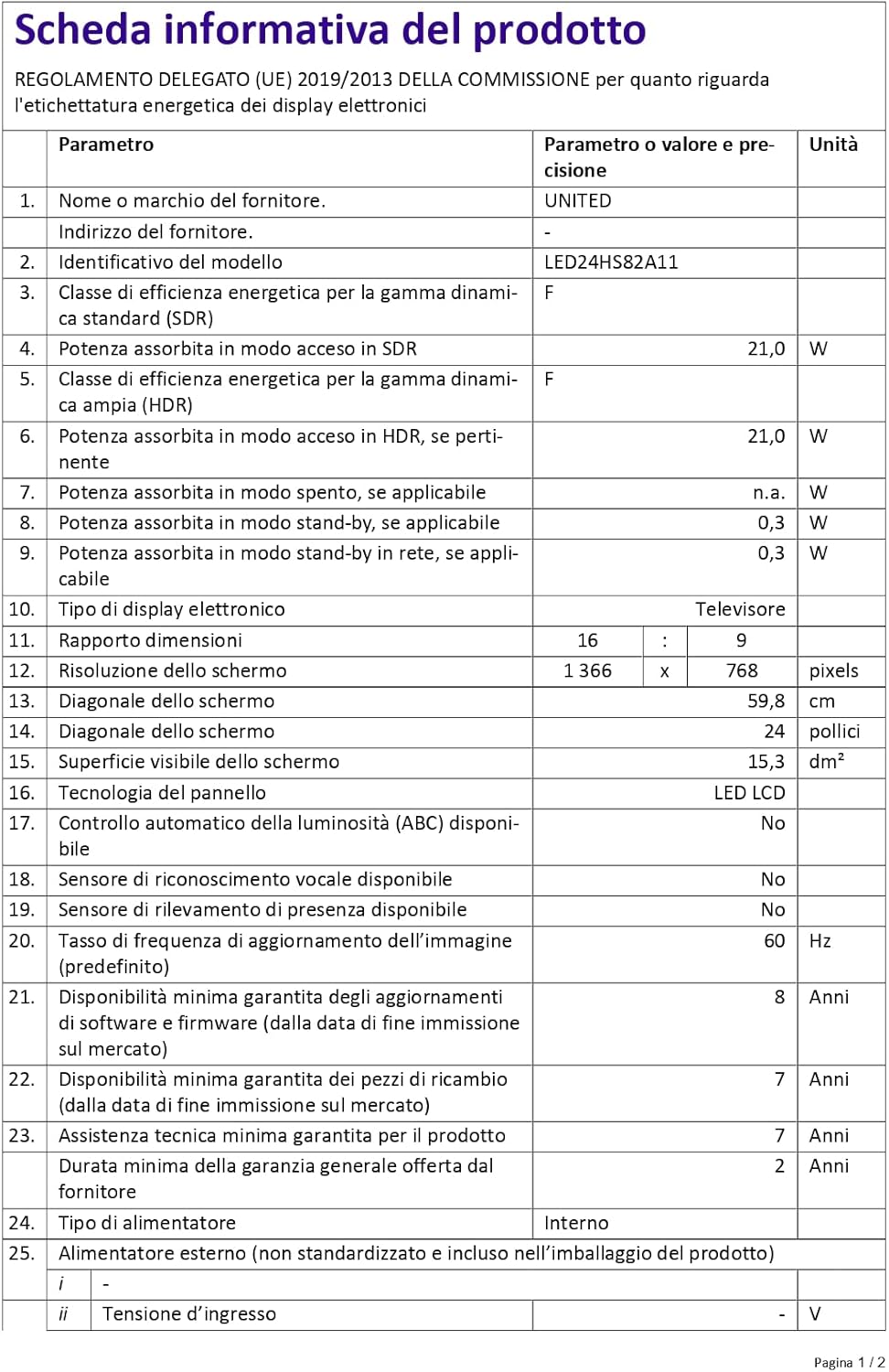
Figure 4: A detailed product information sheet for the UNITED LED24HS82A11 TV, providing comprehensive technical specifications and compliance details.
لمزيد من المعلومات التفصيلية، يرجى الرجوع إلى قاعدة بيانات EPREL الرسمية: https://eprel.ec.europa.eu/qr/1087921
الضمان والدعم
Your UNITED LED24HS82A11 TV comes with the following support and warranty provisions:
- Minimum General Warranty: 2 سنة
- Technical Assistance Availability: 7 سنة
- تحديثات البرامج مضمونة حتى: 8 Years from market placement date
- توفر قطع الغيار: 7 Years from market placement date
For technical support or warranty claims, please contact your retailer or the manufacturer's authorized service center. Keep your proof of purchase for warranty validation.


