مقدمة
يُقدّم هذا الدليل تعليماتٍ مُفصّلة لإعداد وتشغيل وصيانة مكبر الصوت Divoom Ditoo-Mic بتقنية البلوتوث والمُزوّد بميكروفون كاريوكي. يُرجى قراءة هذا الدليل جيدًا قبل الاستخدام لضمان الأداء السليم وتحقيق أقصى استفادة من المنتج. يجمع هذا الجهاز بين مكبر صوت بلوتوث عالي الجودة وشاشة عرض بكسل قابلة للتخصيص وميكروفون كاريوكي محمول، مُصمّم لتوفير ترفيه واستخدامات مُتعددة.
محتويات الحزمة
تأكد من وجود جميع العناصر في الحزمة الخاصة بك:
- مكبر صوت بلوتوث Divoom Ditoo-Mic
- ميكروفون كاريوكي صغير
- كابل شحن USB
- دليل المستخدم (هذا المستند)
- مجموعة ملصقات (قد تختلف باختلاف العبوة)

صورة: مكبر صوت وميكروفون Divoom Ditoo-Mic، بالإضافة إلى كابل USB وملصقات، معروضة في عبوة هدايا.
المنتج انتهىview
يجمع جهاز Divoom Ditoo-Mic بين مكبر صوت بلوتوث وشاشة عرض فنية بكسلية وميكروفون كاريوكي، مما يوفر ميزات ترفيهية ووظيفية متعددة الاستخدامات.
الوحدة الرئيسية (مكبر صوت Ditoo-Mic)
- شاشة عرض البكسل: شاشة LED قابلة للتخصيص لعرض فن البكسل والإشعارات والساعة والرسوم المتحركة.
- لوحة مفاتيح ميكانيكية: مفاتيح بإضاءة خلفية RGB للتفاعل والتحكم.
- شبكة مكبر الصوت: يوجد في الأعلى لإخراج الصوت.
- ذراع التحكم/الأزرار: للتنقل واختيار الوظائف.
ميكروفون كاريوكي صغير
- رأس الميكروفون: لإدخال الصوت.
- أزرار التحكم: أزرار التحكم في الطاقة ومستوى الصوت والمؤثرات الصوتية.
- منفذ الشحن: لإعادة شحن الميكروفون.
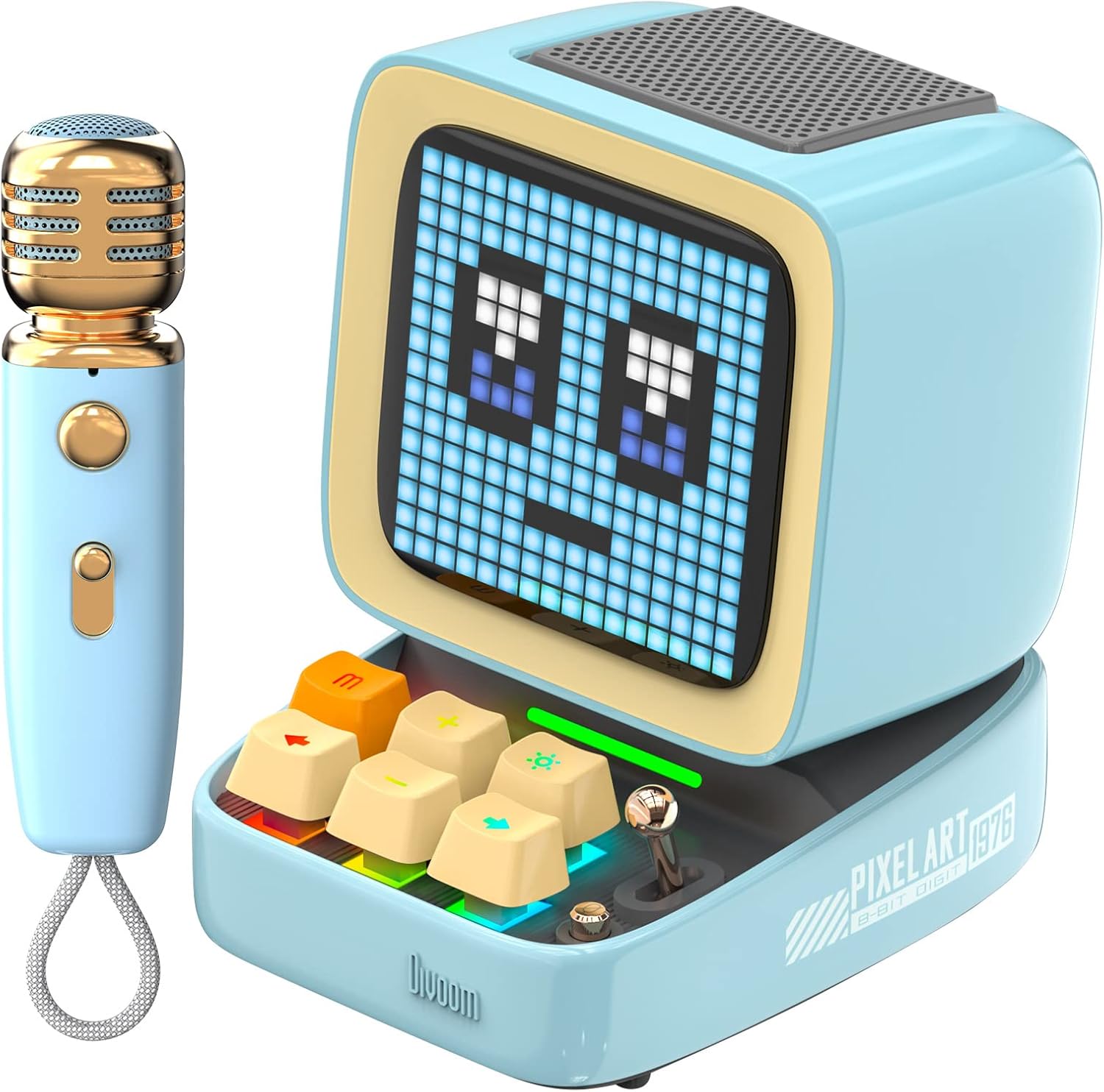
صورة: مكبر الصوت Divoom Ditoo-Mic Bluetooth مع شاشة عرض البكسل التي تعرض وجهًا، إلى جانب ميكروفون الكاريوكي الصغير المطابق.
يثبت
1. شحن الجهاز
قبل الاستخدام الأول، قم بشحن كل من مكبر الصوت Ditoo-Mic والميكروفون الصغير بالكامل.
- قم بتوصيل كابل شحن USB بمنفذ الشحن الموجود على مكبر الصوت Ditoo-Mic وبمحول طاقة USB (غير مرفق).
- قم بتوصيل كابل شحن USB بمنفذ الشحن الموجود على الميكروفون الصغير وبمحول طاقة USB.
- سيُظهر مؤشر الشحن حالة الشحن. يستغرق الشحن الكامل عادةً حوالي 4 ساعات، مما يوفر 8 ساعات من وقت اللعب.
2. تشغيل / إيقاف التشغيل
- المتحدث: اضغط مع الاستمرار على زر التشغيل (غالباً ما يكون مدمجاً في أحد مفاتيح لوحة المفاتيح أو زراً مخصصاً) لبضع ثوانٍ حتى تضيء شاشة العرض. كرر العملية لإيقاف التشغيل.
- ميكروفون: اضغط مع الاستمرار على زر التشغيل الموجود على الميكروفون حتى يضيء مؤشر التشغيل. كرر العملية لإيقاف التشغيل.
3. اقتران بلوتوث
لاستخدام جهاز Ditoo-Mic كمكبر صوت أو للكاريوكي، قم بإقرانه بجهازك المحمول.
- تأكد من تشغيل مكبر الصوت Ditoo-Mic ووضعه في وضع الاقتران عبر البلوتوث (عادة ما يتم الإشارة إلى ذلك بواسطة رمز بلوتوث وامض على شاشة العرض).
- على جهازك المحمول، انتقل إلى إعدادات البلوتوث وابحث عن الأجهزة المتاحة.
- اختر "Divoom Ditoo-Mic" من القائمة للاتصال. سيصدر صوت تأكيد أو رسالة للإشارة إلى نجاح عملية الاقتران.
- لاستخدام الميكروفون في الكاريوكي، تأكد من تشغيله. سيتصل تلقائيًا بمكبر صوت Ditoo-Mic عندما يكون كلاهما قيد التشغيل وفي نطاق التغطية.
تعليمات التشغيل
وظائف مكبر الصوت
- تشغيل الموسيقى: بعد الاقتران، شغّل الصوت من جهازك المحمول. استخدم مفاتيح لوحة مفاتيح Ditoo-Mic أو جهازك للتحكم في مستوى الصوت، والتشغيل/الإيقاف المؤقت، وتخطي المقاطع الصوتية.
- عرض فن البكسل:
- الرسوم المتحركة المُعدة مسبقًا: استخدم عناصر التحكم في جهاز Ditoo-Mic للتنقل بين الرسوم المتحركة المدمجة بتقنية فن البكسل.
- فن البكسل المخصص: قم بتنزيل تطبيق Divoom لإنشاء وتحميل تصميماتك الفنية بالبكسل إلى الشاشة.

صورة: مكبر الصوت Divoom Ditoo-Micasinتعرض شاشتها رسومًا متحركة نابضة بالحياة بتقنية البكسل.

صورة: مكبر الصوت Divoom Ditoo-Mic يطفو مع نوتات موسيقية، مما يمثل جودة الصوت المتميزة.
وظائف ميكروفون الكاريوكي
- الغناء: بعد تشغيل الميكروفون وتوصيله بمكبر صوت Ditoo-Mic، تحدث أو غنِّ في الميكروفون. سيتم تسجيل صوتك ampيتم التعبير عنها من خلال مكبر الصوت.
- التحكم في مستوى الصوت: استخدم الأزرار المخصصة على الميكروفون لضبط مستوى صوتك.
- أوضاع/مؤثرات الصوت: قد يحتوي الميكروفون على أوضاع صوتية مختلفة (مثل الصدى، والتردد). راجع عناصر التحكم الخاصة بالميكروفون لتفعيلها.

صورة: شخص يحمل ويغني في ميكروفون الكاريوكي Divoom Ditoo-Mic، مع ظهور مكبر الصوت في الخلفية.
تطبيق Divoom للهواتف المحمولة
يعمل تطبيق Divoom على تحسين وظائف جهاز Ditoo-Mic الخاص بك. فهو يتيح لك ما يلي:
- إنشاء ومشاركة فن البكسل المخصص.
- الوصول إلى مجتمع كبير من فن البكسل.
- ضبط المنبهات والمخططات.
- استقبال إشعارات وسائل التواصل الاجتماعي على الشاشة.
- ضبط إعدادات معادل الصوت.
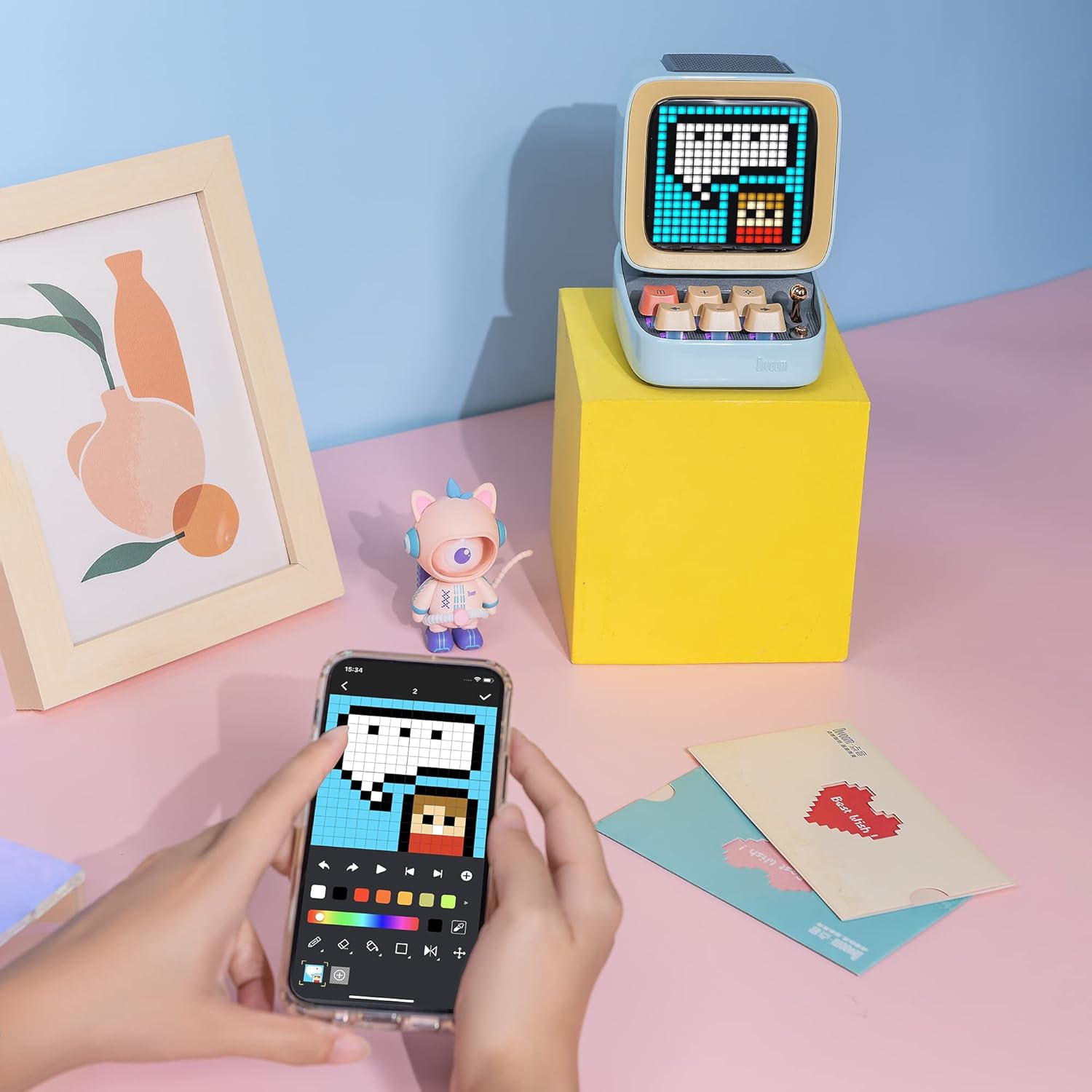
صورة: هاتف ذكي يعرض واجهة تطبيق Divoom، المستخدم لإنشاء وتخصيص فن البكسل.

صورة: تمثيل مرئي لمجتمع فن البكسل Divoom في جميع أنحاء العالم، ويمكن الوصول إليه عبر تطبيق Divoom على الهاتف الذكي.

صورة: مكبر الصوت Divoom Ditoo-Mic يعرض أيقونات إشعارات وسائل التواصل الاجتماعي من منصات مثل فيسبوك وإنستغرام.tagذاكرة الوصول العشوائي، وتويتر، وواتساب.

صورة: مكبر الصوت Divoom Ditoo-Mic يعرض ساعة رقمية، مما يوضح وظائف المنبه الذكي والمخطط.
صيانة
- تنظيف: استخدم قطعة قماش ناعمة وجافة لتنظيف الجزء الخارجي من السماعة والميكروفون. تجنب استخدام المنظفات السائلة أو المذيبات أو المواد الكاشطة، لأنها قد تُلحق الضرر بالطلاء أو المكونات الداخلية.
- تخزين: خزّن الجهاز في مكان بارد وجاف بعيدًا عن أشعة الشمس المباشرة والرطوبة العالية ودرجات الحرارة القصوى. عند التخزين لفترات طويلة، تأكد من شحن البطارية جزئيًا (حوالي 50%) للحفاظ على عمرها الافتراضي.
- العناية بالبطارية: لإطالة عمر البطارية، تجنب تفريغها بالكامل بشكل متكرر. اشحن الجهاز بانتظام، حتى لو لم يكن قيد الاستخدام لفترات طويلة، لمنع تفريغه بشكل كامل.
- التعامل: تعامل مع الجهاز بحرص. تجنب إسقاطه أو تعريضه لصدمات قوية، فقد يؤدي ذلك إلى تلف الإلكترونيات الداخلية أو شاشة العرض.
استكشاف الأخطاء وإصلاحها
| مشكلة | السبب المحتمل | حل |
|---|---|---|
| الجهاز لا يعمل. | بطارية منخفضة. | قم بشحن الجهاز بالكامل باستخدام كابل USB المرفق. |
| لا يوجد صوت من مكبر الصوت. | مستوى الصوت منخفض جدًا؛ لم يتم الاقتران عبر البلوتوث؛ الجهاز في وضع كتم الصوت. | قم بزيادة مستوى الصوت على كل من السماعة والجهاز المتصل؛ أعد إقران البلوتوث؛ تحقق من إعدادات كتم صوت الجهاز. |
| الميكروفون لا يعمل. | الميكروفون غير مُشغّل؛ غير متصل بالسماعة؛ البطارية منخفضة. | قم بتشغيل الميكروفون؛ تأكد من تشغيل السماعة وإقرانها؛ اشحن الميكروفون. |
| اتصال البلوتوث غير مستقر أو ينقطع. | بعيد جدًا عن الجهاز المقترن؛ عوائق تسبب التداخل؛ أجهزة بلوتوث أخرى تتداخل. | قم بتقريب الأجهزة (في حدود 10 أمتار)؛ تأكد من عدم وجود عوائق كبيرة (جدران، أجسام معدنية) بين الأجهزة؛ قم بإيقاف تشغيل أجهزة البلوتوث الأخرى غير الضرورية. |
| شاشة بكسل لا تستجيب أو متجمدة. | خلل برمجي؛ الجهاز متجمد. | أعد تشغيل مكبر الصوت Ditoo-Mic بالضغط مع الاستمرار على زر الطاقة حتى ينطفئ، ثم أعد تشغيله. |
تحديد
- نموذج: ديتو-ميك
- أبعاد المنتج: 7.5 × 7.5 × 10.2 بوصة
- وزن السلعة: 1.18 رطل
- الاتصال: بلوتوث
- بطارية: 1 بطارية ليثيوم بوليمر (متضمنة)
- ميزة خاصة: ميكروفون مدمج (لنظام الكاريوكي)
- المكونات المتضمنة: ميكروفون صغير
- الشركة المصنعة: ديفووم
- تاريخ التوفر الأول: 30 ديسمبر 2022
الضمان والدعم
للحصول على معلومات مفصلة حول الضمان والدعم الفني وخدمة العملاء، يرجى الرجوع إلى موقع Divoom الرسمي. webيمكنك زيارة الموقع الإلكتروني أو الاتصال بخدمة عملاء Divoom مباشرةً. يُنصح بالاحتفاظ بإيصال الشراء كإثبات للشراء في حال تقديم أي مطالبات ضمان.
متجر ديفوم الرسمي: تفضل بزيارة متجر Divoom على أمازون


