1. المقدمة
This manual provides comprehensive instructions for the installation, operation, and maintenance of the YEEHUNG 12.3" Android 13 Car Multimedia System. This system is specifically designed for Mercedes-Benz 2012-2015 ML GL Class W166 X166 vehicles equipped with the NTG4.5 OEM host system. Please read this manual thoroughly before installation and use to ensure proper functionality and to avoid potential issues.

Figure 1.1: YEEHUNG 12.3" Android 13 Car Multimedia Screen
2. انتهى المنتجview
The YEEHUNG 12.3" Android 13 Car Multimedia System offers an enhanced in-car entertainment and navigation experience. It features a blue anti-glare HD screen with a resolution of 1920x720, powered by an 11 nm Qualcomm Snapdragon 662 8-core high-speed processor, 8GB RAM, and 128GB internal memory. The system supports wired and wireless CarPlay, Android Auto, and wireless mirror link functions.
المميزات الرئيسية:
- عرض: 12.3-inch Blue Anti-Glare HD Screen (1920x720 resolution), multi-point capacitive touch, IPS panel, 178° ultra-wide viewزاوية جي.
- المعالج: Qualcomm Snapdragon 662 8-core (4x A73 2.0GHz + 4x A53 1.8GHz).
- ذاكرة: 8GB RAM (LPDDR4X) + 128GB Storage (eMMC 5.1).
- نظام التشغيل: أندرويد 13.
- الاتصال: Built-in Wi-Fi, USB ports, Bluetooth 5.0.
- اندماج: Supports wired and wireless CarPlay, Android Auto, and wireless Mirror Link.
- Original Car System Retention: Retains original car knob and steering wheel controls, original radio, ampليفير، خلفي view camera, and reverse trajectory.
- وظائف إضافية: Supports split screen, Google Play, online voice control, and multiple languages.

Figure 2.1: Anti-Glare Screen Features

Figure 2.2: Snapdragon 662 Processor Details
3. التوافق
This multimedia system is compatible with the following Mercedes-Benz models and OEM host systems:
- موديلات المركبات: Mercedes-Benz ML300, ML320, ML350, ML400, ML500, ML550 (2012-2015)
- موديلات المركبات: Mercedes-Benz GL350, GL400, GL500, GL550 (2012-2015)
- Chassis Numbers: W166, X166
- OEM Host System: NTG4.5
مهم: If your car's model year is not within the indicated range, please verify compatibility by providing a photo of your OEM host system to the seller. Ensure your vehicle has the NTG4.5 system. You can identify your NTG version by referring to the user interface and host panel of your original car.
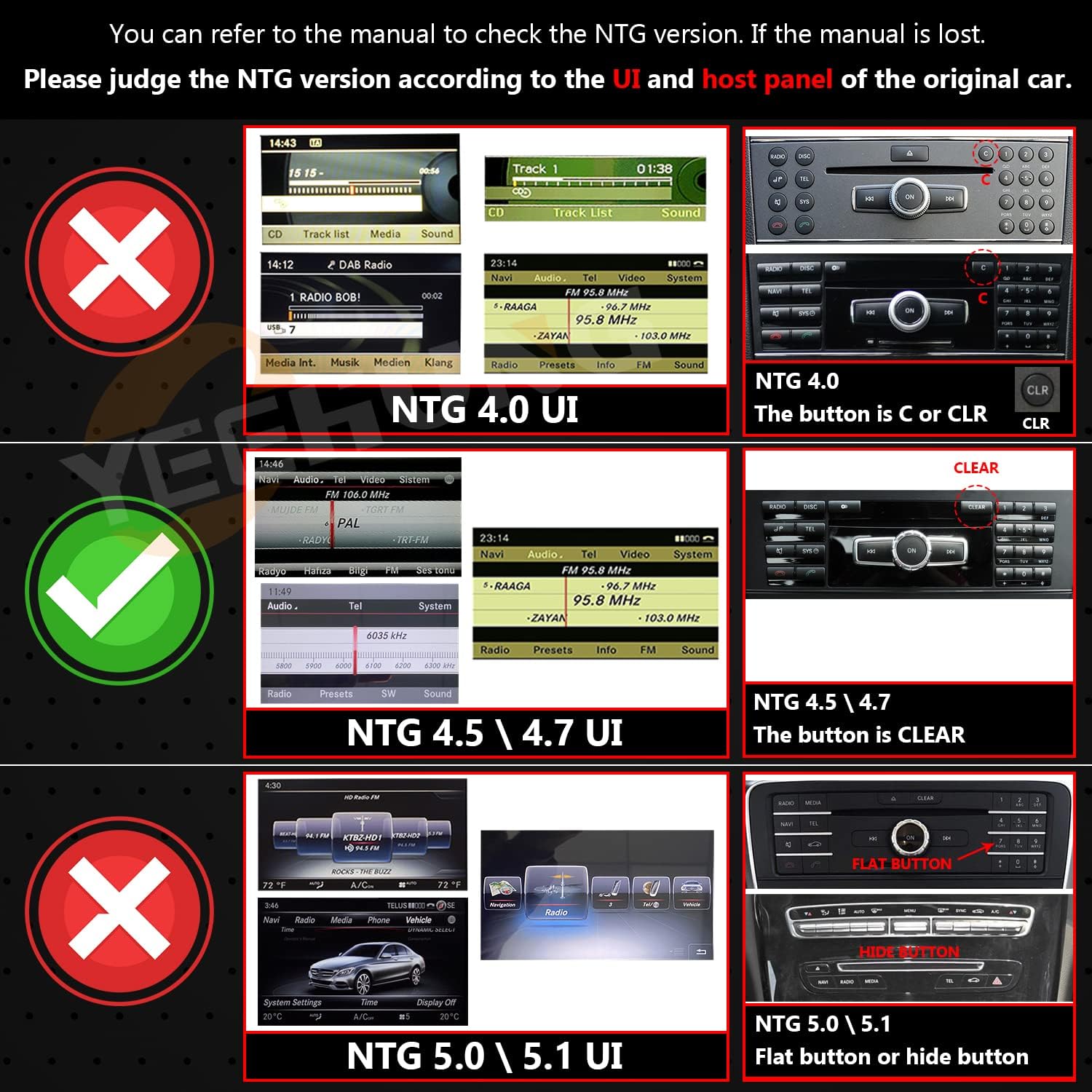
Figure 3.1: NTG Version Identification Guide
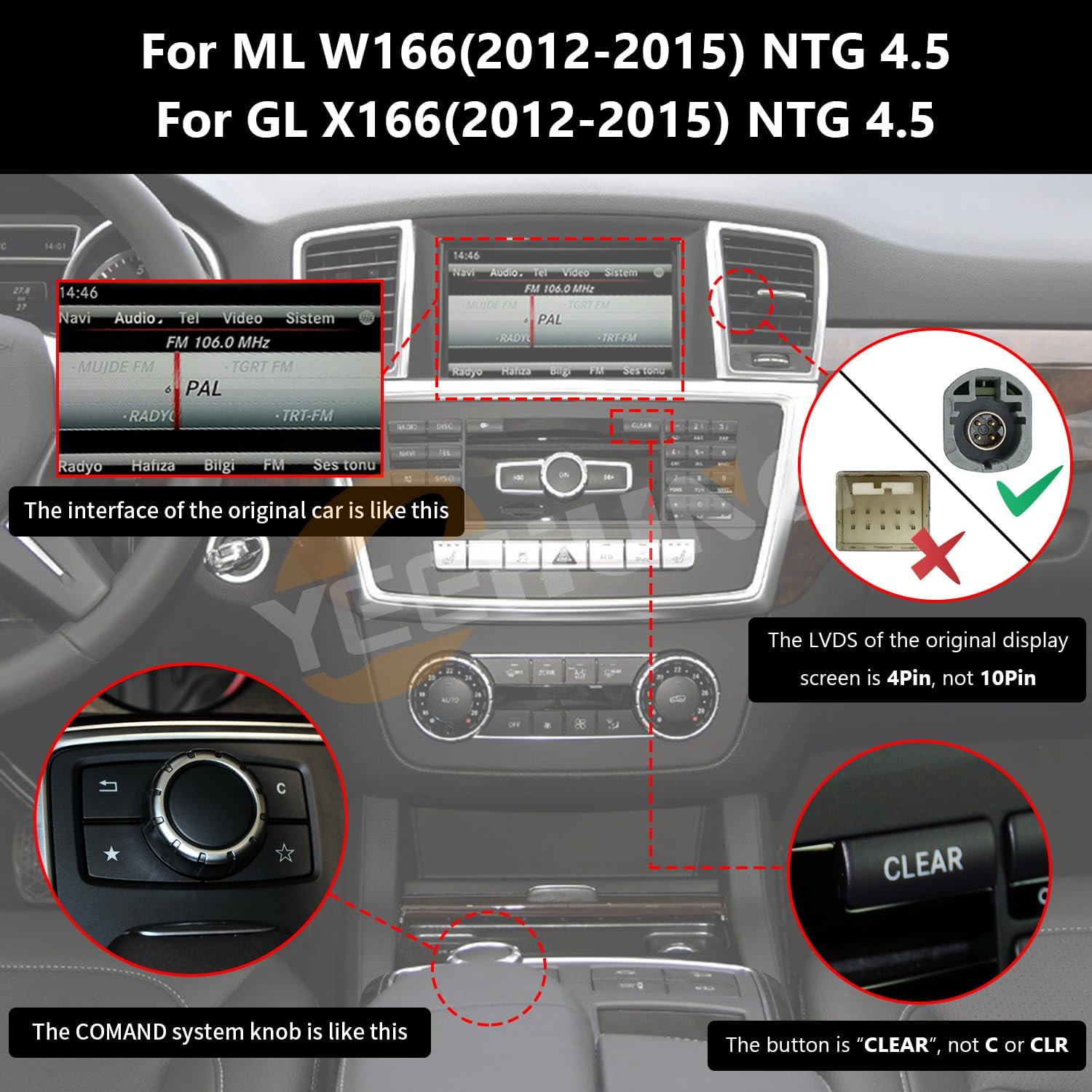
Figure 3.2: NTG 4.5 System Visual Confirmation
4. ماذا يوجد في الصندوق
عند فتح الصندوق، يرجى التأكد من وجود جميع المكونات التالية:
- 1 x 12.3" Multimedia Panel
- 1 × قاعدة
- 1 x ISO Wiring Harness
- شنومكس x رسيا كابل
- 1 x Speaker (Optional)
- 1 × هوائي 4G
- 1 × هوائي GPS
- 1 × ميكروفون
- 1 x AMI Decoder
- 1 x دليل التثبيت
- 1 × دليل المستخدم
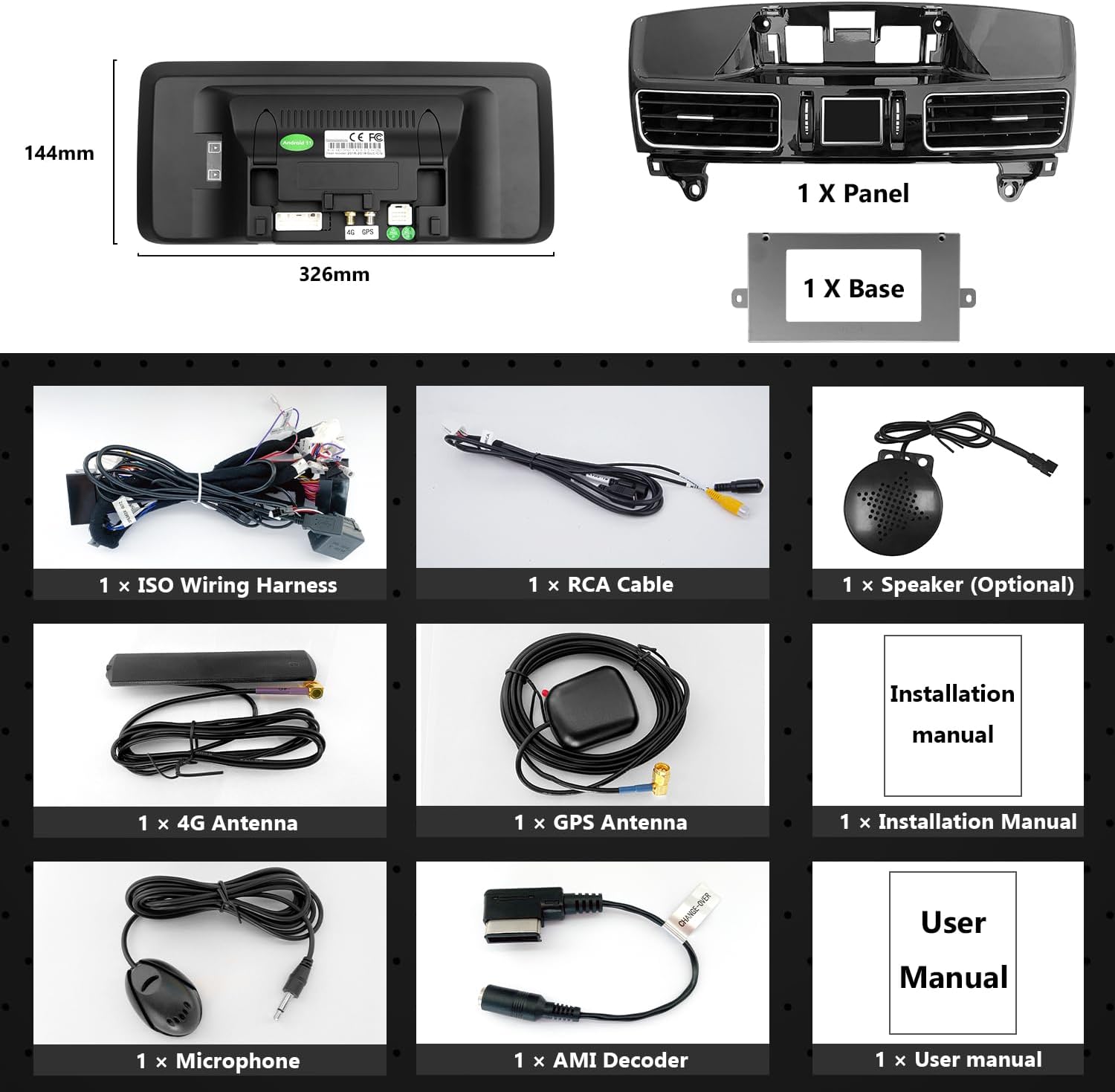
الشكل 4.1: محتويات العبوة
5. دليل التثبيت
Professional installation is recommended. Ensure the vehicle's power is disconnected before beginning installation. This system is designed for 'no injury installation', meaning no need to damage original vehicle wires.
5.1 Precautionary Note on AUX Audio
If your NTG4.5 system does not have an AUX menu, you must activate the AUX menu for the Android system's sound to function. You will need to connect the audio output from the new system to your car's AUX input. This can be done via an AMI cable or by using the Audio out on the ISO cable to interface with the car's AUX jack, depending on your car's interface type.

Figure 5.1: Audio Out to AMI Connection

Figure 5.2: Audio Out to AUX IN Connection
5.2 الأسلاك والتوصيلات
Carefully connect all wiring harnesses as per the provided installation manual. Ensure all connections are secure. The system is designed to integrate with your existing vehicle wiring without modification.

Figure 5.3: Wiring Connection Example
5.3 AUX Activation and Automatic Switching (NTG 4.5/4.7)
For NTG4.5 and NTG4.7 systems with original car AUX function, follow these steps to set up automatic AUX switching:
- On the original car interface, navigate to the AUDIO menu. Set the position of the AUDIO icon to '2'.
- Within the AUDIO menu, locate the AUX icon and set its position to '8'.
- Access the Factory Settings of the Android device.
- Under 'AUX Switching Modes', select 'Automatic' or 'Other' as appropriate for your vehicle.
- Ensure 'AUX Activate' is checked in the settings.
- Verify the 'CAN Protocol' is set to 'BC_Protocol_type_4.5'.
- Confirm 'Car Display' settings are appropriate for NTG4.0/NTG4.5 (e.g., 800x480 or 400x240 depending on original screen resolution).

Figure 5.4: Automatic AUX Switching Setup

Figure 5.5: AUX Activate Setting

Figure 5.6: CAN Protocol Setting

Figure 5.7: Car Display Setting
5.4 فحص ما بعد التثبيت
After completing the cable and device installation, re-route all original cables to their proper positions. Before restoring covers and panels, turn on the Android device and thoroughly test all functions to ensure they are operating normally.
6. تعليمات التشغيل
The YEEHUNG multimedia system integrates seamlessly with your vehicle's existing controls while offering advanced Android functionality.
6.1 التنقل الأساسي والواجهة
The 12.3-inch touchscreen allows for intuitive navigation through the Android interface. Swipe, tap, and use multi-touch gestures to control applications and settings. The system also supports online voice control functions when connected to a network.

Figure 6.1: CarPlay Interface

Figure 6.2: Android Auto Interface

Figure 6.3: Video Playback
6.2 CarPlay وAndroid Auto
The system supports both wired and wireless CarPlay and Android Auto. Connect your smartphone to access navigation, music, messages, and other compatible apps directly on the car's display. The wireless mirror link function also allows mirroring your phone's screen.

Figure 6.4: CarPlay and Android Auto Functionality
6.3 Retained OEM Functions
The YEEHUNG system is designed to retain all original car functions. You can continue to use your original car knob (COMAND knob), steering wheel controls, original car radio, amplifier, and factory rear view camera with reverse trajectory. The system supports dual system switching (NTG 4.5) allowing access to both the original car system and the Android system.
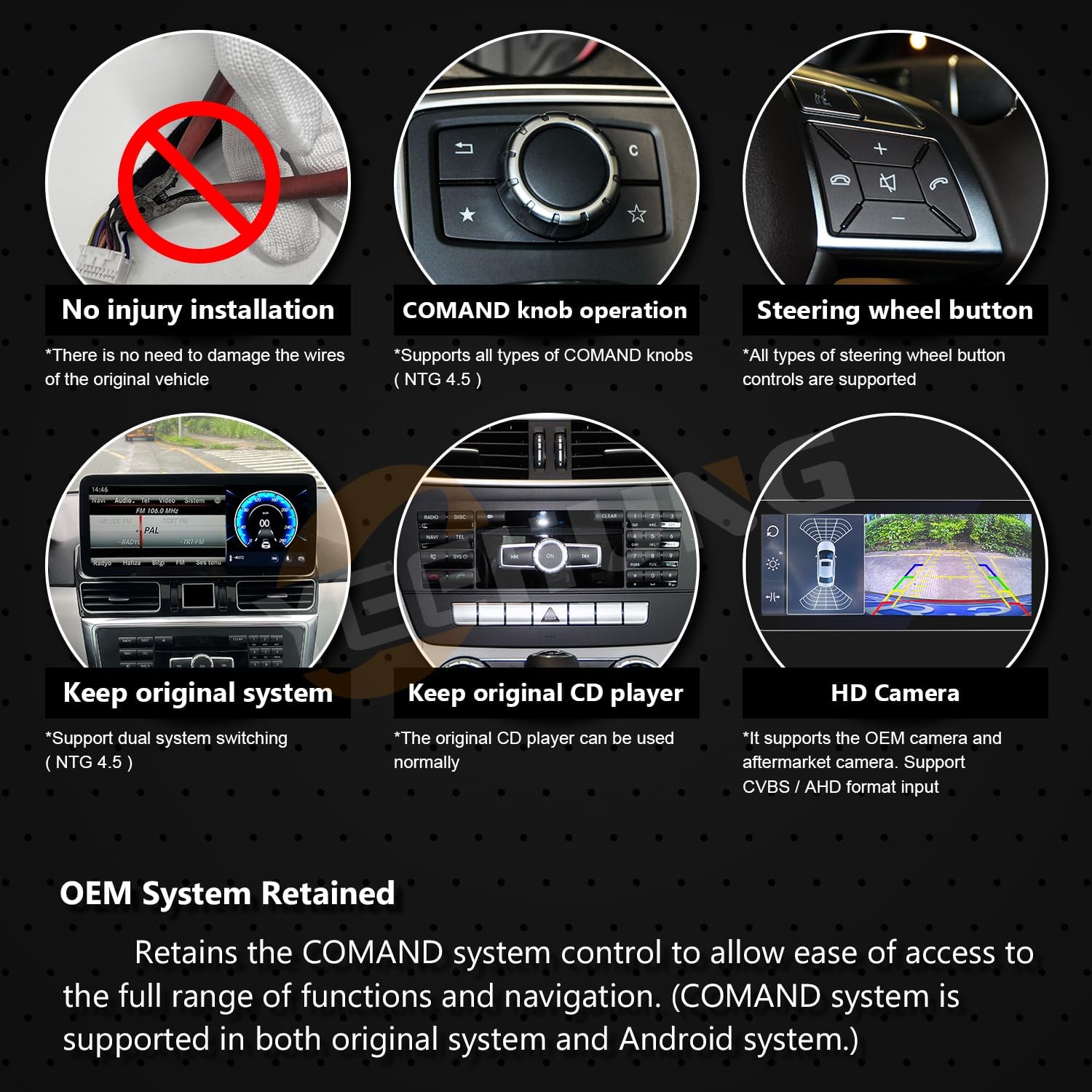
Figure 6.5: Retained OEM System Features
7. المواصفات
| ميزة | مواصفة |
|---|---|
| وزن العنصر | 7.28 رطل |
| أبعاد المنتج | 12.83 × 11.02 × 7.48 بوصة |
| رقم موديل العنصر | YH-7115 |
| حجم العرض | 12.3 بوصة |
| دقة العرض | 1920×720 |
| فتحة بطاقة الذاكرة | SD |
| الأوامر الصوتية | شاشة تعمل باللمس |
| ماركة | ييهونغ |
| نوع خدمة المركبة | سيارة |
| ميزة خاصة | بلوتوث، شاشة تعمل باللمس |
| تكنولوجيا الاتصال | Bluetooth, USB, Wi-Fi, Wireless |
| نوع الخريطة | أمريكا الشمالية |
| وضع إخراج الصوت | ستيريو |
| نوع التركيب | جبل لوحة القيادة |
8. استكشاف الأخطاء وإصلاحها
8.1 No Sound from Android System
علامة مرض: The Android system is powered on and displays correctly, but there is no audio output.
حل: This typically indicates that the AUX menu in your original NTG4.5 system is not activated or the audio output from the Android unit is not correctly connected to the car's AUX input. Refer to Section 5.1 and 5.3 for detailed instructions on activating AUX and setting up the audio connection.
8.2 System Not Responding / Freezing
حل: Try restarting the device by turning off the car's ignition and waiting for a few minutes before restarting. If the issue persists, check all power connections. A factory reset might be necessary as a last resort (consult the separate installation manual for factory reset procedures).
8.3 مشاكل الاتصال (بلوتوث/واي فاي)
حل: Ensure the antennas (4G and GPS) are correctly installed and secured. Check the system settings for Bluetooth and Wi-Fi to ensure they are enabled. If connecting to a phone, ensure the phone's Bluetooth/Wi-Fi is also on and discoverable.
9. الصيانة
The YEEHUNG 12.3" Android 13 Car Multimedia System requires minimal maintenance. Follow these guidelines to ensure longevity and optimal performance:
- تنظيف: Use a soft, lint-free cloth to clean the screen. For stubborn smudges, slightly dampامسح القماش بالماء أو بمنظف آمن للشاشات. تجنب المواد الكيميائية القاسية أو المواد الكاشطة.
- تحديثات البرامج: Periodically check for software updates through the system's settings menu to ensure you have the latest features and security patches.
- الظروف البيئية: Avoid exposing the device to extreme temperatures or direct sunlight for prolonged periods, as this can affect performance and lifespan.
- سلامة الكابل: Ensure all cables remain securely connected and are not pinched or damaged.
10. الضمان والدعم
10.1 معلومات الضمان
- Within 1 Month: Free returns according to Amazon rules. Contact Amazon Buyer Services for return procedures.
- Within 12 Months: Free warranty service for non-human damage. The customer is responsible for shipping costs within the U.S. for product return and repair.
- After 1 Year: Repair service is available. In addition to U.S. postage, customers will be responsible for the cost of replacement parts and labor.
10.2 دعم العملاء
If you encounter any problems or have questions regarding your YEEHUNG multimedia system, please contact our customer support team. Clearly describe your issue to facilitate a quick resolution. We aim to reply within 24 hours.
For general inquiries or to verify compatibility, you may also refer to the YEEHUNG Store on Amazon.


