مقدمة
This manual provides essential information for the safe and proper installation, operation, and maintenance of your Leviton LP220-BPD 20 Space, 20 Circuit Indoor Load Center with a 200 Amp Main Circuit Breaker. Please read all instructions carefully before beginning any work. This load center is designed for indoor use and is NEMA 1 rated. The enclosure and interior are included; the door is sold separately.
معلومات السلامة
تحذير: Risk of electric shock or electrocution. Installation and servicing of this electrical equipment must be performed by a qualified electrician in accordance with all national and local electrical codes. Always turn off power at the main service disconnect before working on the load center. Use appropriate personal protective equipment (PPE).
- تأكد من فصل جميع مصادر الطاقة قبل التركيب أو الصيانة.
- لا تثبت في الرطب أو دamp المواقع ما لم يتم تصنيفها خصيصًا لمثل هذه البيئات.
- Verify proper grounding and bonding.
- Use only Leviton circuit breakers with this load center.
- Keep the load center door closed and secured after installation.
المنتج انتهىview
The Leviton LP220-BPD Load Center offers a modern, efficient solution for residential electrical distribution. Key features include:
- التوصيل السهل: Designed for rough-in wiring without circuit breakers installed, simplifying the process.
- موصلية فائقة: Equipped with tin-plated copper bussing for optimal electrical performance.
- Organized Layout: Stamped notches for cable ties ensure secure and neat wiring management.
- التصميم الحديث: Features a white, powder-coated finish for a clean aesthetic.
- التصميم المعياري: Allows for in-field main breaker customization and future upgrades.
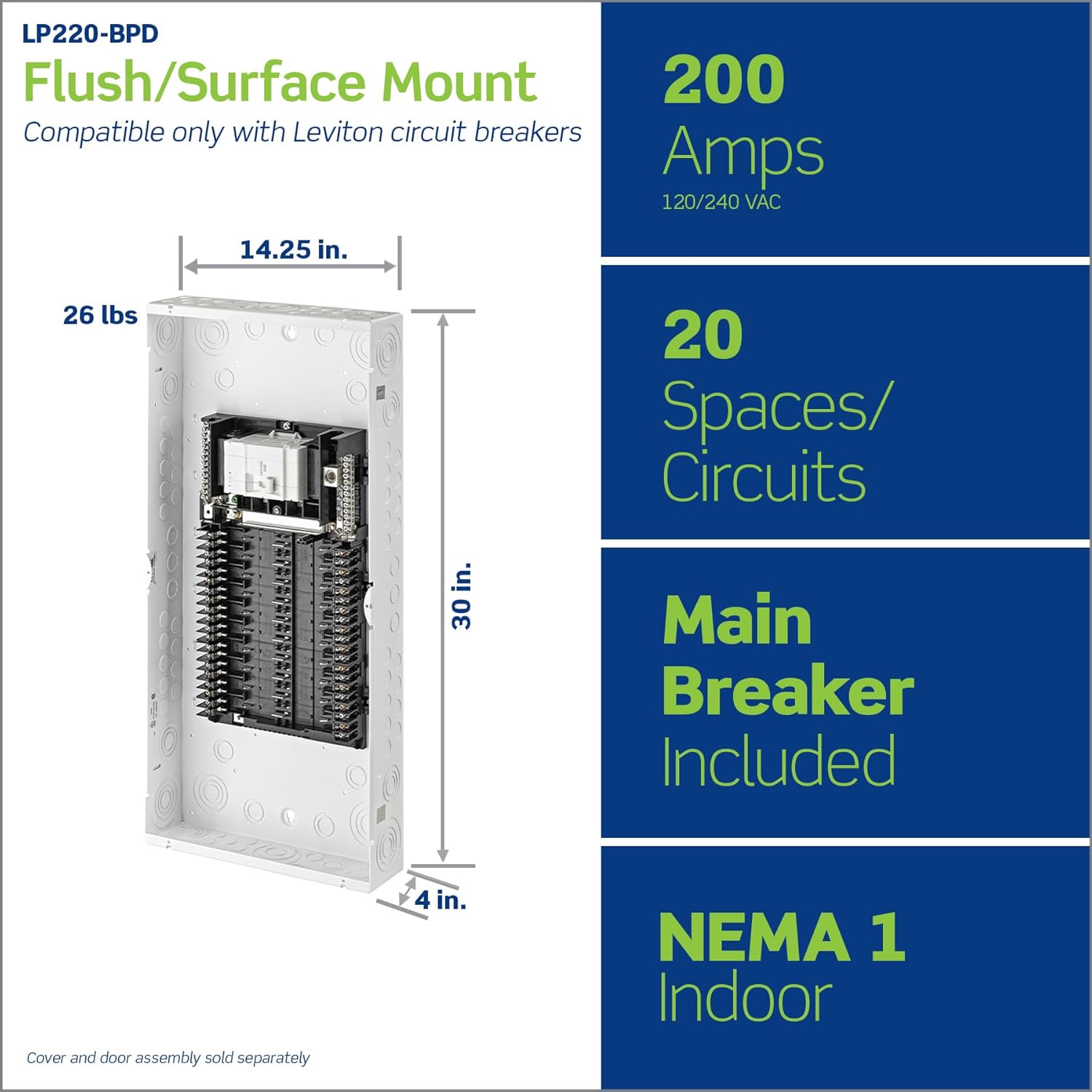
Image 1: Leviton LP220-BPD Load Center showing overall dimensions (14.25"L x 4"W x 30"H) and key specifications like 200 Amps, 20 Spaces/Circuits, Main Breaker Included, and NEMA 1 Indoor rating.

الصورة 2: داخلي view of the load center highlighting features such as notches for cable ties, white powder-coated finish, included main breaker, custom lugs for hot and neutral wires, tin-plated copper bussing, and invertibility for bottom feed applications.
الإعداد والتثبيت
Installation should only be performed by a qualified electrician. Follow all applicable electrical codes.
1. Mounting the Load Center
- Choose a suitable indoor location for flush or surface mounting, ensuring adequate clearance around the panel.
- Securely mount the load center enclosure to the wall studs or appropriate structural support.
2. Wiring at Rough-in
- With no circuit breakers present, neatly land all branch phase and neutral wires directly onto the panel's custom lugs.
- Utilize the stamped notches for cable ties to organize and secure wiring within the enclosure.
- Ensure all connections are tight and conform to torque specifications.
3. Installing Circuit Breakers
Leviton's plug-on design allows for quick and easy installation of circuit breakers.
- Align the Leviton circuit breaker with the desired space on the bussing.
- Firmly snap the breaker into place. No additional wiring is required for the breaker itself.
- Repeat for all necessary circuit breakers.

Image 3: A hand demonstrating the plug-on installation of a Leviton circuit breaker into the load center, emphasizing the ease and speed of installation.
4. Main Breaker Customization
The modular panel design and 225 Amp rated bussing allow for in-field main breaker customization, providing flexibility for future upgrades.
Video 1: Official Leviton Load Center Video. This video demonstrates the key features and installation benefits of the Leviton Load Center, including the easy wiring at rough-in, plug-on circuit breakers, and modular design for future upgrades.
Operating the Load Center
Once installed, the load center operates like a standard electrical panel. Circuit breakers protect individual circuits from overcurrents and short circuits.
Resetting a Tripped Circuit Breaker
- Locate the tripped breaker, which will typically be in an intermediate position between 'ON' and 'OFF'.
- Firmly push the breaker handle to the full 'OFF' position.
- Then, push the handle to the full 'ON' position to restore power.
- If the breaker immediately trips again, there may be a persistent fault. Do not attempt to reset it repeatedly. Consult a qualified electrician.
صيانة
The Leviton Load Center requires minimal maintenance. Regular inspections by a qualified electrician are recommended.
- تفتيش سنوي: Have a qualified electrician inspect the load center annually for loose connections, signs of overheating, or damaged components.
- تنظيف: Keep the area around the load center clear and free of obstructions. Clean the exterior with a dry cloth; do not use liquids or abrasive cleaners.
- باب: If a door is installed (sold separately), ensure it closes securely to protect internal components.

Image 4: Illustration of two types of doors for the Leviton Load Center: a standard solid door (LDC20) and a windowed door (LDC20-W), both sold separately.
استكشاف الأخطاء وإصلاحها
For persistent electrical issues, always consult a qualified electrician.
| مشكلة | السبب المحتمل | حل |
|---|---|---|
| تتعطل قواطع الدائرة الكهربائية بشكل متكرر | دائرة كهربائية محملة بشكل زائد، أو دائرة كهربائية قصيرة، أو عطل في الأرض، أو جهاز معيب. | Reduce load on the circuit. Unplug appliances. If problem persists, consult an electrician. |
| No power to a circuit | Tripped circuit breaker, loose connection, or power outage. | Check and reset the circuit breaker. Verify main power supply. If issue continues, contact an electrician. |
| Load center feels warm | Normal operation under load, or potentially loose connections/overload. | A slight warmth is normal. If excessively hot or accompanied by burning smell, immediately turn off main power and call an electrician. |
تحديد
| يصف | التفاصيل |
|---|---|
| ماركة | ليفيتون |
| رقم الموديل | LP220-BPD |
| أبعاد المنتج | 14.25 بوصة طول × 4 بوصة عرض × 30 بوصة ارتفاع |
| تيار محول التيار المتردد | 200 Amps |
| مادة | نحاس |
| عدد الدوائر | 20 |
| نوع المرحلة | مرحلة واحدة |
| وزن العنصر | 22.7 رطل |
| رمز المنتج الموحد | 078477996188 |
التكامل مع المنزل الذكي (اختياري)
The Leviton Load Center is compatible with optional smart upgrades, allowing for enhanced energy management and control. This includes the ability to install Leviton Whole Home Energy Monitors and 2nd Gen Smart Circuit Breakers, which can be enrolled in the My Leviton App.
- Electrical Anomaly Notifications: Receive alerts for unusual electrical activity.
- Remote Breaker Control: Manage circuits remotely via the My Leviton App.
- مراقبة الطاقة في الوقت الفعلي: Track energy consumption for individual circuits or the entire home.

Image 5: A diagram illustrating the three steps for smart home integration: 1) Install the Leviton Whole Home Energy Monitor, 2) Snap in 2nd Gen Smart Circuit Breakers, and 3) Enroll Breakers in the My Leviton App.
الضمان والدعم
For specific warranty details and customer support, please refer to the official Leviton webيمكنك زيارة الموقع الإلكتروني أو الاتصال بخدمة عملاء ليفيتون مباشرةً. احتفظ بإيصال الشراء لتقديم مطالبات الضمان.
Leviton offers various protection plans for their products. For more information on available protection plans, please visit the Leviton webقم بزيارة الموقع أو استشر بائع التجزئة الخاص بك.


