مقدمة
This manual provides detailed instructions for the proper use and maintenance of your AIWA HST-250BT Bluetooth Over-Ear Headphones. Please read this manual thoroughly before using the product to ensure optimal performance and longevity.
ماذا يوجد في الصندوق
عند تفريغ الأمتعة، يرجى التأكد من وجود جميع العناصر التالية:
- AIWA HST-250BT Bluetooth Over-Ear Headphones
- Braided nylon micro USB charging cable
- Aux cable 3.5mm stereo to 3.5mm stereo (1 meter length, high quality with metal plugs)
- Deluxe carrying case
- دليل المستخدم (هذا المستند)
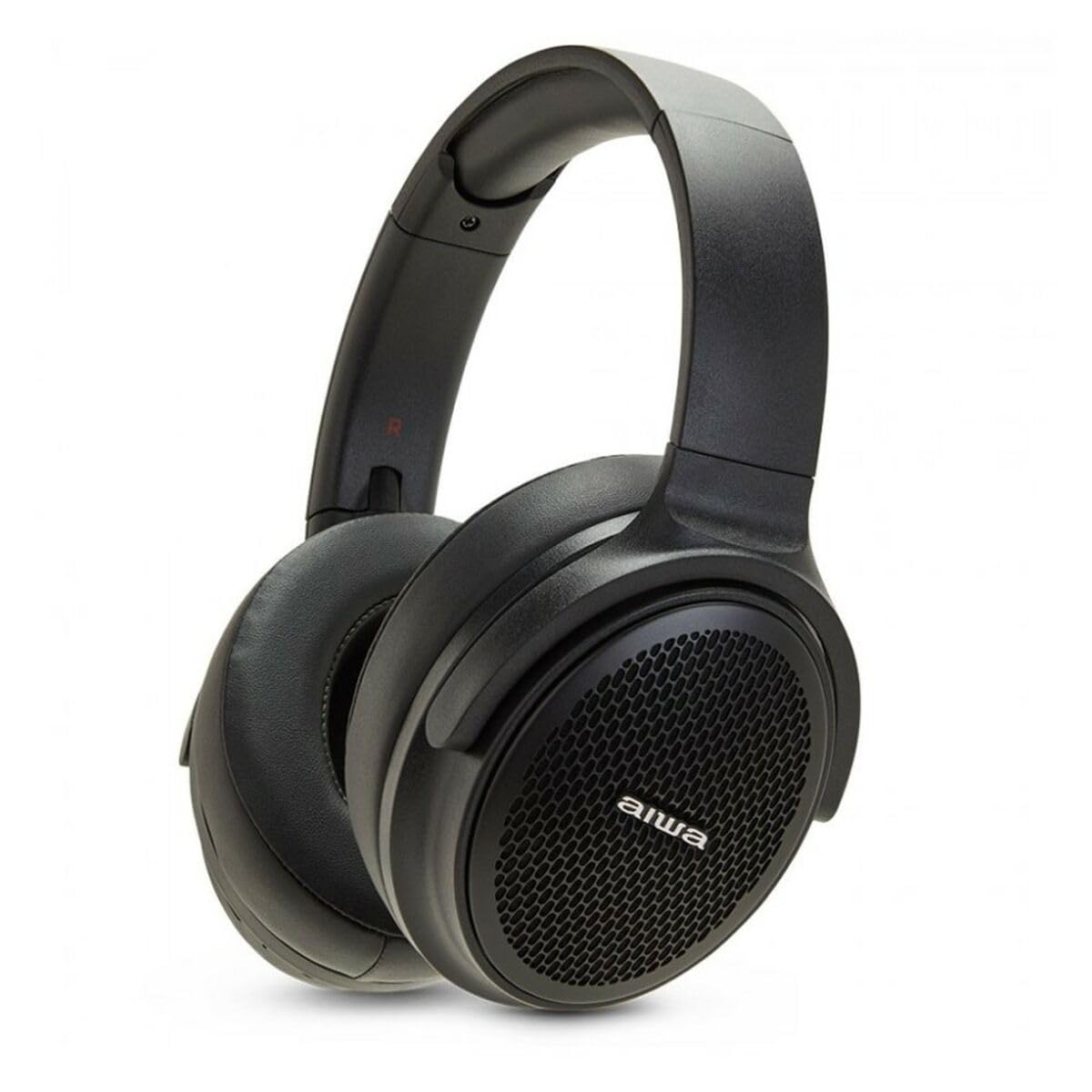
Image: The AIWA HST-250BT headphones shown with the braided micro USB charging cable, 3.5mm aux cable, and deluxe carrying case.
مميزات المنتج
- اتصال بلوتوث 5.0: للحصول على اتصال لاسلكي مستقر وفعال.
- HyperBass Technology: Enhanced bass for a rich audio experience.
- التشغيل السلكي واللاسلكي: Use via Bluetooth or the included 3.5mm audio cable.
- فتحة Micro SD: تشغيل الموسيقى مباشرة من بطاقة Micro SD.
- الضوابط المتكاملة: Touch controls for music playback and call management.
- ميكروفون مدمج: لإجراء مكالمات بدون استخدام اليدين.
- بطارية قابلة لإعادة الشحن: Long-lasting battery with ultra-low power consumption.
- تصميم مقاوم للماء: يوفر الحماية ضد البقع والعرق.
- تصميم مريح: Over-ear earpiece shape for extended wear.
يثبت
1. شحن سماعات الرأس
Before first use, fully charge your AIWA HST-250BT headphones. Use the provided micro USB charging cable.
- Connect the micro USB end of the cable to the charging port on the headphones.
- قم بتوصيل طرف USB-A من الكابل بمحول طاقة USB (غير مرفق) أو بمنفذ USB في الكمبيوتر.
- The LED indicator will illuminate to show charging status. It typically takes approximately 2 hours for a full charge.
- Once fully charged, the LED indicator will change or turn off (refer to the specific LED behavior in your product's quick start guide if available).
2. اقتران بلوتوث
Pair your headphones with your smart device for wireless audio.
- تأكد من شحن سماعات الرأس وإيقاف تشغيلها.
- اضغط مع الاستمرار على زر الطاقة الموجود على سماعات الرأس حتى يومض مؤشر LED بسرعة (عادةً ما يكون أزرق وأحمر)، مما يشير إلى وضع الاقتران.
- على جهازك الذكي (الهاتف الذكي، الجهاز اللوحي، الكمبيوتر)، انتقل إلى إعدادات البلوتوث.
- قم بتشغيل البلوتوث والبحث عن الأجهزة المتاحة.
- Select "AIWA HST-250BT" from the list of found devices.
- Once paired, the LED indicator on the headphones will typically show a slow blue flash or solid blue light.
- إذا طُلب منك إدخال كلمة المرور، أدخل "0000".
ملاحظة: ستحاول سماعات الرأس تلقائيًا إعادة الاتصال بآخر جهاز مقترن بها عند تشغيلها.
تعليمات التشغيل
تشغيل/إيقاف الطاقة
- تشغيل الطاقة: اضغط مع الاستمرار على زر الطاقة لمدة ثانيتين تقريبًا.
- إيقاف التشغيل: اضغط مع الاستمرار على زر الطاقة لمدة ثانيتين تقريبًا.
تشغيل الموسيقى (وضع البلوتوث)
- تشغيل/إيقاف مؤقت: اضغط على الزر متعدد الوظائف مرة واحدة.
- المسار التالي: اضغط مع الاستمرار على زر رفع الصوت.
- المسار السابق: اضغط مع الاستمرار على زر خفض الصوت.
- رفع الصوت: اضغط لفترة قصيرة على زر رفع الصوت.
- اخفض الصوت: اضغط لفترة قصيرة على زر خفض الصوت.
استدعاء إدارة
- الرد/إنهاء المكالمة: اضغط على الزر متعدد الوظائف مرة واحدة.
- رفض المكالمة: اضغط مع الاستمرار على الزر متعدد الوظائف لمدة ثانيتين.
- إعادة الاتصال بالرقم الأخير: اضغط مرتين على الزر متعدد الوظائف.
استخدام بطاقة Micro SD
تدعم سماعات الرأس التشغيل المباشر من بطاقة Micro SD.
- أدخل بطاقة ذاكرة Micro SD (مع دعم الصوت) files) في الفتحة المخصصة على سماعات الرأس.
- The headphones will automatically switch to Micro SD playback mode or you may need to press a mode button (refer to specific button layout if available).
- Use the music playback controls (Play/Pause, Next/Previous Track, Volume) as described above.
الاتصال السلكي (وضع AUX)
For a wired connection, use the included 3.5mm audio cable.
- Connect one end of the 3.5mm audio cable to the AUX input port on the headphones.
- Connect the other end to the 3.5mm audio output jack of your audio source (e.g., smartphone, MP3 player).
- In AUX mode, controls on the headphones (like volume, play/pause) may not function, and you will need to control playback from your audio source.
صيانة
- تنظيف: امسح سماعات الرأس بقطعة قماش ناعمة وجافة. لا تستخدم منظفات أو مذيبات كاشطة.
- تخزين: Store the headphones in the provided deluxe carrying case when not in use to protect them from dust and damage.
- العناية بالبطارية: لإطالة عمر البطارية، تجنب تفريغ سماعات الرأس بالكامل بشكل متكرر. اشحنها بانتظام، حتى لو لم تستخدمها لفترات طويلة.
- مقاومة الماء: على الرغم من أنها مقاومة للماء، تجنب غمر سماعات الرأس في الماء. جففها جيداً إذا تبللت.
استكشاف الأخطاء وإصلاحها
| مشكلة | السبب المحتمل | حل |
|---|---|---|
| لا يتم تشغيل سماعات الرأس. | بطارية منخفضة. | اشحن سماعات الرأس بالكامل باستخدام كابل USB المرفق. |
| لا يمكن الاقتران بالجهاز. | سماعات الرأس ليست في وضع الاقتران؛ البلوتوث غير مفعل على الجهاز؛ الجهاز بعيد جدًا. | Ensure headphones are in pairing mode (flashing LED). Turn on Bluetooth on your device. Move device closer to headphones (within 10 meters). Forget previous pairings on your device and try again. |
| لا يوجد صوت أو مستوى الصوت منخفض. | Volume too low on headphones or device; incorrect audio source; headphones not connected. | Increase volume on both headphones and connected device. Ensure headphones are properly paired or the AUX cable is fully inserted. Check if the correct audio output is selected on your device. |
| بطاقة الذاكرة الصغيرة لا تعمل. | لم يتم إدخال البطاقة بشكل صحيح؛ غير مدعومة file تنسيق البطاقة تالفة. | Reinsert the Micro SD card. Ensure audio files are in a supported format (e.g., MP3). Try a different Micro SD card. |
تحديد
| ميزة | التفاصيل |
|---|---|
| اسم الموديل | اتش اس تي-250 بي تي |
| تكنولوجيا الاتصال | لاسلكي (بلوتوث)، سلكي (AUX 3.5 مم) |
| تكنولوجيا الاتصالات اللاسلكية | بلوتوث 5.0 |
| شكل سماعة الأذن | فوق الأذن |
| نوع برنامج تشغيل الصوت | سائق ديناميكي |
| طريقة التحكم | يلمس |
| المميزات الخاصة | HyperBASS, 10M Range, Call use, Rechargeable, Ultra low power consumption, Micro SD Slot, Waterproof |
| وقت الشحن | حوالي 2 ساعات |
| الأجهزة المتوافقة | الأجهزة الذكية |
| وزن العنصر | 100 جرام (3.53 أونصة) |
| أبعاد المنتج | 19.69 × 19.69 × 11.02 بوصة |
| مادة | نايلون |
| الشركة المصنعة | أيوا |
معلومات السلامة
Please observe the following safety guidelines for safe operation and to prevent damage to your device:
- لا تعرض سماعات الرأس لدرجات حرارة عالية أو أشعة الشمس المباشرة أو الرطوبة العالية.
- تجنب الاستماع إلى مستويات صوت عالية لفترات طويلة لمنع تلف السمع.
- لا تحاول تفكيك سماعات الرأس أو تعديلها. سيؤدي ذلك إلى إلغاء الضمان وقد يتسبب في تلفها.
- احتفظ بسماعات الرأس بعيدًا عن متناول الأطفال والحيوانات الأليفة.
- استخدم فقط كابل الشحن المقدم أو ما يعادله المعتمد.
- تخلص من المنتج بطريقة مسؤولة وفقًا للوائح المحلية. لا تتخلص منه مع النفايات المنزلية.
الضمان والدعم
AIWA products are designed and manufactured to the highest quality standards. For warranty information and technical support, please refer to the warranty card included with your purchase or visit the official AIWA webموقع.
For further assistance, you may contact AIWA customer support through their official channels.
Note: Specific warranty terms may vary by region. Please retain your proof of purchase for warranty claims.


