1. المقدمة
شكرا لك على الشراءasing the Deeyaple LED Digital Alarm Clock. This manual provides detailed instructions for setting up, operating, and maintaining your new alarm clock. Please read this manual thoroughly before use to ensure proper functionality and to maximize your user experience. This clock features adjustable brightness, dual alarms, a snooze function, and a clear LED display showing both time and day.
2. معلومات السلامة
- لا تعرض الجهاز لدرجات حرارة عالية، أو أشعة الشمس المباشرة، أو الرطوبة العالية.
- احتفظ بالجهاز بعيدًا عن الماء والسوائل الأخرى.
- Use only the provided USB cable for power. An AC adapter is not included.
- لا تحاول تفكيك الجهاز أو إصلاحه بنفسك. تواصل مع خدمة العملاء في حال وجود أي مشاكل.
- يحفظ بعيدًا عن متناول الأطفال.
3. محتويات العبوة
- Deeyaple LED Digital Alarm Clock (Model: F-8816)
- كابل طاقة USB (ملاحظة: محول الطاقة غير مرفق)
- دليل المستخدم (هذه الوثيقة)

Figure 3.1: Back panel and side view of the alarm clock, showing control buttons and USB port.
4. انتهى المنتجview
4.1 الشاشة الأمامية
The front of the clock features a large LED display that shows the time, day of the week, and indicators for Alarm 1 and Alarm 2. The display uses vibrant, multi-colored digits for enhanced readability.

الشكل 4.1: الجبهة view of the alarm clock with time and day displayed.
4.2 الأزرار العلوية
- زر الغفوة/الإضاءة: Located on the top. Press to activate snooze during an alarm or to adjust display brightness.
4.3 Back Controls
- زر ضبط الوقت: يُستخدم للدخول إلى وضع ضبط الوقت.
- زر ضبط التنبيه: يُستخدم للدخول إلى وضع ضبط المنبه.
- UP (+) Button: Increases values during setting or toggles functions.
- DOWN (-) Button: Decreases values during setting or toggles functions.
- منفذ DC 5V: USB power input.
- زر إعادة الضبط: Small button to reset the clock to factory settings.

الشكل 4.2: خلفي view of the alarm clock, highlighting the USB power input and control buttons.
5. الإعداد
5.1 تشغيل الجهاز
- Connect the provided USB power cable to the DC 5V port on the back of the alarm clock.
- Plug the other end of the USB cable into a standard USB power adapter (not included) or a powered USB port (e.g., computer, power bank).
- ستضيء الشاشة، مما يشير إلى أن الساعة قيد التشغيل.

Figure 5.1: The alarm clock is powered via a USB cable, ensuring continuous display.
6. تعليمات التشغيل
6.1 ضبط الوقت
- اضغط على الوقت المحدد اضغط على الزر الموجود في الجزء الخلفي من الساعة. ستبدأ أرقام الساعات بالوميض.
- استخدم أعلى (+) or تحت (-) أزرار لضبط الساعة.
- يضعط الوقت المحدد اضغط مرة أخرى لتأكيد الساعة والانتقال إلى إعداد الدقائق. ستومض أرقام الدقائق.
- استخدم أعلى (+) or تحت (-) أزرار لضبط الدقائق.
- يضعط الوقت المحدد a third time to confirm the minutes and move to 12/24H format selection.
- استخدم أعلى (+) or تحت (-) buttons to select between 12-hour (with AM/PM indicator) or 24-hour format.
- يضعط الوقت المحدد قم بحفظ الإعدادات مرة أخيرة ثم اخرج من وضع ضبط الوقت.
6.2 ضبط المنبهات (منبهات مزدوجة)
تدعم الساعة منبهين مستقلين (المنبه 1 والمنبه 2).
- اضغط على مجموعة التنبيه button. The Alarm 1 hour digits will start flashing, and the Alarm 1 icon will appear.
- استخدم أعلى (+) or تحت (-) buttons to adjust the Alarm 1 hour.
- يضعط مجموعة التنبيه again to confirm the hour and move to Alarm 1 minute setting. The minute digits will flash.
- استخدم أعلى (+) or تحت (-) buttons to adjust the Alarm 1 minutes.
- يضعط مجموعة التنبيه a third time to confirm minutes and move to Alarm 1 day setting.
- استخدم أعلى (+) or تحت (-) buttons to select the alarm days:
- 1-1: إنذار ليوم واحد
- 1-5: من الاثنين إلى الجمعة
- 1-6: من الأثنين إلى السبت
- 1-7: Monday to Sunday (Every day)
- 6-7: Saturday to Sunday (Weekend)
- يضعط مجموعة التنبيه again to confirm Alarm 1 settings and proceed to Alarm 2 setting. Repeat steps 2-6 for Alarm 2.
- After setting Alarm 2, press مجموعة التنبيه one last time to save all alarm settings and exit.

Figure 6.1: Alarm days setting options for customized wake-up schedules.
6.3 وظيفة الغفوة
عند سماع صوت الإنذار، اضغط على الزر الكبير غفوة / ضوء button on the top of the clock. The alarm will pause for 5 minutes and then sound again. You can repeat the snooze cycle multiple times.

Figure 6.2: Activating the snooze function by touching the top button for an additional 5 minutes of rest.
6.4 ضبط سطوع الشاشة
The clock has 3 levels of brightness (Bright, Medium, Low) and an option to turn off the display.
- اضغط على غفوة / ضوء button on the top of the clock (when no alarm is sounding) to cycle through the brightness levels: Bright > Medium > Low > Off > Bright.
- Select the brightness level that best suits your environment and preference.
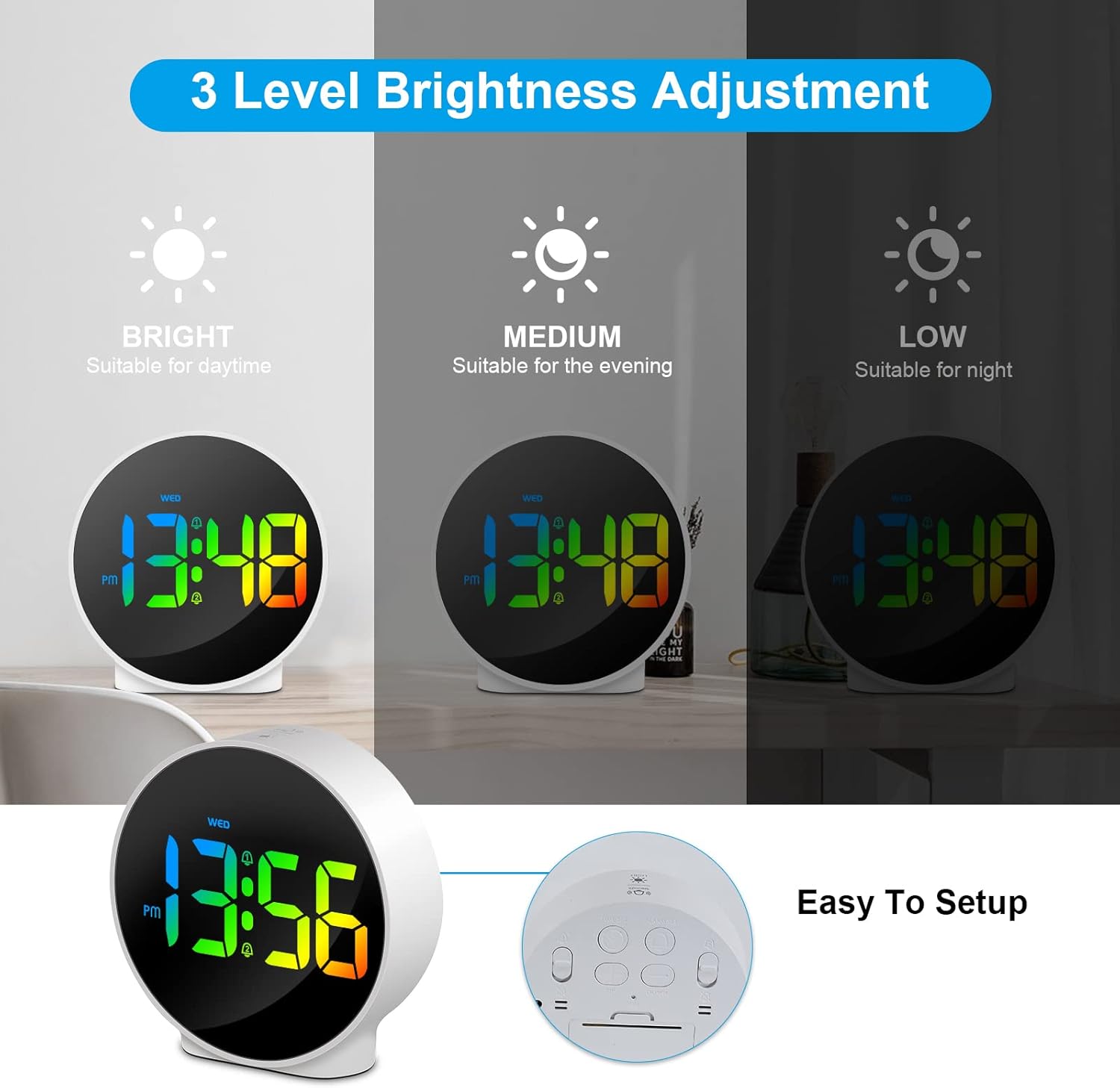
Figure 6.3: Three adjustable brightness levels for optimal viewفي ظروف الإضاءة المختلفة.
6.5 Week and Time Display
The clock simultaneously displays the current time and the day of the week on the same screen, eliminating the need to switch displays.

Figure 6.4: The clock displays both the time and the day of the week on a single screen for convenience.
7. الصيانة
- تنظيف: استخدم قطعة قماش ناعمة وجافة لتنظيف سطح الساعة. لا تستخدم منظفات أو مذيبات كاشطة.
- تخزين: If storing the clock for an extended period, disconnect it from power and store it in a cool, dry place.
8. استكشاف الأخطاء وإصلاحها
| مشكلة | السبب المحتمل | حل |
|---|---|---|
| الشاشة مطفأة أو خافتة. | Not powered, brightness set to off/low. | Ensure USB cable is securely connected to a power source. Press SNOOZE/LIGHT button to adjust brightness. |
| لا يصدر صوت الإنذار. | Alarm not set, alarm volume too low (not applicable for this model), incorrect alarm days. | Verify alarm time and ensure the alarm icon is displayed. Check alarm day settings. |
| الوقت غير صحيح. | Time not set correctly, power interruption. | Re-set the time following Section 6.1. Ensure continuous power supply. |
| الأزرار لا تستجيب. | خلل مؤقت في البرنامج. | Unplug the USB cable, wait 10 seconds, then plug it back in. If issue persists, use the RESET button on the back (requires a thin object like a paperclip). |
9. المواصفات
- ماركة: ديابل
- رقم الموديل: إف-8816
- لون: White shell with multi-color display
- الأبعاد (الطول × العرض × الارتفاع): 10 x 3.81 x 10 cm (3.94 x 1.5 x 3.94 inches)
- وزن: 180 جرام (0.4 رطل)
- سمات: Dual Alarm, Snooze, Adjustable Brightness (3 levels + off), 12/24H Display, Week Display, Corded Electric
- مصدر الطاقة: USB Cable (DC 5V)
- نوع العرض: الصمام الرقمي
- مادة: أكريلونيتريل بوتادين ستايرين (ABS)

Figure 9.1: Dimensions of the Deeyaple LED Digital Alarm Clock.
10. الضمان والدعم
Deeyaple products are designed for quality and reliability. For any questions, technical support, or warranty claims, please contact the seller or manufacturer directly through your purchase platform. Please retain your proof of purchase for warranty purposes.


