1. المقدمة
Thank you for choosing the Nexxt Indoor Smart Camera. This manual provides essential information for the safe and efficient use of your new device. Please read it thoroughly before installation and operation, and retain it for future reference.
This 1080p HD fixed room camera is designed to provide reliable indoor surveillance with features such as night vision, two-way audio communication, motion detection, and seamless integration with smart home ecosystems like Amazon Alexa and Google Assistant.
2. معلومات السلامة
- Ensure the camera is powered by the provided power adapter. Using unauthorized adapters may damage the device and void the warranty.
- Do not expose the camera to water, moisture, or extreme temperatures. It is designed for indoor use only.
- تجنب وضع الكاميرا في ضوء الشمس المباشر أو بالقرب من مصادر الحرارة.
- لا تحاول تفكيك الكاميرا أو إصلاحها بنفسك. قم بإحالة جميع أعمال الصيانة إلى فنيين مؤهلين.
- أبقِ الكاميرا وملحقاتها بعيداً عن متناول الأطفال والحيوانات الأليفة.
- Ensure stable Wi-Fi connectivity for optimal performance.
3. محتويات العبوة
تأكد من وجود جميع العناصر في العبوة:
- NEXXT Indoor Smart Camera (NHC-I710)
- محول الطاقة
- يقف
- دليل المستخدم (هذا المستند)

Image: The retail packaging of the NEXXT Indoor Smart Camera, showing the camera and key features.
4. انتهى المنتجview
The Nexxt Indoor Smart Camera offers a range of features for comprehensive home monitoring:
- دقة الوضوح العالي الكامل 1080 بكسل: يوفر مقاطع فيديو واضحة ومفصلةtage.
- الرؤية الليلية التلقائية: Integrated infrared LEDs enable clear monitoring in low-light conditions up to 30 feet.
- الاتصال في الاتجاهين: Built-in microphone and speaker allow for real-time audio interaction.
- كشف الحركة: Alerts you to detected movement within the camera's field of view.
- التخزين المحلي والسحابي: Supports microSD cards (sold separately) and Microsoft Azure cloud storage (subscription sold separately) for recording.
- تكامل المنزل الذكي: Compatible with Amazon Alexa and Google Assistant for voice control and integration into smart routines.
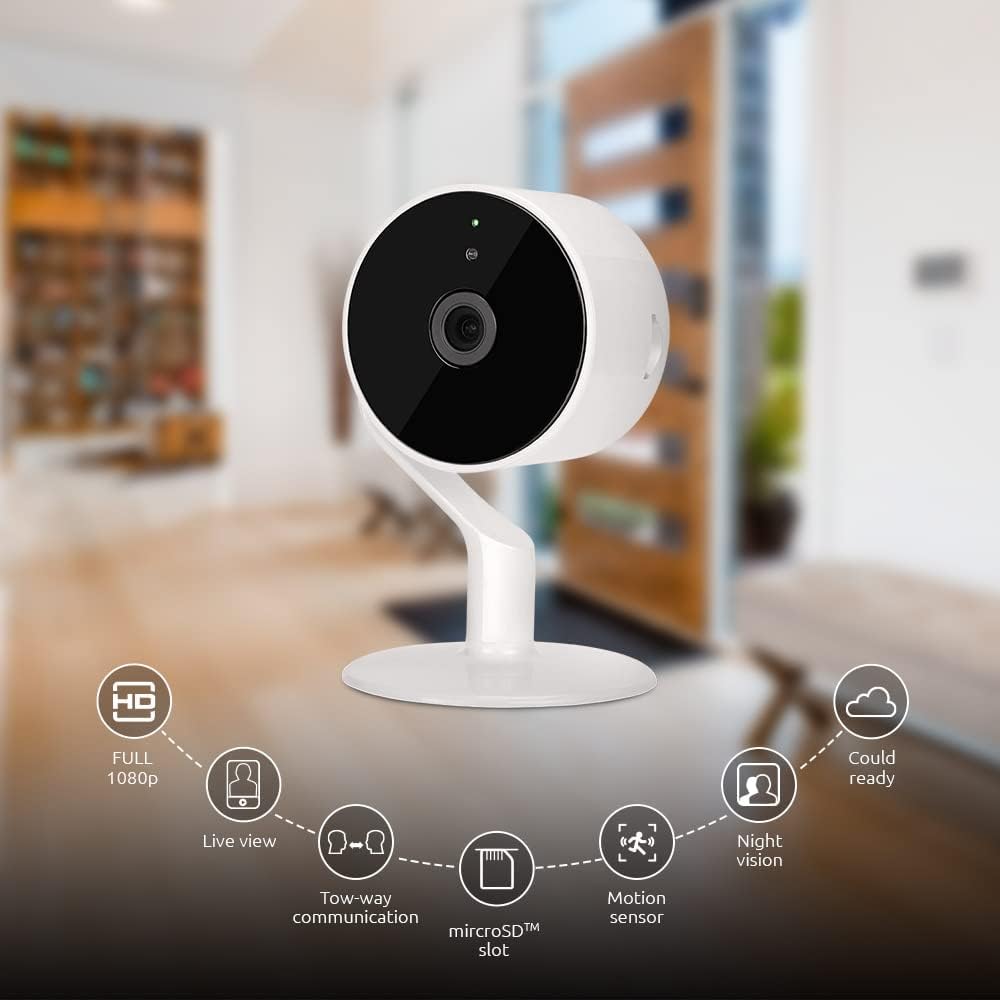
Image: The NEXXT Indoor Smart Camera highlighting its key features: Full HD 1080p, Live View, Two-way communication, microSD slot, Motion sensor, Night vision, and Cloud ready.
5. الإعداد
5.1 التشغيل
- Place the camera on a stable, flat surface or mount it using appropriate hardware (not included).
- قم بتوصيل محول الطاقة بمنفذ إدخال الطاقة الخاص بالكاميرا.
- Plug the power adapter into a standard electrical outlet. The camera will power on and its indicator light will begin to flash, indicating it's ready for pairing.
5.2 تثبيت التطبيق وإقرانه
To control and monitor your camera, you need to download the Nexxt Home App:
- تنزيل تطبيق Nexxt Home من متجر جوجل بلاي (for Android devices) or the متجر تطبيقات ابل (for iOS devices).
- Open the Nexxt Home App and create a new account or log in if you already have one.
- انقر على أيقونة "+" أو "إضافة جهاز" لبدء عملية الاقتران.
- Select "Camera" or the specific camera model from the list of devices.
- Follow the on-screen instructions in the app to connect the camera to your home Wi-Fi network. This typically involves scanning a QR code displayed on your phone with the camera.
- Once connected, the camera's indicator light will turn solid, and you will see the camera added to your app.

Image: Illustration showing the NEXXT Indoor Smart Camera being set up to function as a webcam, connecting to a laptop.
6. تعليمات التشغيل
6.1 مباشر View
From the Nexxt Home App, tap on your camera's name to access the live video feed. You can view الوقت الحقيقيtagهـ من منطقتك الخاضعة للمراقبة.

Image: The NEXXT Indoor Smart Camera on a desk, with text indicating "Full HD resolution" and its ability to provide 1080p high-quality video day or night.
6.2 محادثة ثنائية الاتجاه
أثناء العيش view, tap the microphone icon in the app to enable two-way audio. You can speak through your phone, and your voice will be projected through the camera's speaker. Tap the icon again to end communication.

Image: An illustration depicting communication between a person using a phone and another person near the camera, symbolizing the two-way talk feature.
6.3 الرؤية الليلية
The camera automatically switches to night vision mode in low-light conditions. You can also manually toggle night vision on/off within the app settings for the camera.

Image: A split image showing a room in daylight on one side and the same room in night vision on the other, demonstrating the camera's night vision capability.

Image: A smartphone screen displaying the Nexxt Home app interface with a night vision toggle switch, overlaid on a room scene, indicating active night vision monitoring.
6.4 كشف الحركة والتنبيهات
Configure motion detection sensitivity and alert preferences in the app. When motion is detected, you will receive notifications on your smartphone.

Image: A person sleeping in bed with a motion detection icon overlaid, indicating advanced motion detection with an effective range of up to 30 feet.

Image: A woman holding a smartphone displaying the Nexxt Home app, with text indicating that advanced human identification technology helps reduce false alarms and unwanted notifications.
6.5 التسجيل والتخزين
The camera supports local storage via a microSD card (up to 128GB, not included) and cloud storage via Microsoft Azure (subscription required, sold separately). Insert the microSD card into the designated slot on the camera. Manage recording settings and view تم تسجيل فوtage through the Nexxt Home App.
6.6 مشاركة الوصول
You can securely share your camera's security feed with multiple approved devices, allowing family members or trusted individuals to also monitor your home.

Image: Two smartphones displaying the Nexxt Home app, with text stating "Everyone Can Keep Watch" and explaining that the security feed can be securely shared with multiple approved devices.
6.7 تكامل المنزل الذكي
The Nexxt Indoor Smart Camera is compatible with Amazon Alexa and Google Assistant. Follow the instructions in your Alexa or Google Home app to link your Nexxt Home account and enable voice commands for your camera.
7. الصيانة
- تنظيف: استخدم قطعة قماش ناعمة وجافة لتنظيف عدسة الكاميرا وجسمها. لا تستخدم المنظفات السائلة أو البخاخات.
- تخزين: في حال تخزين الكاميرا لفترة طويلة، افصلها عن مصدر الطاقة وخزنها في مكان بارد وجاف.
- تحديثات البرامج الثابتة: Regularly check the Nexxt Home App for available firmware updates to ensure optimal performance and security.
8. استكشاف الأخطاء وإصلاحها
- الكاميرا غير متصلة بشبكة Wi-Fi:
- تأكد من أن شبكة Wi-Fi لديك بتردد ٢.٤ جيجاهرتز. الكاميرا لا تدعم Wi-Fi بتردد ٥ جيجاهرتز.
- تأكد من صحة كلمة مرور شبكة الواي فاي الخاصة بك.
- قم بتقريب الكاميرا من جهاز توجيه Wi-Fi الخاص بك.
- أعد تشغيل جهاز التوجيه والكاميرا.
- لا يعيش view or choppy video:
- تحقق من سرعة اتصالك بالإنترنت.
- Ensure the camera has a strong Wi-Fi signal.
- Close and reopen the Nexxt Home App.
- Motion alerts not received:
- تأكد من تفعيل خاصية كشف الحركة في إعدادات التطبيق.
- Check your phone's notification settings for the Nexxt Home App.
- اضبط حساسية كشف الحركة.
- الصوت ثنائي الاتجاه لا يعمل:
- Ensure your phone's microphone is enabled for the Nexxt Home App.
- تحقق من إعدادات مستوى الصوت على هاتفك وداخل التطبيق.
9. المواصفات
| ميزة | مواصفة |
|---|---|
| اسم الموديل | ان اتش سي-I710 |
| دقة التقاط الفيديو | 1080 بكسل عالية الدقة |
| الاستخدام الداخلي والخارجي | داخلي |
| تكنولوجيا الاتصال | لاسلكي (واي فاي) |
| بروتوكول الاتصال | واي فاي (2.4 جيجا هرتز) |
| مصدر الطاقة | كهرباء سلكية |
| نطاق الرؤية الليلية | 30 أقدام |
| نوع وحدة التحكم | أمازون أليكسا، مساعد جوجل |
| نوع التركيب | جبل منضدية |
| أبعاد العنصر (الطول × العرض × الارتفاع) | 3 × 7 × 3 بوصة |
| وزن العنصر | 6.7 أونصة (0.19 كجم) |
| رمز المنتج الموحد | 798302056152 |
| تصنيف الحماية الدولية | IP65 |
10. الضمان والدعم
The Nexxt Indoor Smart Camera comes with a ضمان لمدة 2 سنوات من تاريخ الشراء. يُرجى الاحتفاظ بإيصال الشراء للمطالبة بالضمان.
For technical support, troubleshooting assistance, or warranty inquiries, please visit the official Nexxt Solutions website or contact their customer support through the Nexxt Home App.
حلول نكست Webموقع: www.nexxtsolutions.com


